
1. Pengenalan
Terima kasih kerana membeliasing the AIWA MSBTU-900DAB HiFi System. This all-in-one audio system delivers powerful stereo sound with 100W RMS output, featuring a Class D amplifier. It offers a wide range of audio sources including Internet Radio, DAB+, FM RDS, Bluetooth 5.2, CD MP3, and USB playback. Multiple connectivity options such as HDMI ARC, Phono input, Optical, RCA, and AUX ensure compatibility with various devices. This manual provides detailed instructions for setup, operation, and maintenance to help you get the most out of your new system.
2. Maklumat Keselamatan
Please read all safety instructions carefully before operating the unit and retain them for future reference. Failure to follow these instructions may result in electric shock, fire, or damage to the unit.
- Sumber Kuasa: Sambungkan unit hanya kepada salur keluar kuasa AC daripada vol yang ditentukantage. Ensure the power plug is fully inserted.
- Pengudaraan: Do not block any ventilation openings. Allow sufficient space around the unit for proper airflow to prevent overheating.
- Air dan Kelembapan: Jangan dedahkan unit kepada hujan, lembapan, titisan atau percikan. Jangan letakkan objek yang diisi dengan cecair, seperti pasu, pada unit.
- haba: Jauhkan unit daripada sumber haba seperti radiator, daftar haba, dapur, atau radas lain (termasuk amppenghidup) yang menghasilkan haba.
- Pembersihan: Cabut plag unit daripada soket dinding sebelum membersihkan. Gunakan kain lembut dan kering sahaja. Jangan gunakan pembersih cecair atau pembersih aerosol.
- Servis: Jangan cuba servis produk ini sendiri. Rujuk semua perkhidmatan kepada pegawai perkhidmatan yang berkelayakan.
- penempatan: Place the unit on a stable, flat surface. Avoid placing it in direct sunlight or near strong magnetic fields.
3. Kandungan Pakej
Please check that all items are present in the packaging:
- Main Unit (AIWA MSBTU-900DAB)
- Dua Unit Pembesar Suara
- Alat Kawalan Jauh
- Kabel Kuasa
- Manual Pengguna (dokumen ini)
- Antena FM
4. Produk Lebihview
4.1 Panel Depan

Imej: Depan view of the AIWA MSBTU-900DAB main unit.
The front panel features the main display, a large multifunction controller for navigation and volume, and various control buttons:
- STANDBY: Hidupkan/matikan unit.
- SUMBER: Select input source (CD, USB, Bluetooth, Internet Radio, DAB+, FM, HDMI ARC, Phono, AUX).
- PASANGAN BT: Mulakan mod gandingan Bluetooth.
- PRESET: Access preset stations.
- BACK/PLAY/PAUSE/NEXT/STOP/EJECT: CD/USB playback controls.
- MENU: Access system menus.
- BASS/TREBLE: Adjust bass and treble levels.
- Pengawal Pelbagai fungsi: Rotate to adjust volume or navigate menus; press to confirm.
- TELEFON: Output fon kepala 3.5mm.
- AUX-IN: Input tambahan 3.5mm.
- USB MP3: USB port for MP3 playback.
4.2 Panel Belakang
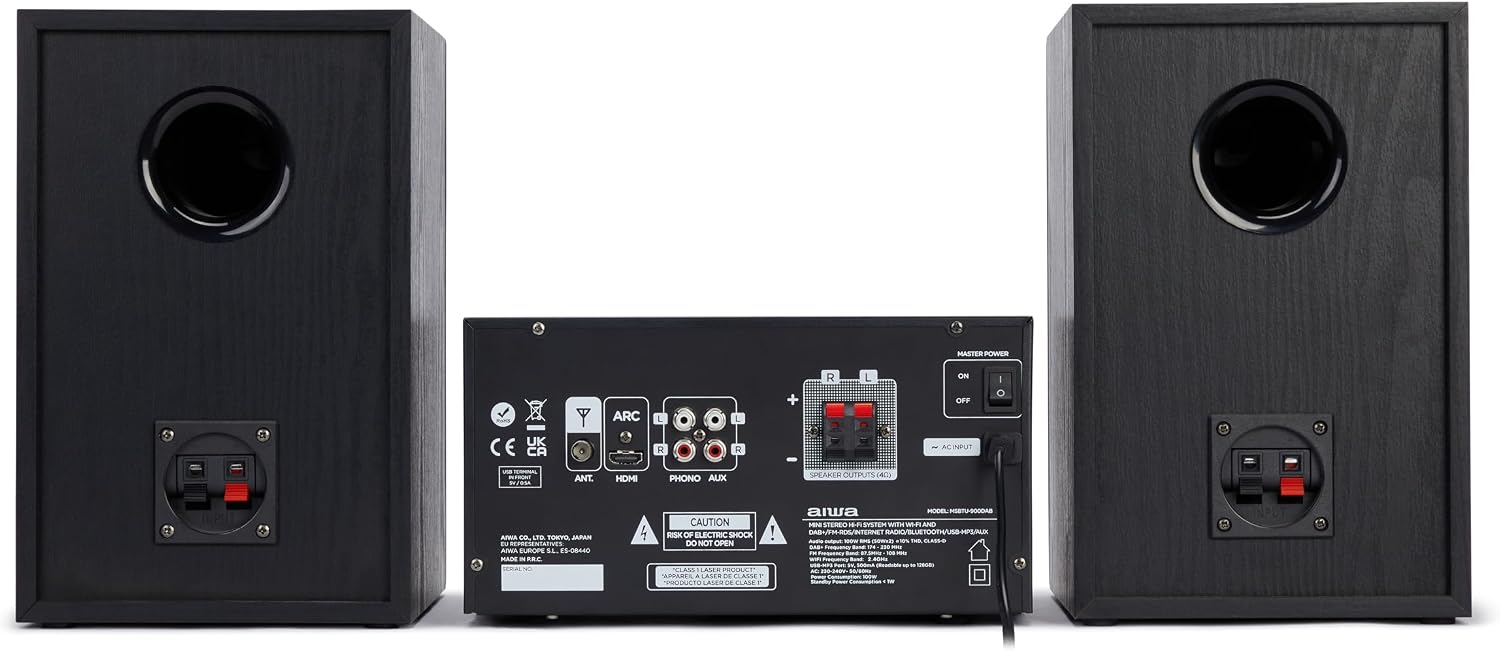
Imej: Belakang view of the AIWA MSBTU-900DAB main unit.
The rear panel provides various connection ports:
- SEMUT: FM/DAB+ antenna input.
- ARC HDMI: HDMI Audio Return Channel for TV connection.
- OPTIKAL: Input audio digital optik.
- PHONO (L/R): RCA input for turntable with RIAA equalizer.
- AUX (L/R): RCA auxiliary input.
- SPEAKER OUTPUTS (L/R): Terminal untuk menyambungkan pembesar suara pasif.
- INPUT AC: Sambungan kabel kuasa.
- KUASA MASTER: Suis kuasa utama.
4.3 Alat Kawalan Jauh

Image: AIWA MSBTU-900DAB remote control.
The remote control provides convenient access to all functions:
- KUASA: Hidupkan / matikan unit.
- ARAHAN: Switch between different playback modes/sources.
- STOP/SHUFFLE/PROG/PRESET/EJECT/REPEAT: CD/USB playback and radio functions.
- MENU / INFO: Access menus and display information.
- Butang Navigasi (Atas/Bawah/Kiri/Kanan/OK): Navigate menus and control playback.
- MAIN/JEDA: Mainkan atau jeda media.
- EQ: Pilih pratetap penyama.
- BASS/TREBLE: Adjust bass and treble.
- MATI: Redam/nyahredamkan audio.
- VOL +/-: Laraskan kelantangan.
- Butang Nombor (0-9): Direct input for radio stations or tracks.
- ALARM/SLEEP/SNOOZE: Timer functions.
5. Persediaan
5.1 Membongkar
Carefully remove all components from the packaging. Keep the packaging materials for future transport or storage.
5.2 Sambungan Pembesar suara

Image: AIWA MSBTU-900DAB HiFi System with main unit and speakers.
Connect the speaker cables from the speaker units to the corresponding SPEAKER OUTPUTS (L/R) terminals on the rear of the main unit. Ensure correct polarity (+ to + and - to -) for optimal sound quality.
5.3 Sambungan Antena
Connect the supplied FM antenna to the ANT terminal on the rear panel. Extend the antenna fully for best FM/DAB+ reception.
5.4 Sambungan Kuasa
Plug the power cable into the AC INPUT on the rear panel of the main unit, then plug the other end into a suitable wall power outlet.
5.5 Kuasa Awal Hidup
Flip the MASTER POWER switch on the rear panel to the 'ON' position. Press the STANDBY button on the front panel or remote control to turn on the unit.
5.6 Network Setup (WLAN)
For Internet Radio and app compatibility, connect the system to your Wi-Fi network:
- Tekan butang MENU.
- Navigate to 'Network' or 'System Settings' and select 'Network Wizard' or 'Wi-Fi Setup'.
- The system will scan for available Wi-Fi networks. Select your network from the list.
- Enter your Wi-Fi password using the multifunction controller or remote control.
- Confirm the connection. Once connected, the Wi-Fi icon will appear on the display.
6. Arahan Operasi
6.1 Pemilihan Sumber
Press the SOURCE button on the front panel or remote control repeatedly to cycle through available input sources: Internet Radio, DAB+, FM, CD, USB, Bluetooth, HDMI ARC, Phono, AUX.
6.2 Radio Internet
Once connected to Wi-Fi:
- Select 'Internet Radio' as the source.
- Use the multifunction controller or navigation buttons to browse stations by location, genre, or search.
- Pilih stesen untuk memulakan main balik.
- To save a station as a preset, refer to the 'Presets' section in the full manual.
6.3 Radio DAB+
Ensure the FM/DAB+ antenna is connected.
- Select 'DAB+' as the source.
- The system will automatically scan for available DAB+ stations upon first use.
- Use the navigation buttons to select a station from the list.
6.4 FM RDS Radio
Ensure the FM/DAB+ antenna is connected.
- Select 'FM' as the source.
- Press and hold the NEXT/PREVIOUS buttons to auto-scan for stations.
- Press briefly to fine-tune. RDS information (station name, program type) will be displayed if available.
6.5 Operasi Bluetooth
Memadankan peranti Bluetooth:
- Select 'Bluetooth' as the source. The display will show 'BT Pairing' or similar.
- On your smartphone, tablet, or computer, enable Bluetooth and search for devices.
- Select 'AIWA MSBTU-900DAB' from the list of found devices.
- Once paired, you can stream audio from your device to the HiFi system.
6.6 Main Semula CD

Image: AIWA MSBTU-900DAB with CD tray open.
The system supports CD, CD-R, CD-RW, and CD-MP3 discs.
- Pilih 'CD' sebagai sumber.
- Press the EJECT button to open the motorized CD tray.
- Place a disc gently into the tray with the label side facing up.
- Press EJECT again to close the tray. Playback will start automatically or can be initiated with the PLAY/PAUSE button.
6.7 Main Semula USB
The USB port supports MP3 playback from USB drives up to 128GB.
- Insert a USB drive into the USB MP3 port on the front panel.
- Pilih 'USB' sebagai sumber.
- Use the navigation buttons to browse folders and files. Press PLAY/PAUSE to start playback.
6.8 HDMI ARC
Connect your TV's HDMI ARC output to the HDMI ARC input on the rear panel of the HiFi system. Select 'HDMI ARC' as the source to output TV audio through the system's speakers. Ensure ARC is enabled on your TV settings.
6.9 Input Phono
Connect a turntable to the PHONO (L/R) RCA inputs on the rear panel. Select 'Phono' as the source. The built-in RIAA equalizer will process the audio signal.
6.10 Input AUX
Connect external audio devices (e.g., MP3 player, smartphone) to the front 3.5mm AUX-IN port or the rear RCA AUX (L/R) inputs. Select 'AUX' as the source.
6.11 Sound Adjustments
Use the BASS and TREBLE buttons on the front panel or remote control to adjust the sound characteristics. The remote also offers an EQ button for preset equalizer modes.
7. Penyelenggaraan
7.1 Membersihkan Unit
Always unplug the unit from the power outlet before cleaning. Use a soft, dry, lint-free cloth to wipe the surfaces. Do not use abrasive cleaners, waxes, or solvents as they may damage the finish.
7.2 Pembersihan Kanta CD
If CD playback becomes erratic, the CD lens may be dirty. Use a commercially available CD lens cleaner disc to clean the lens. Do not attempt to clean the lens manually.
8. Penyelesaian masalah
If you encounter problems with your HiFi system, please refer to the following common issues and solutions before contacting support.
| Masalah | Kemungkinan Punca | Penyelesaian |
|---|---|---|
| Tiada kuasa | Power cable not connected; Master Power switch off | Ensure power cable is securely connected. Turn Master Power switch ON. Press STANDBY button. |
| Tiada bunyi | Volume too low; Mute activated; Incorrect source selected; Speakers not connected | Increase volume. Deactivate Mute. Select correct input source. Check speaker connections. |
| Penerimaan radio yang lemah | Antenna not extended or poorly positioned | Extend and reposition the FM/DAB+ antenna for better signal. |
| Isu sambungan Bluetooth | Device not in pairing mode; Out of range; Interference | Ensure unit is in Bluetooth pairing mode. Move device closer. Avoid obstacles. Try re-pairing. |
| CD tidak dimainkan | Disc inserted incorrectly; Disc dirty/scratched; Unsupported disc format | Insert disc correctly (label side up). Clean disc. Use supported CD formats. |
9. Spesifikasi
- model: MSBTU-900DAB
- Output Kuasa: 100 W RMS (2 x 50 W RMS)
- AmpJenis yang lebih hidup: Kelas D
- Versi Bluetooth: 5.2
- Kesambungan Tanpa Wayar: WLAN (Wi-Fi)
- Penala Radio: Internet Radio, DAB+, FM RDS (40 preset stations)
- Keserasian CD: CD, CD-R, CD-RW, CD-MP3 (with ID3 tag paparan)
- Main balik USB: MP3 (supports up to 128 GB)
- Input: HDMI ARC, Optical, Phono (RIAA equalizer), RCA AUX (rear), 3.5mm AUX-IN (front), USB
- Keluaran: Fon kepala 3.5mm
- Jenis pembesar suara: Stereo
- warna: Hitam
- Dimensi (Pakej): 75.59 x 37.29 x 35.5 cm
- Berat (Pakej): 10.92 kg
- Sumber Kuasa: Elektrik dengan kord
10. Waranti dan Sokongan
10.1 Maklumat Waranti
This AIWA MSBTU-900DAB HiFi System comes with a Waranti pengilang selama 2 tahun from the date of purchase. This warranty covers manufacturing defects and faulty materials under normal use. Please retain your proof of purchase for warranty claims.
Waranti tidak meliputi:
- Damage caused by accident, misuse, abuse, neglect, or unauthorized modification.
- Haus dan lusuh biasa.
- Damage caused by power surges or improper voltage sambungan.
- Damage caused by failure to follow the instructions in this manual.
10.2 Sokongan Pelanggan
For technical assistance, warranty service, or general inquiries, please contact your local AIWA dealer or visit the official AIWA webtapak untuk maklumat hubungan sokongan.