
1. Pengenalan
The QCY MeloBuds A30 are advanced wireless earbuds designed to deliver a superior audio experience. They feature active noise cancellation, high-resolution audio support, and a robust wireless connection, making them suitable for various listening environments.
2. Produk Lebihview
Familiarize yourself with the components of your QCY MeloBuds A30 earbuds.

Image: QCY MeloBuds A30 earbuds and charging case.
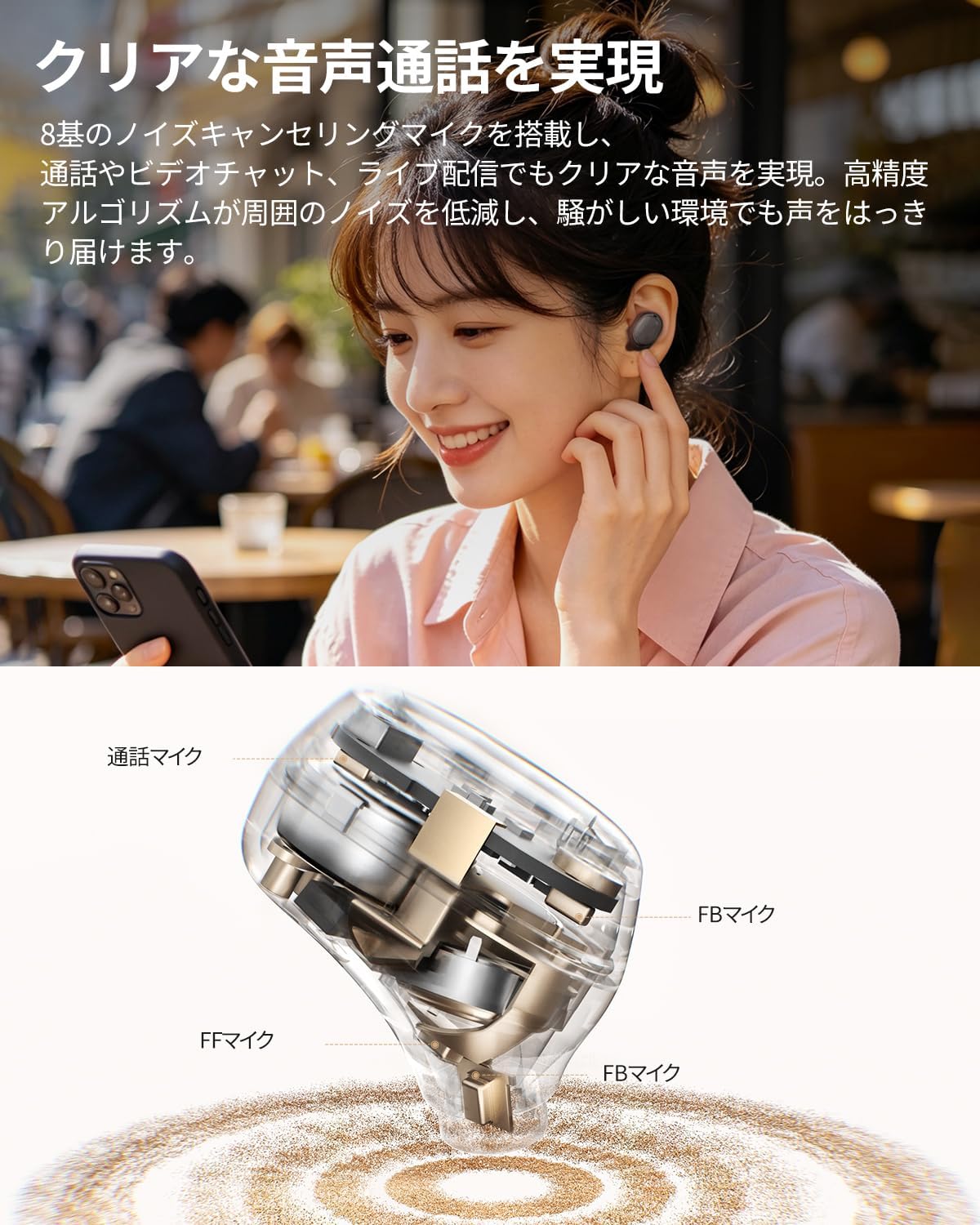
Image: Detailed internal view of a QCY MeloBuds A30 earbud, highlighting microphone components.
3. Persediaan
3.1 Gandingan Awal
- Buka bekas pengecas. Fon telinga akan memasuki mod berpasangan secara automatik.
- Pada peranti anda (telefon pintar, tablet, PC), dayakan Bluetooth.
- Cari untuk "QCY MeloBuds A30" in the list of available Bluetooth devices and select it to connect.
- Setelah disambungkan, gesaan suara akan mengesahkan gandingan yang berjaya.
3.2 Sambungan Berbilang Peranti
The MeloBuds A30 supports simultaneous connection with up to 3 devices. To switch between connected devices, simply play audio on the desired device. The earbuds will automatically switch to the active audio source.

Image: Man playing game with phone and QCY MeloBuds A30 earbuds, illustrating multi-device connection.
3.3 QCY App Installation
For full customization and advanced features, download the dedicated QCY app from your device's app store. The app allows for EQ adjustments, firmware updates, and personalized control settings.

Image: Smartphone displaying the QCY app interface for MeloBuds A30, showing various customization options and settings.
4. Arahan Operasi
4.1 Kawalan Sentuhan
The MeloBuds A30 feature intuitive touch controls on each earbud. You can customize these controls via the QCY app.
- Main/Jeda: Ketik dua kali sama ada fon telinga.
- Lagu Seterusnya: Ketik tiga kali pada fon telinga kanan.
- Trek Sebelumnya: Ketik tiga kali pada fon telinga kiri.
- Jawab/Tamatkan Panggilan: Ketik dua kali sama ada fon telinga.
- Tolak Panggilan: Tekan dan tahan salah satu fon telinga selama 1.5 saat.
- Pembantu Suara: Ketik tiga kali pada fon telinga kiri.
- ANC Mode Cycle: Press and hold the right earbud for 1.5 seconds to cycle through ANC ON → ANC OFF → Transparency Mode.

Image: Diagram illustrating touch controls for QCY MeloBuds A30 earbuds.
4.2 Pembatalan Bising Aktif (ANC)
The MeloBuds A30 feature up to 60dB hybrid ANC and 5.5kHz wideband noise cancellation. Adaptive ANC automatically adjusts to your environment and wearing conditions. AI scene-adaptive ANC and wind noise-adaptive ANC provide optimal noise cancellation, ensuring a clear listening experience even in windy conditions.

Image: Person wearing QCY MeloBuds A30 earbuds, demonstrating active noise cancellation.

Image: Diagram illustrating the effect of Active Noise Cancellation (ANC) on and off with sound waves around a person wearing QCY MeloBuds A30.
4.3 Fungsi Panggilan
Equipped with 8 noise-cancelling microphones and a high-precision algorithm, the MeloBuds A30 effectively reduce ambient noise during calls, video chats, and live streaming. This ensures your voice is clearly transmitted even in noisy environments.

Image: Woman talking on phone while wearing QCY MeloBuds A30 earbuds in an outdoor setting.
5. Mengecas
The earbuds provide approximately 11 hours of continuous playback on a single charge (ANC off), and up to 50 hours with the charging case. With ANC on, the earbuds offer about 6 hours of playback, extending to 27 hours with the charging case.

Image: QCY MeloBuds A30 earbuds and charging case, illustrating battery life with and without ANC.
To charge the earbuds, place them back into the charging case. To charge the case, connect it to a power source using the provided USB-C cable.
6. Penyelenggaraan
- Bersihkan fon telinga dan bekas pengecas dengan kerap menggunakan kain lembut dan kering.
- Elakkan menggunakan bahan yang melelas atau bahan kimia yang keras.
- Ensure the charging contacts on both the earbuds and case are clean and dry to prevent charging issues.
- Store the earbuds in their charging case when not in use to protect them from dust and damage.
6.1 Tahan Air
The MeloBuds A30 are IPX5 water resistant, protecting them from sweat and water splashes. This makes them suitable for workouts and commuting. However, they are not designed for submersion in water.

Image: QCY MeloBuds A30 earbuds with water droplets, demonstrating IPX5 water resistance.
7. Penyelesaian masalah
- Fon telinga tidak berpasangan: Pastikan kedua-dua fon telinga berada dalam bekas pengecasan, kemudian buka penutup untuk mengaktifkan mod berpasangan. Semak tetapan Bluetooth peranti anda dan cuba sambungkan semula.
- Tiada bunyi dari satu fon telinga: Letakkan kedua-dua fon telinga kembali ke dalam bekas pengecasan, tutup penutupnya, tunggu beberapa saat, kemudian bukanya semula. Ini selalunya akan menyegerakkan semula fon telinga.
- Isu pengecasan: Clean the charging contacts on both earbuds and the case. Ensure the charging cable is securely connected and the power source is working.
- Kualiti panggilan yang lemah: Ensure the microphones are not obstructed. Try adjusting the earbuds' position in your ears.
- Isu sambungan aplikasi: Ensure Bluetooth is enabled and the earbuds are connected to your device. Restart the QCY app or reinstall it if problems persist.
8. Spesifikasi
| Jenama | QCY |
| Nama Model | MeloBuds A30 |
| Nombor Model | BH26HT22A |
| warna | Hitam |
| Teknologi Ketersambungan | Tanpa wayar |
| Versi Bluetooth | 6.0 |
| Julat Bluetooth | 10 meter |
| Kawalan Bunyi | Active Noise Cancellation, Adaptive Noise Cancellation, Environmental Noise Cancellation |
| Codec Audio | LDAC, Hi-Res Audio Wireless |
| Mikrofon | 8-mic system with AI Call Noise Cancelling |
| Masa Main Semula (Fon Telinga) | Approx. 11 hours (ANC off), Approx. 6 hours (ANC on) |
| Jumlah Masa Main Semula (dengan Kes) | Up to 50 hours (ANC off), Up to 27 hours (ANC on) |
| Tahan Air | IPX5 |
| Kaedah Kawalan | Kawalan Sentuh |
| Peranti Serasi | Windows/Macbook Air/Pro PCs, iPads, iPhones, Android devices (Galaxy, Huawei, Xiaomi, OPPO, Xperia, Nexus, ASUS, Fujitsu, etc.) |
9. Waranti dan Sokongan
QCY products come with a standard manufacturer's warranty. For detailed warranty information, please refer to the warranty card included in your product packaging or visit the official QCY webtapak.
For technical support, troubleshooting assistance, or any product-related inquiries, please contact QCY customer service through their official webtapak atau maklumat hubungan yang diberikan dalam dokumentasi produk anda.