
pengenalan
Thank you for choosing the UGREEN HiTune Max 5s Wireless ANC Headphones. This manual provides detailed instructions for setting up, operating, maintaining, and troubleshooting your headphones to ensure optimal performance and longevity. Please read this manual thoroughly before use.
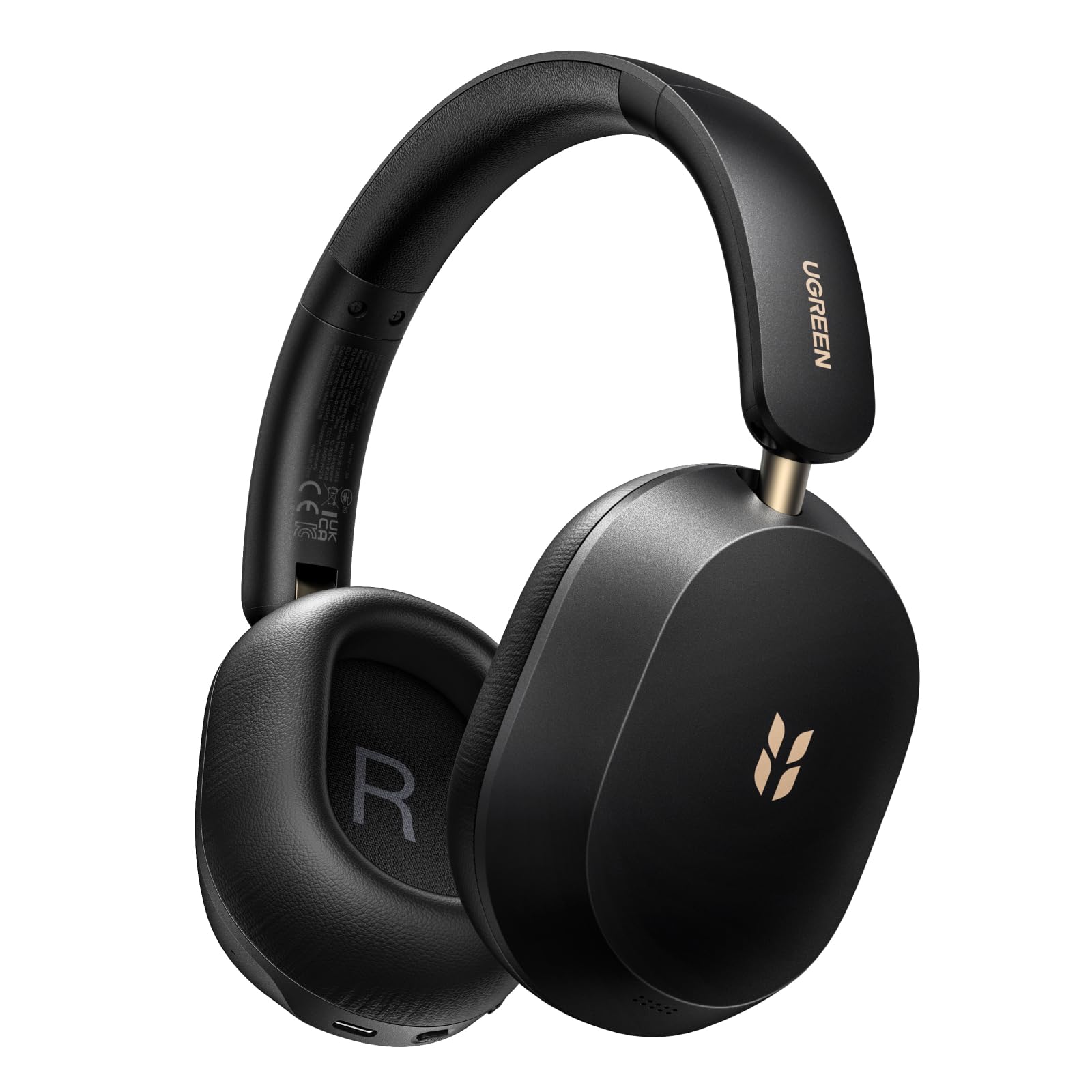
Image: UGREEN HiTune Max 5s Wireless ANC Headphones, black, shown from a slight angle.
Ciri-ciri Utama:
- 45dB Adaptive Hybrid Active Noise Cancellation: Equipped with a 5-microphone array, these headphones intelligently adjust and reduce ambient noise by up to 45dB.
- Audio Hi-Res & Audio Ruang: Supports Hi-Res Audio and Hi-Res Audio Wireless certifications, including LDAC high-resolution codec. Features 40mm PET diaphragm drivers for clear, balanced sound and immersive 360° spatial audio.
- Hayat Bateri Sehingga 112 Jam: Enjoy extended listening with an 800mAh battery, providing up to 112 hours of playback with ANC off. A 10-minute charge offers 18 hours of listening.
- AI-Enhanced 5-Microphone Calls: Five integrated microphones with AI noise reduction algorithm ensure clear voice pickup and effective filtering of environmental noise during calls.
- Lightweight & Foldable Design: Weighing only 240 grams, the headphones offer comfort for prolonged use. The ergonomic headband and soft memory foam earcups provide a secure fit. The foldable design enhances portability.
- Bluetooth 6.0 & Multipoint Connection: Offers stable and secure wireless connectivity with the ability to connect to two devices simultaneously.
Persediaan
Mengecas Fon Kepala
Before first use, fully charge your UGREEN HiTune Max 5s headphones. Connect the included USB-C cable to the charging port on the headphones and to a compatible USB power source. The charging indicator light will show the charging status.

Image: UGREEN HiTune Max 5s headphones with text indicating 'Up to 112 Hours Battery Life' and '10 Minutes Charge = 18 Hours Music'.
Hidupkan/Mati Kuasa
- Untuk MENGHIDUPKAN: Press and hold the Power button for approximately 2 seconds. A white light indicator will confirm power-on.
- Untuk MATI: Press and hold the Power button for approximately 2 seconds. A red light indicator will confirm power-off.
Berpasangan Bluetooth
- Pastikan fon kepala dimatikan.
- Press and hold the Bluetooth button until the light rapidly flashes, indicating pairing mode.
- On your host device (smartphone, tablet, computer), enable Bluetooth and search for available devices.
- Select "UGREEN Studio Headphone" from the list to connect.
- Sebaik sahaja disambungkan, lampu penunjuk akan bertukar kepada biru stabil atau padam, bergantung pada model.
Clearing Pairings
To clear all previous Bluetooth pairings from the headphones, press and hold the Bluetooth button for 10 seconds.
Arahan Operasi
Mod Pembatalan Bunyi Aktif (ANC)
The UGREEN HiTune Max 5s features adaptive hybrid active noise cancellation. You can switch between different modes:
- ANC HIDUP: Activates noise cancellation, reducing ambient sounds by up to 45dB. This mode may consume battery faster.
- ANC MATI: Melumpuhkan pembatalan hingar.
- Mod Suara Ambient: Allows you to hear some surrounding sounds while still enjoying your audio. Note that ambient sounds are slightly reduced in level.

Image: UGREEN HiTune Max 5s headphones with a visual representation of -45dB noise reduction.
Sambungan Berbilang Titik
The headphones support multipoint connection, allowing you to connect to two devices simultaneously (e.g., a smartphone and a PC). This enables seamless switching between audio sources without re-pairing.

Image: UGREEN HiTune Max 5s headphones shown with a smartphone displaying the UGREEN app and a tablet, illustrating multipoint connection.
Ciri Audio
- Audio Resolusi Tinggi & LDAC: Enjoy high-fidelity audio with support for Hi-Res Audio and the LDAC codec (up to 990 kbps).
- Audio Spatial: Experience immersive 360° sound for an enhanced listening experience.
- Mod Permainan Kependaman Rendah: For gaming, activate the low latency mode (0.08s) for synchronized audio and visuals.

Image: A person wearing UGREEN HiTune Max 5s headphones playing a mobile game, illustrating the low latency feature.
Fungsi Panggilan
The integrated 5-microphone system with AI noise reduction ensures clear voice transmission during calls, even in noisy environments. The adaptive wind noise attenuation further improves call clarity.
UGREEN Audio App
Customize your listening experience using the UGREEN Audio app. The app allows for EQ adjustments (preset profiles or graphic EQ) and button customization. A personalized sound profile feature, based on an auditory test, is expected via an OTA update.

Image: A smartphone screen displaying the UGREEN Audio app interface with options for noise cancellation control, music modes, game mode, and equalizer settings.
Penyelenggaraan
Proper care and maintenance will extend the life of your UGREEN HiTune Max 5s headphones.
- Pembersihan: Gunakan kain lembut dan kering untuk membersihkan fon kepala. Elakkan menggunakan pembersih atau pelarut yang kasar.
- Storan: When not in use, store the headphones in a cool, dry place. The foldable design allows for compact storage. Avoid exposing them to extreme temperatures or humidity.
- Penjagaan Bateri: Untuk mengekalkan kesihatan bateri, elakkan daripada kerap mengecas fon kepala sepenuhnya. Caskannya secara berkala, walaupun tidak digunakan untuk tempoh yang lama.
- Pendedahan Air: Fon kepala ini tidak kalis air. Elakkan pendedahan kepada air atau kelembapan berlebihan.

Image: UGREEN HiTune Max 5s headphones in a folded state, being placed into a backpack, demonstrating their compact and portable design.
Menyelesaikan masalah
Jika anda menghadapi masalah dengan fon kepala anda, rujuk kepada penyelesaian biasa berikut:
| Masalah | Penyelesaian yang Mungkin |
|---|---|
| Fon kepala tidak dihidupkan. | Pastikan fon kepala dicas. Sambungkan mereka ke sumber kuasa dan cuba lagi. |
| Tidak boleh berpasangan dengan peranti. | Make sure the headphones are in pairing mode (rapidly flashing light). Clear previous pairings by holding the Bluetooth button for 10 seconds, then try pairing again. Ensure Bluetooth is enabled on your device. |
| Poor sound quality or unbalanced audio. | Check the audio source. Use the UGREEN Audio app to adjust the equalizer settings. Ensure the headphones are properly seated on your ears. |
| ANC tidak berkesan. | Ensure ANC mode is activated. For optimal performance, ensure earcups form a good seal around your ears. ANC is most effective against low-frequency, constant noises. |
| Sambungan Bluetooth tidak stabil. | Ensure your device is within the effective range (typically 10 meters) and there are no significant obstructions. Disconnect and reconnect the Bluetooth connection. |
Spesifikasi
| Ciri | Perincian |
|---|---|
| Nama Model | HiTune Max 5s |
| Nombor Model | 16172 |
| Jenama | UGREEN |
| warna | Hitam |
| Berat badan | 240 Gram |
| Penempatan Telinga | Atas Telinga |
| Faktor Bentuk | Lingkaran-Aural |
| Kawalan Bunyi | Hybrid Noise Reduction (up to 45dB) |
| Teknologi Ketersambungan | Wayarles (Bluetooth) |
| Teknologi Komunikasi Tanpa Wayar | Bluetooth |
| Versi Bluetooth | 6.0 |
| Komponen yang Disertakan | Cable (USB-C charging cable) |
| Kaedah Kawalan | Butang Tekan |
| Jenis Pemacu Audio | Dinamik |
| Julat Kekerapan | 20 Hz - 40 kHz |
| Bahan Dalaman | Kulit Tiruan |
| Special Product Uses | Muzik, Perjalanan |
| Peranti Serasi | Telefon Bimbit |
| Bateri | 1 Litium-ion (termasuk) |
| Pengeluar | Ugreen Group Limited |
| Negara Asal | China |
Waranti dan Sokongan
Maklumat Waranti
The UGREEN HiTune Max 5s Wireless ANC Headphones come with a 24-month UGREEN warranty. Sila simpan bukti pembelian anda untuk tuntutan waranti.
Sokongan Pelanggan
For further assistance, technical support, or warranty inquiries, please contact UGREEN customer service through their official webtapak atau peruncit tempat anda membeli produk tersebut.