
pengenalan
Thank you for choosing the Monster Open Ear BC300 Swimming Headphones. These bone conduction headphones are designed for comfort and versatility, offering both Bluetooth connectivity and an integrated MP3 player with 32GB storage. With an IPX8 waterproof rating, they are suitable for various activities, including swimming, running, and cycling, allowing you to stay aware of your surroundings while enjoying your audio.
Kandungan Pakej
- Monster Open Ear BC300 Swimming Headphones
- Kabel Pengecasan Magnetik
- Manual Pengguna
Produk Selesaiview
Familiarize yourself with the components and controls of your BC300 headphones.
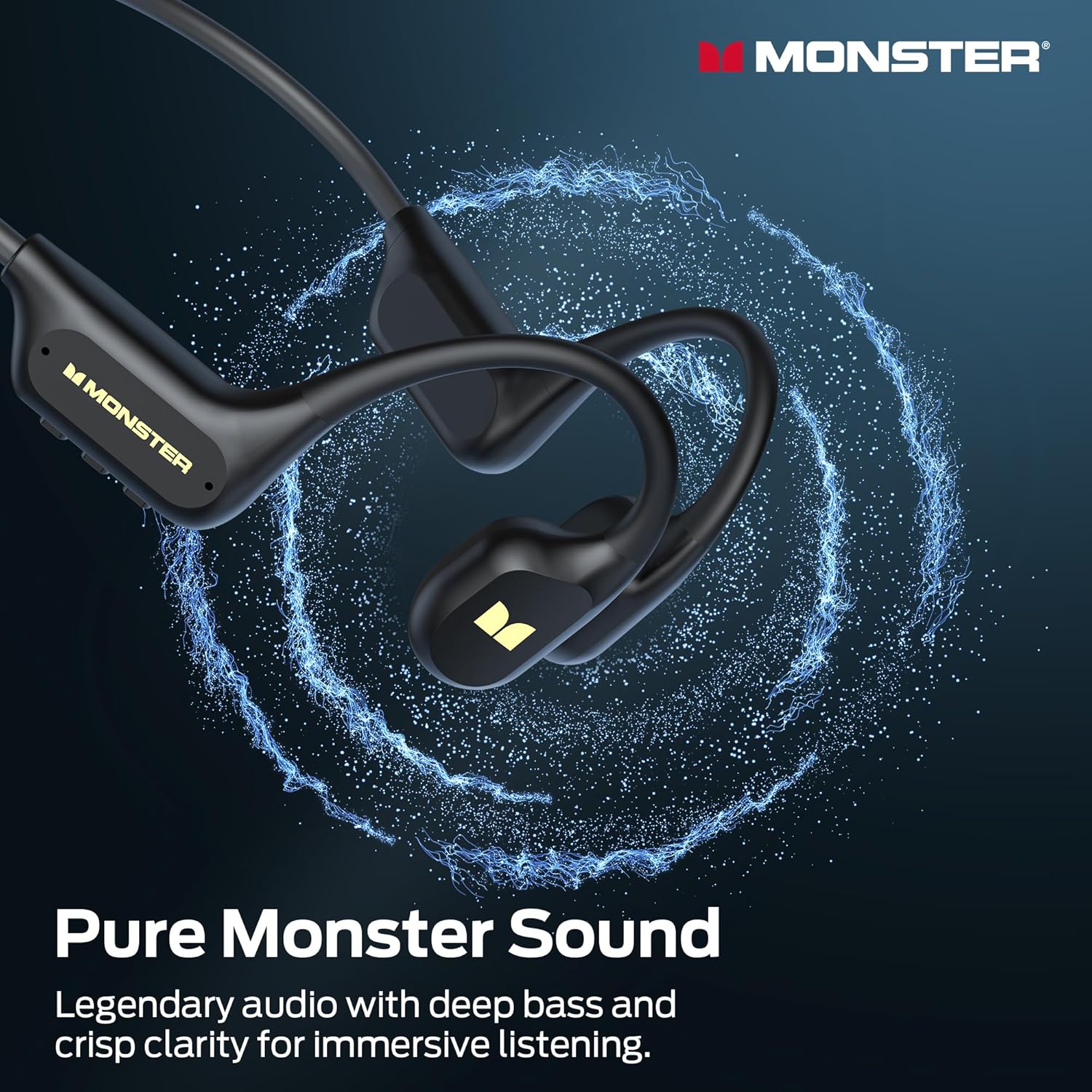
Image: The Monster BC300 headphones, showcasing their open-ear design and flexible neckband.
Kawalan dan Penunjuk:
- Butang Kuasa/Pelbagai Fungsi: Hidupkan/matikan kuasa, Main/Jeda, Jawab/Tamatkan panggilan.
- Kelantangan Naik (+): Tingkatkan kelantangan, Trek seterusnya (tekan lama).
- Perlahankan suara (-): Kurangkan kelantangan, Trek sebelumnya (tekan lama).
- Butang Suis Mod: Toggle between Bluetooth mode and MP3 mode.
- Port Pengecasan Magnet: Untuk pengecasan dan pemindahan data.
- Penunjuk LED: Memaparkan kuasa, pengecasan dan status sambungan.
Persediaan
1. Mengecas Fon Kepala
Sebelum penggunaan pertama, cas sepenuhnya fon kepala anda.
- Sambungkan kabel pengecas magnet ke port pengecasan pada fon kepala.
- Sambungkan hujung kabel yang satu lagi ke penyesuai kuasa USB (tidak disertakan) atau port USB komputer.
- The LED indicator will show charging status (e.g., red while charging, blue when fully charged).
- Cas penuh mengambil masa kira-kira 2 jam dan menyediakan sehingga 10 jam main balik.

Image: The Monster BC300 headphones connected to a laptop via its magnetic charging cable, illustrating the charging process and data transfer capability.
2. Menghidupkan/Mematikan
- Hidupkan kuasa: Press and hold the Power/Multi-function button for 3 seconds until the LED indicator flashes blue.
- Matikan: Press and hold the Power/Multi-function button for 5 seconds until the LED indicator flashes red and then turns off.
3. Berpasangan Bluetooth
Pasangkan fon kepala anda dengan peranti yang didayakan Bluetooth.
- Pastikan fon kepala dimatikan.
- Press and hold the Power/Multi-function button for 5-7 seconds until the LED indicator flashes red and blue alternately, indicating pairing mode.
- Pada peranti anda (telefon pintar, tablet, komputer), dayakan Bluetooth dan cari peranti yang tersedia.
- Select "Monster BC300" from the list.
- Setelah dipasangkan, penunjuk LED akan berkelip biru perlahan-lahan.
4. Using MP3 Mode (Internal Storage)
The headphones have 32GB of internal storage for music playback without a connected device.
Memindahkan Muzik Files:
- Connect the headphones to your computer using the magnetic charging cable.
- Fon kepala akan muncul sebagai pemacu cakera boleh tanggal pada komputer anda.
- Seret dan lepaskan audio yang anda inginkan files (e.g., MP3 format) into the headphone's storage folder.
- Keluarkan peranti dari komputer anda dengan selamat sebelum memutuskan sambungan kabel.
Switching to MP3 Mode:
- While the headphones are powered on, press the Mode Switch button to toggle between Bluetooth and MP3 modes.
- Gesaan suara akan menunjukkan mod semasa.
- Nota: MP3 mode is recommended for underwater use as Bluetooth signals do not transmit effectively through water.
Arahan Operasi
Kawalan Asas:
| Fungsi | Tindakan |
|---|---|
| Hidupkan/Mati Kuasa | Press and hold Power button (3s for On, 5s for Off) |
| Main/Jeda | Tekan pendek butang Kuasa |
| Kelantangan Naik | Tekan pendek butang '+' |
| Kelantangan Kurang | Tekan pendek butang '-' |
| Trek Seterusnya | Tekan lama butang '+' |
| Trek Sebelumnya | Tekan lama butang '-' |
| Jawab/Tamatkan Panggilan | Tekan pendek butang Kuasa |
| Tolak Panggilan | Tekan lama butang Kuasa |
| Switch Mode (Bluetooth/MP3) | Short press Mode Switch button |
Memakai Fon Kepala
Place the headphones with the transducers resting on your cheekbones, just in front of your ears. The neckband should rest comfortably behind your head.

Image: A person wearing the Monster BC300 headphones during a basketball game, demonstrating the secure and comfortable fit during physical activity.

Image: A person wearing the Monster BC300 headphones while cycling, showing how they fit comfortably with a helmet, maintaining open awareness of surroundings.
Underwater Use (IPX8 Waterproof)
The BC300 headphones are IPX8 rated, suitable for submersion up to 2 meters for 2 hours.
- Always switch to Mod MP3 before entering water. Bluetooth signals do not transmit effectively underwater.
- Ensure the magnetic charging port is clean and dry before and after use to prevent corrosion.
- Rinse the headphones with fresh water after swimming in chlorinated or saltwater, then dry thoroughly.

Image: A person swimming underwater while wearing the Monster BC300 headphones and goggles, demonstrating their IPX8 waterproof capability for aquatic activities.
Penyelenggaraan
- Pembersihan: Lap fon kepala dengan lembut, damp kain. Jangan gunakan bahan kimia yang keras atau pembersih yang kasar.
- Pengeringan: After exposure to water, especially after swimming, ensure the headphones are completely dry before charging or connecting to a computer. Gently shake off excess water and wipe with a dry cloth.
- Storan: Simpan fon kepala di tempat yang sejuk dan kering jauh dari cahaya matahari langsung dan suhu yang melampau.
- Port Pengecasan: Keep the magnetic charging contacts clean and free of debris to ensure proper charging and data transfer.
Menyelesaikan masalah
| Masalah | Penyelesaian yang Mungkin |
|---|---|
| Fon kepala tidak dapat dihidupkan. | Charge the headphones fully. Ensure the Power button is pressed and held for 3 seconds. |
| Tidak boleh berpasangan melalui Bluetooth. | Pastikan fon kepala berada dalam mod berpasangan (berkelip merah/biru). Matikan dan hidupkan Bluetooth pada peranti anda. Bergerak lebih dekat ke peranti. |
| Tiada bunyi dalam mod Bluetooth. | Check volume levels on both headphones and connected device. Ensure headphones are correctly paired. Try re-pairing. |
| Tiada bunyi dalam mod MP3. | Ensure headphones are switched to MP3 mode. Check if music files are properly loaded onto the internal storage. Adjust volume. |
| Headphones not recognized by computer. | Ensure the magnetic charging cable is securely connected. Try a different USB port or cable. Ensure headphones are powered on. |
| Poor sound quality underwater. | Ensure you are using MP3 mode for underwater listening. Bluetooth is not effective underwater. |
Spesifikasi
- model: E129
- Jenama: raksasa
- Ketersambungan: Bluetooth 6.0
- Julat Bluetooth: 10 Meter
- Storan Dalaman: 32GB (sehingga 8,000 lagu)
- Tahan Air: IPX8 (submersible up to 2 meters for 2 hours)
- Hayat Bateri: Main balik sehingga 10 jam
- Masa Pengecasan: Lebih kurang 2 jam
- Jenis Pengecasan: Pengecasan Magnet
- Peletakan Telinga: Over Ear (Open Ear design)
- Jenis Pemacu Audio: Pemacu Pengaliran Tulang
- Saiz Pemacu Audio: 13 Milimeter
- Jenis Kawalan: Kawalan Butang
- Dimensi Bungkusan: 15.7 x 11.99 x 5.69 cm
- Berat: 191 g
Maklumat Waranti
The Monster Open Ear BC300 Swimming Headphones come with a Waranti 1 Tahun dari tarikh pembelian. Waranti ini meliputi kecacatan pembuatan dan mutu kerja di bawah penggunaan biasa. Ia tidak melindungi kerosakan yang disebabkan oleh penyalahgunaan, kemalangan, pengubahsuaian yang tidak dibenarkan atau haus dan lusuh biasa. Sila simpan bukti pembelian anda untuk tuntutan waranti.
Sokongan
For further assistance, technical support, or warranty inquiries, please contact Monster customer service through their official website or the retailer where you purchased the product. Please have your model number (E129) and proof of purchase ready.
You can visit the official Monster store for more information: Kedai Rasmi Monster