
1. Pengenalan
This manual provides detailed instructions for the proper use, setup, operation, and maintenance of your TOPDON TC001 Max Dual-Lens Thermal Camera. Please read this manual thoroughly before operating the device to ensure safe and efficient use. The TOPDON TC001 Max is a versatile thermal imaging device designed for a wide range of applications, offering enhanced thermal resolution and broad device compatibility.
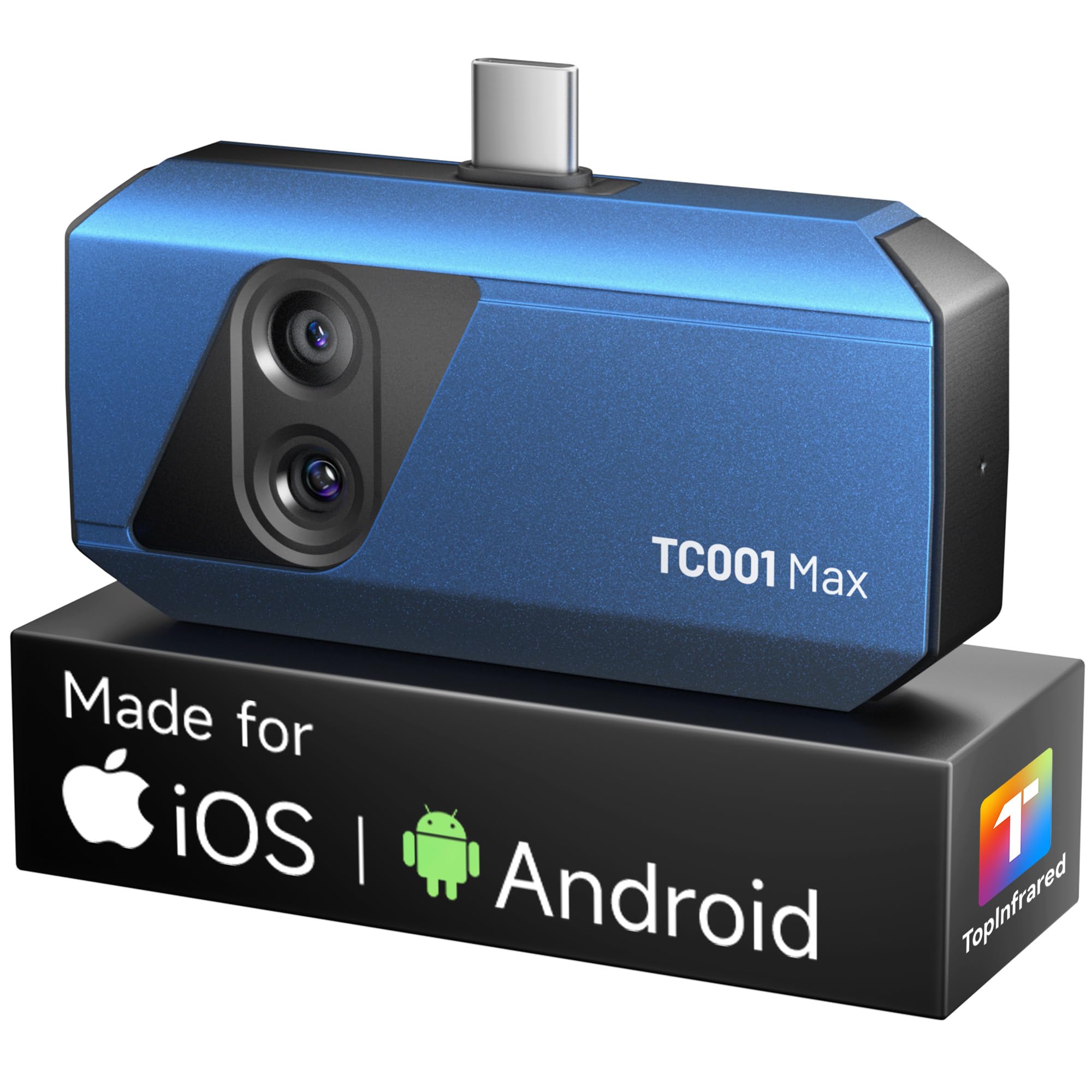
The TOPDON TC001 Max Dual-Lens Thermal Camera, a compact and portable device designed for thermal imaging.
2. Produk Lebihview
Ciri-ciri Utama
- Dual-Lens Thermal Imaging: Combines infrared thermal imaging with a visible-light camera for sharper outlines and clearer detail.
- Keserasian Peranti Luas: Compatible with USB-C iPhone, iPad, Android, and Windows devices. Includes USB-C and Lightning adapters.
- High-Resolution Thermal Clarity: Features TOPDON's patented TISR technology, enhancing thermal resolution from 256x192 to 512x384. Offers a 25Hz refresh rate and ≤40mK NETD.
- Ciri-ciri Aplikasi Lanjutan: Utilize TopInfrared or TopView apps for photo/video capture, image rotation, 3D temperature data analysis, real-time graphs, and multiple color palettes.
- Padat dan Mudah Alih: Pocket-sized design (7.1 × 4.2 cm, 33 g) for easy transport and use. Case-friendly construction allows direct connection.
- Julat Suhu Luas: Measures temperatures from -20°C to 550°C (-4°F to 1,022°F) with ±2°C / ±2% accuracy.
Apa yang ada dalam Kotak
- TC001 Max Thermal Camera
- Kabel USB-A ke USB-C
- USB-C to USB-C Adapter
- USB-C ke Penyesuai Kilat
- Kain Pembersih Microfiber
- Manual Pengguna
- Membawa Beg
- Kotak Pembungkusan

This image displays the complete contents of the product package, including the TC001 Max thermal camera, USB-A to USB-C cable, USB-C to USB-C adapter, USB-C to Lightning adapter, microfiber cleaning cloth, user manual, carrying bag, and the packing box.
3. Persediaan
Keserasian Peranti
The TC001 Max is designed for broad compatibility with various devices. It supports:
- USB-C enabled iPhones and iPads
- USB-C enabled Android smartphones and tablets
- Windows PCs (via USB-A port with included cable)
The device is plug-and-play, requiring no internal batteries or wireless pairing. It draws power directly from the connected device.
Pemasangan Apl
To operate the TC001 Max, you need to install the dedicated application:
- For iOS and Android devices, download the TopInfrared apl daripada Apple App Store atau Google Play Store.
- For Windows PCs, download the AtasView software from the official TOPDON webtapak.
Menyambung Peranti
- Ensure the appropriate adapter (USB-C to USB-C or USB-C to Lightning) is attached to the TC001 Max, if necessary.
- Plug the TC001 Max directly into your smartphone, tablet, or connect it to your Windows PC using the USB-A to USB-C cable. The design is case-friendly, allowing connection without removing most phone cases.
- Launch the TopInfrared or TopView application. The device should be automatically recognized and ready for use.

The thermal camera connects directly to iOS devices featuring a USB-C port, such as newer iPhones and iPads, for immediate use.

The thermal camera connects directly to Android devices featuring a USB-C port, including various smartphones and tablets, for immediate use.

The thermal camera connects directly to iOS devices featuring a Lightning port, such as older iPhone models and iPads, using the included adapter.

The thermal camera can also be connected to Windows PCs via a USB-A port for use with the TopView software, expanding its compatibility.
4. Arahan Operasi
Operasi Asas
Once connected and the app is launched, the thermal camera will display a live thermal image on your device's screen. You can point the camera at the area of interest to observe temperature variations.
Thermal Imaging Modes
The TC001 Max utilizes dual-lens technology to provide enhanced thermal images. The patented TISR technology digitally upscales the native 256x192 IR resolution to 512x384, offering clearer and more precise thermal data. The device operates at a 25Hz refresh rate for smooth imaging and has a thermal sensitivity (NETD) of ≤40mK for detecting subtle temperature differences.

This image illustrates the benefit of dual-lens thermal fusion, combining infrared data with visible light for enhanced detail and clearer identification of heat patterns compared to a thermal-only view.

This image demonstrates the enhanced thermal resolution achieved with TISR technology, digitally upscaling the native 256x192 IR resolution to 512x384 for sharper and more detailed thermal images.
App Features and Settings
- Imaging Modes: Select from various modes including Dual Light 1, Dual Light 2, Infrared, Visible Light, and Picture-in-Picture (PIP) to best suit your inspection needs.
- Adjustable Measurement Settings: Customize parameters such as emissivity, ambient temperature, and distance to ensure accurate temperature readings. The app supports spot, line, and area measurements.
- Palet Warna: Choose from 10 different color palettes or create custom color bars to visualize thermal data effectively.
- Pemetaan Terma 3D: Utilize the 3D thermal mapping feature for a three-dimensional representation of temperature distribution, aiding in quick issue identification.
- Tangkapan Foto dan Video: Capture thermal photos and record videos directly through the app to document findings, share, or review nanti.
- PC Analysis: For in-depth analysis, use the TopView software on Windows PCs to view, compare, and analyze thermal images in detail.

The TC001 Max offers five distinct imaging modes, including various dual-light fusions, infrared, visible light, and Picture-in-Picture (PIP), allowing users to select the best view untuk aplikasi khusus mereka.

The accompanying app provides adjustable measurement settings, allowing users to customize parameters like emissivity, ambient temperature, and distance for accurate readings. It also supports various measurement modes such as spots, lines, and areas.

Users can choose from 10 distinct color palettes or create custom color bars within the app to visualize thermal data in a way that best highlights specific temperature differences or patterns.

The app features 3D thermal mapping, which provides a three-dimensional representation of temperature distribution, aiding in faster identification of heat-related issues and clearer visual contrast.

The device allows users to capture thermal photos and record videos directly through the app, enabling documentation of findings, sharing, and later review of thermal data.

For in-depth analysis, the TopView software for Windows PCs allows users to view, compare, and analyze thermal images in detail, which is useful for reports, diagnostics, and side-by-side comparisons.
5. Penyelenggaraan
- Pembersihan: Use the provided microfiber cleaning cloth to gently wipe the lenses and the device body. Do not use abrasive cleaners or solvents.
- Storan: Store the device in its carrying bag when not in use to protect it from dust, scratches, and impacts. Keep it in a cool, dry place away from direct sunlight.
- Pengendalian: Avoid dropping the device or subjecting it to strong vibrations. The lenses are delicate and should be handled with care.
6. Penyelesaian masalah
- Peranti Tidak Dikenali: Ensure the device is securely plugged into your smartphone/tablet or PC. Try using a different adapter or USB port. Verify that the app has the necessary permissions.
- App Issues (e.g., alignment, zoom): Some users have reported minor bugs with the Android app, such as issues with IR/visible camera alignment or zoom functionality. Ensure your app is updated to the latest version. If issues persist, try restarting the app or your device.
- Bacaan Suhu Tidak Tepat: Check and adjust emissivity settings within the app based on the material being inspected. Ensure the distance to the target is appropriate for accurate measurement.
- Tiada Paparan Imej: Confirm the app is open and the camera is properly connected. Check for any physical obstructions on the lenses.
- Peranti Terlalu Panas: While designed for efficiency, prolonged use in high ambient temperatures might affect performance. Allow the device to cool down if it feels excessively warm.
For further assistance, refer to the Warranty and Support section.
7. Spesifikasi
| Ciri | Spesifikasi |
|---|---|
| Resolusi IR | 256 x 192 piksel |
| Enhanced Thermal Resolution (TISR) | 512 x 384 piksel |
| Julat Suhu | -20°C hingga 550°C (-4°F hingga 1,022°F) |
| Ketepatan Suhu | ±2°C atau ±2% |
| Kadar Segar Semula | 25 Hz |
| Kepekaan Terma (NETD) | ≤40 mK |
| Kamera Cahaya Kelihatan | 1.5 MP |
| Ketersambungan | USB-C (with included Lightning and USB-A adapters) |
| Keserasian Peranti | iOS, Android, Windows |
| Berat Barang | 8.1 auns (lebih kurang 230g) |
| Dimensi Pakej | 7.36 x 4.61 x 1.93 inci |
8. Waranti dan Sokongan
TOPDON komited untuk menyediakan produk berkualiti tinggi dan perkhidmatan pelanggan yang cemerlang.
- Jaminan 1 Tahun: The TC001 Max comes with a 1-year guarantee from the date of purchase, covering manufacturing defects.
- Sokongan Teknikal Seumur Hidup: TOPDON offers lifetime technical support for the product.
- U.S.-Based Pro Hotline Assistance: For immediate assistance, contact our U.S.-based professional hotline. Refer to the product packaging or official TOPDON weblaman web untuk maklumat hubungan.

TOPDON provides comprehensive customer support, including lifetime technical assistance, a 1-year guarantee, and access to a U.S.-based professional hotline for any product-related inquiries.