
SmallRig RF20C
SmallRig RF20C RGB Portable LED Photo Torch User Manual
Model: RF20C (5335)
Jenama: SmallRig
1. Pengenalan
The SmallRig RF20C RGB Portable LED Photo Torch is a versatile and powerful lighting tool designed for photographers, videographers, and content creators. It features 5-color LED beads, adjustable beam angle, and supports creative lighting effects with included gobos. This manual provides essential information for the safe and effective use of your device.
2. Maklumat Keselamatan
- Jangan dedahkan peranti kepada air atau kelembapan berlebihan.
- Elakkan pendedahan mata secara langsung kepada cahaya LED.
- Jangan buka atau ubah suai peranti. Pembaikan hendaklah hanya dilakukan oleh kakitangan yang diberi kuasa.
- Jauhkan daripada kanak-kanak.
- Ensure proper ventilation during extended use, as the device may become warm.
- Gunakan hanya kabel pengecasan dan penyesuai kuasa yang ditentukan.
3. Kandungan Pakej
Sahkan bahawa semua item terdapat dalam pakej anda:
- RF20C Portable Focusable LED Video Light x 1
- Gobos x 20
- Silicone Gobo Holder x 1
- Beg simpanan x 1
- Manual Pengguna x 1 (Dokumen ini)
- Kabel Pengecasan x 1
4. Persediaan
4.1 Pengecasan Awal
Before first use, fully charge the RF20C. Connect the provided USB-C charging cable to the device's charging port and to a compatible USB power adapter (PD 36W recommended). The device can be used while charging.

Figure 4.1: Internal battery illustration and runtime information.

Figure 4.2: Portable design, mounting options, cooling fan, and charging capability.
4.2 Attaching Gobos
To use the creative pattern gobos, first remove the plano-convex lens from the front of the light. Then, attach the silicone gobo holder and insert the desired gobo. This ensures optimal projection effects.

Figure 4.3: Gobo projection examples and installation tip.
5. Arahan Operasi
5.1 Kuasa Hidup/Mati dan Kawalan Asas
The RF20C features a single multi-function button for control. To prevent accidental activation during transport, the device requires a specific action to turn on.
- Hidupkan kuasa: Rotate the control button to turn on the device.
- Matikan: Tekan dan tahan butang kawalan selama 3 saat.
- Tukar Warna: Short press the control button to cycle through the available colors (Red, 5600K White, Purple, Orange, Cyan).
- Laraskan Kecerahan: Rotate the control button to increase or decrease the light brightness.
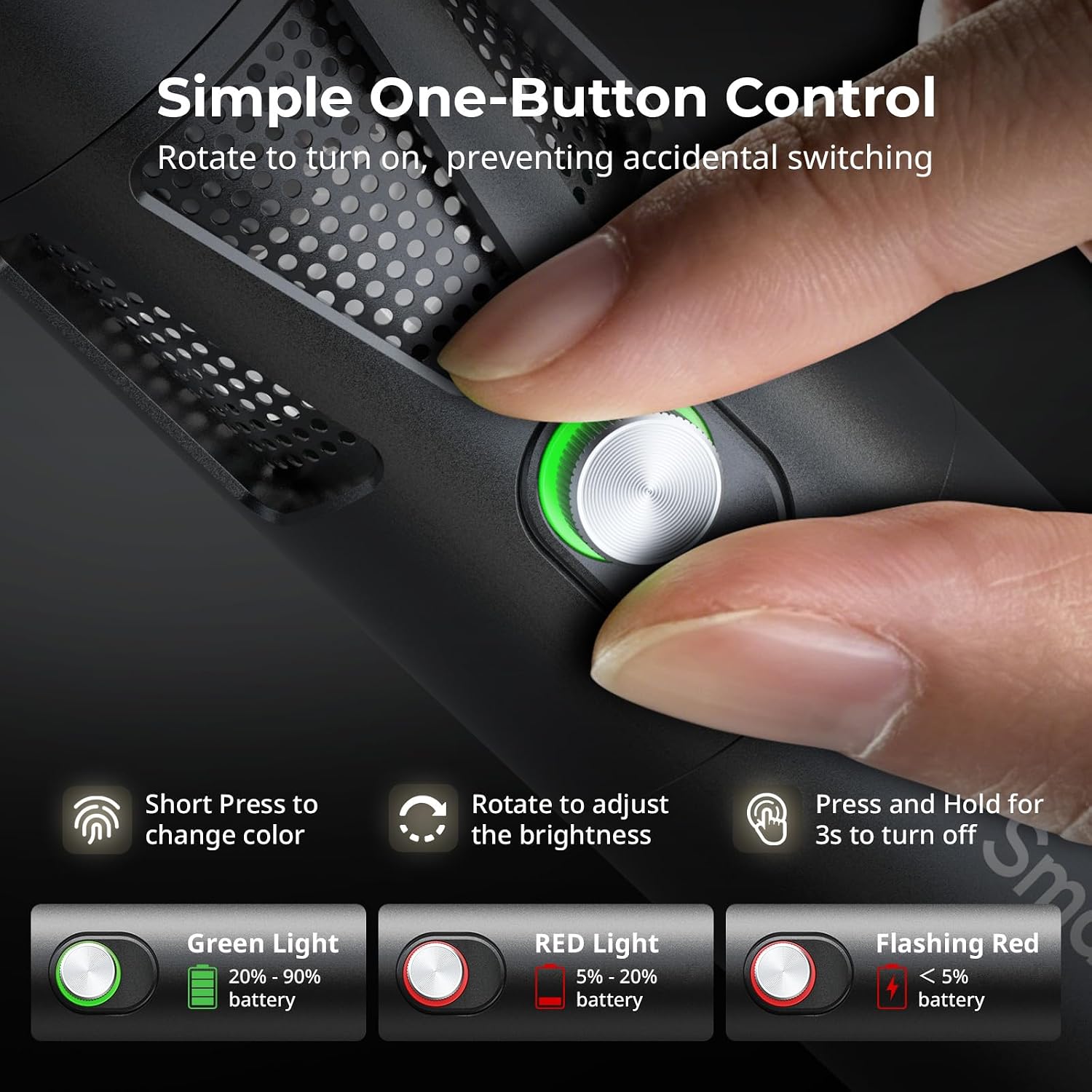
Figure 5.1: One-button control and battery indicator.

Figure 5.2: Available LED colors.
5.2 Melaraskan Sudut Rasuk
The front plano-convex lens allows for adjustment of the beam angle. Push or pull the lens to change the focus of the light from a narrow 24° beam to a wider 60° diffusion.
- Extend the lens: Narrows the beam (e.g., 24°).
- Retract the lens: Diffuses the beam (e.g., 60°).

Figure 5.3: Beam angle adjustment mechanism.
5.3 Petunjuk Bateri
The control button's LED indicates the battery status:
- Lampu Hijau: 20% - 90% battery remaining.
- Lampu Merah: 5% - 20% battery remaining.
- Lampu Merah Berkelip: Baki bateri kurang daripada 5%.

Figure 5.4: Brightness comparison of RF20C.
6. Penyelenggaraan
- Bersihkan peranti ini secara berkala menggunakan kain lembut dan kering. Jangan gunakan bahan kimia yang keras atau bahan yang melelas.
- Simpan peranti di tempat yang sejuk dan kering, jauh dari cahaya matahari langsung dan suhu yang melampau.
- When not in use for extended periods, charge the battery to approximately 50% every three months to prolong battery life.
- Keep the lens and LED surface free from dust and fingerprints for optimal light output.
7. Penyelesaian masalah
| Masalah | Kemungkinan Punca | Penyelesaian |
|---|---|---|
| Peranti tidak dihidupkan. | Bateri lemah; prosedur hidupkan kuasa yang salah. | Charge the device. Ensure you rotate the control button to power on. |
| Keluaran cahaya adalah malap. | Low battery; brightness set too low; dirty lens. | Charge the device. Rotate the control button to increase brightness. Clean the lens. |
| Gobo projection is blurry. | Plano-convex lens not removed; gobo not seated correctly. | Remove the plano-convex lens before attaching the silicone gobo holder. Ensure gobo is properly inserted. |
| Device becomes warm during use. | Normal operation, especially at high power; fan obstruction. | This is normal. Ensure the fan vents are not obstructed for proper heat dissipation. If excessively hot, reduce brightness or allow to cool. |
| Fan noise is noticeable. | Normal operation for cooling. | The device uses a high-speed fan for efficient heat dissipation. This noise is part of normal operation. Consider distance from audio recording equipment. |
8. Spesifikasi
| Ciri | Perincian |
|---|---|
| Model | RF20C (5335) |
| kuasa | 20 W |
| Input | 20 V / 1.8 A (max. 36 W) |
| Warna LED | Red, 5600K White, Purple, Orange, Cyan |
| Indeks Paparan Warna (CRI) | ≥ 97 |
| Indeks Ketekalan Pencahayaan Televisyen (TLCI) | ≥ 99 (at 5600 K) |
| Pencahayaan | 5400 Lux @ 1m / 5600K |
| Kapasiti Bateri | 10000mAh (2 x 5000mAh / 7.4V / 37Wh) |
| Runtime (Full Power) | Sehingga 1.5 jam |
| Mengecas | USB-C PD 36W Fast Charging, supports charging while operating |
| Pelarasan Sudut Rasuk | 24° hingga 60° |
| bahan | Aloi aluminium, ABS |
| Dimensi Produk | φ49.0 x 200.0 mm / φ1.9 x 7.9 inches |
| Berat Produk | 520.0 ± 20.0 g / 18.3 ± 0.7 oz |
| Teknologi Ketersambungan | USB |
| Negara Asal | China |
9. Waranti dan Sokongan
SmallRig products are designed and manufactured to the highest quality standards. This product is covered by a limited warranty from the date of purchase. For detailed warranty terms, technical support, or service inquiries, please refer to the official SmallRig webtapak atau hubungi pengedar tempatan anda.
Sila simpan bukti pembelian anda untuk tuntutan waranti.
10. Senario Penggunaan
The SmallRig RF20C is suitable for various applications, including:
- Fotografi
- Rakaman Video
- Penstriman Langsung
- Creative Accent Lighting
- Macro Work and Close-ups

Gambar 10.1: Cthamples of RF20C usage scenarios.
Ask a question about this manual
Ask about setup, troubleshooting, compatibility, parts, safety, or missing instructions. Manuals+ will review the question and use this page’s manual context to help answer it.