
1. Pengenalan
The DigiQuest Q99 4K UHD Satellite Receiver is designed for receiving Italian television channels. It supports DVB-S2 and DVB-T2 standards, HEVC HDR, and includes an activated TiVuSat 4K card. This allows access to over 60 programs from RAI, Mediaset, and LA7 in HD and 4K UHD resolution. The receiver incorporates Smart TV functions for media libraries such as Rai Play and Mediaset Infinity, requiring an internet connection. The Q99 operates on 12V, making it suitable for mobile use.
2. Apa yang ada di dalam Kotak
Sahkan bahawa semua komponen terdapat dalam pakej:
- DigiQuest Q99 4K UHD Combo Satellite Receiver
- Activated TiVuSat 4K UHD Card
- Alat Kawalan Jauh
- Penyesuai Kuasa
- HTS e-com HDMI Cable
- User Manual (Italian and English)
3. Persediaan
3.1 Sambungan Fizikal
Ikuti langkah-langkah ini untuk menyambungkan penerima anda:
- Satellite Antenna Connection: Connect your satellite dish cable to the "SAT IN" port on the rear panel. Ensure your satellite dish is pointed to Hotbird 13° East.
- Television Connection: Connect one end of the provided HDMI cable to the "HDMI" port on the receiver and the other end to an available HDMI input on your television.
- Sambungan Kuasa: Connect the power adapter to the "DC IN 12V" port on the receiver and then plug it into a power outlet.
- Sambungan Rangkaian Pilihan: For Smart TV functions and software updates, connect an Ethernet cable to the "LAN" port on the receiver and to your internet router. Alternatively, a compatible Wi-Fi USB dongle can be used in a USB port.
- Optional USB Storage: For PVR (recording) and Timeshift functions, connect an external USB storage device (e.g., USB stick or hard drive) to one of the "USB" ports.

Figure 1: Rear panel of the DigiQuest Q99 receiver, illustrating satellite input/output, RF in, AV, S/PDIF, HDMI, USB 2.0, USB 3.0, LAN, and DC IN ports.
3.2 TiVuSat Card Insertion
The TiVuSat 4K card is pre-activated. Insert the card into the designated smart card slot on the side of the receiver, ensuring the chip faces downwards and the card is inserted correctly as indicated by the label.

Rajah 2: Sisi view of the DigiQuest Q99 receiver, highlighting the smart card slot for TiVuSat card insertion.
3.3 Initial Power-On and Channel Scan
After connecting all cables and inserting the TiVuSat card, turn on your television and select the correct HDMI input. Power on the DigiQuest Q99 receiver. The initial setup wizard will guide you through language selection (Italian/English) and channel scanning. The receiver features an automatic update function for the TiVuSat station list.
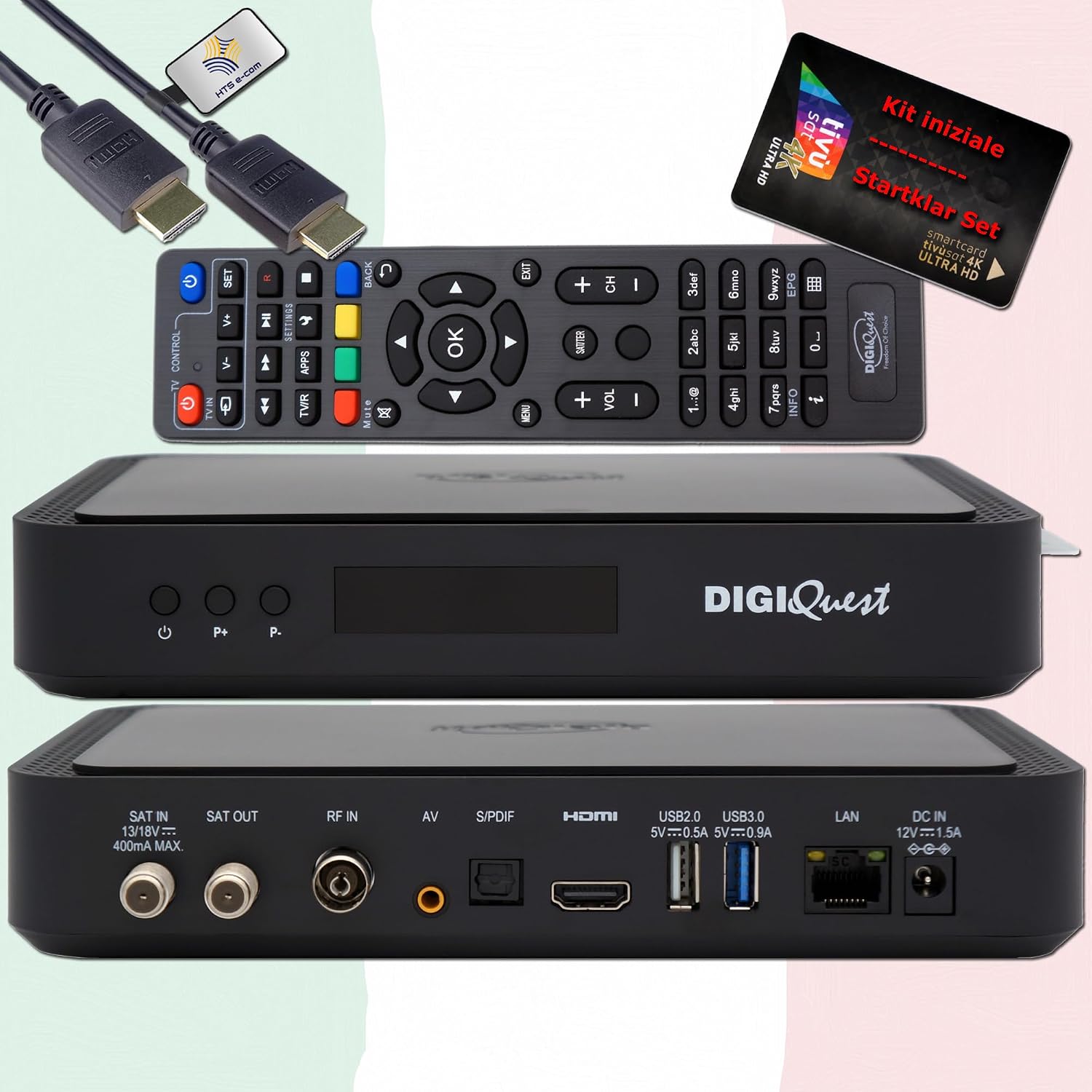
Rajah 3: Depan view of the DigiQuest Q99 receiver, showing the power button and channel selection buttons.
4. Arahan Operasi
4.1 Fungsi Asas
Use the remote control to navigate the receiver's functions:
- Pemilihan Saluran: Use the "P+" and "P-" buttons or the numeric keypad to change channels.
- Kawalan Kelantangan: Laraskan kelantangan menggunakan butang kelantangan khusus.
- Panduan Program Elektronik (EPG): Press the "EPG" button to view program schedules for upcoming broadcasts.
- Navigasi Menu: Akses menu utama untuk tetapan dan ciri.

Figure 4: Remote control layout and detailed features of the DigiQuest Q99 receiver.
4.2 Ciri Lanjutan
- PVR (Personal Video Recorder) and Timeshift: With an external USB storage device connected, you can activate PVR functionality to record programs and use Timeshift to pause live TV.
- Fungsi TV Pintar: Connect the receiver to the internet via LAN or a compatible Wi-Fi USB dongle to access media libraries such as Rai Play and Mediaset Infinity, and tivùon HbbTV services.
- 4K UHD Channels: The receiver supports 4K UHD content, providing access to channels like Rai 4K and other UHD programs available via TiVuSat.
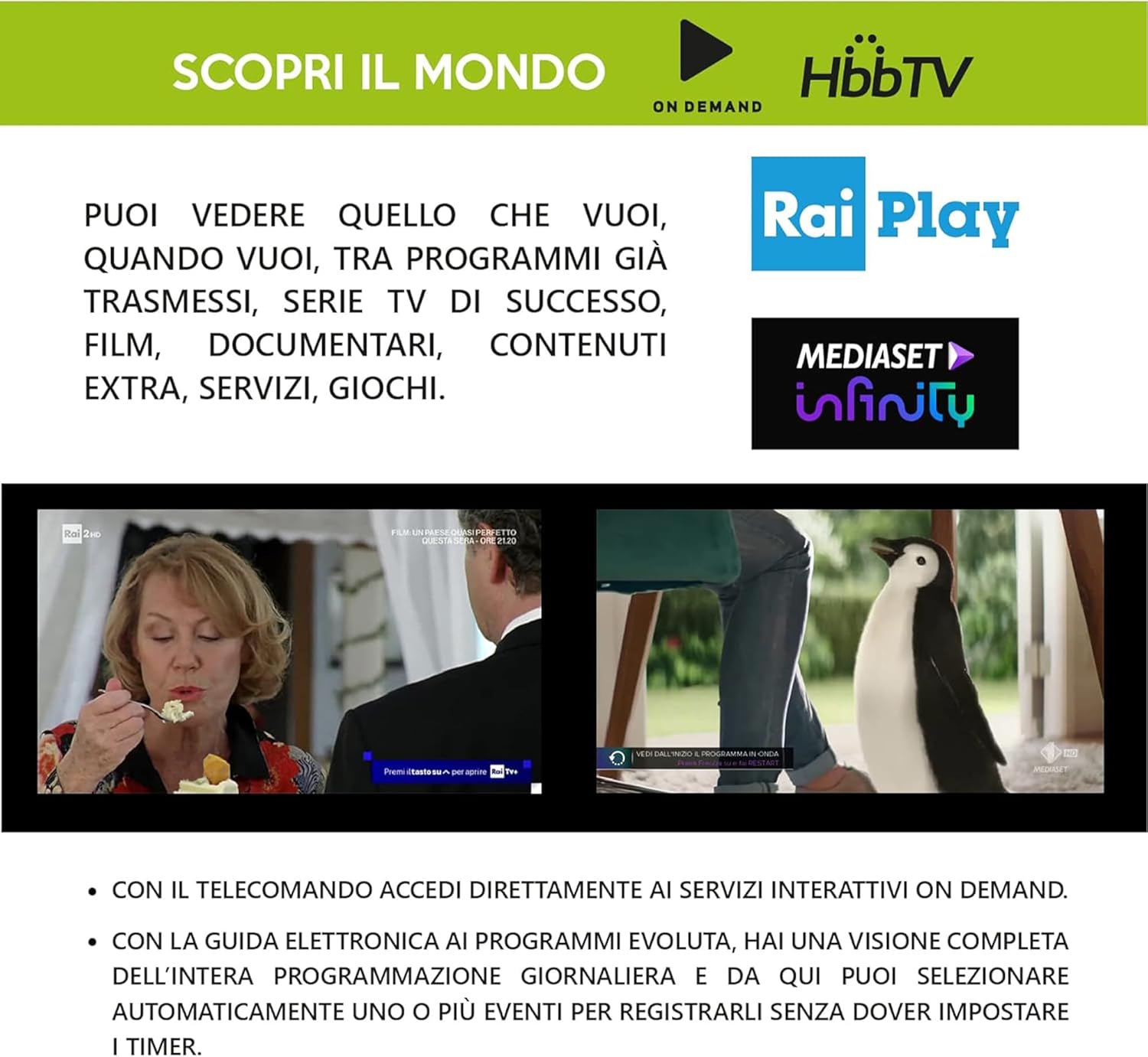
Figure 5: Smart TV capabilities of the DigiQuest Q99, including HbbTV, Rai Play, and Mediaset Infinity.

Gambar 6: Cthample of 4K Ultra HD channels accessible through the TiVuSat platform.

Figure 7: A selection of Italian and international television channels available with the DigiQuest Q99.
5. Penyelenggaraan
- Kemas Kini Perisian: The receiver supports software updates via OTA (Over-The-Air), USB, or FTP. Regularly check for and install updates to ensure optimal performance and access to the latest features.
- Pembersihan: Gunakan kain lembut dan kering untuk membersihkan bahagian luar penerima. Jangan gunakan pembersih cecair atau bahan kasar.
- Pengudaraan: Ensure the receiver is placed in a well-ventilated area to prevent overheating. Do not block ventilation openings.
6. Penyelesaian masalah
If you encounter issues with your DigiQuest Q99 receiver, refer to the following common solutions:
- Tiada Gambar/Bunyi:
- Check all cable connections (HDMI, satellite, power).
- Pastikan TV ditetapkan kepada input HDMI yang betul.
- Sahkan penerima telah dihidupkan.
- Tiada Isyarat Satelit:
- Check the satellite cable connection to the "SAT IN" port.
- Confirm your satellite dish is correctly aligned to Hotbird 13° East.
- Check for any obstructions blocking the satellite signal.
- TiVuSat Card Error:
- Ensure the TiVuSat card is inserted correctly into the smart card slot.
- Verify the card is clean and free from damage.
- Tiada sambungan internet:
- Check the Ethernet cable connection to the "LAN" port and your router.
- If using Wi-Fi, ensure the USB dongle is compatible and properly connected, and check Wi-Fi settings in the receiver's menu.
- Mulakan semula penghala dan penerima anda.
For more detailed troubleshooting, please refer to the complete user manual provided with your product.
7. Spesifikasi
| Ciri | Penerangan |
|---|---|
| Nombor Model | Q99 |
| Jenama | DigiQuest |
| Jenis Penala | DVB-S2 (Satellite), DVB-T2 (Terrestrial - Italy only) |
| Resolusi Video | Sehingga 4K UHD |
| Penyahkodan Video | HEVC H.265 (10-bit), HDR support |
| Mod Keluaran Audio | Dolby Digital, Dolby Digital Plus |
| Ketersambungan | HDMI (1), USB (2 - 2.0 & 3.0), LAN (Ethernet), S/PDIF, AV, RF IN, SAT IN/OUT |
| DiSEqC Support | DiSEqC 1.2, USALS, SCR, Unicable |
| Ciri Khas | PVR Ready, Timeshift, EPG, Automatic TiVuSat channel list update, Smart TV functions (Rai Play, Mediaset Infinity, HbbTV) |
| Bekalan Kuasa | Operasi 12V |
| Dimensi | 210 x 153 x 40 mm (anggaran) |
8. Waranti dan Sokongan
This product comes with a manufacturer's warranty. Please refer to the warranty card included in your package or contact your retailer for specific warranty terms and conditions.
For technical support or service inquiries, please consult the contact information provided in the full user manual or visit the official DigiQuest webtapak.