
pengenalan
This manual provides detailed instructions for the operation and maintenance of your RadioShack Portable CD Player Boombox. Please read this manual thoroughly before using the device to ensure proper function and to maximize your listening experience. This boombox combines classic CD playback with modern connectivity options including Bluetooth, FM radio, USB, and AUX input.
Apa yang ada dalam Kotak

Figure 1: Box Contents. This image displays the items included with your purchase: the boombox unit, AC power cord, remote control, and telescopic antenna.
- 1x RadioShack Portable CD Player Boombox Unit
- Kabel Kuasa 1x AC
- 1x Alat Kawalan Jauh
- 1x Telescopic Antenna (pre-attached)
- 1x Manual Pengguna (dokumen ini)
Note: 4 C batteries are required for portable operation and are not included.
Produk Selesaiview dan Ciri
The RadioShack Portable CD Player Boombox offers multiple audio playback options and user-friendly controls.

Rajah 2: Ciri-ciri Utama. This diagram highlights the boombox's main functionalities including Bluetooth 5.0, various CD formats, USB MP3 playback, FM radio, AUX input, and playback modes.
- Main balik CD: Supports CD, CD-R, CD-RW, and CD-MP3 formats.
- Kesambungan Bluetooth: Stream audio wirelessly from compatible devices.
- Radio FM: Built-in tuner with telescopic antenna and 18 preset stations.
- Main balik USB: Mainkan MP3 files terus daripada pemacu USB.
- Input AUX: Sambungkan peranti audio luaran melalui kabel 3.5mm.
- Mod Main Semula: Includes random, repeat, and program play functions.
- Kawalan Jauh: Untuk memudahkan operasi dari jauh.
Persediaan
1. Mengkuasakan Peranti

Figure 3: Power Options. The boombox can be powered by the included AC cord or by 4 C batteries for portable use.
Your boombox can be powered in two ways:
- Kuasa AC: Connect the included AC power cord to the AC input jack on the back of the boombox and then plug it into a standard wall outlet (110V-240V).
- Kuasa Bateri: For portable use, open the battery compartment on the bottom of the unit and insert 4 "C" size batteries (not included), ensuring correct polarity (+/-). Close the compartment securely.
2. Persediaan Antena (Radio FM)
For optimal FM radio reception, fully extend the telescopic antenna located on the back of the unit. Adjust its position for the best signal.
Arahan Operasi
Kawalan Am
- Butang kuasa (⏻): Tekan untuk menghidupkan atau MATI unit.
- Tombol Kelantangan: Putar mengikut arah jam untuk meningkatkan kelantangan, lawan arah jam untuk mengurangkan.
- Butang Fungsi (FUNC): Press to cycle through playback modes: CD, Bluetooth, FM, USB, AUX.
- Main/Jeda (⏸/⏸) Butang: Memulakan atau menjeda main balik.
- Berhenti (⏹) Butang: Menghentikan main balik.
- Skip/Search (⏮ / ⏭) Butang: Tekan sebentar untuk melangkau trek. Tekan dan tahan untuk mencari dalam trek.
Main semula CD
- Buka penutup petak CD.
- Place a CD (CD, CD-R, CD-RW, or CD-MP3) onto the spindle with the label side facing up.
- Tutup penutup petak CD dengan selamat.
- Tekan ke FUNGSI butang sehingga mod "CD" dipilih.
- CD akan mula dimainkan secara automatik. Jika tidak, tekan butang Main/Jeda butang.
Berpasangan Bluetooth

Rajah 4: Penstriman Bluetooth. Easily stream audio from your smartphone or tablet to the boombox.
- Tekan ke FUNGSI butang sehingga mod "BT" (Bluetooth) dipilih. Paparan akan menunjukkan "BT" dan berkelip, menunjukkan ia berada dalam mod berpasangan.
- On your Bluetooth-enabled device (smartphone, tablet), go to its Bluetooth settings and search for available devices.
- Select "RadioShack Boombox" from the list.
- Once paired, the "BT" indicator on the boombox display will stop flashing and remain solid.
- You can now play audio from your device through the boombox.
Operasi Radio FM

Figure 5: FM Presets and Programmed Playback. Use the SCAN button to automatically save FM stations and REP/PROG for custom playback sequences.
- Tekan ke FUNGSI butang sehingga mod "FM" dipilih.
- Auto Scan and Save Presets: Tekan dan tahan butang IMBAS button (often combined with Play/Pause). The radio will automatically scan for and save up to 18 available FM stations.
- Penalaan Manual: Tekan sebentar Langkau / Cari butang (⏮ / ⏭) to fine-tune the frequency.
- Memilih Pratetap: Tekan sebentar PROG button (often combined with Repeat) to cycle through saved preset stations.
Main Balik USB
- Masukkan pemacu kilat USB yang mengandungi MP3 files ke dalam port USB.
- Tekan ke FUNGSI button until "USB" mode is selected.
- The boombox will automatically detect and begin playing MP3 files daripada pemacu USB.
- Gunakan Main/Jeda, Berhenti, dan Langkau / Cari butang untuk mengawal main balik.
Input AUX
- Sambungkan satu hujung kabel audio 3.5mm (tidak disertakan) ke bicu AUX IN pada boombox.
- Sambungkan hujung kabel yang satu lagi ke bicu fon kepala atau output audio peranti audio luaran anda (cth., pemain MP3, telefon pintar).
- Tekan ke FUNGSI butang sehingga mod "AUX" dipilih.
- Kawal main balik dan kelantangan daripada peranti audio luaran anda.
Penggunaan Alat Kawalan Jauh
The included remote control allows for convenient operation of most functions from a distance. Ensure the remote has working batteries (typically 2x AAA, not included) and point it towards the front of the boombox.
- Kuasa: HIDUP/MATI unit.
- FUNGSI: Select input mode (CD, BT, FM, USB, AUX).
- Jilid +/-: Laraskan tahap kelantangan.
- Main/Jeda, Berhenti, Langkau/Cari: Kawal main balik.
- REP/PROG: Access repeat and program functions.
- IMBAS: Auto-scan FM stations.
- EQ/SLEEP: Adjust equalizer settings or set sleep timer (refer to specific remote markings for details).
Playback Modes (CD/USB)
- Repeat (REP): Tekan ke REP button (on unit or remote) to cycle through repeat modes:
- Repeat One: Repeats the current track.
- Repeat All: Repeats all tracks on the CD/USB.
- Repeat Folder (for MP3 CDs/USB): Repeats all tracks in the current folder.
- Program (PROG): Allows you to program a specific order of tracks for CD or USB playback.
- In CD or USB mode, with playback stopped, press the PROG butang.
- Gunakan Langkau / Cari buttons to select your desired track.
- Tekan PROG again to confirm and add the track to the program list.
- Repeat steps 2-3 to add more tracks.
- Tekan Main/Jeda untuk memulakan main balik yang diprogramkan.
- Random/Shuffle: Some models may have a dedicated shuffle button (often labeled "RDM" or "SHUF") or it may be part of the REP/PROG cycle. This plays tracks in a random order.
Penyelenggaraan
- Pembersihan: Use a soft, dry cloth to clean the exterior of the boombox. Do not use abrasive cleaners or solvents. For the CD lens, use a specialized CD lens cleaner disc.
- Storan: When not in use for extended periods, remove batteries to prevent leakage. Store the unit in a cool, dry place away from direct sunlight and extreme temperatures.
- Penggantian Bateri: Replace all 4 "C" batteries simultaneously when they are depleted. Do not mix old and new batteries or different types of batteries.
- Penjagaan CD: Kendalikan CD dengan tepinya. Pastikan ia bersih dan bebas daripada calar. Simpan dalam bekasnya apabila tidak digunakan.
Menyelesaikan masalah
| Masalah | Kemungkinan Punca | Penyelesaian |
|---|---|---|
| Tiada kuasa | Kord AC tidak disambungkan; Bateri habis atau salah dimasukkan. | Ensure AC cord is securely plugged in. Replace batteries with new ones, checking polarity. |
| Tiada bunyi | Volume too low; Incorrect input mode; Headphones connected. | Increase volume. Press FUNC to select correct mode. Disconnect headphones. |
| CD melangkau atau tidak dimainkan | CD kotor atau tercalar; CD dimasukkan dengan tidak betul; Petak CD tidak ditutup. | Clean CD. Reinsert CD correctly. Close lid firmly. Try another CD. |
| Bluetooth tidak berpasangan | Boombox not in BT mode; Device too far; Device already paired to another unit. | Ensure boombox is in BT mode and flashing. Move device closer. Disconnect from other devices. |
| Penerimaan FM yang lemah | Antena tidak dipanjangkan atau diletakkan dengan betul; Kawasan isyarat lemah. | Panjangkan dan laraskan sepenuhnya antena teleskopik. Cuba alihkan unit ke lokasi lain. |
| USB tidak dimainkan | USB drive not inserted correctly; Files not MP3 format; USB drive corrupted. | Reinsert USB drive. Ensure files are MP3. Try a different USB drive. |
Spesifikasi
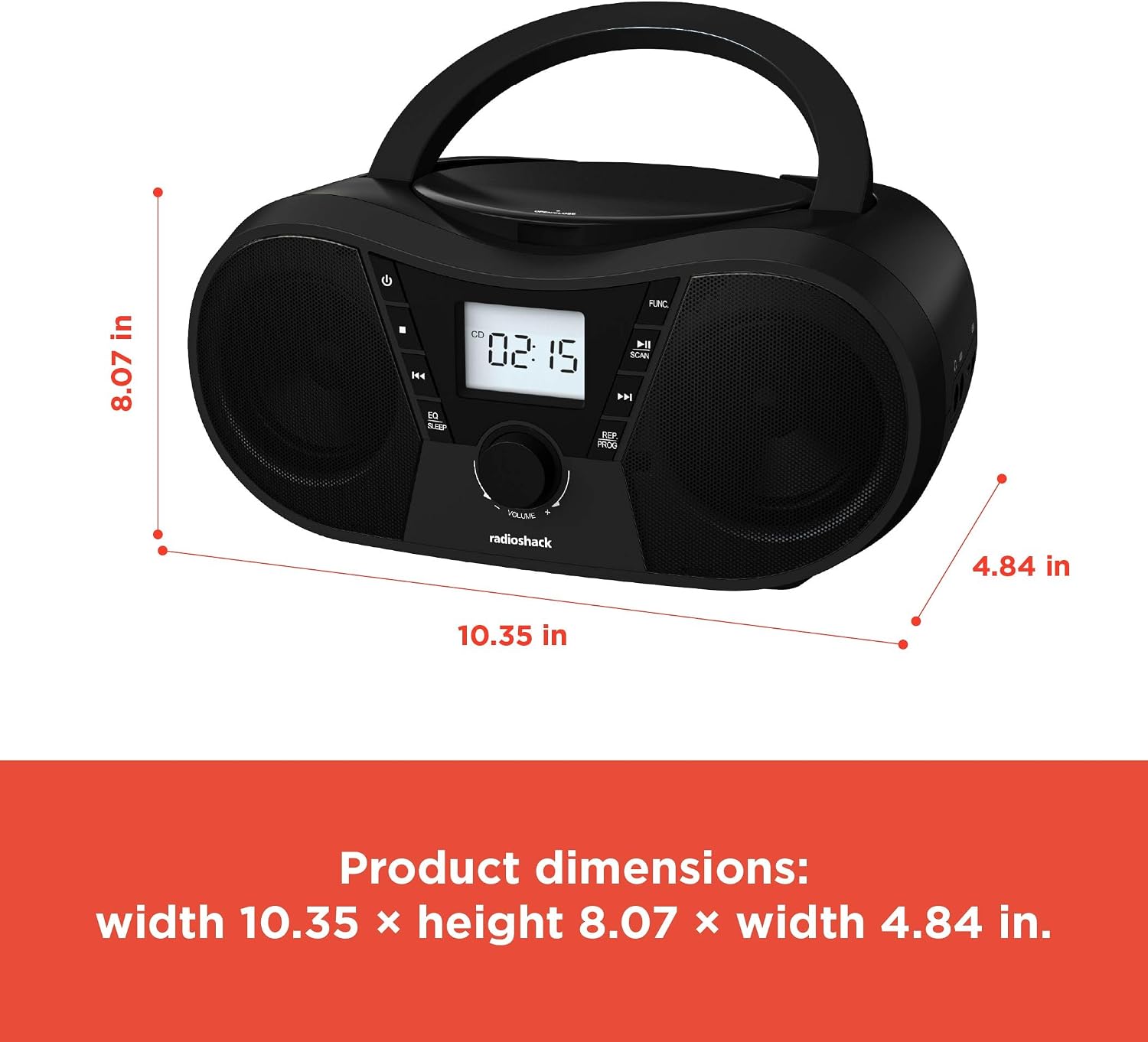
Rajah 6: Dimensi Produk. The boombox measures approximately 10.35 inches wide, 8.07 inches high, and 4.84 inches deep.
| Ciri | Perincian |
|---|---|
| Nombor Model | 1402010 |
| Sumber Kuasa | AC 110V-240V ~ 50/60Hz or 4 x "C" Batteries (DC 6V) |
| Media yang Disokong | CD, CD-R, CD-RW, CD-MP3, USB (MP3), Bluetooth, FM Radio, AUX Input |
| Versi Bluetooth | 5.0 (Compatible) |
| Julat Frekuensi FM | 87.5 - 108 MHz |
| Mod Keluaran Audio | Stereo |
| Bilangan Speaker | 2 (Built-in Stereo Speakers) |
| Wattage | 10 watt |
| Respons Kekerapan | 20 Hz - 20000 Hz |
| Dimensi (W x H x D) | Kira-kira 10.35 x 8.07 x 4.84 inci |
| warna | Hitam |
Waranti dan Sokongan
This RadioShack Portable CD Player Boombox (Model 1402010) comes with a Waranti Terhad 1 Tahun dari tarikh pembelian. Waranti ini meliputi kecacatan pembuatan dalam bahan dan mutu kerja di bawah penggunaan biasa.
For warranty claims, technical support, or customer service inquiries, please contact RadioShack customer support through their official webtapak atau maklumat hubungan yang diberikan bersama dokumentasi pembelian anda.
Sila simpan bukti pembelian anda untuk tujuan waranti.