
1. Pengenalan
Thank you for choosing the Contixo F15 Astro Mini Drone. This compact and lightweight drone is designed for beginners and experienced pilots alike, featuring a 720P HD camera, live video display, optical flow hover, and easy-to-use controls. Please read this manual thoroughly before operating the drone to ensure safe and optimal performance.
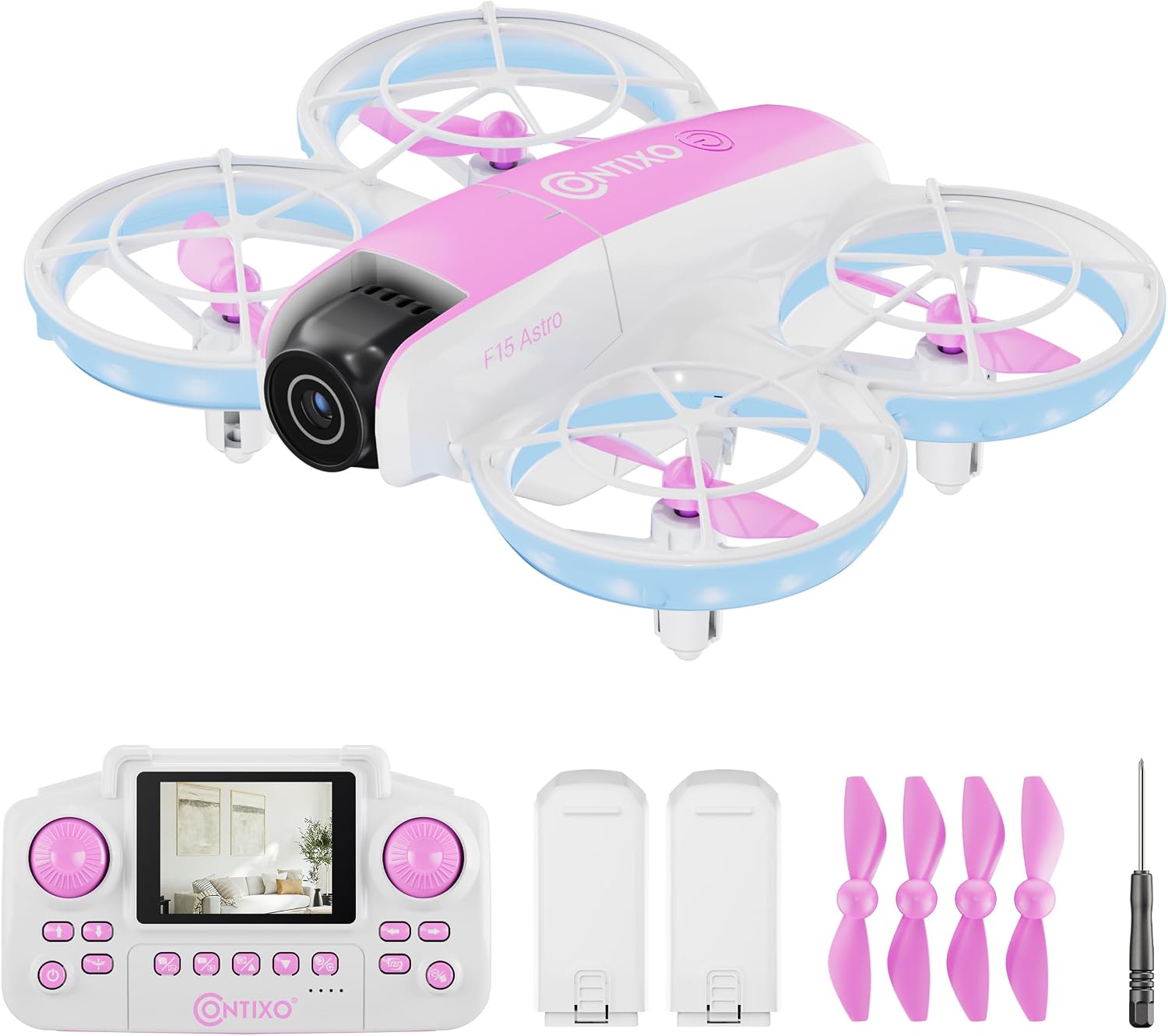
Image: The Contixo F15 Astro Mini Drone, showcasinreka bentuk padat dan pencahayaan LEDnya.
2. Garis Panduan Keselamatan
- Sentiasa kendalikan dron di kawasan terbuka dan jelas, jauh dari manusia, haiwan dan halangan.
- Do not fly near airports, restricted airspace, or power lines.
- Pastikan bateri dron dan bateri alat kawalan jauh dicas sepenuhnya sebelum setiap penerbangan.
- Awasi kanak-kanak semasa operasi dron.
- Elakkan terbang dalam angin kencang atau keadaan cuaca buruk.
- Jangan sentuh kipas semasa ia berputar.
3. Kandungan Pakej
Sahkan bahawa semua item terdapat dalam pakej anda:
- 1x F15 Astro Mini Drone
- 1x Remote Controller with 2.4" Screen
- 2x Drone Batteries
- 4x Spare Propellers
- 1x Pemutar Skru
- 1x Kabel Pengecasan USB

Image: All components included in the Contixo F15 Astro Mini Drone package.
4. Drone Components Overview
4.1 Drone
- Pengawal Kipas: Provide protection for propellers and enhance safety.
- Penjual: Generate lift for flight.
- Kamera HD 720P: Captures photos and videos, with adjustable tilt.
- Lampu LED: Indicate drone status and provide visibility.
- Petak Bateri: Houses the drone's rechargeable battery.

Image: The Contixo F15 Astro Mini Drone highlighting its protected propeller design.
4.2 Alat Kawalan Jauh
- Skrin 2.4": Displays live video feed from the drone's camera.
- Kayu Joy Kiri: Mengawal ketinggian (atas/bawah) dan putaran (kiri/kanan).
- Joystick Kanan: Mengawal pergerakan ke hadapan/belakang dan kiri/kanan.
- Butang Pelepasan/Pendaratan Satu Kekunci: Memulakan berlepas atau mendarat secara automatik.
- Butang Putar 360°: Activates aerial stunt mode.
- Photo/Video Buttons: Capture images or start/stop video recording.

Image: The Contixo F15 Astro remote control with its integrated 2.4-inch screen for live video display.
5. Persediaan
5.1 Mengecas Bateri Dron
- Remove the drone battery from the drone.
- Connect the USB charging cable to the battery and a USB power source (e.g., computer, USB wall adapter).
- The indicator light on the charging cable will show charging status (refer to cable instructions for specific light patterns).
- Charging typically takes approximately 60-90 minutes.

Image: The Contixo F15 Astro Mini Drone and its two included rechargeable batteries.
5.2 Memasang Bateri Dron
- Pastikan dron dimatikan.
- Carefully insert the fully charged battery into the battery compartment on the drone's underside.
- Selamatkan penutup bateri.
5.3 Memasang Bateri Alat Kawalan Jauh
- Buka petak bateri di belakang alat kawalan jauh.
- Masukkan 3 bateri AAA (tidak disertakan) mengikut tanda kekutuban.
- Tutup petak bateri dengan selamat.
5.4 Pairing Drone and Remote
- Letakkan drone di permukaan rata dan rata.
- Power on the drone. The drone's LED lights will flash.
- Hidupkan alat kawalan jauh.
- Tolak kayu bedik kiri ke kedudukan maksimumnya, kemudian tarik ke bawah ke kedudukan minimumnya. Lampu LED dron akan berhenti berkelip dan kekal pekat, menunjukkan pasangan yang berjaya.
5.5 Gyro Calibration
- After pairing, ensure the drone is still on a flat, level surface.
- Simultaneously push both joysticks down and to the bottom-right corner.
- The drone's LED lights will flash rapidly and then become solid, indicating successful calibration.
Video: A detailed guide on how to use the Contixo F15 Astro Drone, covering setup and basic operations.
6. Mengendalikan Dron
6.1 Berlepas dan Mendarat Satu Kunci
- Berlepas: After pairing and calibration, press the One-Key Takeoff/Landing button. The drone will automatically ascend and hover at a stable altitude.
- Pendaratan: During flight, press the One-Key Takeoff/Landing button again. The drone will slowly descend and land automatically.

Image: Visual representation of the one-touch takeoff and landing feature of the F15 Astro drone.
6.2 Kawalan Asas Penerbangan
- Kayu Joy Kiri (Pendikit/Kuap):
- Tolak ke atas/bawah: Tingkatkan/kurangkan altitud.
- Push left/right: Rotate drone left/right.
- Right Joystick (Forward/Backward/Sideways):
- Push up/down: Fly forward/backward.
- Push left/right: Fly left/right (strafe).
6.3 Optical Flow Hover
The F15 Astro drone features Optical Flow Hover technology, which uses a downward-facing camera to detect patterns on the ground and maintain a stable position. This feature helps the drone hover steadily, making it easier to control, especially for beginners.
6.4 360° Stunts
To perform a 360° flip:
- Ensure the drone is flying at a sufficient height (at least 2-3 meters).
- Tekan butang Flip 360° pada alat kawalan jauh.
- Immediately push the right joystick in the desired direction (forward, backward, left, or right) to execute the flip.

Image: The Contixo F15 Astro Mini Drone performing a 360-degree flip.
6.5 Camera Operation (720P HD)
The drone is equipped with a 720P HD camera that can capture photos and videos. The camera angle can be manually adjusted before flight.
- Video Langsung: The 2.4" screen on the remote control provides a real-time live video feed from the drone's camera.
- Mengambil gambar: Press the Photo button on the remote control to capture a still image.
- Rakaman Video: Press the Video button once to start recording, and press it again to stop recording.

Image: The 720P HD camera of the F15 Astro drone, featuring an adjustable angle.
Video: A demonstration of the Contixo F15 Astro Drone's features and flight capabilities.
7. Penyelenggaraan
7.1 Pembersihan
- Use a soft, dry cloth to clean the drone and remote control.
- Do not use water or cleaning solvents, as they may damage the electronics.
7.2 Penggantian Baling-Baling
If a propeller is damaged, replace it with a spare propeller from the package. Use the included screwdriver to carefully remove the screw holding the damaged propeller and install the new one, ensuring it is securely fastened.
7.3 Penjagaan Bateri
- Simpan bateri di tempat yang sejuk dan kering.
- Jangan cas berlebihan atau terlalu nyahcas bateri.
- If the drone will not be used for an extended period, remove the batteries from both the drone and the remote control.
8. Penyelesaian masalah
| Masalah | Kemungkinan Punca | Penyelesaian |
|---|---|---|
| Drone tidak bertindak balas kepada alat kawalan jauh. | Not paired or low battery. | Ensure drone and remote are powered on and paired correctly. Check battery levels. |
| Drone hanyut semasa penerbangan. | Gyro not calibrated. | Perform gyro calibration on a flat surface. |
| Poor video quality or no live feed. | Weak signal or camera issue. | Ensure drone is within range. Check for obstructions. Restart drone and remote. |
| Kipas-kipas tidak berputar. | Halangan atau kerosakan. | Check for hair or debris around propellers. Replace damaged propellers. |
9. Spesifikasi
- Jenama: Contixo
- Nama Model: F15 Astro
- kamera: 720P HD, Adjustable Angle
- Remote Screen: 2.4 inci
- Kapasiti Bateri: 580 mAh (Lithium Polimer)
- Dimensi Produk: 10"L x 7"W x 2"H
- Ciri-ciri Penerbangan: Optical Flow Hover, One-Key Takeoff/Landing, 360° Stunts
10. Waranti dan Sokongan
For warranty information, technical support, or any questions regarding your Contixo F15 Astro Mini Drone, please refer to the contact information provided on the product packaging or visit the official Contixo webtapak. Simpan resit pembelian anda untuk tuntutan waranti.
Video: Pengenalanview of the Contixo F15 Astro Drone, highlighting its key features.