
1. Pengenalan
The Beatbot Sora 10 is an advanced wireless robotic pool cleaner designed to maintain the cleanliness of your pool. It features comprehensive coverage for the pool floor, walls, and waterline, including shallow submerged areas. This manual provides essential information for the safe and efficient operation and maintenance of your device.
2. Produk Lebihview
The Sora 10 is equipped with powerful suction and intelligent navigation to effectively remove debris from various pool surfaces. Its wireless design offers convenience and ease of use.

Image: The Beatbot Sora 10 Wireless Pool Robot Cleaner, showcasing reka bentuknya yang padat.
Ciri-ciri Utama:
- 3-Zone Coverage: Cleans the pool floor, walls, and waterline.
- Shallow Area Cleaning: Operates in areas with a minimum depth of 30 cm, including submerged beaches.
- Kuasa Sedutan Tinggi: 25,700 LPH HydroBalance structure for efficient debris capture.
- Intensive Wall & Waterline Scrubbing: Dedicated 8-second scrubbing for effective stain and algae removal.
- Intelligent Waterline Parking: Automatically returns and parks at the waterline for easy retrieval.
- Large Filter Capacity: 5L filter basket with 150 µm filtration for daily debris.
- Hayat Bateri yang Panjang: Up to 300 minutes of continuous cleaning on a single charge.
- Kawalan Pintar: Manage and monitor via the Beatbot app with Wi-Fi and Bluetooth connectivity.
3. Persediaan dan Penggunaan Awal
Membongkar dan Pemeriksaan:
Carefully remove all components from the packaging. Inspect the robot and accessories for any signs of damage. Contact customer support if any parts are missing or damaged.
Mengecas Robot:
Before first use, fully charge the robot. Connect the charging cable to the robot and a power outlet. The charging indicator will show the charging status. A full charge typically takes approximately 3.5 hours.

Image: The Beatbot Sora 10 connected to its charger, indicating the charging process.
Sambungan Apl:
- Download the Beatbot app from your device's app store.
- Follow the in-app instructions to pair your Sora 10 robot via Wi-Fi or Bluetooth.
- The app allows you to select cleaning modes, monitor progress, and receive software updates.

Image: A smartphone displaying the Beatbot app interface, showing cleaning mode selection and status.
4. Mengendalikan Robot
Meletakkan Robot dalam Kolam:
Gently lower the Beatbot Sora 10 into the pool. Ensure it is fully submerged before starting a cleaning cycle. The robot is designed for both above-ground and in-ground pools.

Image: The Beatbot Sora 10 shown cleaning different types of pools, including rectangular, round, and custom shapes.
Kaedah Pembersihan:
Select your desired cleaning mode via the Beatbot app:
- Mod Standard: Cleans the pool floor, walls, and waterline.
- Mod Lantai: Focuses cleaning solely on the pool floor.
- Mod ECO: Automatically cleans the pool floor every 48 hours.

Image: Visual representation of the three intelligent cleaning modes available for the Beatbot Sora 10.
3-Zone Coverage:
The Sora 10 is designed to clean the entire pool, including the floor, walls, and waterline. Its dual roller brushes ensure excellent grip for multi-surface cleaning.
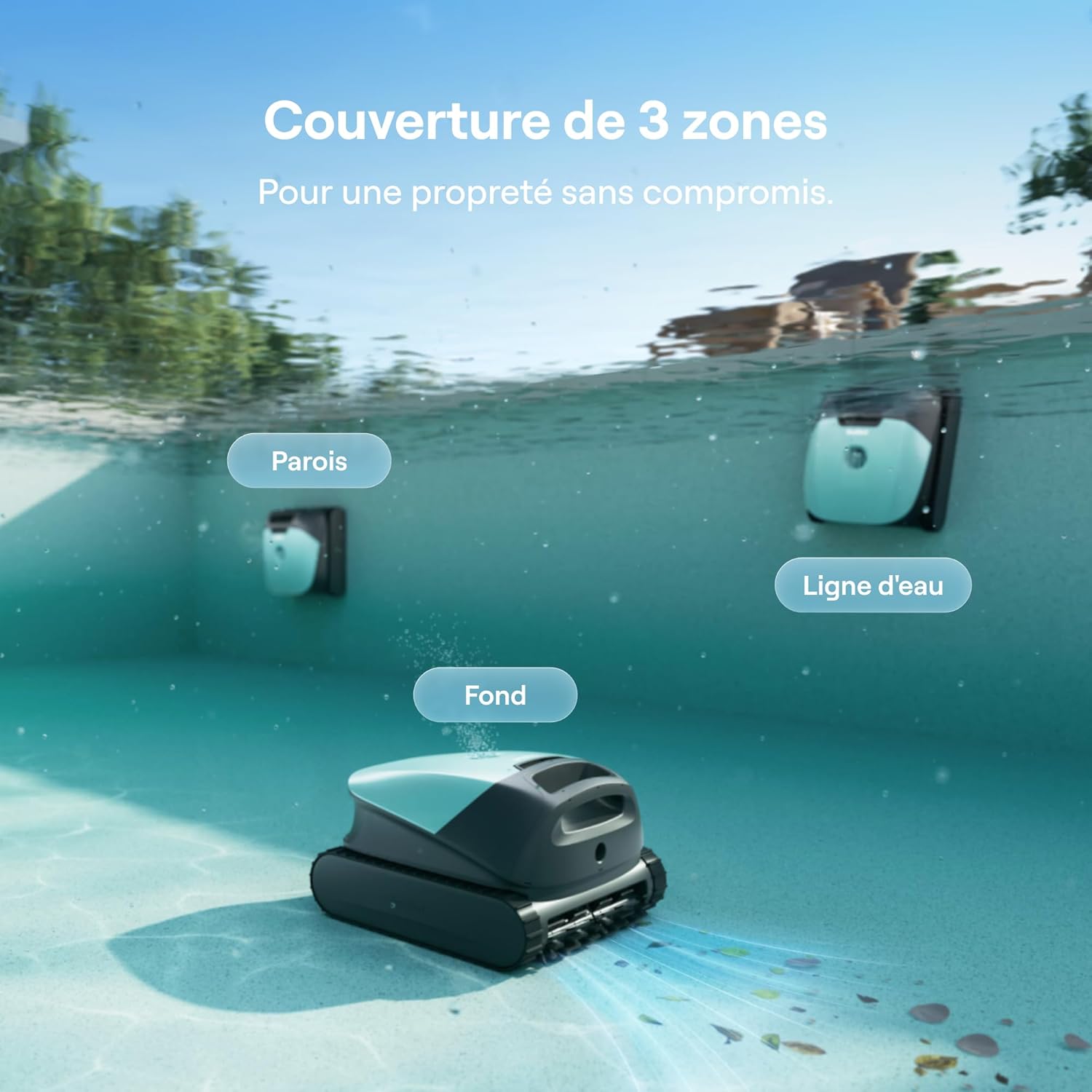
Image: The Beatbot Sora 10 demonstrating its ability to clean the pool floor, walls, and waterline.
Intelligent Waterline Parking:
Upon completion of a cleaning cycle, the robot automatically returns to and parks at the waterline. It remains in position for 10 minutes, allowing for effortless retrieval without heavy lifting.

Image: The Beatbot Sora 10 positioned at the waterline after completing a cleaning cycle, ready for retrieval.
Mengelakkan halangan:
The SonicSense obstacle avoidance system uses an ultrasonic sensor to detect obstacles in real-time, allowing the robot to navigate and clean without interruption.
5. Penyelenggaraan
Membersihkan Bakul Penapis:
The 5L filter basket captures leaves, sand, algae, and other debris. It should be emptied and cleaned after each cleaning cycle or as needed.
- Remove the robot from the pool.
- Open the robot to access the filter basket.
- Remove the filter basket and empty its contents.
- Rinse the filter basket thoroughly with a hose to remove all debris.
- Reinsert the clean filter basket into the robot and close it securely.

Image: The Beatbot Sora 10's 5L filter basket, shown with collected debris, ready for cleaning.
Penjagaan Am:
- Simpan robot di tempat yang sejuk dan kering apabila tidak digunakan.
- Avoid prolonged exposure to direct sunlight when the robot is out of the water.
- Periodically check the brushes and tracks for wear and tear. Replace if necessary.
- The robot's casing is made of durable ASA material, resistant to chemicals, heat, and wear.
6. Penyelesaian masalah
Isu dan Penyelesaian Biasa:
| Isu | Kemungkinan Punca | Penyelesaian |
|---|---|---|
| Robot not moving or cleaning effectively. | Clogged filter basket, low battery, obstacle. | Clean filter basket, fully charge robot, remove obstacles. |
| Robot not connecting to app. | Bluetooth/Wi-Fi off, robot out of range, app issue. | Ensure Bluetooth/Wi-Fi is on, bring robot closer, restart app/robot. |
| Robot not climbing walls. | Dirty brushes, low battery, water chemistry imbalance. | Clean brushes, fully charge robot, check pool water balance. |
| Robot gets stuck. | Obstacle, uneven pool surface. | Remove obstacles, ensure pool is suitable for robotic cleaners. |
For further assistance, refer to the Beatbot app or contact customer support.
7. Spesifikasi
- model: Sora 10 (RCMPM031G)
- Dimensi (L x W x H): 43.2 x 38.6 x 26.7 cm
- Berat: 8.5 kg
- Sumber Kuasa: Dikuasakan Bateri
- Kuasa sedutan: 25,700 LPH
- Kapasiti Penapis: 5L
- Kehalusan Penapis: 150 µm
- Kapasiti Bateri: 7,800 mAh
- Max Cleaning Time: Sehingga 300 minit (5 jam)
- Minimum Operating Depth: 30 sm
- Ketersambungan: Wi-Fi (5G/2.4G), Bluetooth
- Tarikh Pertama Tersedia: 25 Mac 2026
8. Waranti dan Sokongan
Maklumat Waranti:
The Beatbot Sora 10 comes with a 2-year protection warranty. Sila simpan bukti pembelian anda untuk tuntutan waranti.
Sokongan Pelanggan:
For technical support, warranty claims, or any questions regarding your Beatbot Sora 10, please visit the official Beatbot website or contact their customer service department. Contact details can typically be found on the product packaging or the Beatbot webtapak.
9. Video Produk Tamatview
Watch this official product video for a visual guide on the Beatbot Sora 10's features and operation.
Video: Seorang pegawai tamatview of the Beatbot Sora 10, demonstrating its cleaning capabilities, intelligent features, and ease of use.