
1. Produk Lebihview
The Osram Coromuel LED Ceiling Fan (1065mm, 60W, CCT) integrates lighting and air circulation, suitable for rooms up to 13 m². It offers adjustable light color and gentle air movement. This model provides an airflow of up to 6,120 m³/h, six fan speeds, and timer options (1h / 4h / 8h). The integrated LED delivers a luminous flux of 2,600 lm and can be set to 3,000 K, 4,000 K, or 6,500 K. A remote control, powered by 2 AAA batteries, is included for convenient operation.
Ciri-ciri Utama:
- Strong Air Movement: A maximum airflow of 6,120 m³/h ensures noticeable air circulation in small rooms.
- Variable Light Mix: Three color temperatures (3000 K, 4000 K, and 6500 K) allow for creating atmospheric light scenes.
- Operasi senyap: The low noise level at low settings ensures a pleasant, undisturbed sleeping environment.
- Kawalan Mudah: The included remote control allows simple and convenient adjustment of speed, timer, and lighting functions.
- Kawalan Serbaguna: Six speed levels plus 1h / 4h / 8h timer functions enable flexible use.
- Kecekapan Tenaga: This product is a lighting product containing a light source of energy class E.
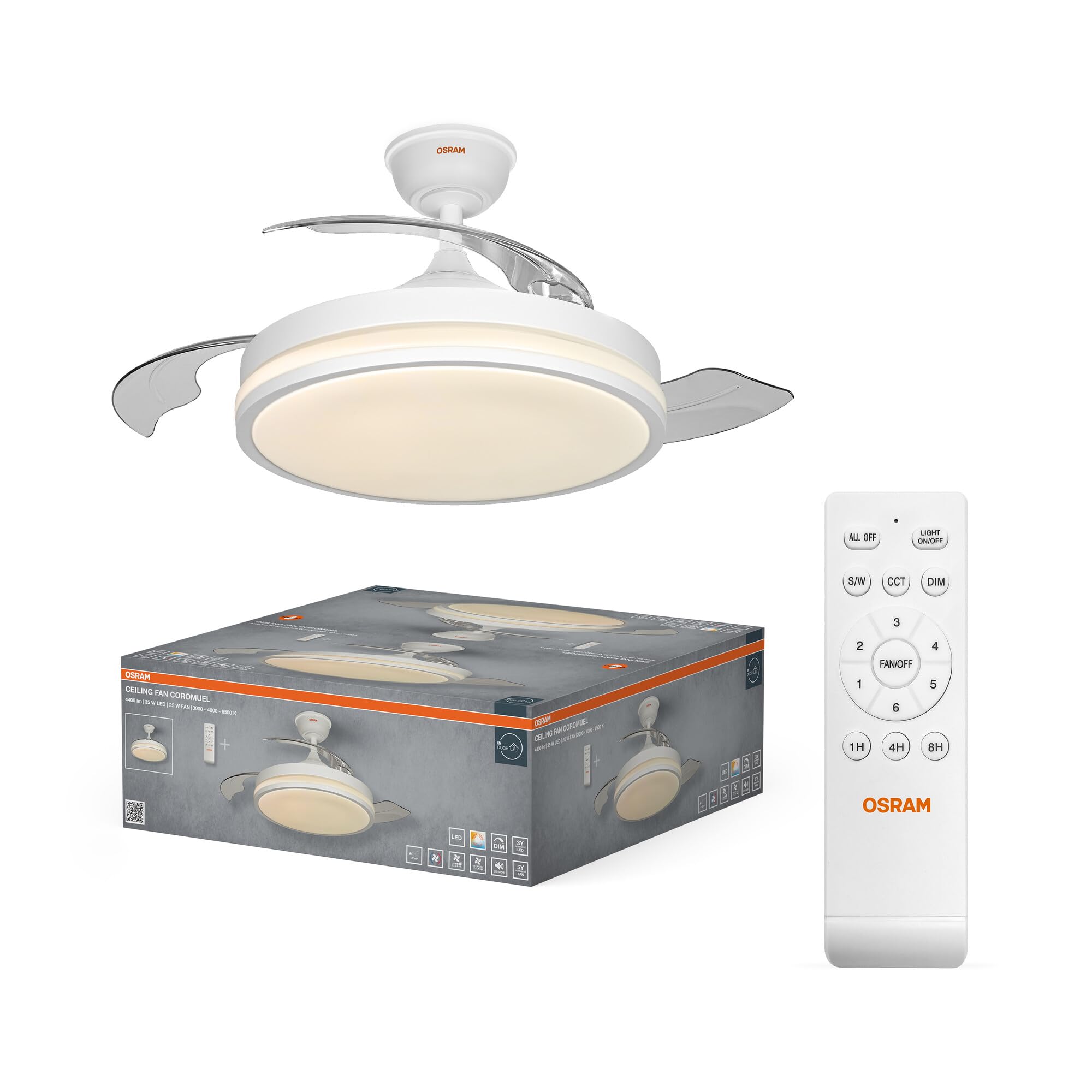
Image 1.1: The Osram Coromuel LED ceiling fan with integrated light, shown installed on a ceiling.

Image 1.2: An illustration of the Osram Coromuel ceiling fan with its blades retracted, appearing as a flush-mount light fixture, and then with the blades extended for air circulation.

Image 1.3: A graph illustrating the quiet operation of the fan, showing low decibel levels at lower speeds, ideal for bedrooms.
2. Arahan Keselamatan
Sila baca semua arahan keselamatan dengan teliti sebelum pemasangan dan penggunaan. Simpan manual ini untuk rujukan masa hadapan.
- Pemasangan mesti dilakukan oleh juruelektrik bertauliah mengikut peraturan pendawaian tempatan.
- Ensure the power supply is disconnected at the main circuit breaker before installation, maintenance, or cleaning.
- The ceiling fan must be securely mounted to a structural part of the building capable of supporting its weight.
- Jangan masukkan objek ke dalam bilah kipas semasa kipas beroperasi.
- Perkakas ini adalah untuk kegunaan dalaman sahaja.
- Use only the remote control provided with the unit.
- Jauhkan bateri daripada kanak-kanak.
3. Kandungan Pakej
Sahkan bahawa semua komponen ada dan tidak rosak semasa membongkar.
- 1x Osram Coromuel Ceiling Fan (1065mm, 60W, CCT)
- 1x Alat Kawalan Jauh
- Perkakasan Pemasangan (skru, sauh, dll.)
- Manual Pengguna (dokumen ini)
4. Pemasangan
Follow these general steps for installation. Refer to the detailed diagrams in the included installation guide for specific instructions. Professional installation is recommended.
- Sediakan untuk Pemasangan: Putuskan kuasa pada pemutus litar utama untuk mengelakkan kejutan elektrik.
- Pasang Pendakap Pemasangan: Secure the mounting bracket to the ceiling joist or a suitable electrical junction box using the provided screws. Ensure it is firmly attached and can support the fan's weight.
- Pasang kipas: Attach the fan motor assembly to the downrod (if applicable) and then to the mounting bracket.
- Dawai kipas: Connect the electrical wires (live, neutral, ground) from the ceiling to the fan's wiring according to the wiring diagram in your separate installation guide. Ensure all connections are secure using wire nuts.
- Pasang Bilah: For models with retractable blades, ensure they are correctly aligned. For visible blades, attach them to the motor housing as per instructions.
- Pasang Kit Cahaya: Connect the light kit wiring and secure the light fixture to the fan assembly.
- Pulihkan Kuasa: Setelah pemasangan selesai dan semua komponen selamat, pulihkan kuasa pada pemutus litar utama.
5. Arahan Operasi
The Osram Coromuel ceiling fan is operated using the included remote control. Ensure 2 AAA batteries are correctly inserted into the remote control.
Fungsi Kawalan Jauh:

Image 5.1: The remote control for the Osram Coromuel ceiling fan.

Image 5.2: A detailed diagram of the remote control buttons and their corresponding functions.
- Lampu HIDUP/MATI: Tekan untuk menghidupkan atau mematikan lampu LED.
- Kipas HIDUP/MATI: Tekan untuk menghidupkan atau mematikan kipas.
- Kawalan Kelajuan (1-6): Use the numbered buttons (1 to 6) to adjust the fan speed from 1 (lowest) to 6 (highest).
- CCT (Color Temperature Change): Press the 'K' button to cycle through the available color temperatures: 3000K (warm white), 4000K (neutral white), and 6500K (cool daylight).
- MALAM (+/-): Use the dimming buttons to increase or decrease the brightness of the LED light.
- Pemasa (1H/4H/8H): Press the 1H, 4H, or 8H button to set the fan to automatically turn off after the selected duration.
- Blade Rotation Direction (Summer/Winter): Press the button with the sun/snowflake icon to change the direction of blade rotation. In summer mode, blades rotate counter-clockwise for a cooling downdraft. In winter mode, blades rotate clockwise to circulate warm air from the ceiling.

Image 5.3: A visual representation of the fan's dual functionality, showing downward airflow for cooling in summer and upward airflow to redistribute warm air in winter.
6. Penyelenggaraan
Penyelenggaraan tetap memastikan prestasi optimum dan jangka hayat kipas siling anda.
- Pembersihan: Always disconnect power before cleaning. Wipe the fan blades and light fixture with a soft, damp cloth. Do not use abrasive cleaners, harsh chemicals, or solvents, as these can damage the finish.
- Pemeriksaan Bilah: Periksa secara berkala bahawa semua skru bilah ketat. Bilah yang longgar boleh menyebabkan goyangan dan bunyi bising yang berlebihan.
- Sumber Cahaya: The integrated LED light source is designed for a long lifespan (50,000 hours) and is not user-replaceable.
7. Penyelesaian masalah
Jika anda menghadapi sebarang masalah, rujuk masalah dan penyelesaian biasa berikut.
| Masalah | Kemungkinan Punca | Penyelesaian |
|---|---|---|
| Kipas tidak bermula | Tiada bekalan kuasa | Check the circuit breaker and wall switch. Ensure power is restored. |
| Kipas tidak bermula | Pendawaian longgar | Disconnect power and carefully check all wire connections at the ceiling and fan. |
| Cahaya tidak berfungsi | Tiada kuasa untuk menyala | Check the light switch and wiring connections. |
| Alat kawalan jauh tidak berfungsi | Bateri mati | Replace the 2 AAA batteries in the remote control. |
| Alat kawalan jauh tidak berfungsi | Alat jauh tidak berpasangan (jika berkenaan) | Refer to the remote control pairing instructions in your separate installation guide. |
| Kipas bergoyang | Pemasangan longgar | Ensure the mounting bracket and fan assembly are securely fastened to the ceiling. |
| Kipas bergoyang | Bilah yang tidak seimbang | Check if blades are properly installed and balanced. Use a balancing kit if necessary. |
| Kebisingan yang berlebihan | Skru longgar | Check and tighten all screws on the fan housing and blades. |
| Kebisingan yang berlebihan | Isu motor | If noise persists after checking screws, contact customer support. |
8. Spesifikasi
| Ciri | Perincian |
|---|---|
| Jenama | Osram |
| Nama Model | Coromuel 1065mm 60W CCT |
| Nombor Model | 4058075857858 |
| warna | putih |
| bahan | Polistirena (PS) |
| Gaya | 60W |
| Bentuk Lekapan | Lampu siling |
| Dimensi Produk (L x W x H) | 106.5 x 106.5 x 35 cm |
| Kegunaan Khusus | Rumah |
| Penggunaan Dalaman/Luar | Dalaman |
| Sumber Kuasa | AC (Arus Ulang-alik) |
| Jenis Pemasangan | Pemasangan Siling |
| Kaedah Kawalan | Alat Kawalan Jauh |
| Jenis Mentol | LED |
| Bilangan Mentol | 1 |
| Voltage | 220 Volt |
| Warna Cerah | CCT adjustable (3000K/4000K/6500K) |
| Sudut Rasuk | 115° |
| Wattage | 60 Watt |
| Keberkesanan Bercahaya | 2600 lm |
| Label Tenaga | E |
| Max Luminous Output | 2600 Lumen |
| Suhu Warna | 6500 Kelvin (adjustable to 3000K/4000K) |
| Berat Barang | 5130 Gram |
| Negara Asal | China |
9. Waranti dan Sokongan
For warranty information or technical support, please contact Osram customer service. Keep your purchase receipt as proof of purchase.
You can find more information and contact details on the official Osram webtapak: www.osram.com