
pengenalan
This manual provides essential information for setting up, operating, maintaining, and troubleshooting your new vivo V70 FE 5G smartphone. Please read this guide thoroughly to ensure optimal performance and longevity of your device. Keep this manual for future reference.
1. Persediaan
1.1 Membuka Kotak dan Pemeriksaan Awal
Upon opening the package, verify that all components are present and undamaged. The box contents typically include:
- vivo V70 FE 5G Smartphone
- Kabel USB
- Ejector Dulang SIM
- Sarung Telefon
- Penyesuai Kuasa
- Screen Protector (pre-applied or in-box)
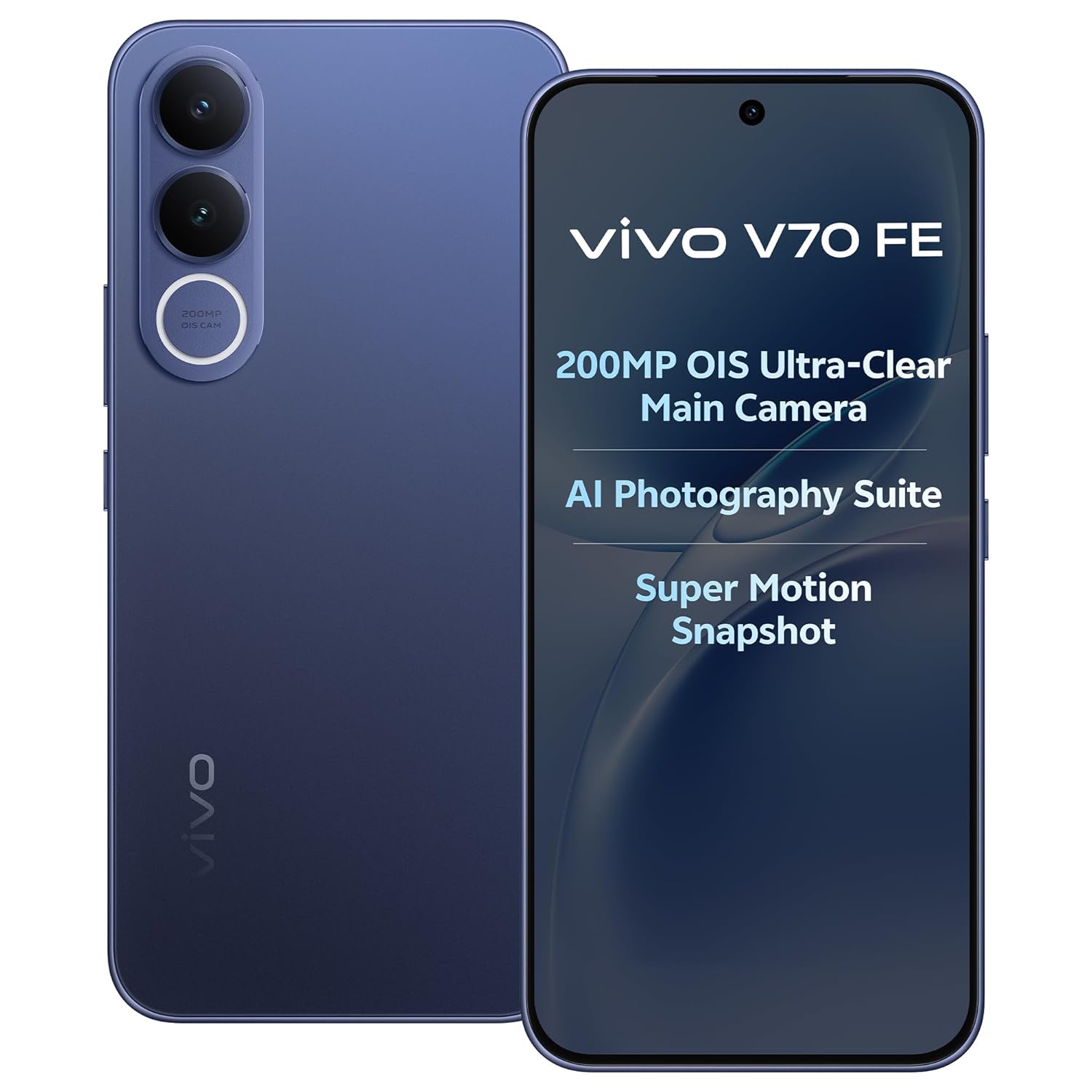
Image: The vivo V70 FE 5G smartphone in Monsoon Blue, showcasing reka bentuknya.
1.2 Pemasangan Kad SIM
- Cari dulang kad SIM di sisi peranti anda.
- Masukkan alat ejektor dulang SIM ke dalam lubang kecil di sebelah dulang dan tekan perlahan-lahan sehingga dulang terkeluar.
- Letakkan kad Nano-SIM anda ke dalam slot yang ditetapkan pada dulang. Peranti ini menyokong fungsi Dwi SIM.
- Masukkan semula dulang SIM dengan berhati-hati ke dalam telefon.
1.3 Pengecasan Awal dan Penghidupan Kuasa
Before first use, it is recommended to fully charge your device. Connect the provided USB cable to the phone's USB Type-C port and the power adapter, then plug it into a power outlet. The device supports 90W FlashCharge for rapid charging of its 7000mAh battery.
To power on, press and hold the Power button located on the side of the phone until the vivo logo appears. Follow the on-screen instructions to complete the initial setup wizard, including language selection, Wi-Fi connection, and Google account setup.
2. Mengendalikan Peranti Anda
2.1 Peranti Selesaiview dan Reka Bentuk
The vivo V70 FE 5G features a minimalist design, crafted for a slim and clean aesthetic.

Image: The minimalist design of the vivo V70 FE 5G, emphasizing its sleek profile.
2.2 Paparan dan Antara Muka Pengguna
Your device is equipped with a 17.35 cm (6.83-inch) 1.5K Ultra Clear AMOLED Display, offering a resolution of 2800 x 1260 pixels, a 120Hz refresh rate, and HDR10+ support for vibrant visuals and smooth scrolling.

Image: The 1.5K Ultra Clear OLED Display of the vivo V70 FE 5G, highlighting its key display specifications.
The phone runs on OriginOS 6, providing a user-friendly interface with features like Drag & Go for easy file management, One Tap Transfer for quick data migration, and vivo Office Kit for productivity.

Image: OriginOS features including Drag & Go, One Tap Transfer, and vivo Office Kit.
2.3 Fungsi Kamera
The vivo V70 FE 5G is equipped with an advanced camera system:
- Kamera Belakang: 200MP OIS Ultra-Clear Main Camera + 8MP 120° Wide-Angle Camera
- Kamera Selfie: 50 MP HD Selfie Camera with Eye AF Group Selfie

Imej: Terperinci view of the 200MP OIS Ultra-Clear Main Camera system.
Key camera features include:
- 200MP Ultra-Clear Cropping: Capture a single high-resolution shot and crop it into multiple scenes without losing detail.

Image: Demonstration of 200MP Ultra-Clear Cropping, showing how one shot can yield multiple compositions.
- AI Magic Weather: AI adjusts the sky, light, and automatically removes unwanted objects in your photos.

Imej: Cthamples of AI Magic Weather effects, transforming backgrounds from morning glow to twilight.
- AI Magic Landscape Mode: Enhance landscapes with AI, transforming scenes like deserts into islands or snow towns.

Image: Before and after comparisons using AI Magic Landscape Mode for various scenic transformations.
- 30X Superzoom with Telephoto Enhancement: Zoom in on distant subjects with clarity.

Image: Visual representation of 30X Superzoom, showing different levels of magnification.
- Super Motion Snapshot: Capture clear images of fast-moving subjects.

Image: Super Motion Snapshot in action, demonstrating its ability to capture clear images of moving subjects.
- 85 mm Close-Up Portrait: Achieve professional-looking portraits with various focal lengths.

Imej: Cthamples of 85mm Close-Up Portrait mode, illustrating different portrait styles.
2.4 Audio
Experience immersive sound with the Symmetrical Dual Stereo Speakers.

Image: Visual representation of the Symmetrical Dual Stereo Speaker system.
2.5 Prestasi dan Penyimpanan
The device is powered by a Mediatek Dimensity 7400 CPU, coupled with 8GB RAM and 128GB internal memory (UFS 3.1) for ultra-fast performance and efficient multitasking.

Image: Illustration of LPDDR5 RAM and UFS 3.1 storage for enhanced speed.
2.6 Bateri dan Pengecasan
The vivo V70 FE 5G features a 7000mAh battery with 90W FlashCharge support. A full charge from 1% to 100% can be achieved in approximately 60 minutes. The battery provides up to 43.8 hours of YouTube video playback.

Image: Details on the 7000mAh battery capacity and 90W FlashCharge capabilities.
3. Penyelenggaraan
3.1 Membersihkan Peranti Anda
To clean your phone, use a soft, lint-free cloth. Avoid using harsh chemicals, abrasive cleaners, or compressed air, as these can damage the screen or finish. For stubborn smudges, slightly dampen kain dengan air atau pembersih skrin yang direka khusus untuk elektronik.
3.2 Penjagaan Bateri
To prolong battery life, avoid exposing your phone to extreme temperatures. While the 90W FlashCharge is efficient, avoid leaving the phone plugged in for extended periods after it's fully charged. For optimal battery health, try to keep the charge level between 20% and 80% when possible.
3.3 Kemas Kini Perisian
Regularly check for and install software updates to ensure your device has the latest features, security patches, and performance improvements. You can usually find this option in your phone's Settings menu under 'System Update' or 'Software Update'.
3.4 Tahan Air dan Habuk
The vivo V70 FE 5G features IP68 & IP69 Top-Grade Dust and Water Resistance. This means it can withstand immersion in 1.5 meters of water for up to 120 minutes and offers 48 hours of rain resistance. However, water and dust resistance are not permanent conditions and may decrease over time with normal wear. Do not intentionally submerge the phone in water or expose it to liquids other than fresh water. Damage caused by liquid ingress is not covered under warranty.

Image: The vivo V70 FE 5G demonstrating its IP68 & IP69 dust and water resistance.
4. Penyelesaian masalah
This section addresses common issues you might encounter with your vivo V70 FE 5G.
4.1 Peranti Tidak Dihidupkan
- Ensure the battery is charged. Connect the phone to the charger and wait a few minutes before attempting to power it on again.
- Tekan dan tahan butang Kuasa selama sekurang-kurangnya 10-15 saat untuk melakukan mula semula secara paksa.
4.2 Isu Pengecasan
- Check if the USB cable and power adapter are securely connected to both the phone and the power outlet.
- Try using a different power outlet or a different compatible charger and cable to rule out faulty accessories.
- Periksa port pengecasan untuk sebarang serpihan atau kerosakan.
4.3 Masalah Ketersambungan Rangkaian
- Pastikan kad SIM anda dimasukkan dan diaktifkan dengan betul.
- Check if Airplane Mode is disabled in your phone's Quick Settings or Settings menu.
- Mulakan semula telefon anda.
- Go to Settings > Network & internet > Mobile network and ensure your preferred network type (e.g., 5G) is selected and data roaming is enabled if necessary.
4.4 App Crashes or Freezing
- Close and reopen the problematic application.
- Kosongkan cache dan data aplikasi (Tetapan > Aplikasi > [Nama Aplikasi] > Storan > Kosongkan cache/Kosongkan data).
- Pastikan apl dikemas kini kepada versi terkini daripada Gedung Google Play.
- Jika masalah berterusan, pertimbangkan untuk menyahpasang dan memasang semula aplikasi tersebut.
4.5 Tetapan Semula Kilang
Jika anda mengalami masalah perisian yang berterusan, tetapan semula kilang mungkin dapat menyelesaikannya. Amaran: Tetapan semula kilang akan memadamkan semua data pada telefon anda. Sandarkan data penting sebelum meneruskan.
- Pergi ke Tetapan > Sistem > Tetapkan semula pilihan.
- Pilih 'Padam semua data (tetapan semula kilang)'.
- Sahkan keputusan anda dan masukkan PIN/kata laluan anda jika digesa.
5. Spesifikasi
| Ciri | Spesifikasi |
|---|---|
| Jenama | vivo |
| Model | V70 FE 5G |
| Sistem Operasi | OriginOS 6 |
| Memori RAM | 8 GB |
| Storan Dalaman | 128 GB (UFS 3.1) |
| Model CPU | Mediatek Dimensity 7400 |
| Saiz Paparan | 17.35 sm (6.83 Inci) |
| Jenis Paparan | AMOLED |
| Resolusi Paparan | 2800 x 1260 (Maximum: 1080 x 2400) |
| Kamera Belakang | 200 MP (OIS Ultra-Clear Main) + 8 MP (120° Wide-Angle) |
| Kamera Depan | 50 MP (HD Selfie) |
| Kapasiti Bateri | 7000 mAh |
| Mengecas | Caj Kilat 90W |
| Slot Kad SIM | Dual SIM |
| Ketersambungan | 5G, Bluetooth, Built-In GPS, USB Type C |
| Tahap Ketahanan Air | IP68 & IP69 (Not Water Resistant - see maintenance section) |
| Dimensi Item | 16.4 x 7.6 x 0.8 Sentimeter |
| Berat Barang | 200 Gram |
| Tahun Model | 2026 |
6. Maklumat Waranti
Your vivo V70 FE 5G comes with a 1-year manufacturer warranty for the device dan 6 months for in-box accessories, effective from the date of purchase. This warranty covers manufacturing defects under normal use. Please retain your proof of purchase for warranty claims. The warranty does not cover damage caused by misuse, accidents, unauthorized repairs, or liquid ingress.
7. Sokongan
For further assistance, technical support, or service inquiries, please contact vivo customer support. You can find more information and contact details on the official vivo website or through the vivo store.
Pengeluar: vivo Mobile India Pvt Ltd Plot No 08, Sector 24, Yamuna Expressway Area, Gautam Buddha Nagar, Uttar Pradesh, 201310
Pengimport: Vivo Mobile India Pvt Ltd
Kedai atas talian: Visit the vivo Store on Amazon.in