
1. Pengenalan
The CELLO Gem 35L Air Cooler is designed to provide efficient cooling for various indoor environments. This manual provides essential information for the safe and effective use, maintenance, and troubleshooting of your air cooler. Please read all instructions carefully before operating the appliance.
2. Arahan Keselamatan
Untuk mengurangkan risiko kebakaran, kejutan elektrik atau kecederaan, sentiasa ikuti langkah berjaga-jaga keselamatan asas ini:
- Baca semua arahan sebelum menggunakan perkakas.
- Do not operate the air cooler with a damaged power cord or plug.
- Pastikan bekalan kuasa voltage matches the rating label on the appliance (230 Volts).
- Jangan rendam unit, kord, atau palamkan ke dalam air atau cecair lain.
- Jauhkan perkakas daripada kanak-kanak dan haiwan peliharaan.
- Always unplug the air cooler from the power outlet before cleaning, maintenance, or when not in use.
- Place the air cooler on a stable, level surface to prevent tipping.
- Ensure adequate ventilation around the unit; do not block air inlets or outlets.
- Jangan masukkan objek ke dalam lubang udara.
- Use only clean water in the water tank.
3. Kandungan Pakej
Sahkan bahawa semua komponen terdapat dalam pembungkusan:
- CELLO Gem 35L Air Cooler Unit
- Penapis Udara
- Cooling Pad (High-Density Honeycomb)
- Manual Pengguna
4. Parts and Features Overview
Familiarize yourself with the main components of your air cooler:
- Panel Kawalan: Buttons for power, speed, and other functions.
- Saluran Masuk Air: Located on the top side for manual water filling.
- Tangki Air: Kapasiti 35 liter untuk operasi yang berpanjangan.
- Honeycomb Cooling Pads: Located on the sides/rear for efficient cooling.
- Penapis Udara: Filters dust from incoming air.
- Louvers Saluran Udara: Direct airflow.
- Roda Castor: Multidirectional wheels for easy mobility.
- Auto-Fill Connection: Port for connecting to a continuous water supply.

Rajah 4.1: Depan view of the CELLO Gem 35L Air Cooler, highlighting its vertical design and air outlet louvers.
Rajah 4.2: Atas view of the air cooler, illustrating the water inlet and the control panel with various buttons.
5. Persediaan dan Pemasangan
- Membongkar: Carefully remove the air cooler from its packaging. Retain packaging materials for future storage or transport.
- penempatan: Position the air cooler on a flat, stable surface. Ensure there is sufficient space around the unit for proper airflow. The multidirectional castor wheels allow for easy movement.
- Water Filling (Manual): Open the water inlet on the top side of the unit. Pour clean water into the tank until it reaches the 'MAX' level indicator. Do not overfill. The reservoir capacity is 35 Liters.
- Water Filling (Auto-Fill): For continuous operation, connect a water hose to the auto-fill port. Ensure the connection is secure to prevent leaks. The system will automatically maintain the optimal water level.
- Sambungan Kuasa: Plug the power cord into a standard 230 Volt AC electrical outlet.
6. Arahan Operasi
The air cooler features button controls and 3 speed settings.
- Hidupkan/Mati Kuasa: Press the 'POWER' button on the control panel to turn the unit on or off.
- Melaraskan Kelajuan Kipas: Press the 'SPEED' button to cycle through the available fan speeds (Low, Medium, High). The current speed setting will be indicated.
- Fungsi penyejukan: Ensure the water tank is filled. The cooling function activates automatically when the unit is running with water.
- Louvers: The air cooler may feature motorized louvers for 4-way air deflection. Adjust as desired for optimal air distribution.
- Operasi senyap: The unit is designed for low noise operation, providing a comfortable environment.
Rajah 6.1: Visual representation of key operational aspects such as adjustable air delivery, fresh cool air output, and efficient cooling.
7. Penyelenggaraan dan Penjagaan
Penyelenggaraan berkala memastikan prestasi optimum dan jangka hayat penyejuk udara anda.
- Membersihkan Bahagian Luar: Lap permukaan luar dengan lembut, damp kain. Jangan gunakan pembersih atau pelarut yang melelas.
- Membersihkan Tangki Air: Drain the water tank regularly (at least once a week) to prevent the buildup of algae, mold, or mineral deposits. Rinse the tank thoroughly with clean water.
- Cleaning Honeycomb Cooling Pads: Periodically remove the cooling pads and rinse them under running water to remove dust and mineral deposits. Ensure they are completely dry before reinserting. Replace pads if they show signs of significant wear or damage.
- Membersihkan Penapis Udara: Remove the air filter and wash it with mild soap and water. Rinse thoroughly and allow it to dry completely before reattaching.
- Storan: Before storing the air cooler for an extended period, drain all water from the tank, clean all components, and ensure they are dry. Store the unit in a cool, dry place, preferably in its original packaging.
8. Penyelesaian masalah
Jika anda menghadapi masalah dengan penyejuk udara anda, rujuk masalah dan penyelesaian biasa berikut:
| Masalah | Kemungkinan Punca | Penyelesaian |
|---|---|---|
| Air cooler does not turn on. | No power supply; Power cord not connected; Faulty outlet. | Check if the power cord is securely plugged in. Test the outlet with another appliance. Check your home's circuit breaker. |
| Weak or no cooling effect. | Low water level; Dirty cooling pads; Pump malfunction. | Ensure the water tank is filled to the 'MAX' level. Clean the honeycomb cooling pads. If the pump is not working, contact customer support. |
| Aliran udara yang lemah. | Dirty air filter; Obstruction in air vents. | Clean the air filter. Remove any obstructions from the air inlet or outlet. |
| Kebocoran air. | Overfilled water tank; Loose drain plug; Damaged tank/hose. | Do not overfill the water tank. Ensure the drain plug is securely closed. Check for cracks or loose connections, especially if using auto-fill. |
| Bunyi luar biasa semasa operasi. | Unit not on a level surface; Obstruction in fan blades. | Place the air cooler on a flat, stable surface. Turn off and unplug the unit, then check for any foreign objects obstructing the fan. |
9. Spesifikasi
| Ciri | Perincian |
|---|---|
| Jenama | CELLO |
| Nama Model | Gem 35L Air Cooler |
| bahan | plastik |
| Jenis Pemasangan | Lantai Lantai |
| Ciri Khas | Adjustable Speed, Auto Fill, Built-In Wheel, Portable, Silent Operation |
| warna | putih |
| Jenis Kawalan | Butang |
| Kapasiti Takungan | 35 Liter |
| Liputan Keluasan Lantai | 235 Kaki Persegi |
| Berat Barang | 500 Gram |
| Penggunaan yang Disyorkan | Commercial, Personal |
| Wattage | 200 Watt |
| Bilangan Kelajuan | 3 |
| Voltage | 230 Volt |
| Dimensi (D x W x H) | 48D x 37W x 79H Sentimeter |
| Komponen yang Disertakan | Air Filter, Cooling Pad, User Manual |
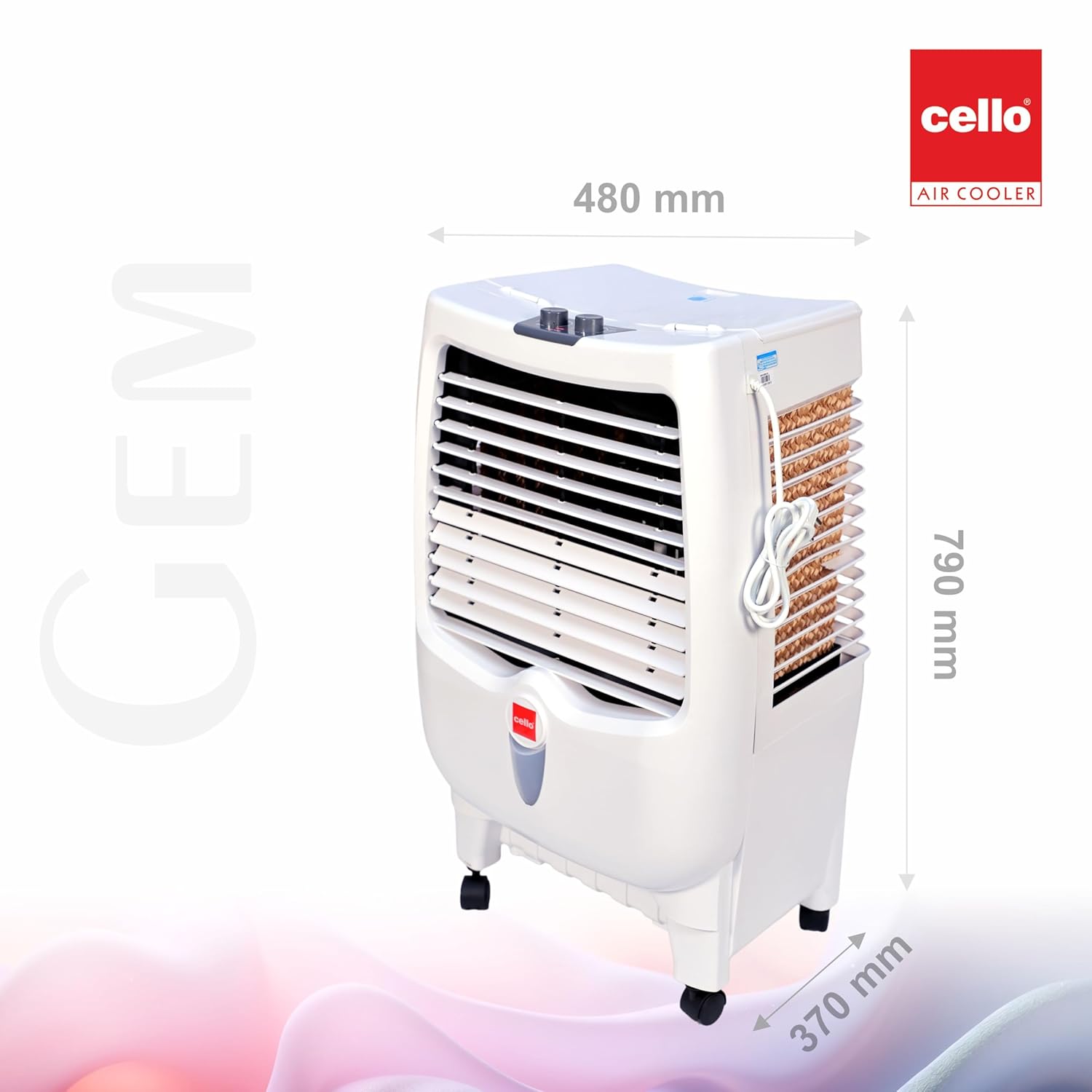
Rajah 9.1: Dimensions of the CELLO Gem 35L Air Cooler (Depth: 480mm, Width: 370mm, Height: 790mm).
10. Maklumat Waranti
This product is eligible for a 10-day replacement policy from the date of purchase. For detailed warranty terms and conditions, please refer to your purchase receipt or contact customer support. Extended warranty plans may also be available for purchase separately.
11. Sokongan Pelanggan
For any queries, assistance, or service requests, please contact CELLO customer support:
- telefon: +91-74000 01799, +91-7400423300
- Webtapak: www.cellocoolers.com
- CELLO Store on Amazon: Visit the CELLO Store