
1. Pengenalan
Welcome to the user manual for your new Motorola Moto G57 5G smartphone. This guide provides essential information on setting up, operating, maintaining, and troubleshooting your device to ensure optimal performance and user experience. Please read this manual thoroughly before using your phone.
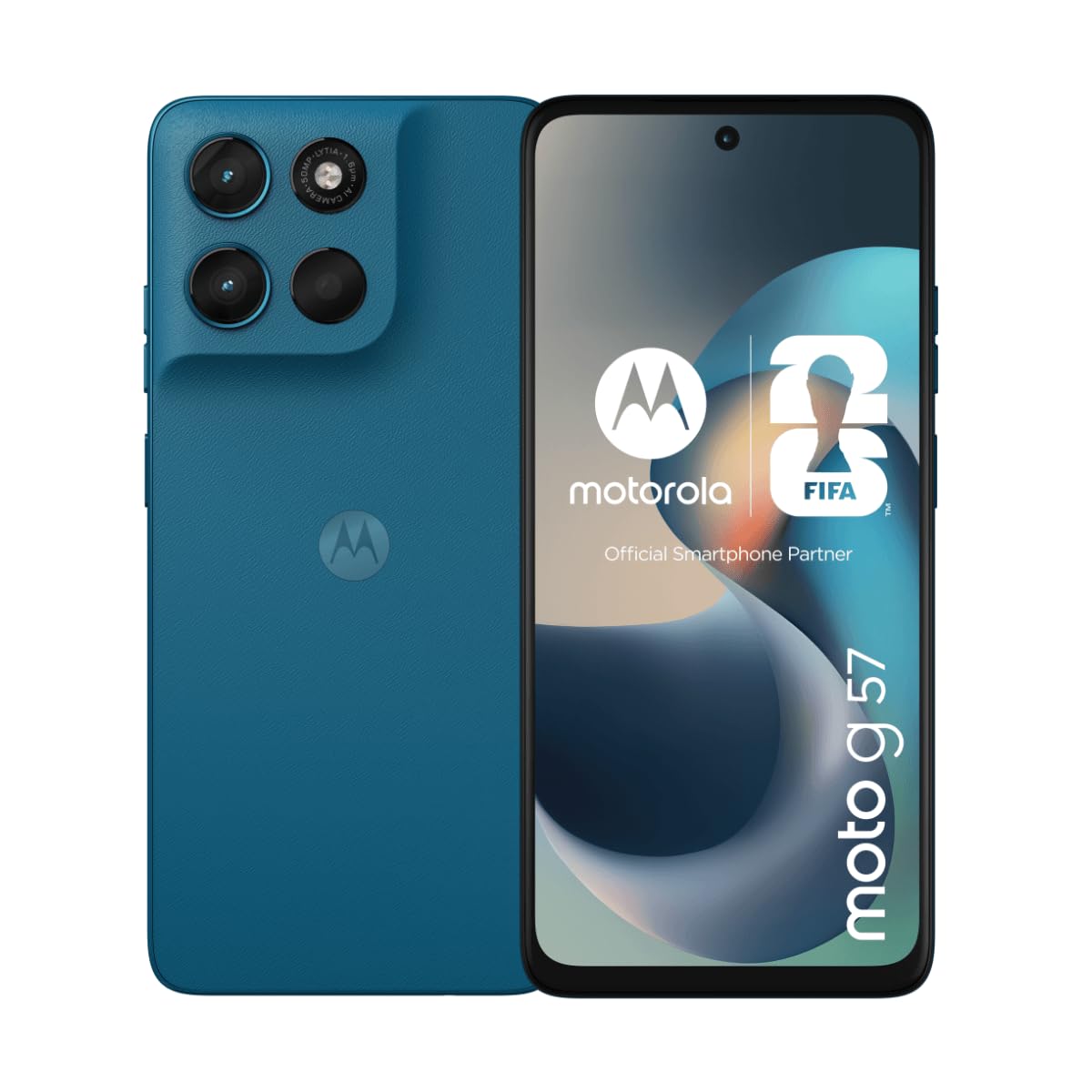
Imej 1.1: Depan view telefon pintar Motorola Moto G57 5G.
2. Kandungan Pakej
Ensure that your package contains the following items:
- Telefon Pintar Motorola Moto G57 5G
- Kabel USB
- Panduan Mula Pantas (mungkin berbeza mengikut wilayah)
- Alat Ejector SIM (mungkin berbeza mengikut wilayah)
3. Peranti Lebihview
Familiarize yourself with the physical features of your Motorola Moto G57 5G.
3.1 Depan View
- Kamera Depan: Untuk selfie dan panggilan video.
- paparan: 6.72-inch Full HD+ LCD IPS screen.
- Alat dengar: Untuk panggilan.
3.2 Belakang View
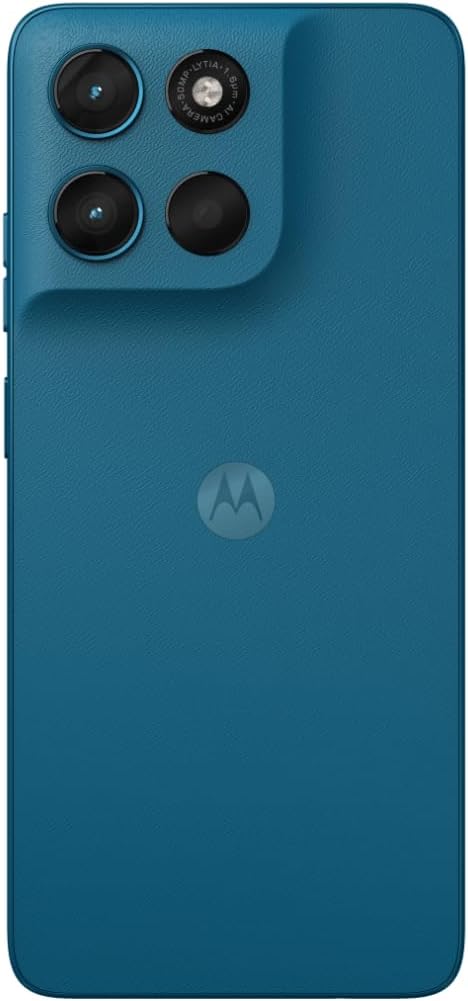
Imej 3.1: Belakang view of the Motorola Moto G57 5G, showing the camera module and Motorola logo.
- Modul Kamera Utama: Includes 50 MP main sensor and 8 MP ultra-wide sensor.
- kilat: Untuk fotografi cahaya malap.
- Logo Motorola: Pengenalan jenama.
3.3 Bahagian Views

Imej 3.2: Sisi view of the Motorola Moto G57 5G, typically showing power and volume buttons.
- Butang Kuasa: Menghidupkan/mematikan peranti, mengunci/membuka kunci skrin.
- Butang Kelantangan: Melaraskan media dan kelantangan panggilan.
- Dulang Kad SIM/SD: Located on the side for inserting SIM cards and an optional microSD card.
- Port USB-C: Untuk pengecasan dan pemindahan data.
- Bicu Fon Kepala 3.5mm: Untuk aksesori audio berwayar.
4. Persediaan
4.1 Memasukkan Kad SIM dan Kad MicroSD
- Locate the SIM/SD card tray on the side of your phone.
- Masukkan alat ejektor SIM ke dalam lubang kecil di sebelah dulang dan tolak perlahan-lahan sehingga dulang terkeluar.
- Place your Nano-SIM card(s) and/or microSD card into the tray with the gold contacts facing down. The Motorola Moto G57 5G supports Dual SIM functionality.
- Masukkan semula dulang dengan berhati-hati ke dalam telefon.

Imej 4.1: Sisi view illustrating the location of the SIM/SD card tray.
4.2 Mengecas Bateri
Sebelum penggunaan pertama, cas sepenuhnya bateri telefon anda.
- Connect the USB cable to the USB-C port on your phone.
- Connect the other end of the USB cable to a compatible power adapter (sold separately) and plug it into a power outlet.
- Penunjuk pengecasan akan muncul pada skrin.
4.3 Menghidupkan/Mematikan
- Untuk Menghidupkan: Tekan dan tahan butang Kuasa sehingga logo Motorola muncul.
- Untuk Mematikan: Tekan dan tahan butang Kuasa, kemudian ketik 'Matikan kuasa' pada skrin.
4.4 Wizard Persediaan Awal
Upon first power-on, follow the on-screen instructions to set up your device, including language selection, Wi-Fi connection, Google account login, and security settings.
5. Mengendalikan Peranti Anda
5.1 Navigasi Asas
- Sentuh: Tap items on the screen to select them.
- Leret: Drag your finger across the screen to scroll or switch between screens.
- Cubit: Gunakan dua jari untuk zum masuk atau keluar pada foto dan web muka surat.
5.2 Membuat Panggilan dan Menghantar Mesej
- Buka telefon aplikasi untuk mendail nombor atau memilih kenalan.
- Buka Mesej aplikasi untuk mengarang dan menghantar mesej teks.
5.3 Penggunaan Kamera
Your Motorola Moto G57 5G features a versatile camera system:
- Kamera Utama: 50 MP sensor with Quad Pixel technology for detailed photos, especially in low light.
- Kamera Ultra-lebar: 8 MP sensor for capturing broader scenes.
- Kamera Depan: 8 MP untuk swafoto berkualiti tinggi.
Buka Kamera app, select your desired mode (Photo, Video, Portrait, etc.), and tap the shutter button to capture images or start recording.
5.4 Ketersambungan
- 5G: Nikmati kelajuan data mudah alih yang pantas.
- Wi-Fi: Sambung ke rangkaian wayarles untuk akses internet.
- Bluetooth: Pasangkan dengan fon kepala wayarles, pembesar suara dan peranti lain.
5.5 Ciri Audio
Experience immersive sound with:
- Dolby Atmos: Enhanced audio for music, movies, and games.
- Bicu Fon Kepala 3.5mm: Connect your favorite wired headphones.
6. Penyelenggaraan
6.1 Membersihkan Peranti Anda
Use a soft, lint-free cloth to clean your phone. Avoid abrasive materials or harsh chemicals. The display can be cleaned with a screen cleaner specifically designed for electronics.
6.2 Kemas Kini Perisian
Semak dan pasang kemas kini perisian secara kerap untuk memastikan peranti anda mempunyai ciri terkini, tampung keselamatan dan peningkatan prestasi. Pergi ke Tetapan> Sistem> Kemas kini sistem.
6.3 Penjagaan Bateri
- Elakkan suhu yang melampau.
- Do not let the battery drain completely often.
- Gunakan kabel USB yang disediakan untuk mengecas.
6.4 Tahan Air
The Motorola Moto G57 5G is rated IP64 for water resistance, meaning it is protected against dust and splashing water from any direction. It is not designed to be submerged in water. Avoid exposing the device to pressurized water or liquids other than fresh water.
7. Penyelesaian masalah
7.1 Peranti Tidak Dihidupkan
- Ensure the battery is charged. Connect the phone to a charger for at least 15 minutes.
- Tekan dan tahan butang Kuasa selama 10-15 saat untuk memaksa mula semula.
7.2 Network Issues
- Periksa sama ada kad SIM anda dimasukkan dengan betul.
- Mulakan semula telefon anda.
- Pergi ke Tetapan > Rangkaian & internet > Rangkaian mudah alih dan memastikan data mudah alih didayakan.
7.3 Aplikasi Ranap atau Terhenti
- Tutup dan buka semula apl.
- Kosongkan cache dan data apl (Tetapan > Apl > [Nama Apl] > Storan & cache).
- Kemas kini aplikasi daripada Gedung Google Play.
7.4 Tetapan Semula Kilang
If issues persist, you may need to perform a factory reset. This will erase all data on your phone. Back up important data before proceeding.
- Pergi ke Tetapan > Sistem > Tetapkan semula pilihan.
- Ketik Padam semua data (set semula kilang).
- Ikut gesaan pada skrin untuk mengesahkan.
8. Spesifikasi
| Ciri | Perincian |
|---|---|
| Nama Model | Motorola Moto G57 |
| Sistem Operasi | Android 16 |
| Pemproses | Qualcomm SM6435-AA Snapdragon 6s Gen 4 (4 nm) |
| RAM | 8 GB |
| Storan Dalaman | 256 GB |
| Saiz Paparan | 6.72 inci |
| Jenis Paparan | LCD IPS |
| Resolusi Paparan | 1080 x 2400 piksel |
| Kadar Segar Semula | 120 Hz |
| Kamera Utama | 50 MP, f/1.8 (lebar) |
| Kamera Ultra Lebar | 8 MP, f/2.2 |
| Kamera Depan | 8 MP |
| Kapasiti Bateri | 5200 mAh |
| Mengecas | 30W Fast Charging (adapter sold separately) |
| Ketersambungan | 5G, Wi-Fi, Bluetooth, USB-C |
| Slot SIM | Dual SIM |
| Audio | Stereo speakers with Dolby Atmos, 3.5mm headphone jack |
| Tahan Air | IP64 (tahan percikan) |
| Dimensi | 8 x 76 x 166 mm |
| GTIN/UPC | 840493619057 |
9. Waranti dan Sokongan
Untuk maklumat waranti, sila rujuk kad waranti yang disertakan dengan produk anda atau lawati sokongan rasmi Motorola website. For technical assistance, software updates, or further inquiries, please contact Motorola customer support.
You can often find support resources, FAQs, and contact information on the official Motorola webtapak: www.motorola.com/support

