
1. Persediaan
1.1 Membuka Kotak dan Kandungan Pakej
Carefully remove the television and all components from the packaging. Ensure all items listed below are present.
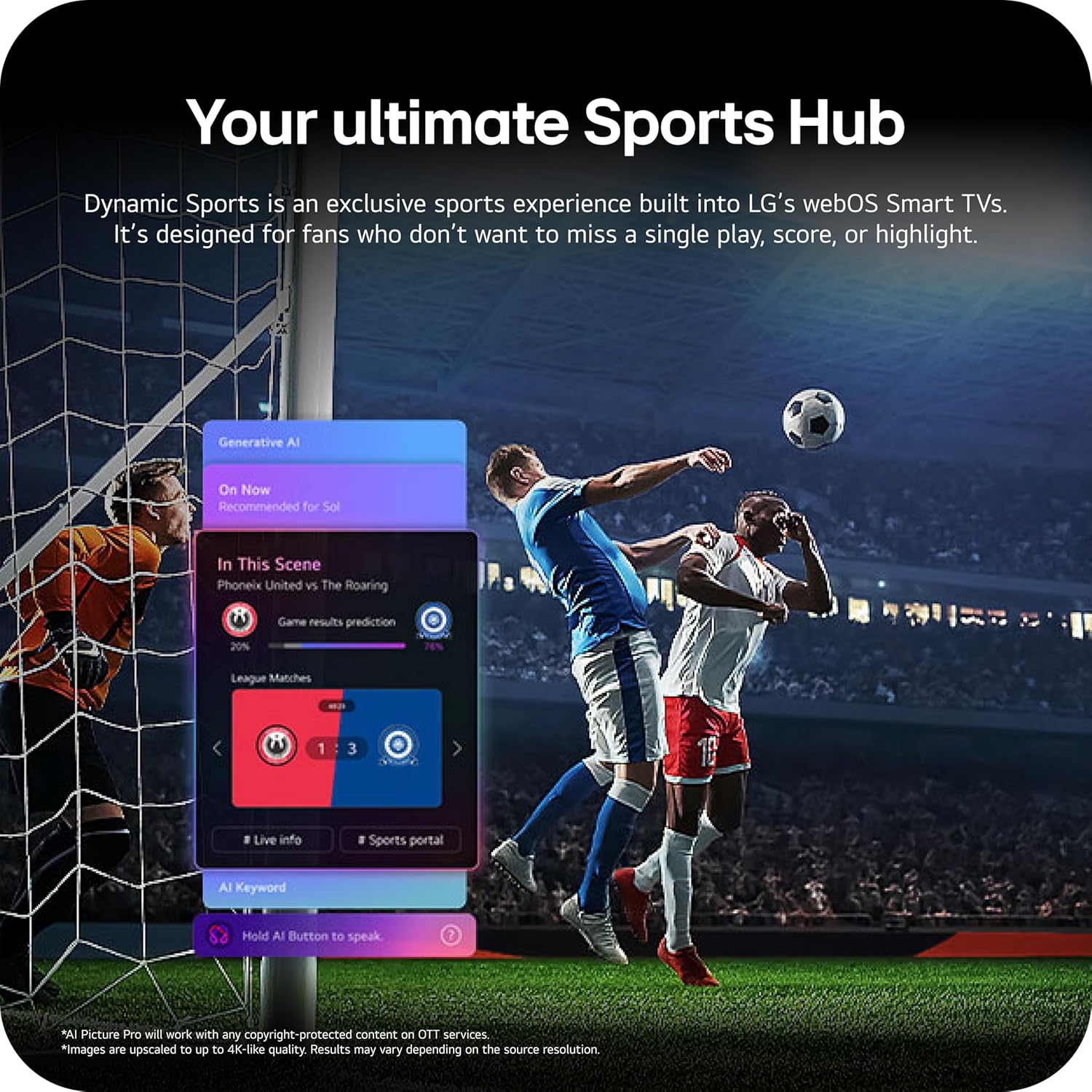
Image: The LG 65-inch OLED TV showing its dimensions with and without the stand, and a list of included accessories such as the Magic Remote, batteries, power cable, stand, and quick start guide.
Komponen yang Disertakan:
- LG 65-Inci Kelas OLED evo AI 4K C6 Series Smart TV
- Alat Jauh Sihir
- Bateri Kawalan Jauh (2 AAA)
- Kabel Kuasa
- Berdiri
- Manual Pengguna (dokumen ini)
1.2 Pemasangan Fizikal
The LG OLED65C6PUA can be installed using the included stand or mounted on a wall. Refer to the separate Installation Manual (PDF) for detailed wall mounting instructions.
Pemasangan Stand:
- Letakkan skrin TV ke bawah pada permukaan yang lembut dan rata untuk mengelakkan kerosakan.
- Attach the stand to the designated area on the bottom of the TV using the provided screws. Ensure it is securely fastened.
- Angkat TV dengan berhati-hati dan letakkan pada permukaan yang stabil dan rata.
Dimensi:
- TV Dimensions with Stand (WxHxD): 56.7" x 34.6" x 9.1"
- TV Dimensions without Stand (WxHxD): 56.7" x 32.5" x 1.8"
- Stand Footprint: 18.5"
1.3 Ketersambungan
Connect your external devices to the appropriate ports on the rear and side of the television.

Image: The back panel of the LG OLED TV, displaying multiple HDMI ports, USB ports, Ethernet port, and antenna input for connecting various devices.
- Port HDMI (4): Connect Blu-ray players, gaming consoles, soundbars, and other HDMI-enabled devices.
- Port USB (2): Sambungkan peranti storan USB untuk main balik media atau kemas kini perisian.
- Port Ethernet (LAN): Untuk sambungan internet berwayar.
- Input Antena/Kabel: Sambungkan antena atau isyarat TV kabel.
- Optical Digital Audio Out (S/PDIF): Untuk menyambung ke sistem audio luaran.
1.4 Hidupkan Awal dan Persediaan Rangkaian
- Palamkan kabel kuasa ke dalam TV dan kemudian ke soket dinding.
- Tekan butang kuasa pada alat kawalan jauh atau TV.
- Follow the on-screen instructions to complete the initial setup, including language selection, time zone, and network connection (Wi-Fi or Ethernet).
- An LG account may be required to access network-based smart services.
2. Arahan Operasi
2.1 Alat Kawalan Jauh Ajaib
The Magic Remote allows for intuitive control of your TV with point, click, scroll, and voice commands.

Image: The LG Magic Remote, featuring a central scroll wheel, directional buttons, and dedicated buttons for various functions and streaming services.
- Butang Kuasa: Menghidupkan atau mematikan TV.
- Butang Nombor: Akses saluran terus.
- Kelantangan Naik/Turun: Melaraskan kelantangan.
- Saluran Atas/Bawah: Menukar saluran.
- Butang rumah: Mengakses ke webSkrin utama TV Pintar OS.
- Pointer/Scroll Wheel: Menavigasi menu dan memilih item.
- Butang Perintah Suara: Activates intelligent voice recognition.
2.2 webOS Smart TV Platform (AI Hub)
The webOS 2026 platform provides access to streaming services, apps, and AI-powered features.

Imej: Perwakilan visual LG webOS Smart TV interface, highlighting AI features like Multi AI Search, AI Concierge, AI Voice ID, AI Picture Wizard, AI Chatbot, and AI Sound Wizard, all accessible via the remote's AI button.
- AI Hub: Press the AI button on your remote to access personalized recommendations and AI features.
- Perkhidmatan Penstriman: Access popular apps like Netflix, Disney+, Prime Video, Apple TV, and YouTube.
- Saluran LG: Enjoy over 400 free channels and 10,000+ movies & shows on-demand.
- Multi AI Search: Powered by Google Gemini & Microsoft Copilot for broader, more relevant search results.
2.3 Tetapan Gambar dan Bunyi
Optimumkan anda viewpengalaman dalam dan mendengar dengan teknologi gambar dan bunyi yang canggih.

Image: A split screen on an LG OLED TV illustrating the difference between an anti-glare matte display and a Perfect Black & Perfect Color display, emphasizing the deep blacks and vibrant colors achieved by OLED technology.
- Penggalak Kecerahan: Enhances visuals for brighter, more vivid detail, powered by the α11 AI Processor Gen 3.
- Hitam Sempurna dan Warna Sempurna: Over 8.3 million self-lit pixels deliver infinite contrast and accurate colors.
- Dolby Vision, HDR10, HLG: Supports multiple HDR formats for enhanced contrast and color.
- Mod Pembuat Filem: Preserves the director's original vision by disabling motion smoothing and other post-processing.
- Dolby Atmos: Memberikan bunyi berbilang dimensi yang mengasyikkan.
- AI Picture & AI Sound: AI-assisted deep learning analyzes content to optimize picture and sound settings.
2.4 Ciri-ciri Permainan
Experience responsive and fluid gameplay with dedicated gaming enhancements.

Image: A dynamic image of a race car on a track, overlaid with logos for 165Hz refresh rate, NVIDIA G-Sync, and AMD FreeSync Premium, indicating the TV's advanced gaming capabilities.
- Kadar Refresh 165Hz: Provides ultra-smooth motion for gaming (up to 165Hz for PC gaming).
- 0.1ms Masa Tindak Balas: Minimizes input lag for quick reactions.
- NVIDIA G-Sync & AMD FreeSync Premium: Reduces screen tearing and stuttering for compatible graphics cards.
- Four HDMI 2.1 Inputs: Supports high bandwidth features required for next-gen gaming.
2.5 Dynamic Sports Hub
Access an exclusive sports experience built into LG's webOS Smart TVs.

Image: A soccer match displayed on an LG webOS Smart TV, with an overlay showing the 'Dynamic Sports Hub' interface, offering game results predictions, live info, and a sports portal.
The Dynamic Sports Hub is designed for fans to track scores, highlights, and relevant information without missing live action.
3. Penyelenggaraan
3.1 OLED Care
The OLED Care feature helps protect your OLED display and maintain picture quality over time.

Image: A simple graphic displaying the 'OLED Care' logo with the LG brand, indicating a feature designed for display maintenance.
Access OLED Care settings through the TV menu to manage features like Pixel Cleaning and Screen Shift, which help prevent image retention.
3.2 Membersihkan TV
- Sentiasa cabut plag TV sebelum membersihkan.
- Gunakan kain mikrofiber yang lembut dan kering untuk mengelap skrin dan kabinet dengan lembut.
- Untuk tanda degil, ringankan dampen the cloth with water or a specialized screen cleaner (ensure it is safe for OLED displays). Do not spray liquid directly onto the screen.
- Elakkan daripada menggunakan pembersih yang melelas, lilin atau pelarut.
4. Penyelesaian masalah
Bahagian ini menyediakan penyelesaian kepada isu biasa yang mungkin anda hadapi.
4.1 Tiada Kuasa / TV Tidak Dihidupkan
- Pastikan kabel kuasa dipasang dengan kukuh pada kedua-dua TV dan soket dinding yang berfungsi.
- Check if the wall outlet is receiving power by plugging in another device.
- Cuba tekan butang kuasa pada TV itu sendiri, bukan hanya alat kawalan jauh.
4.2 Tiada Gambar atau Gambar Herot
- Sahkan bahawa sumber input yang betul dipilih (cth, HDMI 1, HDMI 2).
- Check all cable connections between the TV and external devices (HDMI, antenna, etc.). Ensure they are firmly seated.
- Jika menggunakan antena, periksa sambungan dan kedudukannya.
- Restart the connected device (e.g., cable box, gaming console).
4.3 Alat Kawalan Jauh Tidak Berfungsi
- Replace the batteries in the Magic Remote (requires 2 AAA batteries).
- Pastikan tiada halangan antara alat kawalan jauh dan TV.
- Re-pair the Magic Remote if it has become disconnected. Point the remote at the TV and press the Wheel (OK) button.
4.4 Tiada Bunyi atau Bunyi Rendah
- Periksa kelantangan TV dan pastikan ia tidak disenyapkan.
- Jika menggunakan peranti audio luaran (bar bunyi, penerima), pastikan ia dihidupkan dan disambungkan dengan betul.
- Check the audio output settings in the TV menu to ensure the correct output is selected (e.g., TV Speaker, Optical Out).
4.5 Isu Sambungan Rangkaian
- For Wi-Fi, ensure the router is on and within range. Try restarting the router.
- Untuk sambungan berwayar, pastikan kabel Ethernet disambungkan dengan selamat ke TV dan penghala.
- Check network settings in the TV menu to ensure correct configuration.
5. Spesifikasi
| Ciri | Spesifikasi |
|---|---|
| Nama Model | LGOLED65C6PUA |
| Nombor Model | OLED65C6PUA |
| Saiz Skrin | 65 inci |
| Teknologi Paparan | OLED |
| Resolusi | 4K (3840 x 2160) |
| Kadar Segar Semula | 120 Hz (Native), up to 165Hz for PC gaming |
| Pemproses | α11 AI Processor 4K Gen3 (Dual AI Engine) |
| Format HDR Disokong | Dolby Vision, HDR10, HLG |
| Masa Tindak Balas | 0.1 milisaat |
| Sistem Operasi | webOS 2026 |
| Teknologi Ketersambungan | Bluetooth (v5.3), Ethernet, HDMI, USB, Wi-Fi |
| Jumlah Port HDMI | 4 (HDMI 2.1) |
| Jumlah Port USB | 2 (USB 2.0) |
| Output Audio | Optik (S/PDIF) |
| Penerangan Penceramah | Dolby Atmos (2.2 Channel) |
| Ciri Khas | AMD FreeSync, Built-In Speaker, Chromecast, Intelligent Voice Recognition, NVIDIA G-Sync |
| Bekalan Kuasa | 120 volt |
| Item Weight (without stand) | 36.6 paun |
| Dimensi Item (dengan penyangga) | 9.1"D x 56.7"W x 34.6"H |
| Pemasangan VESA Standard | 300 x 200 mm |
6. Waranti dan Sokongan
6.1 Waranti Produk
This LG OLED TV (Model OLED65C6PUA) comes with a Waranti Terhad Alat Ganti dan Buruh 1 Tahun dari tarikh pembelian. Sila simpan bukti pembelian anda untuk tuntutan waranti.
6.2 Additional Protection Plans
Pelan perlindungan lanjutan mungkin tersedia untuk pembelian secara berasingan:
- Pelan Perlindungan 4 Tahun: Provides coverage for 48 months.
- Perlindungan Lengkap: Pelan langganan bulanan yang meliputi pembelian lepas dan akan datang yang layak.
For details on coverage and terms, please refer to the respective plan documentation or contact the provider.
6.3 Sokongan Pelanggan
Untuk bantuan teknikal, penyelesaian masalah di luar manual ini, atau perkhidmatan waranti, sila hubungi Sokongan Pelanggan LG. Anda boleh mendapatkan maklumat hubungan di LG rasmi website or in the Quick Start Guide included with your TV.
Anda juga boleh merujuk kepada pegawai Manual Pengguna (PDF) dan Manual Pemasangan (PDF) untuk maklumat yang lebih terperinci.