
1. Produk Lebihview
The Edifier CC300 is a professional Bluetooth 6.0 communicator headset designed for reliable and high-quality audio communication in various professional environments. It features AI-enhanced dual-microphone noise filtering, a 30mm dynamic driver for clear sound, and multiple connectivity options for versatile use.
2. Kandungan Pakej
- Edifier CC300 Headset
- Dongle USB-C
- Kabel Pengecas USB-A ke USB-C
- Manual Pengguna
3. Ciri-ciri Produk
The Edifier CC300 headset is engineered for comfort and performance, featuring a lightweight design and a flexible microphone arm.

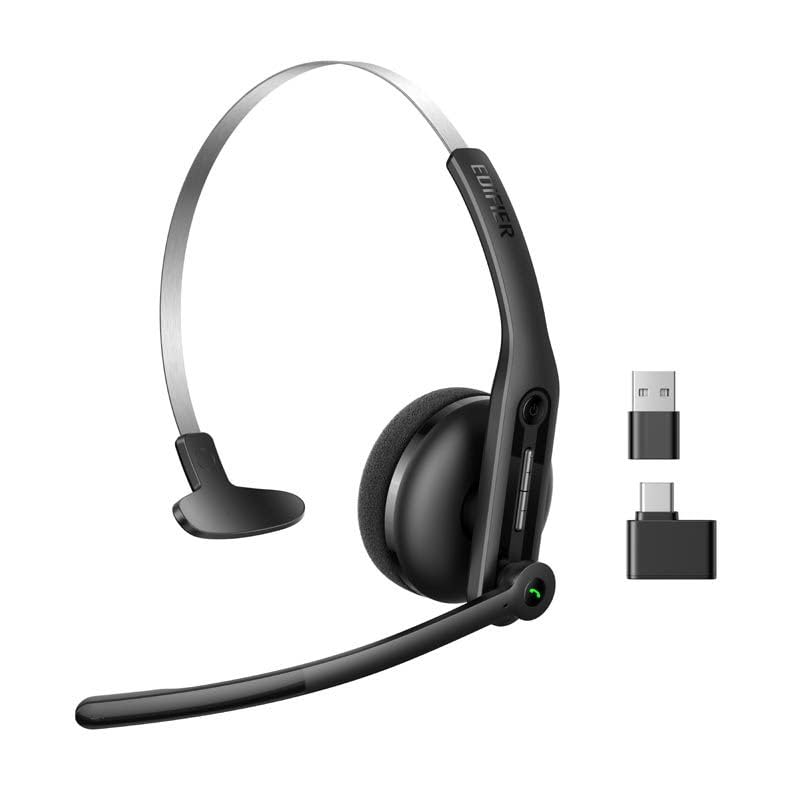
Rajah 3.1: Edifier CC300 Headset with included USB-C dongle and charging cable.

Rajah 3.2: sebelah view of the Edifier CC300 Headset with the microphone arm extended.

Rajah 3.3: The microphone arm can rotate 240 degrees for flexible positioning on either the left or right side.
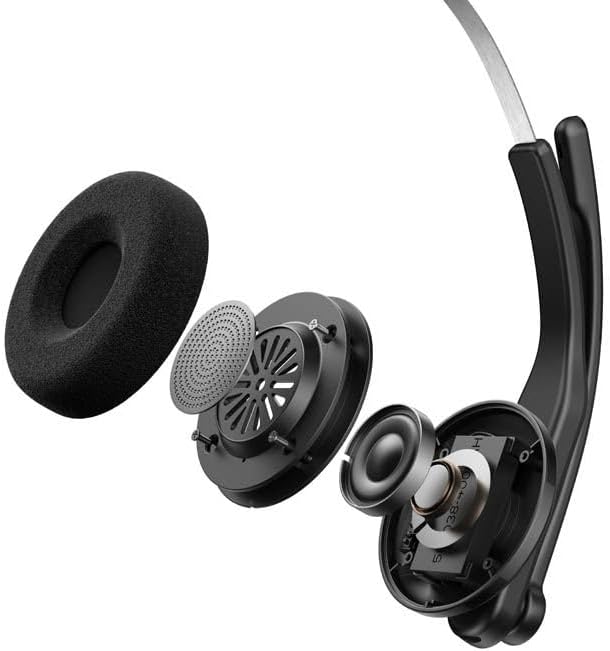
Rajah 3.4: Meletup view showing the internal components of the earcup, including the 30mm dynamic driver.
4. Persediaan
4.1 Pengecasan Awal
Before first use, fully charge the headset using the provided USB-A to USB-C cable. Connect the USB-C end to the headset and the USB-A end to a power source (e.g., computer USB port or wall adapter). The charging indicator light will show the charging status.
4.2 Menghidupkan/Mematikan
- Untuk Menghidupkan: Tekan dan tahan butang Kuasa sehingga lampu penunjuk menyala.
- Untuk Mematikan: Tekan dan tahan butang Kuasa sehingga lampu penunjuk padam.
4.3 Memakai Alat dengar
Adjust the headband for a comfortable fit. The microphone arm can be rotated 240 degrees to be positioned on either the left or right side of your face. Position the microphone approximately 2-3 cm from your mouth for optimal voice pickup.
5. Arahan Operasi
The Edifier CC300 features intuitive controls for managing calls and audio playback.

Rajah 5.1: Diagram illustrating the control buttons and their functions on the Edifier CC300 Headset.
5.1 Fungsi Butang
| Tindakan | Fungsi |
|---|---|
| Press and hold (Power Button) | Hidupkan/Mati Kuasa |
| Press 1x (Mute Button) | Activate/Deactivate Mute (during calls) |
| Press 1x (Volume Up) | Tingkatkan Kelantangan |
| Press and hold (Volume Up) | Trek Seterusnya |
| Press and hold (Volume Down) | Kurangkan Kelantangan |
| Press 1x (Volume Down) | Trek Sebelumnya |
| Press 1x (Call Button) | Play/Pause Audio; Answer/End Call |
| Press and hold (Call Button) | Tolak Panggilan |
| Press 2x (Call Button) | Dail Semula Nombor Terakhir |
6. Pilihan Kesambungan
The Edifier CC300 offers three versatile connection methods:
Rajah 6.1: Visual representation of the three connectivity options: Bluetooth, USB-C dongle, and wired USB-A.
6.1 Sambungan Bluetooth
- Ensure the headset is powered on and in pairing mode (indicator light flashing).
- On your device (smartphone, laptop), enable Bluetooth and search for "EDIFIER CC300".
- Select the headset to pair. Once connected, the indicator light will turn solid blue.
6.2 USB-C Dongle Connection
- Plug the provided USB-C dongle into an available USB-C port on your computer.
- Power on the headset. It will automatically connect to the dongle for a stable, low-latency connection.
6.3 Wired USB-A Connection
- Connect the headset to your computer using the provided USB-A to USB-C cable.
- The headset will function as a wired audio device, providing zero interference.
7. Bateri dan Pengecasan
The CC300 headset is designed for extended use with a long-lasting battery.
- Hayat Bateri: Up to 72 hours for audio playback, or 36 hours for talk time.
- Masa Pengecasan: Kira-kira 1.5 jam untuk cas penuh.
- Penunjuk Pengecasan: Refer to the LED indicator on the headset for charging status.
To charge, connect the headset to a power source using the USB-A to USB-C cable.
8. Penyelenggaraan
- Pembersihan: Gunakan kain lembut dan kering untuk membersihkan set kepala. Jangan gunakan pembersih cecair atau aerosol.
- Storan: Simpan alat dengar di tempat yang sejuk dan kering jauh dari cahaya matahari langsung dan suhu yang melampau.
- Elakkan Kelembapan: Keep the headset away from water and high humidity to prevent damage.
- Tangani dengan Berhati-hati: Elakkan daripada menjatuhkan atau meletakkan set kepala kepada kesan yang kuat.
9. Penyelesaian masalah
9.1 Tiada Bunyi atau Kualiti Audio yang Buruk
- Ensure the headset is powered on and properly connected (Bluetooth, dongle, or wired).
- Semak tahap kelantangan pada kedua-dua set kepala dan peranti anda yang disambungkan.
- If using Bluetooth, ensure the headset is within range of your device.
- Cuba mulakan semula kedua-dua alat dengar dan peranti anda yang disambungkan.
9.2 Mikrofon Tidak Berfungsi
- Ensure the microphone is not muted (check the mute button).
- Verify that the headset is selected as the input device in your computer's or device's sound settings.
- Ensure the microphone arm is positioned correctly near your mouth.
9.3 Headset Not Pairing via Bluetooth
- Ensure the headset is in pairing mode (indicator light flashing).
- Matikan Bluetooth pada peranti berdekatan yang lain untuk mengelakkan gangguan.
- Lupakan peranti tersebut daripada senarai Bluetooth peranti anda dan cuba pasangkan semula.
10. Spesifikasi
| Ciri | Perincian |
|---|---|
| Jenama | edifier |
| Nama Model | CC300 |
| warna | Hitam |
| Teknologi Ketersambungan | Wireless (Bluetooth), Wired (USB-A), USB-C Dongle |
| Versi Bluetooth | 6.0 |
| Protokol Bluetooth | A2DP, AVRCP, HFP |
| Codec Audio | SBC |
| Jenis Pemandu | Pemacu Dinamik 30mm |
| Respons Kekerapan | 20Hz - 20KHz |
| Tahap Tekanan Bunyi | 94 ± 3dB(A) |
| Kapasiti Bateri | 400mAh |
| Masa Main semula Muzik | lebih kurang 72 jam |
| Masa Berbual | lebih kurang 36 jam |
| Masa Mengecas | lebih kurang 1.5 jam |
| Input Kuasa | 5V/500mAh |
| Berat badan | 70 Gram |
| Ciri Khas | AI-enhanced Dual-Mic Noise Cancellation |
| Peranti Serasi | Mobile Phones, Desktops, Laptops |
11. Waranti dan Sokongan
11.1 Maklumat Waranti
The Edifier CC300 Headset comes with a Waranti 1 tahun from the date of purchase, covering manufacturing defects. Please retain your proof of purchase for warranty claims. The warranty does not cover damage caused by misuse, accidents, unauthorized modifications, or normal wear and tear.
11.2 Sokongan Pelanggan
For technical assistance, troubleshooting, or warranty inquiries, please contact Edifier customer support through their official website or the contact information provided with your product packaging. You may also visit the Kedai Edifier di Amazon untuk maklumat lanjut.