
pengenalan
Terima kasih kerana membeliasing the Aiwa 14-inch Portable Media Player Travel Kit. This device is designed to provide versatile entertainment on the go, allowing you to enjoy DVDs, CDs, and other media without relying on internet connectivity. This manual provides essential information for setting up, operating, and maintaining your portable media player.
Maklumat Keselamatan
Sila baca semua arahan keselamatan dengan teliti sebelum menggunakan produk ini. Simpan manual ini untuk rujukan masa hadapan.
- Jangan dedahkan peranti kepada hujan, lembapan atau suhu yang melampau.
- Elakkan meletakkan peranti berhampiran sumber haba atau di bawah cahaya matahari langsung.
- Use only the provided power adapters (AC/DC and car adapter) to charge the device.
- Jangan cuba membuka atau mengubah suai peranti. Rujuk semua servis kepada kakitangan yang berkelayakan.
- Handle discs carefully to prevent scratches or damage.
- Pastikan pengudaraan yang betul semasa mengendalikan peranti.
Kandungan Pakej
Sahkan bahawa semua item terdapat dalam pakej anda:
- Aiwa 14-inch Portable Media Player (Main Unit)
- Alat Kawalan Jauh
- Fon Kepala Berwayar
- Beg Membawa Pelindung
- Penyesuai Kuasa AC/DC
- Car Power Adapter (12V)
- Manual Pengguna
Produk Selesaiview
Familiarize yourself with the components and controls of your portable media player.
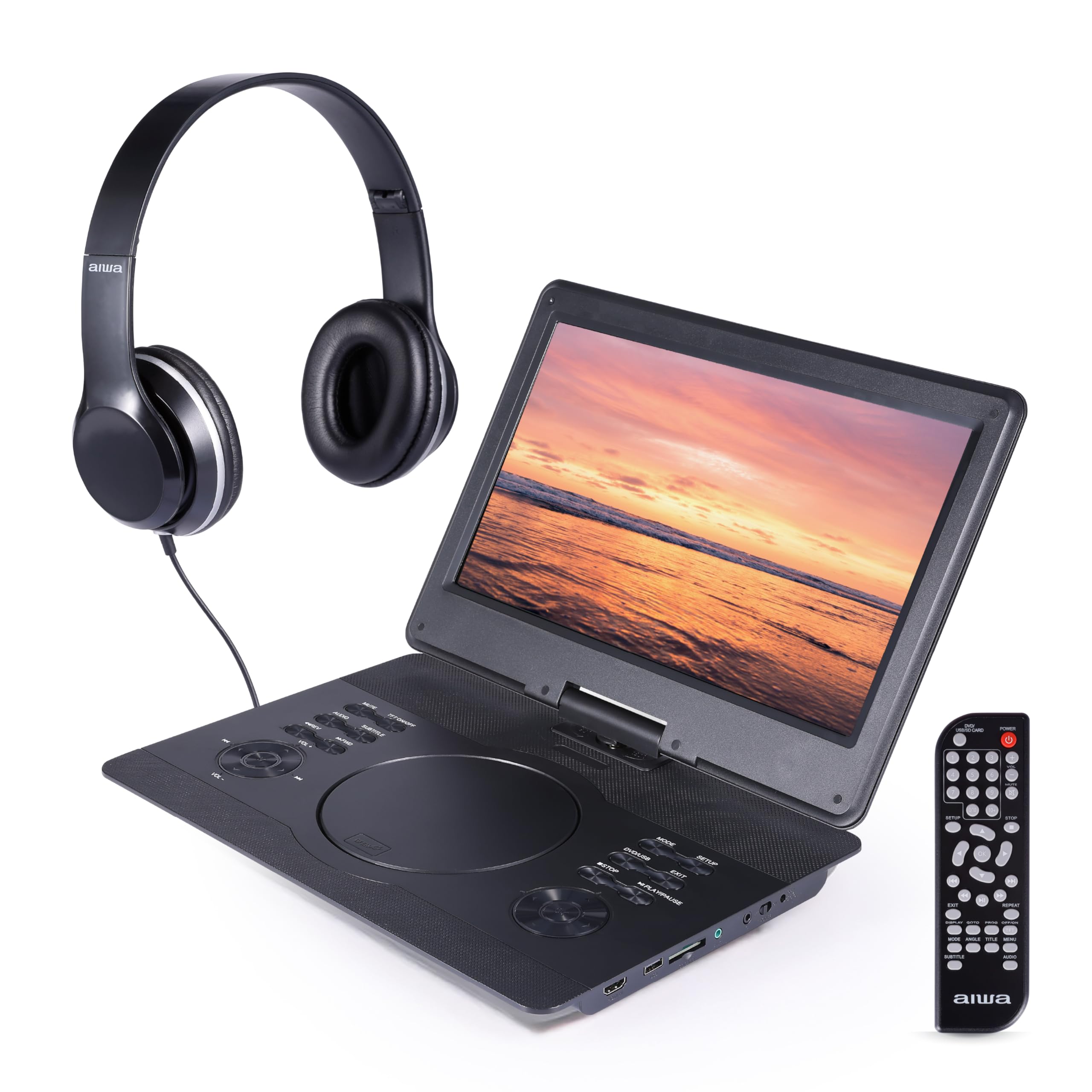
Rajah 1: Depan view of the Aiwa Portable Media Player with included remote control.

Rajah 2: sebelah view showing the open disc tray and headphone connection.
Ciri Unit Utama:
- 14-inch Swiveling LCD Screen: Menyediakan fleksibel viewing angles and can fold flat.
- Dulang Cakera: Untuk memasukkan DVD dan CD.
- Butang Kawalan: Play/Pause, Stop, Skip, Volume, Menu, Setup, Mode, etc.
- Pembesar Suara Stereo Terbina dalam: Untuk main balik audio tanpa fon kepala.
- Input HDMI: Connect external devices like gaming consoles or streaming sticks.
- Port USB: Untuk memainkan media daripada pemacu kilat USB.
- Slot Kad SD: For playing media from SD memory cards.
- Jack fon kepala: Untuk mendengar secara peribadi.
- Input Kuasa: For connecting AC/DC or car adapters.

Rajah 3: The screen can swivel and fold flat for compact use.
Persediaan
1. Mengecas Bateri
- Connect the AC/DC power adapter to the DC IN port on the player and then to a wall outlet.
- Lampu penunjuk pengecasan akan menyala. Cas penuh biasanya mengambil masa 2-3 jam.
- Alternatively, use the car power adapter to charge the device in a vehicle.
2. Menghidupkan/Mematikan
- Untuk menghidupkan, tekan dan tahan KUASA butang pada unit atau alat kawalan jauh.
- Untuk mematikan, tekan dan tahan KUASA butang lagi.
3. Menyambung Fon Kepala
- Plug the included wired headphones into the Fon kepala jack on the side of the player.
- Pembesar suara terbina dalam akan membisukan secara automatik apabila fon kepala disambungkan.
4. Using the Carrying Bag

Rajah 4: The included carrying bag for transport and protection.
- Place the media player and its accessories into the protective carrying bag for safe transport.
Beroperasi
1. Disc Playback (DVD/CD)
- Buka penutup dulang cakera.
- Letakkan DVD atau CD dengan berhati-hati di atas gelendong dengan bahagian label menghadap ke atas.
- Close the disc tray cover firmly.
- The player will automatically detect the disc and begin playback or display the disc menu.
- Use the control buttons on the unit or remote (Play/Pause, Stop, Skip, Menu, etc.) to navigate and control playback.
2. Main semula USB/Kad SD
- Masukkan pemacu kilat USB ke dalam port USB atau kad SD ke dalam slot kad SD.
- Tekan ke MODE button on the unit or remote to select USB or SD mode.
- Navigasi melalui anda files using the directional buttons and press MAIN/MASUK to select and play media.
3. Input HDMI
- Connect an external device (e.g., gaming console, streaming stick) to the HDMI DALAM port on the player using an HDMI cable (not included).
- Tekan ke MODE button on the unit or remote to select HDMI input.
- The player's screen will display the content from the connected HDMI device.
4. Screen Adjustment

Rajah 5: The screen can be swiveled and tilted for optimal viewing.
- The screen can swivel up to 180 degrees and tilt for various viewsudut-sudut.
- It can also be folded flat against the base unit, transforming the device into a tablet-like form factor.
5. Kawalan Kelantangan
- Laraskan kelantangan menggunakan VOL+ dan vol- buttons on the unit or the remote control.
Penyelenggaraan
Membersihkan Peranti
- Lap skrin dan permukaan luar dengan kain lembut, kering dan tidak berbulu.
- Untuk tanda degil, sedikit dampen kain dengan air atau pembersih yang lembut dan tidak melelas.
- Jangan gunakan bahan kimia yang keras atau bahan kasar, kerana ia boleh merosakkan kemasan.
- Keep the disc tray and ports free of dust and debris.
Penyimpanan
- When not in use, store the player in its protective carrying bag in a cool, dry place.
- Elakkan menyimpan di kawasan yang mempunyai suhu yang melampau atau kelembapan yang tinggi.
Menyelesaikan masalah
Jika anda menghadapi masalah, rujuk kepada masalah dan penyelesaian biasa berikut:
| Masalah | Kemungkinan Punca | Penyelesaian |
|---|---|---|
| Tiada kuasa | Battery depleted; Power adapter not connected or faulty. | Charge the battery using the AC/DC or car adapter. Ensure connections are secure. |
| Cakera tidak dimainkan / ralat "Tiada Cakera" | Cakera dimasukkan dengan salah; Cakera kotor atau tercalar; Format cakera tidak serasi. | Ensure disc is inserted label-side up. Clean the disc. Try a different disc. Verify disc is DVD/CD/VCD format. |
| Tiada bunyi | Kelantangan terlalu rendah; Fon kepala disambungkan; Fungsi redam aktif. | Increase volume. Disconnect headphones if using speakers. Check if mute is active on remote. |
| Kualiti gambar yang buruk | Disc quality; Screen viewing angle; Low resolution content. | Ensure disc is clean and undamaged. Adjust screen angle. Note that native resolution is 800x480. |
| Alat kawalan jauh tidak berfungsi | Batteries depleted; Obstruction between remote and player; Remote sensor blocked. | Replace remote batteries. Ensure clear line of sight to the player's IR sensor. |
Spesifikasi
| Ciri | Perincian |
|---|---|
| Jenama | Tidak |
| Nombor Model | AI7017-BLK-T37-6 |
| Saiz Skrin | 14 inci |
| Jenis Paparan | LCD |
| Resolusi Asli | 800x480 |
| Sokongan Jenis Media | DVD, CD, CD-R, DVD-R, VCD, USB, SD Card |
| Ketersambungan | HDMI Input, USB Port, SD Card Slot, Headphone Jack |
| Audio | Built-in Stereo Speakers, Headphone Output |
| Sumber Kuasa | Rechargeable Battery, AC/DC Adapter, Car Adapter (12V) |
| UPC | 021331134455 |
Maklumat Waranti
This product is covered by a limited manufacturer's warranty. Please refer to the warranty card included in your package or contact customer support for details regarding warranty terms and conditions.
Sokongan Pelanggan
For technical assistance, troubleshooting, or warranty inquiries, please contact Aiwa customer support. Contact information can typically be found on the product packaging or the official Aiwa webtapak.