
1. Pengenalan
This manual provides detailed instructions for the installation, operation, and maintenance of your Loddery Android 13 Car Stereo. This multimedia player is designed specifically for the Nissan Murano Z50 models from 2003 to 2008, offering advanced features such as Android 13 operating system, wireless CarPlay and Android Auto, GPS navigation, Bluetooth, FM/RDS radio, and support for a rear view camera. Please read this manual thoroughly before installation and use to ensure proper functionality and safety.
2. Kandungan Pakej
Sahkan bahawa semua item yang disenaraikan di bawah disertakan dalam pakej anda:
- 1 x Pemain MP5 Kereta (Unit Utama)
- 1 x Kabel Kuasa
- 1 x Antena GPS
- 1 x AHD Rear View Kamera
- 1 x Kabel Input/Output RCA
- 1 x Mikrofon Luaran
- 2 x Kabel USB
- 1 x Manual Arahan
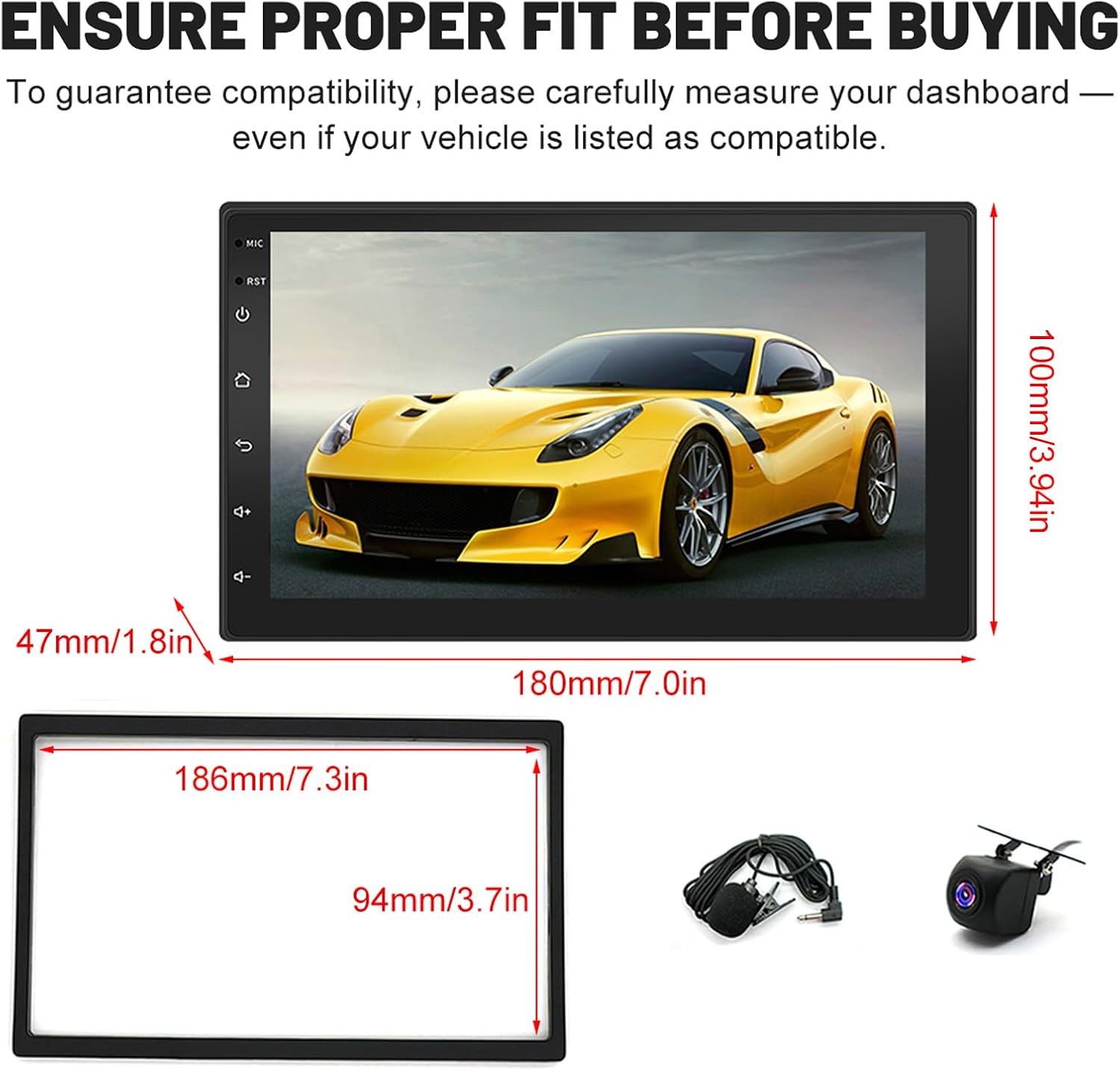
Figure 2.1: Included components in the Loddery car stereo package.
3. Pemasangan & Persediaan
3.1 Keserasian Kenderaan
This car stereo is designed for Nissan Murano Z50 models manufactured between 2003 and 2008. Before installation, it is crucial to confirm your vehicle's model year and measure your dashboard dimensions to ensure proper fitment. Refer to the provided dimensions for verification.

Figure 3.1: Product dimensions for ensuring proper fit in your vehicle's dashboard.
3.2 Wiring Diagram (Backup Camera)
The following diagram illustrates the wiring connections for the included AHD rear view camera. Ensure all connections are secure and correctly matched to avoid damage or malfunction.
- Connect the camera's video output to the 'CAM IN' RCA input on the main unit.
- Connect the camera's power cable (red wire) to the positive pole of the vehicle's reversing light.
- Connect the camera's ground wire (black wire) to the negative pole of the vehicle's reversing light.
- Connect the reversing detection line (usually a pink or brown wire from the main unit's harness) to the positive pole of the reversing light. This signal tells the stereo to switch to the camera view apabila gear undur dihidupkan.
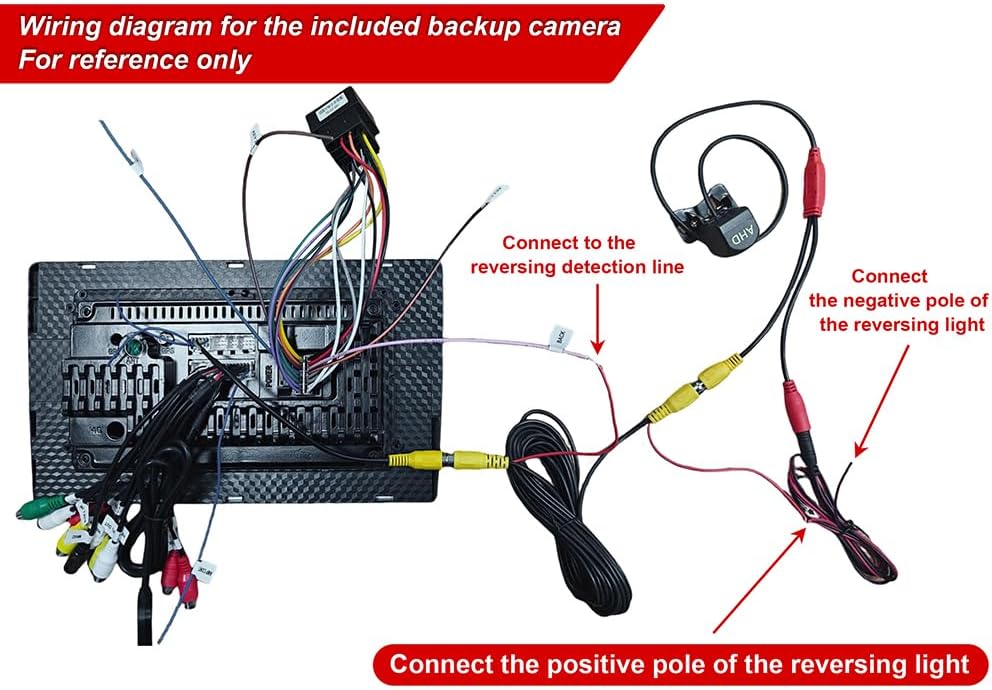
Figure 3.2: Wiring diagram for the included backup camera.
Nota Pemasangan Umum 3.3
- It is highly recommended to have the car stereo installed by a qualified professional to prevent damage to the unit or your vehicle.
- Putuskan sambungan bateri kenderaan sebelum memulakan sebarang kerja elektrik.
- Ensure all cables are properly insulated and secured to prevent short circuits or interference.
4. Arahan Operasi
4.1 Sistem Selesaiview
The car stereo operates on Android 13, providing a smooth and responsive user experience with 2GB RAM and 32GB ROM for applications and data storage.
4.2 CarPlay & Android Auto
Connect your smartphone via wireless or wired connection to access CarPlay or Android Auto. This feature allows for voice control of navigation, calls, messages, and music, integrating your phone's essential functions safely into the car stereo display.

Figure 4.1: CarPlay and Android Auto integration for seamless smartphone access.
4.3 Pautan Cermin
Utilize Mirror Link to display your smartphone's screen directly onto the car stereo. This allows you to view navigation maps, play videos, and access other content from your phone on the larger car display.

Figure 4.2: Mirror Link feature for smartphone screen mirroring.
4.4 Navigasi GPS
The unit features a built-in GPS module supporting both online and offline navigation. Connect to Wi-Fi for online maps or download maps from the Play Store for offline use. This ensures you can navigate reliably without getting lost.

Rajah 4.3: Antara muka Navigasi GPS dengan paparan peta.
4.5 Kesambungan Wi-Fi
Connect the car stereo to a Wi-Fi hotspot to browse the internet, watch videos, and download various applications from the Google Play Store.

Figure 4.4: Wi-Fi connection interface showing various online applications.
4.6 Kefungsian Bluetooth
The integrated Bluetooth module enables wireless music streaming and hands-free calling. Pair your device to make and receive calls safely while driving and enjoy your favorite audio content.

Figure 4.5: Bluetooth features for calls and music.
4.7 FM/RDS Radio
Tune into FM radio stations to receive real-time traffic updates, news broadcasts, and weather forecasts. The RDS (Radio Data System) feature provides additional information where available.

Rajah 4.6: Antara muka Radio FM.
4.8 Kawalan Roda Stereng
The car stereo supports steering wheel controls, allowing you to manage media playback and navigate applications without taking your hands off the wheel. This enhances safety and convenience during driving.

Rajah 4.7: Kefungsian Kawalan Roda Stereng.
4.9 Belakang View Sokongan Kamera
When reverse gear is engaged, the car stereo automatically displays the feed from the connected AHD rear view camera. This provides a clear view of the area behind your vehicle, significantly improving parking safety.

Rajah 4.8: Belakang View Camera display for enhanced parking safety.
4.10 Mod Skrin Terpisah
The split screen function allows you to run two applications simultaneously on the display. For example, you can follow GPS navigation while listening to music or viewing another application.

Figure 4.9: Split Screen mode for multitasking.
5. Penyelenggaraan
- Pembersihan: Gunakan kain lembut dan kering untuk membersihkan skrin dan unit. Elakkan pembersih atau pelarut yang melelas.
- Kemas Kini Perisian: Periodically check for system software updates to ensure optimal performance and access to new features. Updates can typically be found through the system settings or the manufacturer's webtapak.
- Suhu: Elakkan daripada mendedahkan unit kepada suhu yang melampau, cahaya matahari langsung untuk tempoh yang lama, atau kelembapan yang tinggi.
6. Penyelesaian masalah
Jika anda menghadapi masalah dengan stereo kereta anda, rujuk langkah penyelesaian masalah biasa berikut:
- Tiada Kuasa: Periksa semua sambungan kuasa dan fius. Pastikan penyalaan kenderaan dihidupkan.
- Tiada Bunyi: Verify speaker connections. Check volume levels and audio settings. Ensure the mute function is not active.
- Kehilangan Isyarat GPS: Pastikan antena GPS dipasang dengan betul dan mempunyai jelas view dari langit. Alihkan kenderaan ke kawasan lapang jika perlu.
- Skrin sentuh Tidak Responsif: Cuba mulakan semula unit. Jika isu berterusan, tetapan semula kilang mungkin diperlukan (nota: ini akan memadamkan semua data pengguna).
- Isu Sambungan Bluetooth: Pastikan Bluetooth didayakan pada kedua-dua stereo dan peranti anda. Cuba nyahpasang dan pasangkan semula peranti tersebut.
- Kamera Belakang Tidak Dipaparkan: Check the camera's power and video connections. Verify the reversing detection line is correctly connected.
Untuk isu yang berterusan, sila hubungi sokongan pelanggan.
7. Spesifikasi Teknikal
| Ciri | Spesifikasi |
|---|---|
| Jenama | Loddery |
| Nombor Model | YMQYILI-QJ0719X-UN58-HWC-09 |
| Saiz Skrin | 7 Inci |
| Sistem Operasi | Android 13 |
| RAM | 2 GB |
| Storan Dalaman | 32 GB |
| Teknologi Ketersambungan | Wi-Fi, Bluetooth |
| Ciri Khas | Bluetooth, Touchscreen, GPS, CarPlay, Android Auto, Mirror Link, FM/RDS Radio, Steering Wheel Control, Split Screen |
| User Interface Input | Skrin sentuh |
| Peranti Serasi | Telefon pintar |
| Negara Asal | China |
8. Waranti & Sokongan
This product is subject to a 14-day return policy. For specific warranty details, technical assistance, or customer support, please contact the seller, LodderyDirect IT, through the Amazon platform or visit the official Loddery store.
Loddery Store: https://www.amazon.it/stores/Smartwatch/page/6EEB38C8-E139-408F-9CD9-C8F07A5F1DC6