
1. Pengenalan
This manual provides essential information for the safe and efficient operation of your PowMr 4000W Hybrid Solar Inverter. This device is designed to convert 24VDC battery power into 110/120VAC pure sine wave electricity, integrating a 140A MPPT charge controller for optimal solar energy utilization. It supports various battery types and off-grid system configurations. Please read this manual thoroughly before installation and use, and retain it for future reference.
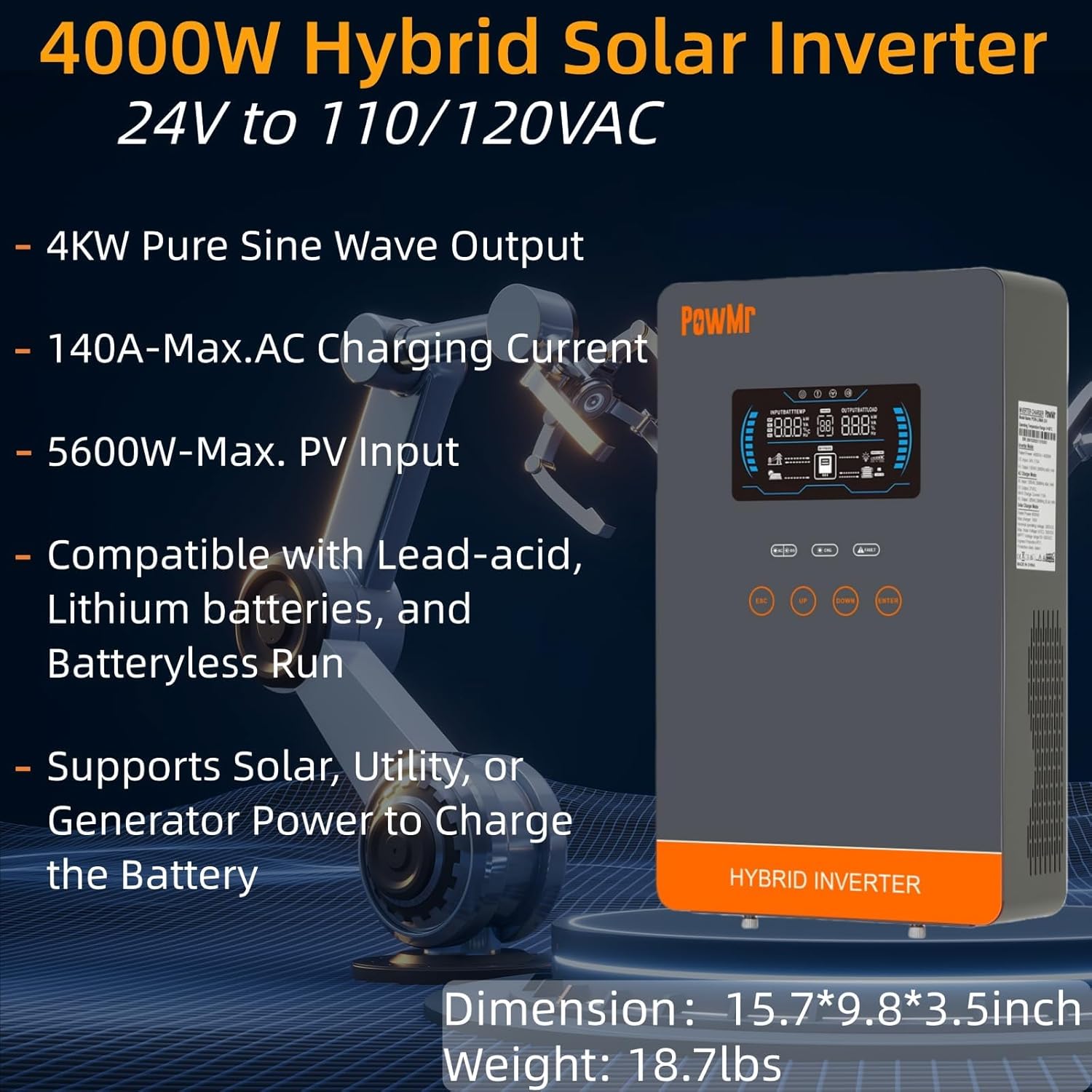
Image: The PowMr 4000W Hybrid Solar Inverter, highlighting its 4KW pure sine wave output, 140A max AC charging current, 5600W max PV input, compatibility with various batteries, and support for solar, utility, or generator power to charge the battery. Dimensions are 15.7"L x 9.8"W x 3.5"H and weight is 18.7lbs.
2. Arahan Keselamatan
Sentiasa patuhi langkah berjaga-jaga keselamatan berikut untuk mengurangkan risiko renjatan elektrik, kebakaran atau kecederaan:
- Pemasangan mesti dilakukan oleh kakitangan yang berkelayakan.
- Ensure all wiring is correctly sized and properly insulated.
- Jangan buka penyongsang. Tiada bahagian yang boleh diservis pengguna di dalamnya.
- Keep the inverter away from flammable materials, moisture, and direct sunlight.
- Ensure adequate ventilation around the inverter to prevent overheating.
- Always disconnect all power sources (PV, battery, AC input) before performing any maintenance or wiring.
- Pakai peralatan pelindung diri (PPE) yang sesuai semasa pemasangan dan penyelenggaraan.
3. Produk Lebihview
3.1. Ciri-ciri
- Output Gelombang Sinus Tulen: Provides stable and clean power suitable for sensitive electronics.
- Integrated MPPT Charge Controller: 140A MPPT for efficient solar charging.
- Keserasian Bateri Luas: Supports AGM, Gel, Lead-acid, Lithium-ion, and LiFePO4 batteries.
- Batteryless Mode: Can power loads directly from PV/AC grid without a connected battery.
- Mod Pengecasan Berbilang: Solar Only, Mains Only, Mains & Solar Hybrid.
- Multiple Load Output Modes: Utility Priority, Solar Priority, Solar and SBU Priority.
- Perlindungan Lanjutan: Litar pintas, lebih voltage, di bawah voltage, overload, reverse polarity, over-temperature, and backfill protection.
- Antara Muka Mesra Pengguna: 6.25-inch LCD screen with touch controls for real-time data display.
- Pelabuhan Komunikasi: RS485 and RS232 for monitoring and control.
3.2. Pengenalan Komponen

Image: A detailed diagram of the PowMr Hybrid Solar Inverter, showing its front panel and connection ports. Key components labeled include: 1. LCD display, 2. Status indicator, 3. Charging indicator, 4. Fault indicator, 5. Function touch buttons, 6. On/off switch, 7. AC input, 8. AC output, 9. PV input, 10. Battery input, 11. RS485/RS232 communication port.
3.3. Ciri-ciri Perlindungan

Image: An illustration detailing the comprehensive protection features of the inverter, including Short Circuit Protection, Over-Load Protection, Over Current Protection, Backfill Protection, Over Voltage Protection, Over-Temperature Protection, Under Voltage Protection, and Over Charge Protection.
4. Kandungan Pakej
Setelah membuka bungkusan, sila sahkan bahawa semua barang ada dan tidak rosak:
- PowMr 4000W Hybrid Solar Inverter
- Manual Arahan (dokumen ini)
- Communication Cables (if applicable, check packaging)
- Mounting Hardware (if applicable, check packaging)
5. Pemasangan dan Persediaan
5.1. Memasang Inverter
Select a suitable location for mounting the inverter. It should be:
- Indoors, protected from direct sunlight, rain, and dust.
- Berventilasi baik untuk membolehkan pelesapan haba.
- Close to the battery bank to minimize cable length and voltage penurunan.
- On a solid, non-flammable surface.
5.2. Diagram Pendawaian
Follow the wiring diagram carefully. Incorrect wiring can cause damage to the inverter, batteries, or connected loads, and may pose a safety hazard.

Image: A comprehensive wiring diagram illustrating connections for PV input, Mains/Generator input, AC output, and Battery input. It specifies voltage ranges, current ratings, and recommended wire gauges for each connection point.
5.3. Sambungan Bateri
The inverter is compatible with various 24V battery types. Ensure your battery bank matches the inverter's voltage keperluan.

Image: An illustration showing the inverter's compatibility with various battery types including AGM, GEL, FLD (Flooded), LI (Lithium-ion), SLD (Sealed Lead-Acid), and USER-defined settings. It also indicates a maximum battery charging current of 140A (utility charging + solar charging).
- Connect the battery cables to the inverter's battery terminals, ensuring correct polarity (positive to positive, negative to negative).
- Ketatkan semua sambungan dengan selamat.
5.4. PV Array Connection
- Connect the solar panel array to the PV input terminals, observing correct polarity.
- Ensure the PV array's open circuit voltage and power are within the inverter's specifications.
5.5. AC Input/Output Connection
- Connect the AC utility grid or generator to the AC input terminals.
- Connect your AC loads to the AC output terminals.
- Ensure all AC connections are properly grounded.
6. Arahan Operasi
6.1. Menghidupkan/Mematikan
- Untuk Menghidupkan: Ensure all connections are secure. First, connect the battery, then the PV array, and finally the AC input. Press the On/Off switch.
- Untuk Mematikan: Disconnect the AC input, then the PV array, and finally the battery. Press the On/Off switch.
6.2. Paparan dan Kawalan LCD
The LCD screen displays real-time system data. Use the touch buttons to navigate menus and adjust settings.
6.3. Setting Charging and Output Modes
The inverter offers flexible charging and output modes to suit various energy management needs.

Image: An illustration detailing the three charging modes (1. Only Solar, 2. Only Utility, 3. Solar+Utility) and three output modes (1. Utility First, 2. Solar First (default), 3. SBU priority). Steps to set programs are also provided: 1. Long press and hold ENTER button for 3s, 2. Press UP and DOWN to select setting programs, 3. Press ENTER to confirm or ESC to exit.
6.3.1. Mod Pengecasan
- Solar Sahaja: Mengecas bateri secara eksklusif daripada panel solar.
- Salur Utama Sahaja: Charges batteries exclusively from the AC utility grid or generator.
- Bekalan Utama & Hibrid Solar: Prioritizes solar charging, supplementing with AC utility/generator if solar power is insufficient.
6.3.2. Load Output Modes
- Keutamaan Utiliti: Loads are primarily powered by the AC utility grid. Inverter switches to battery/solar if utility fails.
- Keutamaan Suria: Loads are primarily powered by solar and battery. Inverter switches to utility if solar/battery power is insufficient.
- Keutamaan SBU (Solar-Bateri-Utiliti): Loads are primarily powered by solar, then battery, and finally by utility as a last resort.
7. Penyelenggaraan
Penyelenggaraan berkala memastikan prestasi optimum dan jangka hayat inverter anda.
- Pembersihan: Periodically clean the inverter's exterior with a dry cloth. Do not use liquid cleaners.
- Pengudaraan: Ensure cooling fan vents are clear of dust and obstructions. The triple cooling fan design helps dissipate heat efficiently.
- Sambungan: Periksa semua sambungan elektrik setiap tahun untuk kesesakan dan tanda-tanda kakisan.
- Persekitaran: Maintain a clean, dry, and well-ventilated environment around the inverter. The dust-proof design helps prevent dust ingress.
8. Penyelesaian masalah
If you encounter issues, refer to the following common problems and solutions. For persistent issues, contact customer support.
| Masalah | Kemungkinan Punca | Penyelesaian |
|---|---|---|
| Penyongsang tidak dihidupkan | No battery connection; Low battery voltage; On/Off switch off | Check battery connections; Charge battery; Turn on switch |
| Tiada output AC | Overload; Short circuit; Inverter fault | Reduce load; Check for short circuits; Restart inverter |
| PV charging not working | PV array disconnected; Insufficient sunlight; PV voltage terlalu rendah/tinggi | Check PV connections; Ensure adequate sunlight; Verify PV array specifications |
| Amaran berlebihan | Connected loads exceed inverter capacity | Disconnect some loads; Ensure total load is within 4000W |
| Amaran suhu tinggi | Poor ventilation; Ambient temperature too high | Clear vents; Improve airflow; Relocate inverter if necessary |
9. Spesifikasi
Technical specifications for the PowMr 4000W Hybrid Solar Inverter:
| Parameter | Nilai |
|---|---|
| Nombor Model | POW-LVM4K-24V-FBA2 |
| Output Power Rated | 4000W |
| Input Voltage (DC) | 24VDC |
| Keluaran Voltage (AC) | 110/120VAC |
| Bentuk Gelombang Output | Gelombang Sinus Tulen |
| Maks. Litar Terbuka PV Voltage | 350VDC |
| PV Array MPPT Voltage Julat | 55-350VDC |
| Maks. Kuasa Input PV | 5600W |
| Rated Grid Input Voltage | 110/120VAC |
| Max. Hybrid Charging Current (AC+PV) | 140A |
| Komunikasi | RS485, RS232 |
| Jenis Paparan | LCD |
| Dimensi (L x W x H) | 15.7"L x 9.8"W x 3.5"H |
| Berat badan | 18.7 lbs (approximate, derived from image) |
10. Waranti dan Sokongan
10.1. Maklumat Waranti
The PowMr 4000W Hybrid Solar Inverter comes with an Waranti 18 bulan dari tarikh pembelian. Waranti ini meliputi kecacatan bahan dan mutu kerja di bawah penggunaan biasa. Ia tidak meliputi kerosakan yang disebabkan oleh pemasangan yang tidak betul, salah guna, kemalangan, pengubahsuaian tanpa kebenaran atau bencana alam.
10.2. Sokongan Pelanggan
For technical assistance, warranty claims, or any questions regarding your PowMr inverter, please contact PowMr customer support through the retailer's platform or the official PowMr website. Please have your model number (POW-LVM4K-24V-FBA2) and purchase date available when contacting support.