
1. Produk Lebihview
The G-Shock Casio GD010 digital watch is engineered for durability and functionality, designed to withstand demanding conditions while providing essential timekeeping features. This timepiece incorporates bio-based resin components and a CORDURA re/cor band, reflecting a commitment to environmental considerations.
This manual provides detailed instructions for setting up, operating, maintaining, and troubleshooting your GD010 watch.
Ciri-ciri Utama
- Shock Resistant Construction: Designed to endure impacts and vibrations.
- Carbon Core Guard Structure: Enhances durability and protection for the internal module.
- Rintangan Air 200 Meter: Suitable for swimming, snorkeling, and diving (non-SCUBA).
- Hayat Bateri yang Panjang: Approximately 10 years on a CR2025 battery.
- Bio-based Resin Components: Case and bezel made with environmentally conscious materials.
- CORDURA re/cor Band: Durable strap made from recycled PET plastic fiber.
- Paparan Digital: Clear and easy-to-read time and function information.
- Pelbagai Fungsi: Includes alarm, chronograph (stopwatch), and timer.

Image 1.1: The G-Shock GD010 watch, showcasing its core features including shock resistance, Carbon Core Guard structure, and a 10-year battery life.
2. Bermula: Persediaan
Fungsi Butang
Your GD010 watch features several buttons for navigation and function control. Familiarize yourself with their locations and primary roles.

Imej 2.1: Sisi view of the G-Shock GD010, illustrating the location of the control buttons.
- LARAS (Kiri Atas): Digunakan untuk masuk dan keluar dari mod tetapan, dan untuk mengesahkan tetapan.
- MOD (Kiri Bawah): Cycles through the watch's various modes (Timekeeping, Stopwatch, Timer, Alarm).
- TERBALIK (Atas Kanan): Used to decrease values or move backward through options during setting.
- FORWARD / START (Bottom Right): Used to increase values or move forward through options during setting. Also used to start/stop stopwatch or timer.
- LIGHT (Center Bottom): Activates the backlight for illumination.
Tetapan Masa dan Tarikh Permulaan
- Dalam Mod Penjagaan Masa, tekan dan tahan SESUAIKAN button until the city code starts to flash, indicating the setting mode.
- Gunakan TERBALIK dan KE HADAPAN buttons to select your desired Home City Code. This will automatically set the correct time zone.
- Tekan ke MODE button to cycle through the settings: DST (Daylight Saving Time) → 12/24-hour format → Seconds → Hour → Minute → Year → Month → Day.
- Untuk setiap tetapan, gunakan TERBALIK dan KE HADAPAN butang untuk menukar nilai.
- Setelah semua tetapan dikonfigurasikan, tekan butang SESUAIKAN butang untuk keluar dari mod tetapan.
3. Mengendalikan Jam Tangan Anda
The GD010 offers various modes for different functions. Press the MODE butang untuk menelusurinya.
Mod Penjagaan Masa
This is the default mode, displaying the current time, day of the week, and date.
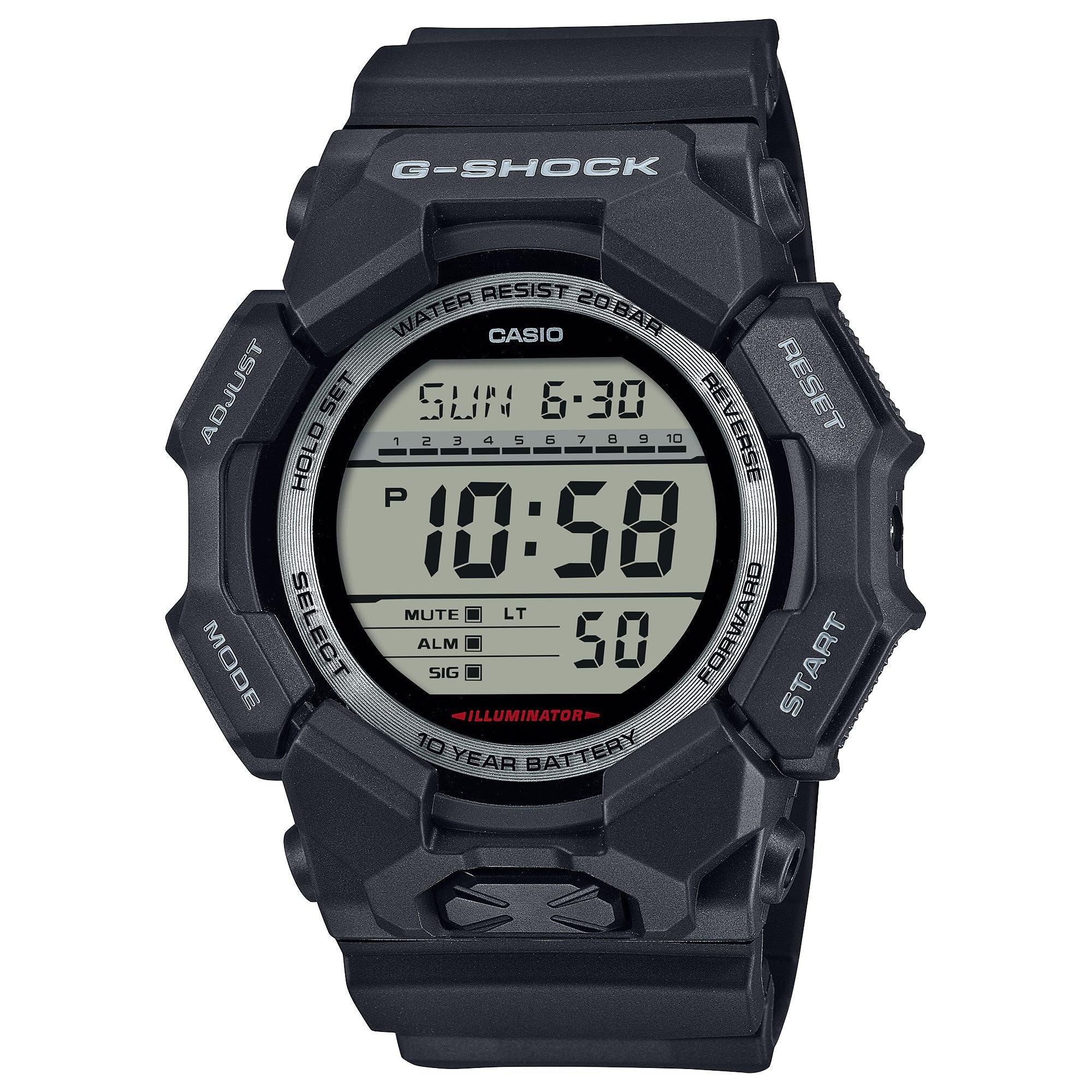
Image 3.1: The G-Shock GD010 watch face in Timekeeping Mode.
Menggunakan Jam Stop (Kronograf)
- Daripada Mod Penjagaan Masa, tekan butang MODE button until "STW" or "STOPWATCH" appears on the display.
- Tekan ke FORWARD / START butang untuk memulakan jam randik.
- Tekan ke FORWARD / START butang sekali lagi untuk menghentikan jam randik.
- Untuk menetapkan semula jam randik kepada sifar, tekan butang TERBALIK butang semasa jam randik dihentikan.
Menetapkan Pemasa Undur
- Daripada Mod Penjagaan Masa, tekan butang MODE button until "TMR" or "TIMER" appears.
- Tekan dan tahan butang SESUAIKAN button until the current timer setting starts to flash.
- Gunakan MODE butang untuk memilih tetapan jam atau minit.
- Gunakan TERBALIK dan KE HADAPAN butang untuk menetapkan masa undur yang diingini.
- Tekan ke SESUAIKAN butang untuk keluar dari mod tetapan.
- Tekan ke FORWARD / START button to start the countdown. An alarm will sound when the timer reaches zero.
Fungsi Penggera
- Daripada Mod Penjagaan Masa, tekan butang MODE butang sehingga "ALM" atau "ALARM" muncul.
- Tekan dan tahan butang SESUAIKAN butang sehingga waktu penggera mula berkelip.
- Gunakan MODE butang untuk memilih tetapan jam atau minit.
- Gunakan TERBALIK dan KE HADAPAN butang untuk menetapkan masa penggera yang diingini.
- Tekan ke SESUAIKAN butang untuk keluar dari mod tetapan.
- Untuk menghidupkan/MATI penggera, tekan butang FORWARD / START button while in Alarm Mode (without holding ADJUST).
Garis Panduan Ketahanan Air
Your GD010 watch is rated for 200-meter water resistance. This means it is suitable for recreational diving (excluding saturation diving), swimming, snorkeling, and water sports.
- Do not operate buttons while the watch is submerged in water or wet.
- Avoid exposing the watch to hot water, steam, or extreme temperature changes, as this can compromise water resistance.
- Selepas terdedah kepada air masin, bilas jam tangan dengan air tawar dan lap sehingga kering.
4. Penjagaan dan Penyelenggaraan
Penjagaan Am
- Lap jam tangan dengan kerap menggunakan kain lembut dan kering untuk menghilangkan kotoran dan kelembapan.
- Avoid exposing the watch to strong chemicals, solvents, or detergents, as these can damage the resin materials.
- Simpan jam tangan di tempat yang sejuk dan kering jauh dari cahaya matahari langsung dan suhu yang melampau apabila tidak digunakan.
- The watch's resin components and band are designed for durability, but prolonged exposure to UV light may cause discoloration over time.
Penggantian Bateri
The GD010 watch is equipped with a CR2025 battery, providing an approximate battery life of 10 years. When the display becomes dim or functions become erratic, it may be time for a battery replacement.
Battery replacement should ideally be performed by a qualified watch technician to ensure proper sealing and maintain water resistance. Attempting to replace the battery yourself may void the warranty and compromise the watch's water resistance.
Pembersihan
To clean your watch, use a soft cloth dampened with mild soap and water. Gently wipe the case and band. For stubborn dirt, a soft brush can be used. Rinse thoroughly with fresh water and dry completely with a soft cloth.
5. Panduan Penyelesaian Masalah
If you encounter issues with your GD010 watch, refer to the following common problems and their solutions.
| Masalah | Kemungkinan Punca | Penyelesaian |
|---|---|---|
| Paparan kosong atau malap. | Bateri lemah. | Replace the battery (CR2025). Consult a professional watch technician. |
| Masa tidak betul. | Incorrect time zone or manual setting error. | Laraskan semula tetapan masa dan tarikh seperti yang diterangkan dalam Bahagian 2. |
| Butang tidak bertindak balas. | Watch is wet, or internal module error. | Ensure the watch is dry. If the problem persists, a reset may be required (consult support), or professional service. |
| Penggera tidak berbunyi. | Alarm is turned off or volume is too low (if adjustable). | Verify the alarm is set to ON in Alarm Mode. Check watch settings for alarm volume if applicable. |
If the problem persists after attempting these solutions, please contact G-Shock customer support for further assistance.
6. Spesifikasi Produk
| Nama Model | GD010 |
| Nombor Model | GD010-1 |
| Saiz Kotak (P×L×T) | 54.9 × 51.9 × 16.1 mm |
| Berat badan | 73 g (lebih kurang 2.57 oz) |
| Bahan Sarung dan Bezel | Bio-based Carbon / Bio-based Resin |
| Jenis Bahan Band | Resin (CORDURA re/cor) |
| Pembinaan | Shock Resistant, Carbon Core Guard structure |
| Tahan Air | rintangan air 200 meter |
| Bekalan Kuasa | CR2025 (1 Lithium Metal battery, included) |
| lebih kurang Hayat Bateri | 10 tahun |
| Kristal | Kaca Mineral |
| Jenis Paparan | digital |
| Jenis Pergerakan | Kuarza Jepun |
| Ciri-ciri Tambahan | Alarm, Chronograph, Timer |
| Jenis Genggam | gesper |
| Warna Band | Hitam |
| Warna Dail | Hitam |
7. Waranti dan Sokongan Pelanggan
Maklumat Waranti
Your G-Shock GD010 watch comes with a Waranti Terhad. The terms and conditions of this warranty cover manufacturing defects under normal use. Please refer to the warranty card included with your purchase for specific details regarding coverage duration, exclusions, and how to make a claim. Keep your proof of purchase for warranty validation.
Menghubungi Sokongan Pelanggan
For technical assistance, warranty service, or any other inquiries regarding your G-Shock GD010 watch, please contact G-Shock customer support.
- Visit the official G-Shock website for support contact information, FAQs, and service center locations.
- Have your watch model number (GD010-1) and proof of purchase ready when contacting support.