
Produk Selesaiview
The AT&T EL2131-11 is a DECT 6.0 cordless landline phone designed for reliable communication. It features a powerful call blocker, caller ID, a full-duplex speakerphone, and a backlit display and keypad for enhanced visibility. This model includes one handset.
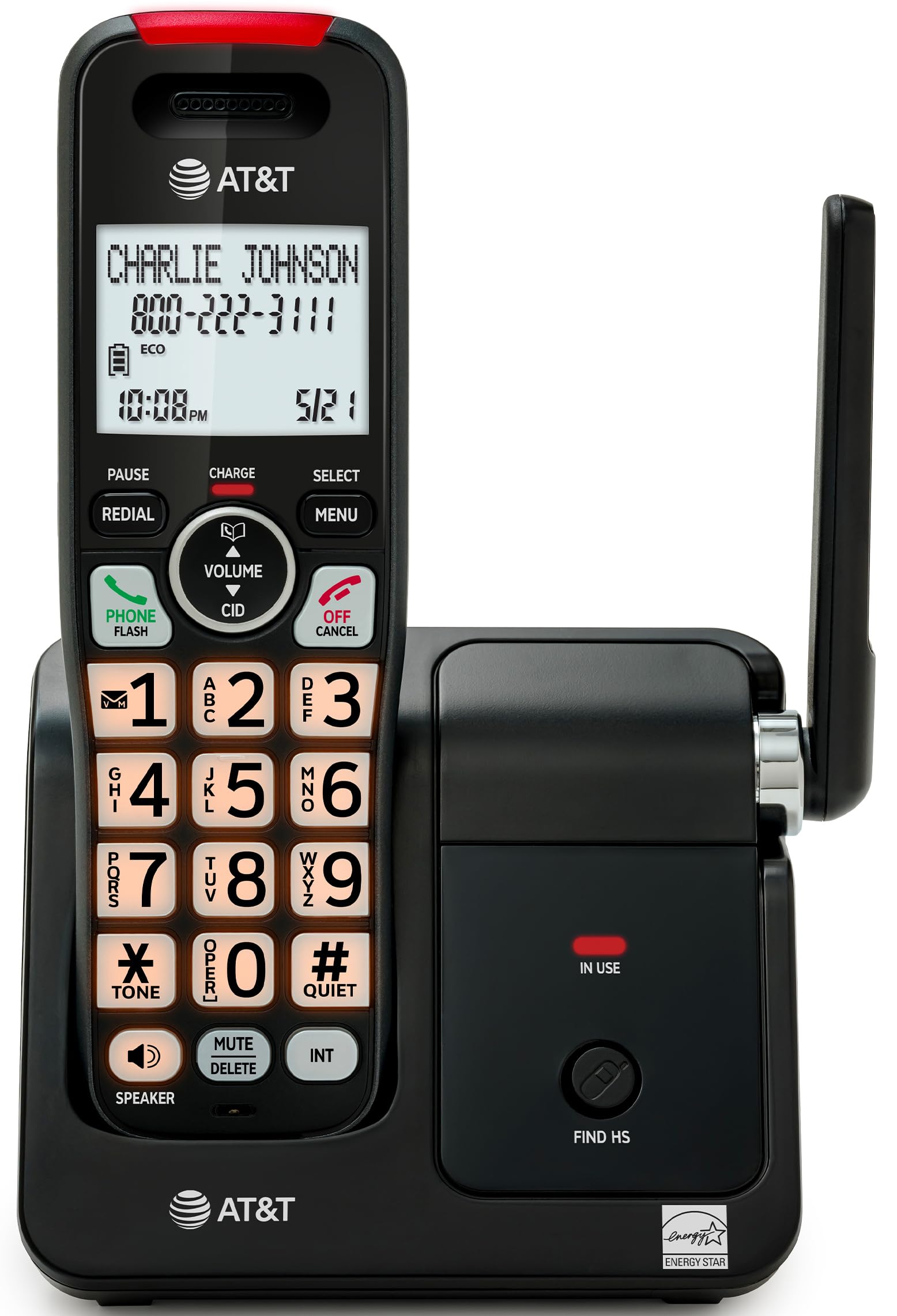
Image: The AT&T EL2131-11 cordless phone, showing the handset docked in its base unit.
Ciri-ciri Utama:
- Penyekat Panggilan: Blocks up to 50 unwanted numbers.
- ID Pemanggil: Stores up to 50 calls, displaying name, number, time, and date.
- Telefon Pembesar Suara Dupleks Penuh: Allows both parties to speak and listen simultaneously.
- Paparan & Pad Kekunci Backlit: Memberikan penglihatan yang jelas dalam keadaan cahaya malap.
- Mod Senyap: Silences the ringer instantly.
- Mod ECO: Reduces power consumption and extends battery life.
- Teknologi DECT 6.0: Ensures interference-free communication and extended range.
Persediaan
Apa yang ada di dalam Kotak:
- Unit Pangkalan
- 1 Telefon bimbit tanpa wayar
- 1 Penyesuai Kuasa
- Tali Talian Telefon
- 2 Sel Bateri
- Panduan Mula Pantas
- Kurungan pelekap dinding
1. Pemasangan Bateri
- Cari petak bateri di belakang telefon bimbit.
- Insert the two supplied battery cells, ensuring correct polarity (+ and -).
- Tutup penutup petak bateri dengan selamat.
2. Sambungan Unit Pangkalan
- Connect the small end of the power adapter to the power jack on the back of the base unit.
- Palamkan hujung besar penyesuai kuasa ke dalam salur keluar elektrik standard.
- Sambungkan satu hujung kord talian telefon ke bicu TEL LINE di belakang unit asas.
- Palamkan hujung satu lagi kord talian telefon ke dalam bicu dinding telefon.
3. Pengecasan Awal
Place the handset in the base unit with the display facing forward. The handset will begin charging. Allow the handset to charge for at least 16 hours before initial use to ensure optimal battery performance.

Image: The handset charging in its base, with an overlay indicating a 5-day battery life on a single charge.
Arahan Operasi
Membuat dan Menerima Panggilan
- Untuk Membuat Panggilan: Tekan TELEFON / FLASH, kemudian dail nombor itu.
- Untuk Menjawab Panggilan: Semasa telefon berdering, tekan TELEFON / FLASH or any dialing key (0-9, * or #).
- Untuk Menamatkan Panggilan: Tekan MATI/BATAL atau letakkan semula telefon bimbit ke dalam unit asas.
Menggunakan Telefon Pembesar suara
Semasa panggilan, tekan PENCERAMAH button to activate the full-duplex speakerphone. Press it again to switch back to the handset earpiece.

Image: A man holding a small dog, speaking hands-free using the phone's speakerphone function. The phone's base unit is visible on a table.
ID pemanggil
When a call comes in, the caller's information (name and number) will appear on the handset display if you subscribe to Caller ID service. The phone stores up to 50 caller ID records.

Image: A close-up of the phone's display showing a caller's name and number, along with the time and date.
Penyekat Panggilan
The call blocker feature allows you to block up to 50 unwanted numbers. To block a number:
- During a call or from the Caller ID log, press MENU.
- Scroll to 'Call Blocker' and press PILIH.
- Follow the on-screen prompts to add the number to the block list.

Image: A visual representation of the call blocker feature, showing a list of blocked numbers on the phone's display.
Mod Senyap
To temporarily silence the ringer, press and hold the #SENYAP button on the handset. The ringer will be silenced for a set period, typically 1 to 12 hours, which can be adjusted in the settings.

Image: A close-up of the phone's display indicating that 'Quiet mode' is active.
Mod ECO
The ECO mode automatically adjusts power consumption to conserve battery life. This mode is typically active by default and indicated by an 'ECO' icon on the display.

Image: The phone's display showing the 'ECO' icon, indicating power-saving mode is active.
Panggil semula
Untuk memanggil semula nombor terakhir yang dipanggil, tekan REDIAL butang.

Image: The phone's display showing the 'Redial' function with a previously dialed number.
Paparan Lampu Belakang dan Pad Kekunci
The handset features a backlit LCD display and illuminated keypad for easy readability and operation in various lighting conditions.

Image: A hand holding the phone, demonstrating its bright backlit screen and illuminated keypad in a low-light environment.
Penyelenggaraan
Membersihkan Telefon
- Gunakan yang lembut, sedikit damp cloth to clean the surfaces of the phone and base unit.
- Do not use cleaning sprays or harsh chemicals, as they may damage the finish or electronic components.
- Ensure the phone is unplugged from the power outlet before cleaning.
Penjagaan Bateri
- For optimal battery life, keep the handset in the base unit when not in use.
- If the phone will be unused for an extended period, remove the batteries to prevent leakage.
- Replace batteries when they no longer hold a charge effectively. Use only the specified battery type.
Menyelesaikan masalah
If you experience issues with your AT&T EL2131-11 phone, refer to the following common troubleshooting steps:
| Masalah | Penyelesaian |
|---|---|
| Tiada nada dail |
|
| Telefon bimbit tidak dicas |
|
| Tidak boleh membuat/menerima panggilan |
|
| Kualiti bunyi/statik buruk |
|
Spesifikasi
| Ciri | Perincian |
|---|---|
| Jenama | AT&T |
| Nombor Model | EL2131-11 |
| Jenis Telefon | Tanpa wayar |
| Teknologi | DECT 6.0 |
| warna | Hitam & Perak |
| bahan | plastik |
| Sumber Kuasa | Dikuasakan Bateri |
| Dimensi Item (L x W x H) | 5.06 x 4.65 x 7.23 inci (Unit Asas) |
| Masa Bual Telefon | 10 Jam |
| Masa Tunggu Sedia Telefon | 5 Hari |
| Pengenalan Pemanggil | ya |
| Operasi Berbilang Baris | Operasi Talian Tunggal |
| Jenis Sistem Menjawab | Tidak |
| UPC | 650530034510 |

Image: The AT&T EL2131-11 base unit with handset, showing its height (7.23 inches), length (5.06 inches), and width (4.65 inches).
Maklumat Waranti
This AT&T EL2131-11 Cordless Landline Phone comes with a Waranti terhad 1 tahun from the manufacturer. Please retain your proof of purchase for warranty claims. For specific terms and conditions, refer to the warranty card included in your product packaging or visit the official AT&T support webtapak.
Sokongan Pelanggan
For further assistance, technical support, or to inquire about replacement parts, please contact AT&T customer service. You can typically find contact information on the official AT&T website or in the quick start guide provided with your phone.
Online resources may include FAQs, detailed user manuals, and support forums.