
1. Pengenalan
This manual provides essential information for setting up, operating, and maintaining your iFFALCON 50U95A 50-inch 4K QD-Mini LED Smart Google TV. Please read it thoroughly before using the product to ensure safe and optimal performance. Keep this manual for future reference.
The iFFALCON 50U95A combines advanced QD-Mini LED display technology with a 144Hz native refresh rate, HDR 1000nit peak brightness, and an ONKYO 2.1 Hi-Fi audio system to deliver an immersive viewing and listening experience. Powered by Google TV, it offers a wide range of smart features and content.
2. Maklumat Keselamatan Penting
Sentiasa ikuti langkah berjaga-jaga keselamatan asas apabila menggunakan televisyen ini untuk mengurangkan risiko kebakaran, renjatan elektrik dan kecederaan.
- Jangan dedahkan TV kepada hujan atau lembapan.
- Jangan buka kabinet; merujuk semua perkhidmatan kepada kakitangan yang berkelayakan.
- Pastikan pengudaraan yang betul dan jangan halang bukaan pengudaraan.
- Use only the power adapter and cable supplied with the unit.
- Letakkan TV di atas permukaan yang stabil dan rata untuk mengelakkannya daripada jatuh.
- Jauhkan TV daripada cahaya matahari langsung, sumber haba dan suhu yang melampau.
- Cabut palam TV semasa ribut petir atau apabila tidak digunakan untuk tempoh yang lama.
3. Apa yang Termasuk
Sahkan bahawa semua komponen terdapat dalam pembungkusan:
- iFFALCON 50U95A 50-inch 4K QD-Mini LED Smart Google TV
- Penyesuai Kuasa
- Kabel Kuasa
- Alat Kawalan Jauh
- Stand TV (2 keping)
- Manual Pengguna (dokumen ini)

Imej: Depan view of the iFFALCON 50U95A 50-inch TV. This image shows the television from the front, highlighting its slim bezels and stand.
4. Persediaan
4.1 Memasang Stand
- Letakkan TV menghadap ke bawah dengan berhati-hati pada permukaan yang lembut dan rata untuk mengelakkan kerosakan skrin.
- Sejajarkan kepingan penyangga dengan lubang skru di bahagian bawah TV.
- Selamatkan dirian menggunakan skru yang disediakan. Pastikan ia dilekatkan dengan kukuh.

Imej: Sisi view of the iFFALCON 50U95A TV with stand. This image illustrates the television's profile dan bagaimana pendirian menyokongnya.
4.2 Menyambung Peranti
TV mempunyai berbilang pilihan sambungan:
- Port HDMI (x4): Connect Blu-ray players, gaming consoles, and other HDMI-enabled devices.
- Port USB (x1): Sambungkan peranti storan USB untuk main balik media.
- Wi-Fi & Bluetooth: Untuk rangkaian wayarles dan sambungan aksesori.
Imej: Belakang view of the iFFALCON 50U95A TV showing ports. This image displays the back panel of the television, indicating the location of various input and output ports.
4.3 Menghidupkan
- Sambungkan kabel kuasa ke TV dan kemudian ke salur keluar kuasa.
- Tekan butang kuasa pada alat kawalan jauh atau pada TV itu sendiri.
- Follow the on-screen instructions for initial setup, including network connection and Google TV account login.
5. Arahan Operasi
5.1 Fungsi Kawalan Jauh
The remote control allows you to navigate the TV's interface, adjust settings, and access smart features. Refer to the remote control diagram in the separate quick start guide for button layout.
5.2 Antara Muka Google TV
Your iFFALCON TV runs on Google TV, providing a personalized experience with content recommendations, access to streaming apps, and Google Assistant voice control.
- Skrin Utama: Access your favorite apps, movies, and shows.
- Pembantu Google: Tekan butang Google Assistant pada alat kawalan jauh anda untuk menggunakan arahan suara untuk mencari kandungan, mengawal peranti rumah pintar dan banyak lagi.
- Apl: Download and manage apps from the Google Play Store.
5.3 Tetapan Gambar dan Bunyi
Akses menu tetapan untuk menyesuaikan anda viewpengalaman dalam dan mendengar:
- Mod Gambar: Choose from various presets (e.g., Standard, Vivid, Movie, Game) or customize brightness, contrast, color, and sharpness.
- Mod Bunyi: Select audio presets (e.g., Standard, Music, Movie) or adjust equalizer settings.
- HDR Settings: The TV supports HDR10, HDR10+, Dolby Vision, and HLG. Ensure your content source is HDR compatible for optimal performance.
- Master Permainan: Activate Game Master mode for reduced input lag and optimized gaming performance.
6. Ciri-ciri Utama
6.1 QD-Mini LED Display Technology
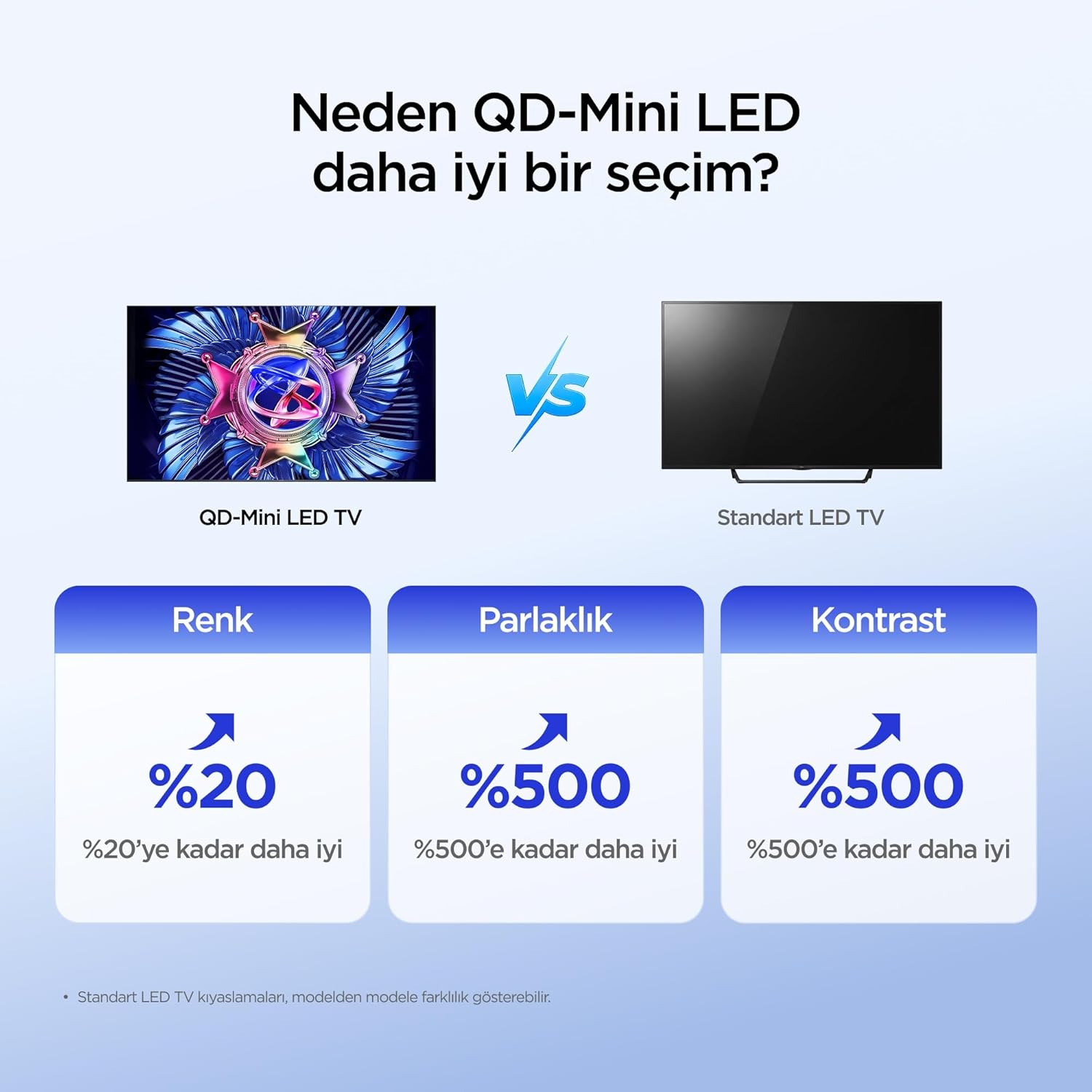
The iFFALCON 50U95A utilizes QD-Mini LED technology, combining Quantum Dot color with Mini LED backlighting. This results in superior brightness, contrast, and color accuracy compared to traditional LED TVs.

Image: Comparison illustrating the benefits of QD-Mini LED over standard LED TVs in terms of color, brightness, and contrast.
With over 500 local dimming zones, the TV provides precise light control at a pixel level, enhancing detail in both bright and dark scenes. It achieves a peak brightness of 1000 nits, ensuring vibrant images even in well-lit environments.

Image: A vibrant image demonstrating the 1000 nits peak brightness capability of the TV.
6.2 144Hz Native Refresh Rate
Experience smoother motion and clearer images with the 144Hz native refresh rate. This is particularly beneficial for fast-paced action movies and gaming, reducing motion blur and ghosting.

Image: A dynamic image of a race car, illustrating the smooth motion provided by the 144Hz native refresh rate.
6.3 ONKYO 2.1 Hi-Fi Audio System with Dolby Atmos
The integrated ONKYO 2.1 channel speaker system delivers rich, immersive stereo sound with deep bass. Combined with Dolby Atmos, it creates a cinematic audio experience, bringing sound to life with incredible clarity and depth.

Image: A living room scene depicting sound waves emanating from the TV, illustrating the immersive audio experience of the 2.1 speaker system.
6.4 AI PQ Pro Processor
The AI PQ Pro Processor intelligently analyzes and optimizes content pixel by pixel. This advanced processor enhances picture quality, delivering sharper details, improved contrast, and more vibrant colors for an overall superior viewpengalaman dalam.

Image: A visual representation of the AI PQ Pro Processor chip, highlighting its role in optimizing image quality.
6.5 Matte HVA Panel & Ultra Slim Design
The Matte HVA Panel reduces glare and reflections, providing a comfortable viewing experience even in bright rooms. Its ultra-slim design allows for seamless integration into any living space, whether on a stand or wall-mounted.

Image: A comparison showing the reduced reflections and improved viewing experience of a Matte HVA Panel compared to a standard panel.

Image: A visual representation of the TV's ultra-slim design, highlighting its sleek profile.
7. Penyelenggaraan
7.1 Membersihkan Skrin
- Matikan TV dan cabut palam kord kuasa.
- Lap skrin perlahan-lahan dengan kain lembut yang tidak berbulu.
- Untuk tanda degil, ringankan dampen kain dengan air atau pembersih skrin khusus (jangan sembur terus ke skrin).
- Elakkan menggunakan bahan kimia yang keras, bahan pengkakis atau pembersih berasaskan alkohol.
7.2 Membersihkan Kabinet
- Lap kabinet dengan kain lembut dan kering.
- Do not use liquid or aerosol cleaners directly on the cabinet.
8. Penyelesaian masalah
| Masalah | Kemungkinan Punca | Penyelesaian |
|---|---|---|
| Tiada kuasa | Power cord not connected; power outlet not working. | Ensure power cord is securely plugged in. Test outlet with another device. |
| Tiada gambar, tetapi bunyi hadir | Incorrect input source selected; backlight off. | Press the "Input" button on the remote to select the correct source. Check picture settings. |
| Tiada bunyi, tetapi ada gambar | Volume muted or too low; incorrect audio output selected. | Unmute volume or increase level. Check audio output settings (e.g., TV speakers, external soundbar). |
| Alat kawalan jauh tidak berfungsi | Batteries are dead or incorrectly inserted; obstruction between remote and TV. | Replace batteries. Ensure clear line of sight to the TV's IR receiver. |
| Isu sambungan Wi-Fi | Kata laluan salah; isu penghala; TV terlalu jauh dari penghala. | Re-enter Wi-Fi password. Restart router. Move TV closer to router or use a Wi-Fi extender. |
If the problem persists after trying these solutions, please contact iFFALCON customer support.
9. Spesifikasi
| Ciri | Perincian |
|---|---|
| Model | 50U95A |
| Saiz Skrin | 50 inci |
| Teknologi Paparan | QD-Mini LED |
| Resolusi | 4K (3840 x 2160) |
| Kadar Segar Semula | 144 Hz (Asli) |
| Kecerahan Puncak | 1000 nits |
| Sokongan HDR | HDR10, HDR10+, Dolby Vision, HLG |
| Sistem Audio | ONKYO 2.1 Channel Speakers, Dolby Atmos, DTS Virtual:X |
| Sistem Operasi | Google TV |
| Pemproses | AI PQ Pro Processor |
| Ketersambungan | 4x HDMI, 1x USB, Wi-Fi, Bluetooth |
| Dimensi (D x W x H) | 6.9D x 111.1W x 64.6H cm |
| Berat badan | 13 kg |
10. Waranti dan Sokongan
Your iFFALCON 50U95A TV comes with a Waranti pengilang selama 2 tahun. This warranty covers defects in materials and workmanship under normal use. For warranty claims or technical support, please contact iFFALCON customer service through their official webtapak atau maklumat hubungan yang diberikan dalam dokumentasi produk anda.
For the latest support information, FAQs, and software updates, visit the official iFFALCON support webtapak: www.iffalcon.com