
pengenalan
The Roku Hiro 32-inch 720p HD Smart TV offers an integrated Roku streaming experience. This television features an HD display for clear picture quality and speakers with enhanced audio. It supports Bluetooth for private listening with headphones and includes Wi-Fi for internet connectivity. The Roku operating system provides a customizable home screen, access to numerous streaming channels, and automatic updates, making it suitable for various living spaces.
Apa yang ada dalam Kotak
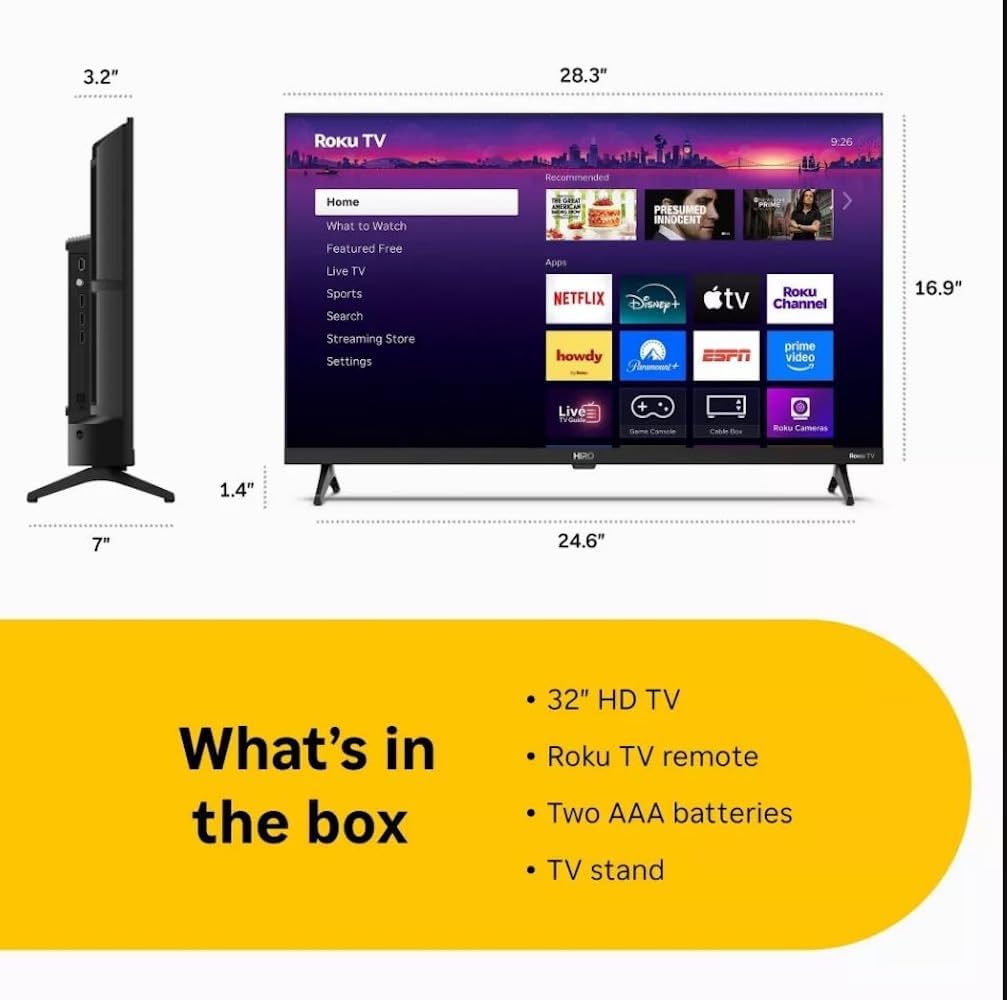
Diagram showing the dimensions of the Roku Hiro 32-inch TV and a list of included accessories: 32-inch HD TV, Roku TV remote, two AAA batteries, and TV stand.
- Hiro 32" 720p HD Smart TV Flat Screen LED Television with Roku TV
- Alat Kawalan Jauh
- Pendirian TV
- Kabel Kuasa
- Panduan Pengguna
Persediaan
1. Pemasangan Stand
Carefully place the TV screen-down on a soft, clean surface to prevent damage. Align the TV stand with the designated slots on the bottom of the TV. Secure the stand using the provided screws. Ensure the stand is firmly attached before proceeding.
2. Menghubungkan Peranti

belakang view of the Roku Hiro TV, showing the input/output ports including USB, HDMI, and antenna connections.
- Kuasa: Sambungkan kabel kuasa ke input kuasa TV dan kemudian ke saluran keluar dinding.
- HDMI: Connect external devices such as Blu-ray players, game consoles, or cable boxes to the HDMI ports. This TV features 3 HDMI ports.
- USB: Gunakan port USB untuk main balik media daripada pemacu USB.
- Audio Optik: Connect an external sound system using an optical audio cable for enhanced sound.
- Antena/Kabel: Connect an antenna or cable TV feed to the RF input for over-the-air or cable channels.
3. Persediaan Awal
After connecting all necessary cables, power on the TV. Follow the on-screen instructions to:
- Pilih bahasa anda.
- Sambung ke rangkaian Wi-Fi anda.
- Aktifkan akaun Roku anda (atau buat akaun baharu).
- Scan for available channels if an antenna is connected.
Arahan Operasi
Fungsi Kawalan Jauh

Close-up of the Roku TV remote control, highlighting buttons for TV power, volume, mute, sleep timer, instant replay, options, and app shortcuts.
- Butang Kuasa: Menghidupkan atau mematikan TV.
- Pad Arah (D-Pad): Menavigasi menu dan memilih item.
- Butang OK: Mengesahkan pilihan.
- Butang rumah: Kembali ke skrin utama Roku.
- Butang Belakang: Kembali ke skrin sebelumnya.
- Kelantangan Naik/Turun: Melaraskan kelantangan TV.
- Butang Bisukan: Membisukan atau menyahredamkan bunyi TV.
- Butang Pintasan Apl: Direct access to popular streaming services (e.g., Netflix, Disney+, Apple TV+, Prime Video).
- Pemasa Tidur: Sets a timer for the TV to turn off automatically.
- Main Semula Segera: Jumps back a few seconds in supported content.
- Pilihan: Accesses additional settings or information for the current content.
Navigating the Roku OS

The Roku TV home screen interface, showing recommended content and various streaming applications.
The Roku home screen provides access to all your streaming channels, inputs, and settings. Use the D-Pad on your remote to navigate through the menu options on the left and the app grid on the right. You can customize the order of your channels by highlighting an app, pressing the * (Options) button, and selecting 'Move channel'.
Menstrim Kandungan
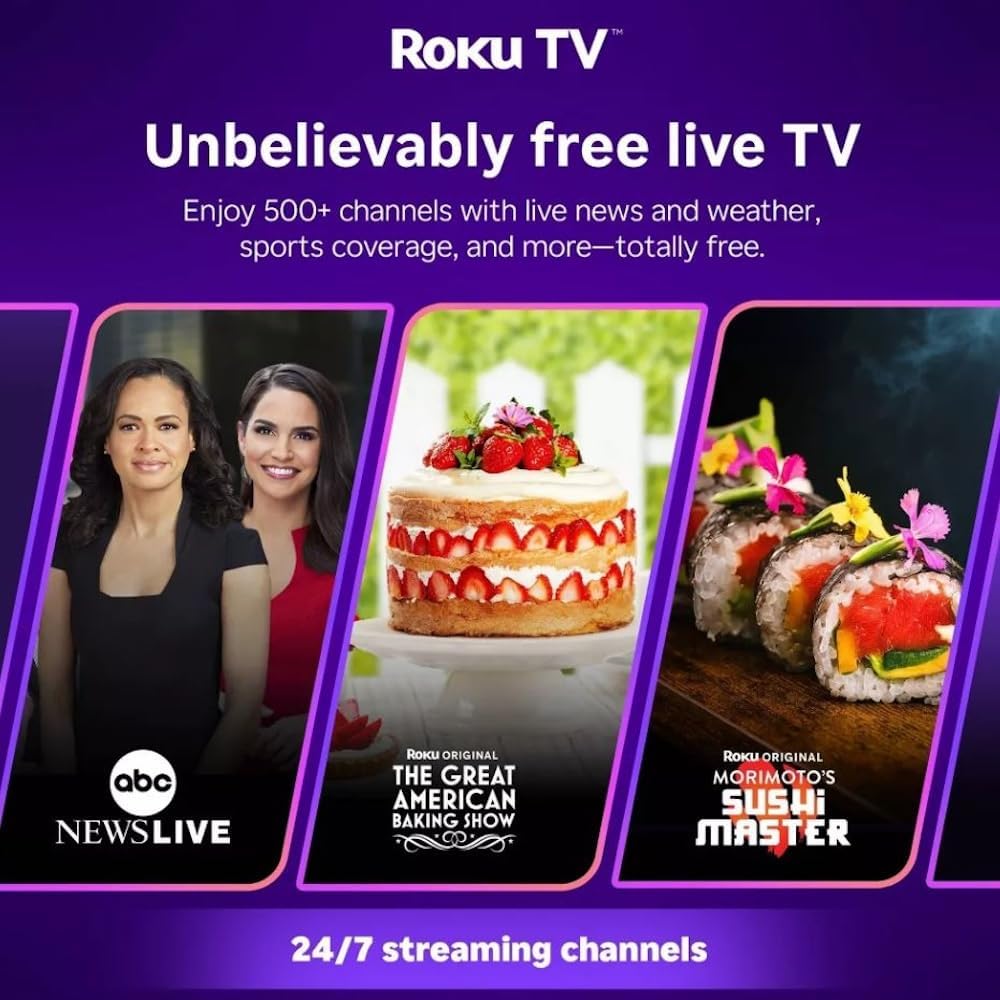
Roku TV interface promoting free live TV channels, featuring examples like ABC News Live, The Great American Baking Show, and Morimoto's Sushi Master.
Access a wide range of streaming services and free content through the Roku Channel Store. The Roku platform offers over 500 free channels, including live television, movies, and news. Use the 'Search' function on the home screen to find specific titles or channels.
Ciri Audio

Roku Hiro TV displaying the home screen with various streaming apps, emphasizing enhanced audio quality.
The TV features enhanced audio quality. For private listening, you can pair Bluetooth headphones directly with the TV. Navigate to Settings > Remotes & devices > Bluetooth devices > Pair new device to connect your headphones.
Penyelenggaraan
Membersihkan TV
- Sentiasa cabut plag TV sebelum membersihkan.
- Gunakan kain lembut yang tidak berbulu untuk mengelap skrin dan kabinet dengan perlahan.
- Untuk tanda degil, ringankan dampen kain dengan air atau pembersih skrin yang lembut dan tidak melelas. Jangan sembur pembersih terus ke skrin.
- Elakkan menggunakan bahan kimia yang keras, pad kasar atau pelarut.
Kemas Kini Perisian
The Roku TV automatically checks for and installs software updates when connected to the internet. To manually check for updates, go to Tetapan > Sistem > Kemas kini perisian.
Menyelesaikan masalah
| Masalah | Penyelesaian |
|---|---|
| Tiada kuasa | Pastikan kabel kuasa disambungkan dengan selamat ke kedua-dua TV dan salur keluar elektrik yang berfungsi. Cuba outlet lain. |
| Tiada gambar, tetapi bunyi hadir | Semak sumber input. Tekan ke Rumah button on the remote and select the correct input. Ensure all HDMI cables are securely connected. |
| Tiada bunyi, tetapi ada gambar | Check the volume level and ensure the TV is not muted. If using external audio, verify connections and settings. |
| Tidak dapat menyambung ke Wi-Fi | Verify your Wi-Fi password. Restart your router and modem. Go to Settings > Network > Set up connection to reconfigure. |
| Alat kawalan jauh tidak berfungsi | Gantikan bateri di alat kawalan jauh. Pastikan tiada halangan antara alat kawalan jauh dan penderia IR TV. |
Spesifikasi
| Nama Model | H32C2C4 |
| Saiz Skrin | 32 Inci |
| Teknologi Paparan | LED |
| Resolusi | 720p |
| Kadar Segar Semula | 60 Hz |
| Sistem Operasi | OS Roku |
| Teknologi Ketersambungan | Bluetooth, HDMI, Optical Audio, USB, Wi-Fi |
| Total Number of HDMI Ports | 3 |
| Jumlah Port USB | 1 |
| Dimensi Produk (D x W x H) | 3.2"D x 28.3"W x 16.9"H |
| Berat Barang | 7.5 paun |
| Voltage | 120 Volt (AC) |
| Jenis Pemasangan | Lekap Meja |
| warna | Hitam |
Maklumat Waranti
This Roku Hiro TV is covered by a 90-day Replacement Warranty. Please retain your proof of purchase for any warranty claims. For detailed terms and conditions, refer to the warranty documentation included with your product or visit the official Roku support webtapak.
Sokongan
For further assistance, troubleshooting guides, or to contact customer support, please visit the official Roku support website. You can find comprehensive FAQs and contact information there.