
SQUATZ SQWPVH15WH
Squatz 2-in-1 Walking Pad Treadmill with Handlebar & Vibration Plates User Manual
Model: SQWPVH15WH
Arahan Keselamatan Penting
Baca semua arahan dengan teliti sebelum menggunakan perkakas ini. Simpan manual ini untuk rujukan masa hadapan.
- Sentiasa letakkan treadmill di atas permukaan yang rata dan stabil.
- Pastikan ruang kosong yang mencukupi di sekeliling treadmill (sekurang-kurangnya 2 meter di belakang dan 0.6 meter di setiap sisi).
- Jauhkan kanak-kanak dan haiwan peliharaan dari treadmill semasa operasi.
- Jangan kendalikan treadmill jika ia mempunyai kord atau palam yang rosak, atau jika ia tidak berfungsi dengan betul.
- Wear appropriate athletic footwear. Do not use the treadmill barefoot or in socks.
- The maximum user weight capacity is 119.75 kg (264 lbs). Do not exceed this limit.
- Rujuk doktor sebelum memulakan sebarang program senaman.
- Cabut palam treadmill daripada soket kuasa apabila tidak digunakan atau sebelum membersihkan.
Produk Selesaiview
The Squatz 2-in-1 Walking Pad Treadmill with Handlebar & Vibration Plates is designed for versatile home or office fitness. It functions as both a walking pad and a vibration plate, offering options for walking, balance training, and light recovery. This model includes a foldable handlebar for stability and a device holder for convenience.
Komponen yang Disertakan:
- Squatz Walking Pad Treadmill
- Alat Kawalan Jauh
- Power Cable (US / Canada Plug)
- L Spanner
- Minyak Silikon
Arahan Persediaan
The Squatz 2-in-1 Walking Pad Treadmill arrives fully assembled, requiring minimal setup before first use.
- Membongkar: Keluarkan treadmill dari bungkusannya dengan berhati-hati.
- penempatan: Letakkan treadmill di atas permukaan yang kukuh dan rata. Pastikan terdapat ruang yang mencukupi di sekeliling unit untuk operasi yang selamat.
- Persediaan Hendal: If using the handlebar, unfold it into the upright position until it locks securely. The device holder can be attached to the handlebar.
- Sambungan Kuasa: Connect the power cable to the treadmill and then plug it into a grounded electrical outlet.
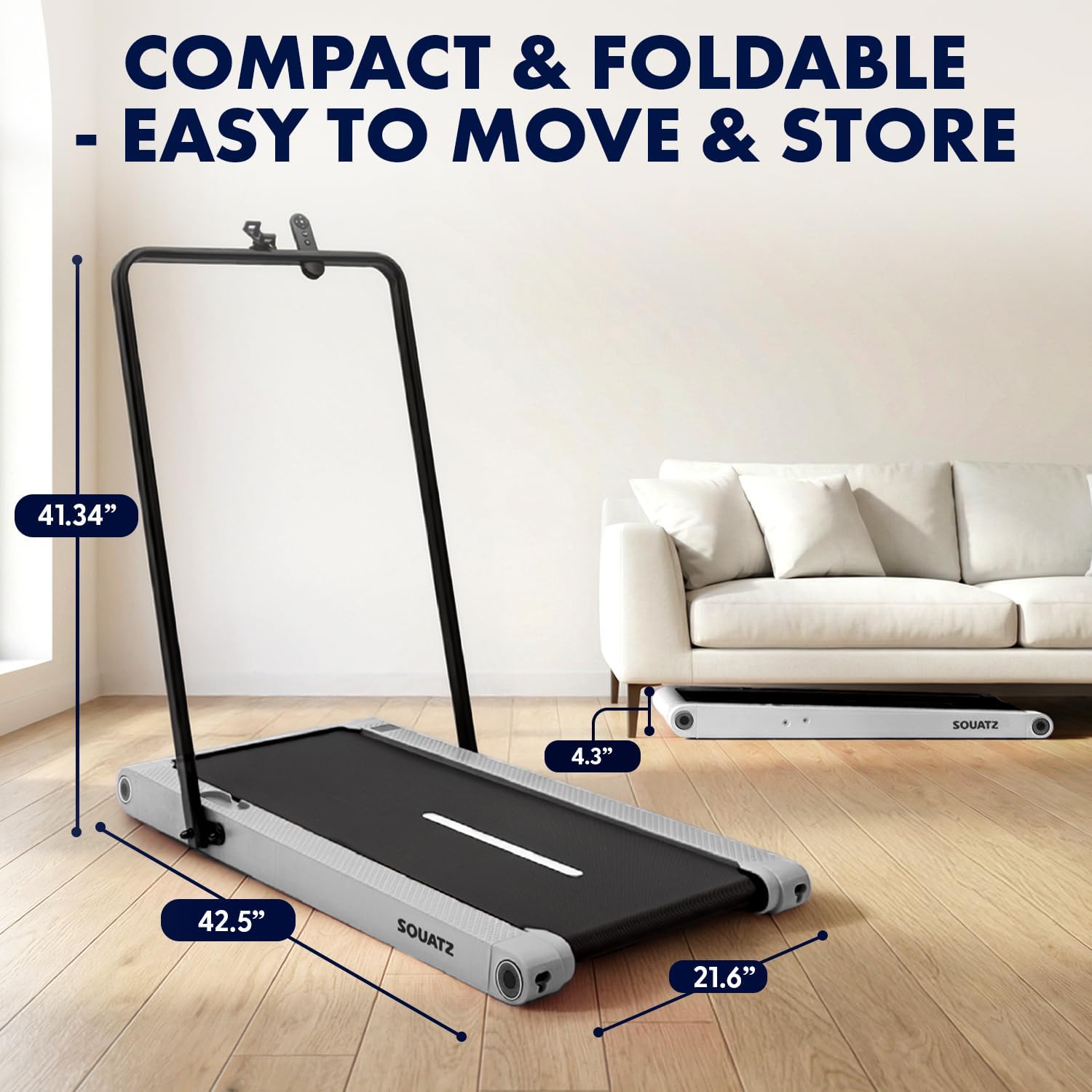
Image: The treadmill shown with its dimensions (42.5 inches length, 21.6 inches width, 4.3 inches height when flat, 41.34 inches height with handlebar up) and its compact storage capability under a sofa.
Arahan Operasi
Menghidupkan/Mematikan
- To power on, plug in the treadmill and press the power button on the remote control or the unit.
- To power off, press the power button again. Always unplug the unit when not in use.
Mod Pengendalian

Image: Visual representation of the three primary operating modes: Walking Mode (0.5 MPH min. speed), Running Mode (3.7 MPH max. speed), and Vibration Mode (4 mode adjustable). A person is shown walking on the pad at a standing desk, another running with the handlebar, and a third performing squats on the pad in vibration mode.
- Mod Berjalan: Ideal for light activity, with a minimum speed of 0.5 MPH.
- Mod Berlari: For more intense workouts, reaching a maximum speed of 3.7 MPH.
- Mod Getaran: Activates built-in vibration plates for muscle activation, balance training, or recovery.
Vibration Training
The treadmill features integrated vibration plates with 4 adjustable modes.

Imej: Empat bekasamples of vibration fitness: Gentle Vibration (person sitting), Moderate Vibration (person squatting), Strong Vibration (person standing with phone), and Intense Vibration (person standing with hands on hips). Red glowing areas indicate vibration.
- Use the remote control to select between Gentle, Moderate, Strong, and Intense vibration levels.
- Vibration training can be used independently or in conjunction with walking.
Kawalan dan Paparan
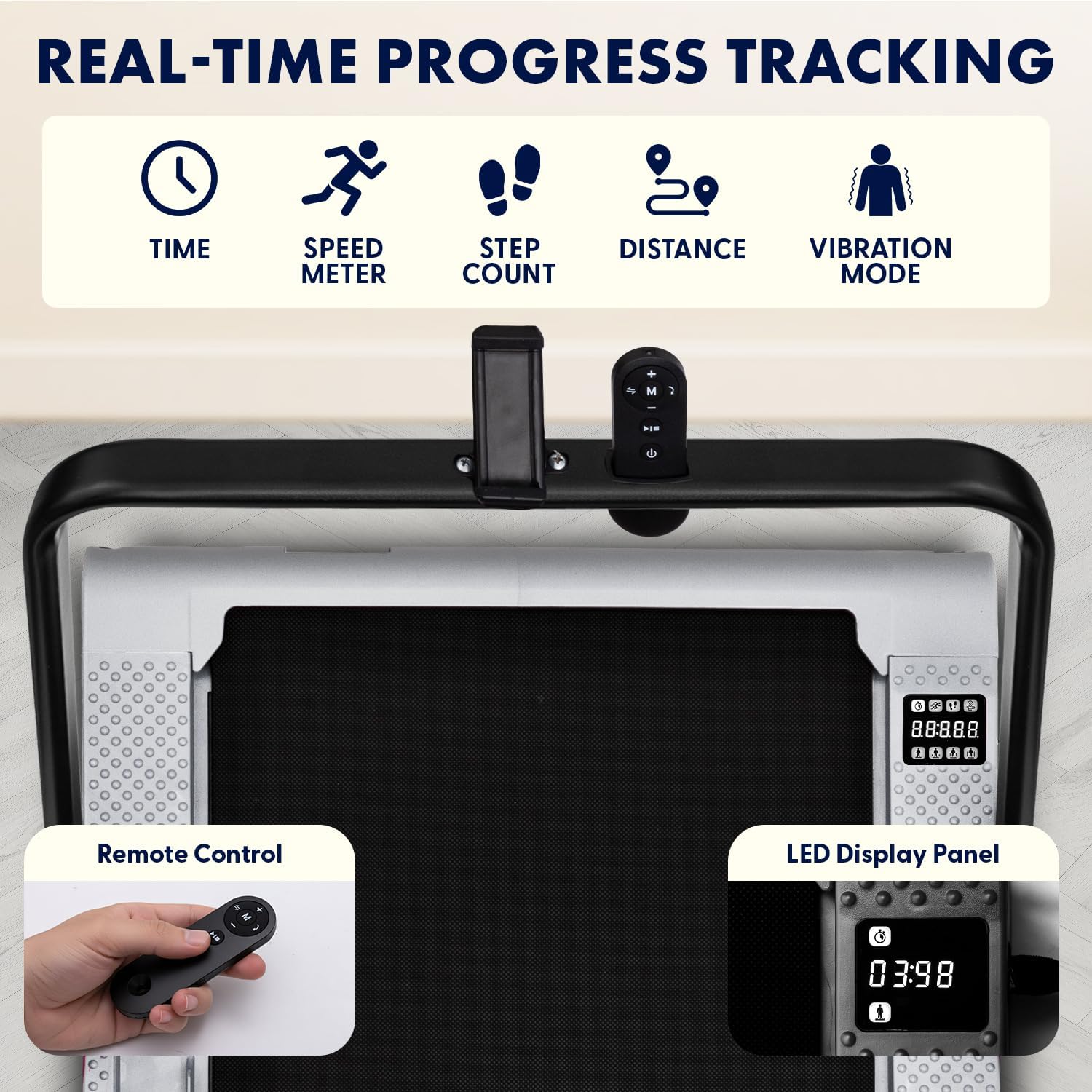
Image: Close-up of the treadmill's LED display panel showing time, speed, step count, distance, and vibration mode indicators. A remote control is also shown, featuring power, speed adjustment, and mode selection buttons.
- Panel Paparan LED: Tracks real-time data including time, calories burned, speed, and distance.
- Kawalan Jauh: Use the remote to power on/off, adjust speed, select operating modes, and choose from 12 preset programs.
- Program Pratetap: The treadmill offers 12 pre-programmed workouts for varied training sessions. Refer to the remote control instructions for program selection.
Bluetooth and App Integration
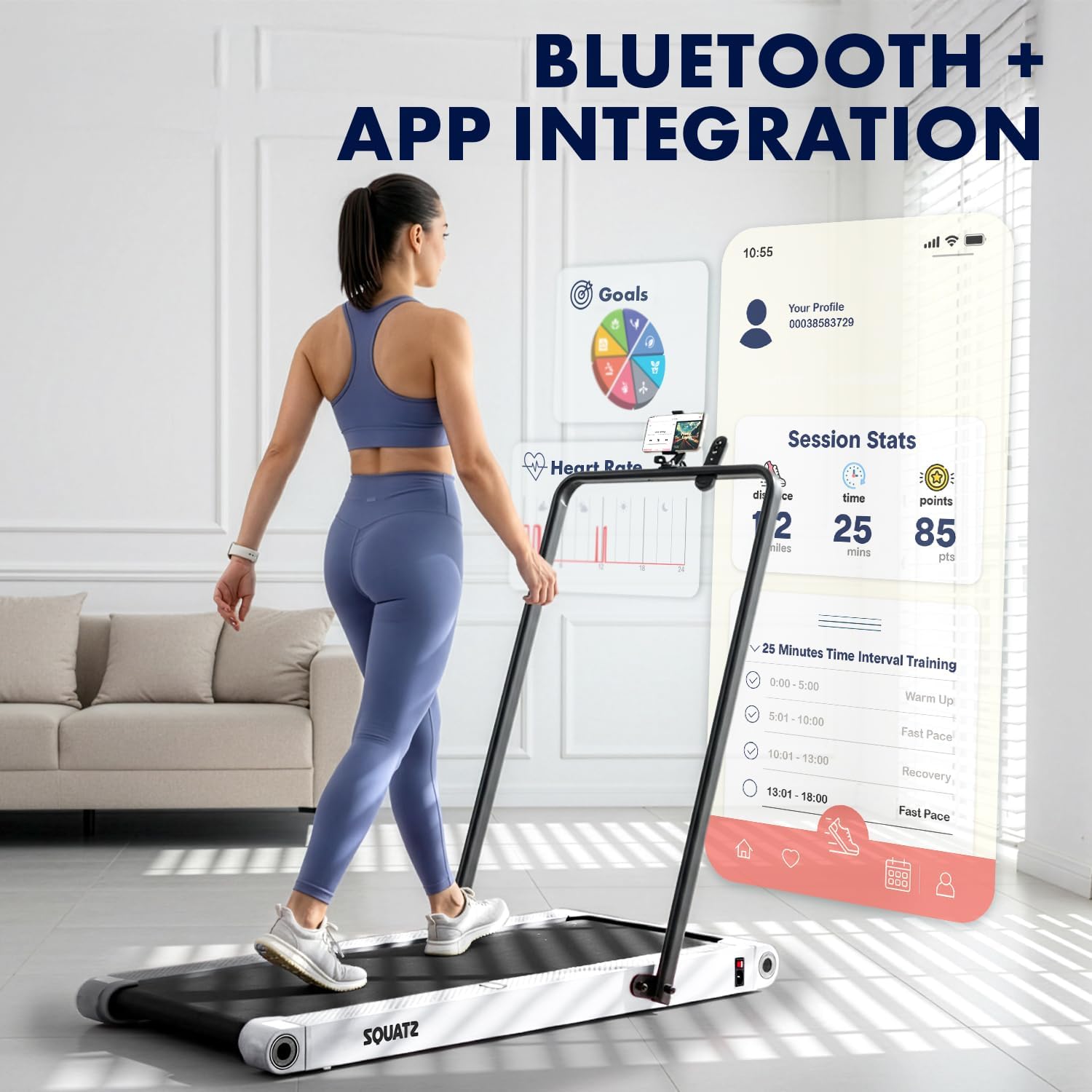
Image: A person walking on the treadmill while looking at a smartphone displaying a fitness app interface. The app shows session statistics like distance, time, and points, along with workout goals and interval training options.
- The treadmill supports Bluetooth connectivity for integration with a compatible fitness app.
- Download the official Squatz fitness app (if available) to track progress, set goals, and access additional workout features.
- Follow the app's instructions for pairing your device with the treadmill.
Penyelenggaraan
Penyelenggaraan tetap memastikan umur panjang dan prestasi optimum treadmill anda.
Pembersihan
- Sentiasa cabut plag treadmill sebelum membersihkan.
- Lap ke bawah paparan dan permukaan luar dengan lembut, damp kain. Elakkan pembersih yang kasar.
- Sembur vakum di bawah treadmill secara berkala untuk membuang habuk dan serpihan.
Pelinciran Tali Pinggang
- The running belt requires periodic lubrication with the provided silicone oil to reduce friction and extend belt life.
- Refer to the specific instructions included with the silicone oil for application frequency and method. Generally, apply a small amount under the belt every few months, depending on usage.
Menyelesaikan masalah
Jika anda menghadapi masalah dengan treadmill anda, rujuk masalah dan penyelesaian biasa berikut:
| Masalah | Kemungkinan Punca | Penyelesaian |
|---|---|---|
| Treadmill tidak boleh dihidupkan | Power cable not connected; Outlet issue; Power button not pressed | Ensure power cable is securely plugged into treadmill and a working outlet. Press the power button on the unit or remote. |
| Belt stops or slips during use | Belt requires lubrication; Belt tension is incorrect; Overload | Apply silicone oil to the belt. Check belt tension (refer to maintenance section). Ensure user weight does not exceed maximum capacity. |
| Alat kawalan jauh tidak berfungsi | Low battery; Obstruction; Not paired | Replace remote control battery. Ensure no obstructions between remote and treadmill. Re-pair remote if necessary (refer to remote instructions). |
| Bunyi luar biasa dari motor | Debris under belt; Motor issue | Unplug and carefully check for debris under the belt. If noise persists, contact customer support. |
If the problem persists after attempting these solutions, please contact Squatz customer support.
Spesifikasi

Imej: Keratan view of the treadmill highlighting the 1.0 HP motor, shock absorber, and indicating a speed range of 0.5-3.7 MPH.

Image: Close-up of the treadmill's anti-slip, multi-layer running belt, showing its dimensions (39.3 inches length, 15 inches width) and indicating support for up to 264 lbs.
| Ciri | Perincian |
|---|---|
| Nombor Model | SQWPVH15WH |
| Dimensi Produk (L x W x H) | 108D x 54.9W x 105H Centimetres (with handlebar up) |
| Berat Barang | 14 kg |
| bahan | Polypropylene (PP), Powder Coated Steel |
| Kuasa Kuda Motor | 1.0 HP (Tanpa Berus) |
| Julat Kelajuan | 0.5 - 3.7 Batu sejam |
| Cadangan Berat Maksimum | 119.75 kg (264 lbs) |
| Tahap Kebisingan | ≤45 dB |
| Dimensi Tali Pinggang Larian | 39.3" x 14.9" |
| Plat Getaran | Integrated, 4 adjustable modes |
| Paparan | LED (Time, Calories, Speed, Distance) |
| Kawalan | Alat Kawalan Jauh |
| Perhimpunan Diperlukan | Tidak (Tiba dalam keadaan terpasang sepenuhnya) |
| UPC | 842893184166 |
Waranti dan Sokongan
Maklumat Waranti
This Squatz Walking Pad Treadmill comes with a Waranti 1 Tahun from the date of purchase. This warranty covers manufacturing defects under normal use. It does not cover damage caused by misuse, accident, unauthorized modification, or improper maintenance.
Sokongan Pelanggan
For technical assistance, warranty claims, or any questions regarding your Squatz product, please contact our customer support team. Have your model number (SQWPVH15WH) and proof of purchase ready when contacting support.
Maklumat Hubungan: Please refer to the contact details provided on the Squatz official webtapak atau dokumentasi pembelian anda untuk saluran sokongan yang paling terkini.
Ask a question about this manual
Ask about setup, troubleshooting, compatibility, parts, safety, or missing instructions. Manuals+ will review the question and use this page’s manual context to help answer it.