
pengenalan
This manual provides instructions for the RadioShack Mechanical Gaming Keyboard, Model 2607135. This keyboard features a 98-key layout, mechanical switches designed for durability, adjustable rainbow backlighting, 25-key anti-ghosting, and an integrated rotary knob for volume control. It is designed for plug-and-play operation via USB and is compatible with Windows operating systems.
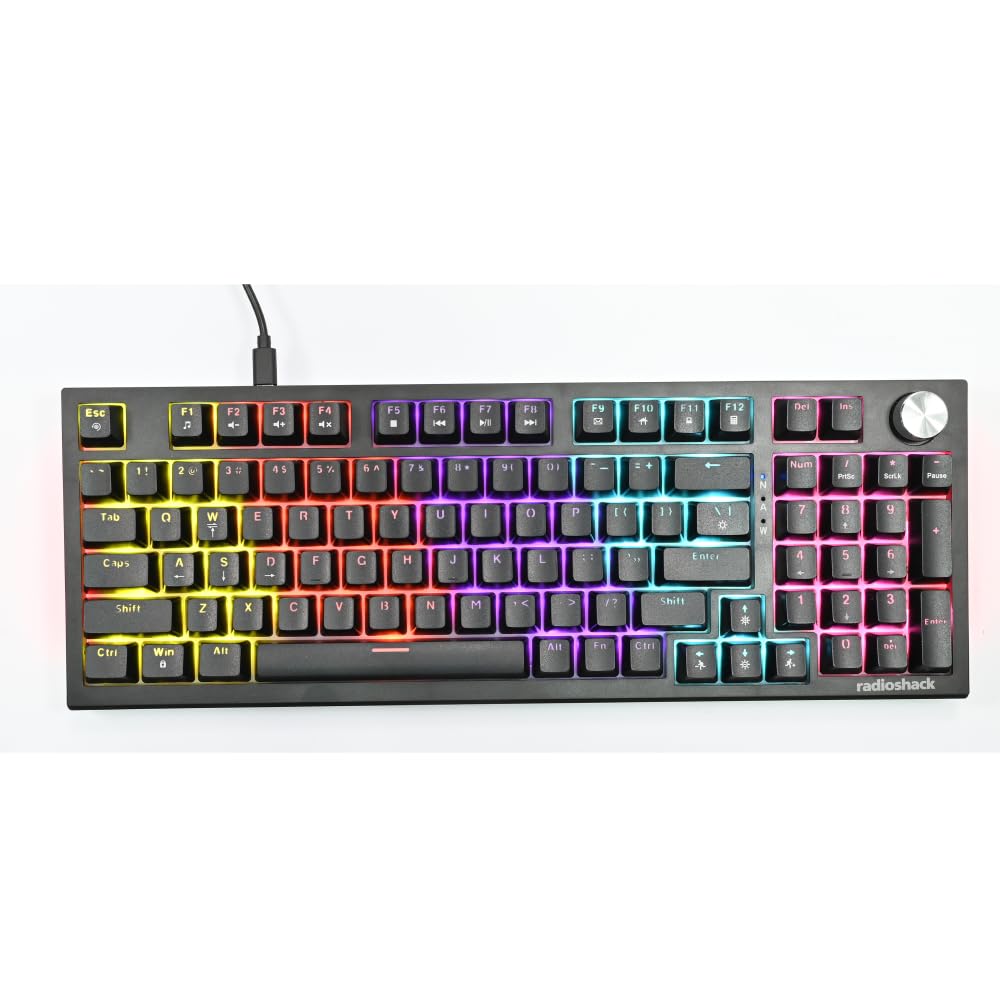
Image: The RadioShack Mechanical Gaming Keyboard, showcasing its 98-key layout and vibrant rainbow backlighting.
Kandungan Pakej
Sila semak kandungan pakej untuk memastikan semua item ada:
- 1x RadioShack Mechanical Gaming Keyboard
- 1x Kabel USB
- 1x Manual Pengguna (dokumen ini)

Image: A graphic illustrating the contents of the product package, including the gaming keyboard and user manual.
Persediaan
- Buka pek Papan Kekunci: Carefully remove the keyboard and USB cable from its packaging.
- Sambung ke Komputer: Insert the USB-A connector of the provided USB cable into an available USB port on your computer.
- Pemasangan Pemandu: The keyboard is plug-and-play. Your operating system (Windows XP-10 compatible) will automatically detect and install the necessary drivers. No additional software installation is required.
- penempatan: Letakkan papan kekunci di atas permukaan yang stabil dan rata. Laraskan kaki belakang untuk sudut menaip pilihan anda.

Image: An illustration highlighting key features such as the 1.5m USB cable length and compatibility with Windows XP through 10.
Arahan Operasi
Susun Atur Papan Kekunci dan Fungsi
The keyboard features a 98-key layout, providing a compact design while retaining essential keys, including a numeric keypad.
Fungsi Tombol Putar
The dedicated rotary knob located on the top right of the keyboard controls audio volume.
- Putar mengikut arah jam: Meningkatkan kelantangan.
- Putar lawan arah jam: Mengurangkan kelantangan.
- Tekan ke bawah: Redam/nyahredamkan audio.

Image: A close-up of a hand interacting with the rotary knob, demonstrating its use for volume adjustment.
Kawalan Lampu Belakang
The keyboard features adjustable rainbow backlighting with multiple modes and side-light effects. Specific key combinations (often Fn + a function key) are used to cycle through lighting modes, adjust brightness, or change speed. Refer to the keycap legends for specific lighting control functions.
- Penukaran Mod: Typically Fn + Ins, Home, PgUp, Del, End, PgDn.
- Pelarasan Kecerahan: Biasanya kekunci anak panah Fn + Atas/Bawah.
- Pelarasan Kelajuan: Biasanya Fn + kekunci anak panah Kiri/Kanan.

Image: A collage showing the keyboard with various backlighting patterns and side-light effects, illustrating the 17 available lighting modes.
Anti-Ghosting
The keyboard supports 25-key anti-ghosting, ensuring that multiple simultaneous key presses are registered accurately, which is crucial for gaming and fast typing.

Image: A user actively typing on the keyboard during a gaming session, emphasizing the accuracy provided by 25 anti-ghosting keys.
Penyelenggaraan
- Pembersihan: Use a soft, dry cloth to wipe the surface of the keyboard. For deeper cleaning, use compressed air to remove dust and debris from between the keycaps. Avoid using liquid cleaners directly on the keyboard.
- Storan: Apabila tidak digunakan untuk tempoh yang lama, simpan papan kekunci di persekitaran yang bersih dan kering, jauh daripada cahaya matahari langsung dan suhu yang melampau.
- Elakkan Tumpahan: Liquids can damage the internal components. Exercise caution to prevent spills on the keyboard.
Menyelesaikan masalah
Papan Kekunci Tidak Membalas
- Pastikan kabel USB disambungkan dengan selamat ke kedua-dua papan kekunci dan komputer.
- Cuba sambungkan papan kekunci ke port USB lain pada komputer anda.
- Mulakan semula komputer anda.
- Uji papan kekunci pada komputer lain untuk menentukan sama ada masalahnya adalah pada papan kekunci atau port/pemacu USB komputer.
Lampu Latar Tidak Berfungsi
- Check if the backlighting has been turned off using the keyboard's function keys (e.g., Fn + brightness down key).
- Cycle through the lighting modes to see if it reactivates.
Keys Not Registering / Ghosting Issues
- Ensure the keyboard is clean and free of debris that might be obstructing key switches.
- The keyboard features 25-key anti-ghosting. If more than 25 keys are pressed simultaneously, some inputs may not register.
Spesifikasi
| Nombor Model | 2607135 |
| Jenama | RadioShack |
| Jenis Papan Kekunci | Papan Kekunci Permainan Mekanikal |
| Reka Letak Kekunci | 98-Kunci |
| Ketersambungan | USB-A (Corded Electric) |
| Ketahanan Suis | Sehingga 50 juta ketukan kekunci |
| Pencahayaan latar | Rainbow (Adjustable modes, brightness, speed) |
| Anti-Ghosting | 25-Kunci |
| Ciri Khas | Rotary Volume Knob, Ergonomic Design |
| Peranti Serasi | Laptop, PC (Windows XP-10) |
| Komponen yang Disertakan | Kabel USB |

Imej: A terperinci view of a mechanical switch, illustrating the 50-million keystroke life for long-term reliability.
Sokongan
For further assistance or inquiries, please refer to the official RadioShack support channels or webtapak.