
1. Pengenalan
Thank you for choosing the Sharp 40HF2265E Full HD Google TV. This manual provides essential information for setting up, operating, and maintaining your television. Featuring integrated Google TV, HDR10 support, Dolby Digital audio, and Bluetooth connectivity, your new TV offers a rich entertainment experience. Please read this manual thoroughly before use to ensure proper operation and to maximize your viewkeseronokan.

Imej 1.1: Depan view of the Sharp 40HF2265E Full HD Google TV.
2. Apa yang ada di dalam Kotak
Buka bungkusan televisyen anda dengan berhati-hati dan pastikan semua item berikut disertakan:
- Sharp 40HF2265E Television
- Kabel Kuasa
- Alat Kawalan Jauh (memerlukan 2 bateri AAA, tidak selalu disertakan)
- Manual Pengguna (dokumen ini)
- Kad Waranti
If any items are missing or damaged, please contact your retailer or Sharp customer support immediately.
3. Persediaan
3.1 Pemasangan Stand
To install the TV stand, place the TV screen-down on a soft, flat surface to prevent scratches. Align the stand feet with the corresponding slots on the bottom of the TV and secure them with the provided screws. Ensure the stand is firmly attached before placing the TV upright.

Imej 3.1: Depan view of the TV with stand feet attached.
3.2 Pemasangan Dinding
If you prefer to wall-mount your TV, you will need a VESA-compatible wall mount (not included). The Sharp 40HF2265E supports a VESA mounting standard of 200 x 200 mm. Refer to the wall mount's instructions for installation. Always ensure the wall can support the weight of the TV and the mount.

Imej 3.2: Belakang view of the TV, highlighting VESA mounting points and ports.
3.3 Menyambung Peranti
Connect your external devices to the appropriate ports on the back and side of the TV. The TV features multiple HDMI, USB, and other connectivity options.
- Port HDMI: Untuk menyambungkan pemain Blu-ray, konsol permainan, kotak atas set, dsb.
- Port USB: Untuk menyambungkan peranti storan USB untuk memainkan media atau untuk kemas kini perisian.
- Pelabuhan Ethernet: Untuk sambungan internet berwayar.
- Input Antena/Kabel: Untuk menyambungkan antena atau isyarat TV kabel.
- Output Audio: Untuk menyambungkan sistem audio luaran.
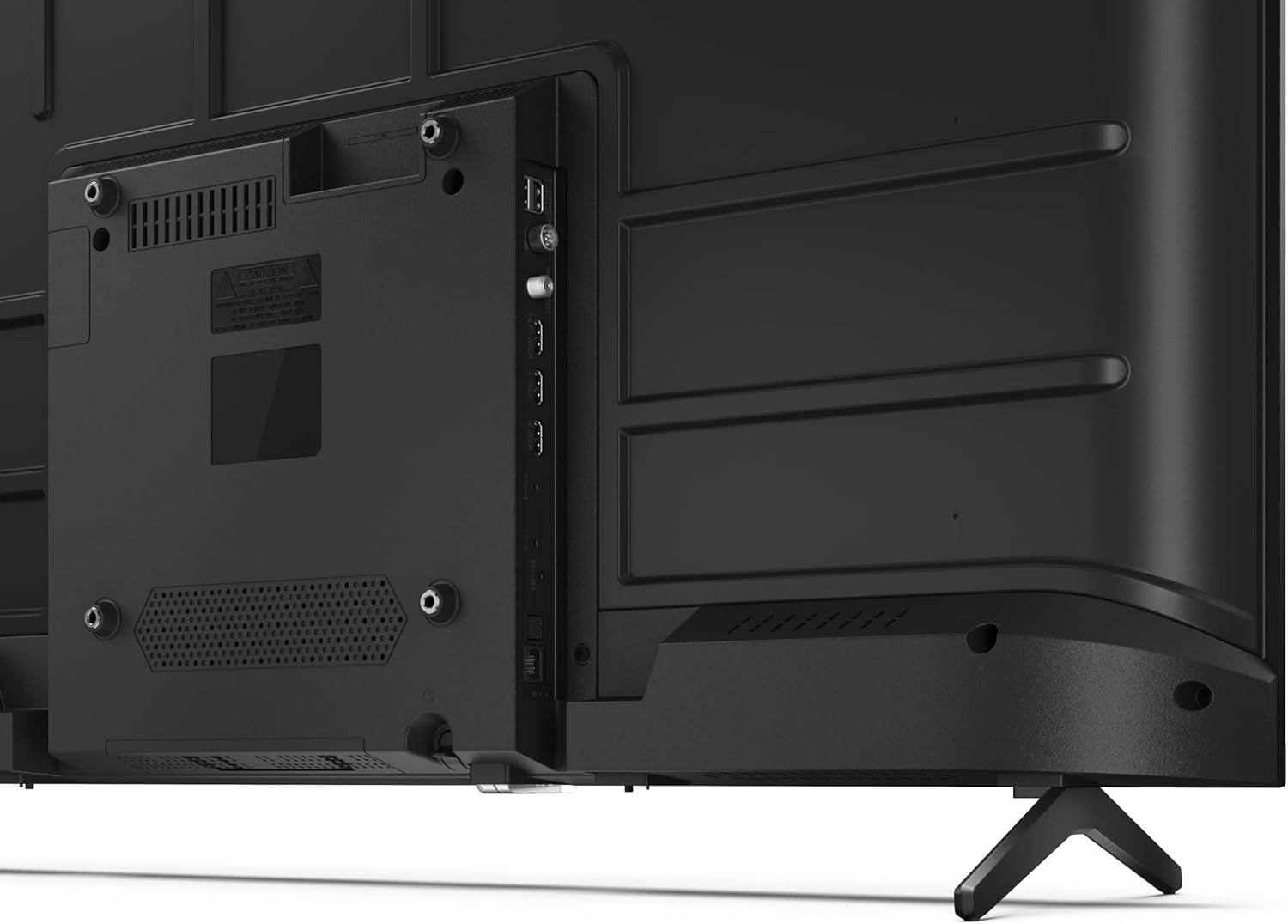
Imej 3.3: Terperinci view daripada port sambungan TV.
3.4 Hidupkan Awal dan Persediaan Google TV
After connecting all necessary cables, plug the power cable into an electrical outlet. Press the power button on the remote control or on the TV. Follow the on-screen instructions to complete the initial setup, including network connection, Google account login, and channel scanning.
4. Beroperasi
4.1 Fungsi Kawalan Jauh
The remote control allows you to navigate the TV's features. Common buttons include Power, Volume Up/Down, Channel Up/Down, Input Source, Home (Google TV), Navigation (directional arrows, OK), Back, and Google Assistant.
4.2 Antara Muka Google TV
Your Sharp TV runs on Google TV, providing a personalized home screen with content recommendations from your subscriptions. Use the remote's navigation buttons to browse movies, shows, apps, and your library.

Image 4.1: The Google TV home screen on the Sharp 40HF2265E.
4.3 Pemilihan Input
To switch between connected devices (e.g., HDMI 1, HDMI 2, TV tuner), press the 'Input' or 'Source' button on your remote control and select the desired input from the on-screen menu.
4.4 Tetapan Gambar dan Bunyi
Access the TV's settings menu to adjust picture modes (Standard, Vivid, Cinema, Game), brightness, contrast, color, and sound modes (Standard, Music, Movie, Speech). The TV supports HDR10 for enhanced contrast and color, and Dolby Digital for rich audio.

Image 4.2: Visual representation of HDR (High Dynamic Range) technology.
4.5 Pembantu Google dan Chromecast
Use the built-in Google Assistant for voice control. Press the Google Assistant button on your remote and speak your commands, such as searching for content, controlling smart home devices, or getting information. Chromecast allows you to cast content directly from compatible devices like smartphones or tablets to your TV.

Image 4.3: Google Assistant integration for voice commands.
4.6 Kesambungan Bluetooth
Pair Bluetooth-enabled devices such as headphones or soundbars with your TV for a wireless audio experience. Navigate to the TV's settings menu, select 'Remotes & Accessories', and then 'Pair new device' to connect.
5. Penyelenggaraan
5.1 Membersihkan TV
Always unplug the TV before cleaning. Use a soft, dry cloth to wipe the screen and TV body. For stubborn marks, lightly dampbersihkan kain dengan air atau pembersih skrin khusus. Jangan sekali-kali menggunakan pembersih, lilin atau pelarut yang kasar.
5.2 Kemas Kini Perisian
Your Google TV may receive automatic software updates. Ensure your TV is connected to the internet to receive these updates, which can improve performance and add new features. You can also manually check for updates in the settings menu.
6. Penyelesaian masalah
Jika anda menghadapi masalah dengan TV anda, rujuk kepada penyelesaian biasa berikut:
- Tiada Kuasa: Check if the power cable is securely plugged into both the TV and the wall outlet. Ensure the outlet is functional.
- Tiada Gambar/Bunyi: Verify that the correct input source is selected. Check all cable connections (HDMI, antenna). Try restarting the TV.
- Alat Kawalan Jauh Tidak Berfungsi: Gantikan bateri (2 AAA). Pastikan tiada halangan antara alat kawalan jauh dan sensor IR TV.
- Isu Sambungan Rangkaian: For Wi-Fi, check your router and ensure the TV is within range. For wired connections, check the Ethernet cable. Try restarting your router and the TV.
- Isu Kualiti Gambar: Laraskan tetapan gambar (kecerahan, kontras, ketajaman). Pastikan sumber input menyediakan isyarat berkualiti tinggi.
For more complex issues, consult the comprehensive troubleshooting section in the full digital manual or contact Sharp customer support.
7. Spesifikasi
Below are the technical specifications for the Sharp 40HF2265E Full HD Google TV:

Image 7.1: Dimensions of the Sharp 40HF2265E TV.
| Ciri | Spesifikasi |
|---|---|
| Jenama | tajam |
| Nombor Model | 40HF2265E |
| Nama Model | Siri HF |
| Tahun Model | 2025 |
| Saiz Skrin | 40 Inci (81 Sentimeter) |
| Teknologi Paparan | LED |
| Resolusi | 1080p (HD Penuh) |
| Kadar Segar Semula | 60 Hz |
| Nisbah Aspek | 16:9 |
| Nisbah Kontras | 100000:1 |
| Screen Finish | Matte |
| Masa Tindak Balas | 8 milisaat |
| Teknologi Lampu Latar | LED |
| Supported HDR Format | HDR10, HLG |
| Peningkatan Kualiti Imej | Dynamic Contrast, HDR10, HLG |
| Motion Enhancement Technology | Interpolasi Gerakan |
| Sistem Operasi | Google TV |
| Internet Applications | Apple TV, Google TV, Hulu, Prime Video, YouTube |
| Ciri Khas | Bluetooth, Chromecast, Dolby Digital, HD Tuner |
| Teknologi Ketersambungan | Ethernet, USB, Wi-Fi |
| Teknologi Tanpa Wayar | Bluetooth |
| Versi Bluetooth | 5.0 |
| Screen Mirroring Technology | Chromecast, Google Cast |
| Jumlah Port HDMI | 3 |
| Total USB 2.0 Ports | 2 |
| Number of Composite Video Inputs | 1 |
| Input Audio | Mini composite/CVBS + audio input |
| Total Audio Output Ports | 2 |
| Mod Keluaran Audio | Stereo |
| Pengekodan Audio | DD |
| Integrated Surround Sound Format | Dolby AC-4, Dolby Digital, Dolby Digital Plus |
| Kuasa Output Pembesar Suara Maks | 16 Watts (2x8W) |
| Bilangan Saluran Audio | 2.0 |
| Sistem Penyiaran | DVB-T2/C/S/S2 |
| Pengekodan Video | MKV |
| Dimensi Produk (DxWxH) | 8.4P x 89.2p x 50.9T cm |
| Berat Barang | 5.4 Kilogram |
| Berat tanpa Stand | 5.4 Kilogram |
| Lebar Asas | 765 Milimeter |
| Piawaian Pemasangan VESA | 200 x 200 mm |
| Penggunaan Kuasa | 37 Watt |
| Voltage | 230 Volt |
| Remote Control Battery Size | AAA |
| Remote Control Battery Quantity | 2 |
| Parental Control Technology | Kindersicherung Über Google Tv |
| EU Spare Parts Availability | 7 Tahun |
8. Waranti dan Sokongan
8.1 Waranti Produk
The Sharp 40HF2265E television comes with a 2-year manufacturer's warranty. Please refer to the included Warranty Card for detailed terms and conditions regarding coverage and service. Keep your proof of purchase for warranty claims.
8.2 Sokongan Pelanggan
If you require further assistance, have questions not covered in this manual, or need technical support, please contact Sharp customer service. Contact information can typically be found on the Warranty Card or the official Sharp webtapak.