
pengenalan
The Cosmic Byte Lumora Tri-Mode Controller is designed to provide a versatile and high-performance gaming experience across multiple platforms. This manual offers detailed instructions for setting up, operating, and maintaining your controller, ensuring you can fully utilize its advanced features.

Image: The Cosmic Byte Lumora controller showcasing its RGB-reveal design.
Ciri-ciri Produk
The Lumora controller integrates several key features for enhanced gameplay:
- Stealth Black Finish with RGB-Reveal Artwork: The controller features a stealth black appearance when RGB lighting is off, revealing a vibrant graphic design when RGB is activated.
- Kayu Joy & Pencetus Hall Effect: Advanced Hall Effect technology provides precise, drift-free control for joysticks and offers both analog and digital modes for triggers.
- Kesambungan Tri-Mod: Supports 2.4GHz wireless, Bluetooth, and wired USB-C connections with a 1000Hz polling rate for low-latency input.
- Giroskop 6-Paksi: Built-in motion sensor for gyro-based input in compatible games, enhancing aiming and motion control.
- Dedicated Windows Software: Allows comprehensive customization of button mapping, macros, RGB lighting, vibration, trigger sensitivity, and joystick response.
- Mechanical Buttons with Macro & Turbo Support: Crisp mechanical ABXY buttons and D-Pad provide tactile feedback. Turbo mode and on-board macro recording are available.
- 3.5mm Audio Jack & Adjustable Trigger Travel: Integrated audio jack for wired headsets and a rear switch to adjust trigger pull distance.
- 1300mAh Battery, Replaceable Caps & Ergonomic Design: Offers up to 10 hours of playtime (RGB off), features replaceable joystick caps and D-Pad, ergonomic grips, and dual vibration motors.

Image: Visual representation of the RGB-reveal feature and Hall Effect components.
Persediaan
1. Pengecasan Awal
Before first use, fully charge the controller using the provided USB-C cable. Connect the USB-C end to the controller and the USB-A end to a power source (e.g., PC, USB wall adapter). The charging indicator will show status and turn off when fully charged.
2. Connecting via Wired USB-C
- Connect the USB-C cable to the controller's port.
- Sambungkan hujung kabel yang lain ke port USB pada PC atau peranti yang serasi anda.
- The controller will be automatically detected and ready for use.
3. Menyambung melalui Wayarles 2.4GHz
- Insert the 2.4GHz wireless dongle into a USB port on your PC or compatible device.
- Hidupkan pengawal.
- Press and hold the 2.4GHz pairing button (refer to controller diagram for location) until the indicator light flashes rapidly.
- The controller will automatically pair with the dongle. The indicator light will become solid when connected.
4. Menyambung melalui Bluetooth
- Hidupkan pengawal.
- Press and hold the Bluetooth pairing button (refer to controller diagram for location) until the indicator light flashes rapidly.
- On your device (PC, Android, iOS, Mac), go to Bluetooth settings and search for new devices.
- Select "Cosmic Byte Lumora" from the list of available devices.
- The indicator light on the controller will become solid when successfully paired.

Image: Illustration of the tri-mode connectivity options: wired, 2.4GHz wireless, and Bluetooth.
Arahan Operasi
1. Hidupkan/Mati Kuasa
- Untuk Menghidupkan: Tekan butang Utama.
- Untuk Mematikan: Press and hold the Home button for 3-5 seconds. The controller will also automatically power off after a period of inactivity.
2. Kawalan Pencahayaan RGB
The RGB lighting can be toggled on or off, revealing or concealing the artwork. Specific lighting modes and colors can be customized via the dedicated Windows software.

Image: The controller demonstrating its appearance with RGB lighting off and on.
3. Kayu Ria dan Pencetus Kesan Hall
The Hall Effect joysticks provide precise, smooth movement without drift. The Hall Effect triggers can operate in two modes:
- Mod Analog: For gradual input, ideal for racing games or precise acceleration.
- Mod Digital: For instant on/off input, suitable for shooting games where quick response is critical.

Imej: Jarak dekat view of the Hall Effect triggers on the controller.
4. 6-Axis Gyroscope
The integrated 6-axis gyroscope enables motion-based controls in games that support this feature. This can be used for aiming, steering, or other interactive movements.
5. Macro and Turbo Functions
- Makro: Record a sequence of button presses to a dedicated macro button for complex actions with a single press. Refer to the Windows software section for detailed setup.
- Turbo: Activate Turbo mode on specific buttons to enable rapid, continuous input when held down.

Image: The controller highlighting the macro buttons and the turbo function indicator.
6. Adjustable Trigger Travel
A switch on the rear of the controller allows you to adjust the physical travel distance of the triggers. This enables quick toggling between a short pull for faster response and a longer pull for more nuanced control.
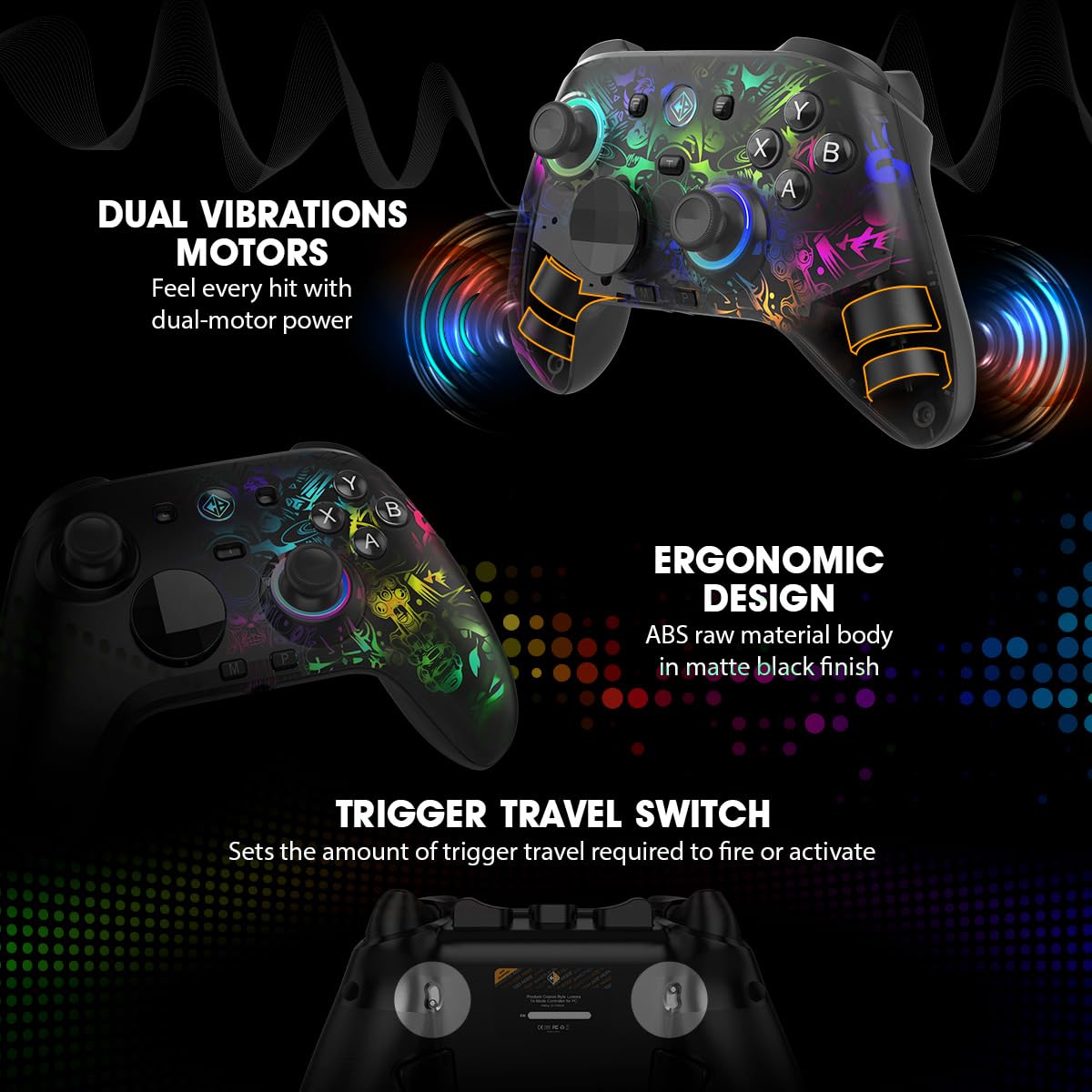
Image: The controller's rear view, illustrating the trigger travel switch.
7. Jack Audio 3.5mm
Connect a wired headset to the 3.5mm audio jack for direct audio output and microphone input in supported connection modes (e.g., wired USB-C, 2.4GHz wireless).

Image: The controller's bottom view, highlighting the 3.5mm audio jack and USB-C port.
Windows Software Customization
The dedicated Windows software allows for in-depth customization of your Lumora controller.
1. Downloading and Installation
Visit the official Cosmic Byte website to download the latest Lumora controller software. Follow the on-screen instructions for installation.
2. Pilihan Penyesuaian
- Pemetaan Butang: Reassign functions to any button.
- Macro Configuration: Create and assign complex macro sequences.
- Pencahayaan RGB: Adjust colors, effects, and brightness of the RGB lighting.
- Keamatan Getaran: Customize the strength of the dual vibration motors.
- Sensitiviti Pencetus: Fine-tune the response curve of the Hall Effect triggers.
- Joystick Response: Adjust dead zones and response curves for joysticks.
- Kemas kini Firmware: Keep your controller updated with the latest performance improvements and features.

Image: The controller alongside a depiction of its Windows software interface.
Penyelenggaraan
1. Pembersihan
Wipe the controller regularly with a soft, dry cloth. For stubborn dirt, use a slightly damp cloth and ensure the controller is completely dry before use. Avoid using harsh chemicals or abrasive materials.
2. Penjagaan Bateri
- Elakkan menyahcas sepenuhnya bateri dengan kerap.
- Store the controller in a cool, dry place if not used for extended periods.
- Gunakan hanya kabel USB-C yang disediakan atau setara yang diperakui untuk mengecas.
3. Replacing Joystick Caps and D-Pad
The joystick caps and D-Pad are replaceable. Gently pull the existing caps/D-Pad upwards to remove them and press the new ones firmly into place until they click.
Menyelesaikan masalah
1. Isu Sambungan
- Berwayar: Ensure the USB-C cable is securely connected to both the controller and the device. Try a different USB port or cable.
- Wayarles 2.4GHz: Ensure the dongle is properly inserted. Re-pair the controller by holding the 2.4GHz pairing button. Check for interference from other wireless devices.
- Bluetooth: Ensure Bluetooth is enabled on your device. Forget the device in your Bluetooth settings and re-pair. Ensure the controller is in Bluetooth pairing mode.
2. Joystick Drift or Incorrect Input
- Calibrate the joysticks using the dedicated Windows software.
- Pastikan firmware pengawal dikemas kini.
- Clean around the base of the joysticks to remove any debris.
3. Pencahayaan RGB Tidak Berfungsi
- Check RGB settings in the Windows software.
- Pastikan pengawal mempunyai cas bateri yang mencukupi.
4. Bateri Tidak Mengecas
- Verify the USB-C cable and power source are functional.
- Pastikan port pengecasan pada pengawal bersih dan bebas daripada serpihan.
5. Software Not Detecting Controller
- Ensure the controller is connected to the PC via wired USB-C or 2.4GHz wireless.
- Restart the software and the controller.
- Reinstall the Windows software.
Spesifikasi
| Jenama | Bait Kosmik |
| Nama Model | Lumora |
| Peranti Serasi | Android, iOS, Mac, PC |
| Jenis Pengawal | Pad permainan |
| Teknologi Ketersambungan | Bluetooth, USB-C, Tanpa Wayar 2.4GHz |
| Ciri-ciri Produk | Ergonomic, Rumble, Wireless, Hall Effect Joysticks & Triggers, Mechanical Buttons, 6-Axis Gyro, Macro & Turbo, RGB Lighting |
| Platform Perkakasan | Desktop, Komputer riba, Telefon Pintar |
| Jenis Sumber Kuasa | Dikuasakan Bateri |
| Berat Barang | 0.2 Kilogram |
| Dimensi Item | 10 x 8 x 5 Sentimeter |
| Kapasiti Bateri | 1300mAh |
| Kadar Mengundi | 1000Hz (Wired & 2.4GHz Wireless) |
| Bicu Audio | 3.5mm |
| Negara Asal | China |
Maklumat Waranti
The Cosmic Byte Lumora Tri-Mode Controller comes with a Waranti 1 Tahun against manufacturing defects from the date of purchase. This warranty covers defects in materials and workmanship under normal use. It does not cover damage caused by misuse, accidents, unauthorized modifications, or normal wear and tear. Please retain your proof of purchase for warranty claims.
Sokongan
For further assistance, technical support, or warranty claims, please visit the official Cosmic Byte website or contact their customer service. You can typically find contact details and support resources on the manufacturer's webtapak.
Maklumat Hubungan Pengilang: Cosmic Byte, Prakash Warehousing, S. No.163, Hissa No 1-2-3-4-5A-5B/2/1, Phursungi, Pune 412308, Maharashtra, India.