
1. Pengenalan
This manual provides detailed instructions for the safe and effective use of the HABOTEST HT821A Thermal Imager. The HT821A is a professional-grade handheld thermal imaging camera designed for fast, accurate, and intuitive temperature detection across various applications. It features a temperature measurement range of -20°C to 550°C (-4°F to 1022°F) and an infrared resolution of 96x96, which can be enhanced to 240x240 using super-resolution technology. Please read this manual thoroughly before operating the device.
2. Maklumat Keselamatan
To ensure safe operation and to prevent damage to the device, please observe the following safety precautions:
- Jangan halakan pengimej haba terus ke sumber tenaga yang kuat, seperti matahari atau laser berkuasa tinggi, kerana ini boleh merosakkan pengesan.
- Elakkan mendedahkan peranti kepada suhu ekstrem, kelembapan tinggi atau persekitaran yang menghakis.
- Jangan buka atau ubah suai peranti ini. Pembaikan hanya boleh dilakukan oleh kakitangan servis yang dibenarkan.
- Gunakan hanya kabel pengecasan dan penyesuai kuasa yang ditentukan.
- Jauhkan peranti daripada air dan cecair lain.
- Ensure the device is securely held during operation to prevent accidental drops.
- Buang bateri dan peranti mengikut peraturan tempatan.
3. Produk Lebihview dan Komponen
The HABOTEST HT821A Thermal Imager package includes the following items:
- HABOTEST HT821A Thermal Imager
- Kabel Data USB
- Manual Pengguna (dokumen ini)
Familiarize yourself with the main parts of the thermal imager:

Rajah 3.1: Depan view of the HABOTEST HT821A Thermal Imager, showing the display screen and control buttons.
4. Persediaan
4.1 Mengecas Peranti
The HT821A Thermal Imager is equipped with a built-in 2000mAh Lithium battery. Before initial use, ensure the device is fully charged.
- Connect the provided USB-C data cable to the USB-C port on the thermal imager.
- Sambungkan hujung kabel USB-C yang satu lagi ke penyesuai kuasa USB yang serasi (tidak disertakan) atau port USB komputer.
- The charging indicator on the device will illuminate, indicating that charging is in progress.
- Once fully charged, the indicator light will change (refer to device display for battery status).
4.2 Menghidupkan/Mematikan
- Untuk Menghidupkan: Press and hold the power button (usually marked with a power symbol) until the screen illuminates.
- Untuk Mematikan: Tekan dan tahan butang kuasa sehingga peranti dimatikan.
5. Arahan Operasi
5.1 Pengukuran Suhu Asas
The HT821A provides real-time temperature readings with automatic tracking of the highest, lowest, and center temperatures on the screen.

Rajah 5.1: Display showing automatic tracking of highest and lowest temperature points.
The device automatically identifies and displays the maximum, minimum, and center point temperatures within the field of view, providing immediate insights into temperature distribution.
5.2 Super-Resolution Mode
Enhance the clarity of thermal images by activating the super-resolution mode. This technology increases the infrared resolution from 96x96 to 240x240.
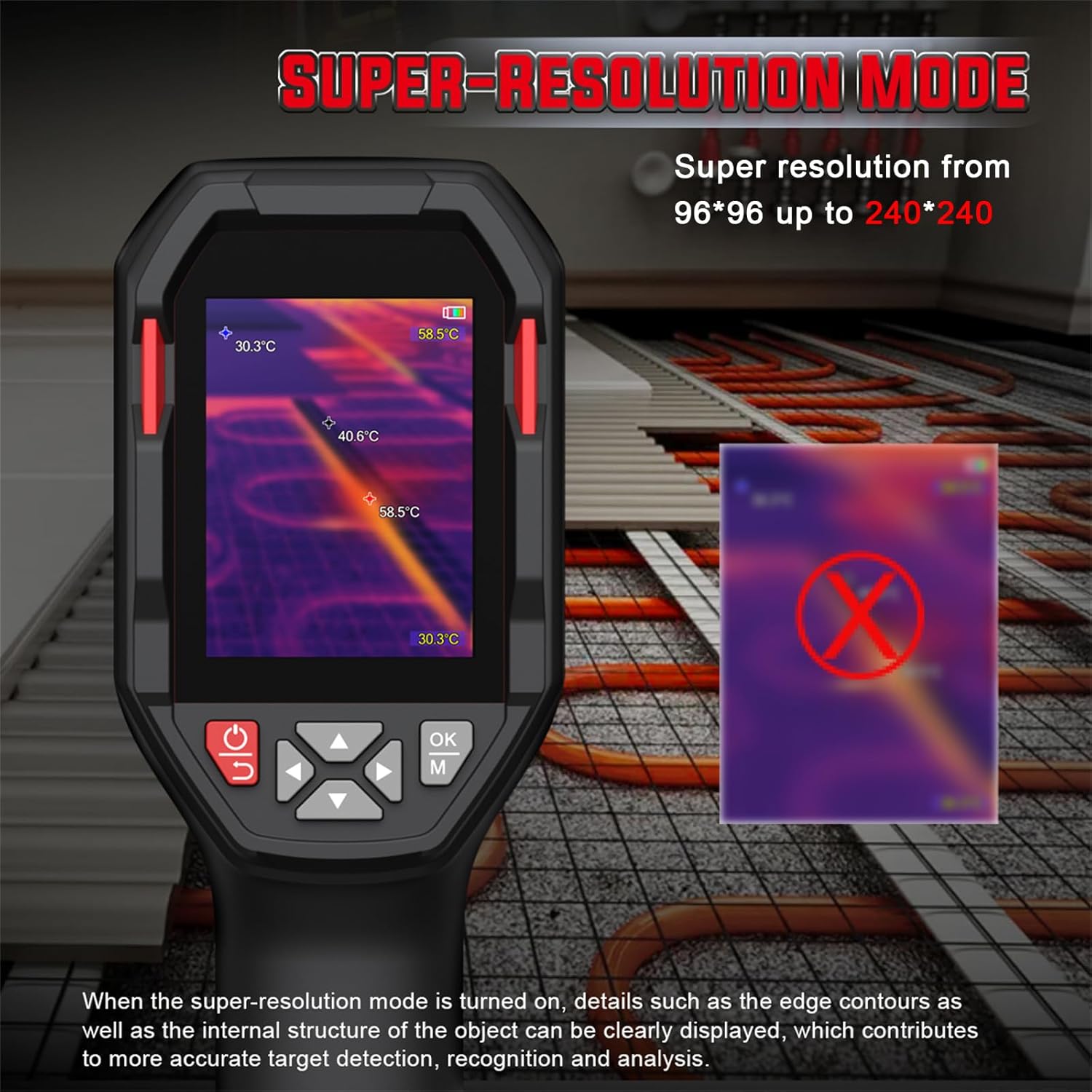
Rajah 5.2: Comparison of standard and super-resolution thermal images, showing enhanced detail.
- Refer to the device menu for activating or deactivating the super-resolution feature.
- When active, details such as edge contours and internal structures of objects become clearer, aiding in precise target detection and analysis.
5.3 Multiple Color Palettes
The HT821A offers 8 pseudocolor palettes to visualize temperature differences. Different palettes can highlight specific temperature ranges or details, making them suitable for various inspection scenarios.
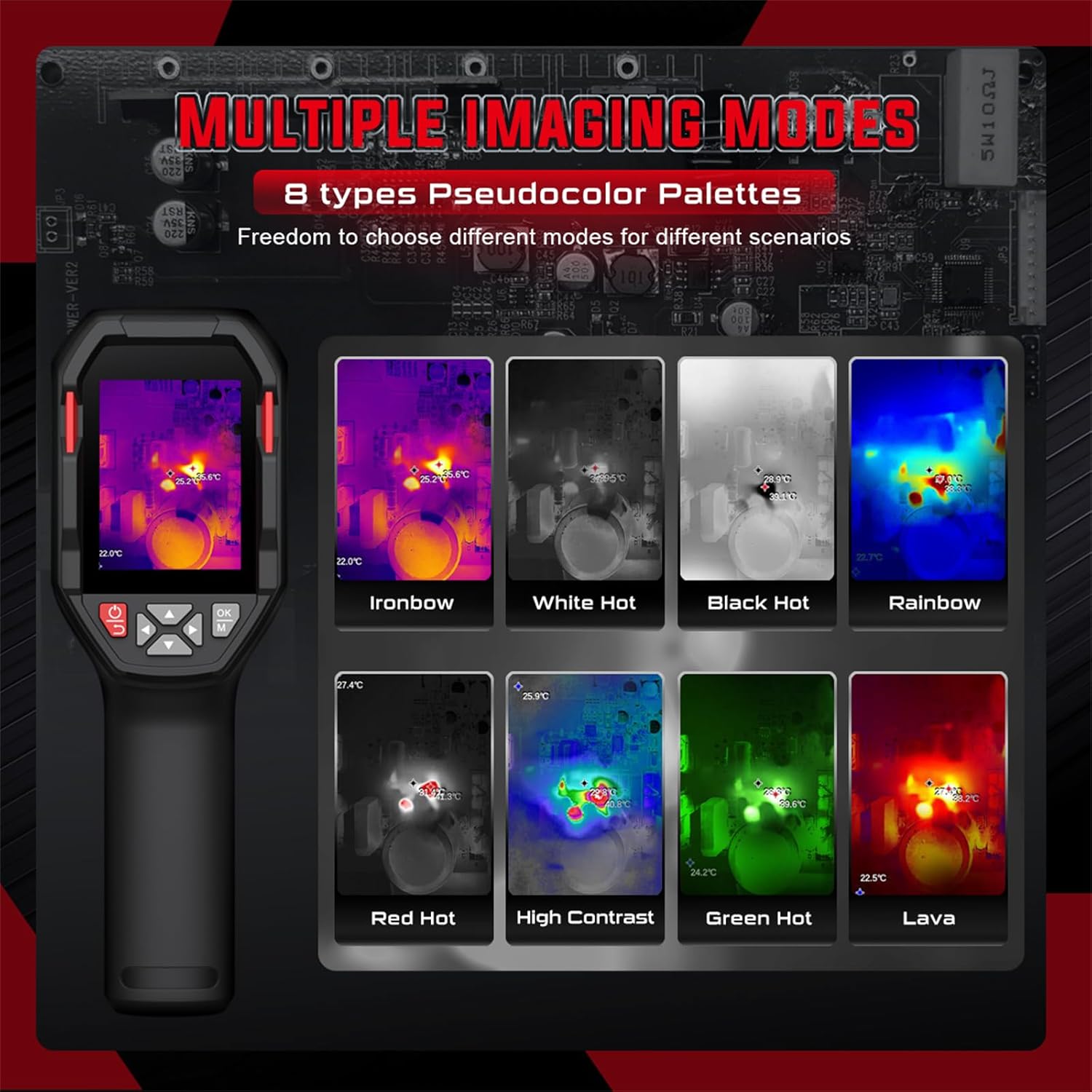
Rajah 5.3: Examples of different pseudocolor palettes available on the HT821A.
- Common palettes include Ironbow, White Hot, Black Hot, Rainbow, Red Hot, High Contrast, Green Hot, and Lava.
- Navigate through the device menu to select the desired color palette.
5.4 Penggera Suhu Tinggi dan Rendah
Set custom temperature limits to trigger an alarm when measured temperatures exceed or fall below the defined thresholds.

Rajah 5.4: Visual representation of high and low temperature alarm functionality.
- Access the alarm settings in the device menu.
- Define the upper and lower temperature limits.
- The device will provide a visual or audible alert when temperatures fall outside the set range.
5.5 Area Temperature Measurement
The device allows for fixed-area temperature measurement, enabling you to analyze temperatures within a specific region of interest.

Rajah 5.5: Display with a fixed-area measuring frame, showing center, maximum, and minimum temperatures within that frame.
- Activate the area measurement function through the menu.
- A frame will appear on the screen, and the device will measure the center, maximum, and minimum temperatures exclusively within this frame.
5.6 Distance Compensation and Emissivity
- Pampasan Jarak: The HT821A supports distance compensation for improved accuracy, with settings for 0.5 M, 1 M, 2 M, and 3 M. Adjust this setting based on your distance to the target object.
- Emisiviti boleh laras: The device features adjustable emissivity to ensure accurate readings across different material surfaces. Consult a table of common material emissivities and adjust the setting in the menu accordingly.
5.7 Tetapan Bahasa
The HT821A supports multiple languages for user interface navigation.
Rajah 5.6: Language selection menu on the HT821A.
- Navigate to the language settings in the device menu.
- Select from available languages including English, Spanish, French, German, Dutch, Japanese, Korean, Russian, Arabic, Simplified Chinese, and Traditional Chinese.
5.8 Image Storage and Data Transfer
- Penyimpanan Imej: The device has built-in memory to store thermal images in JPG format. Press the capture button (refer to device layout) to save an image.
- Pemindahan Data: Connect the thermal imager to a computer using the provided USB-C cable. The device will appear as a removable storage device, allowing you to transfer stored images for further analysis.
5.9 Fungsi Lampu Suluh
The HT821A includes a built-in flashlight for reliable operation in dark or low-light environments. Activate the flashlight through the device menu or a dedicated button (refer to device layout).
6. Aplikasi
The HABOTEST HT821A Thermal Imager is a versatile tool suitable for a wide range of professional and home inspection scenarios.

Rajah 6.1: Examples of the HT821A in use for various inspection tasks.
- Pemeriksaan Bangunan: Detecting insulation deficiencies, moisture issues, and air leaks.
- Penyelenggaraan Elektrik: Mengenal pasti komponen terlalu panas dalam panel elektrik, litar dan motor.
- HVAC Performance: Inspecting heating and cooling systems for blockages or inefficiencies.
- Mechanical Equipment: Monitoring machinery for abnormal heat signatures indicating wear or malfunction.
- Paip: Locating hidden water leaks behind walls or under floors.
- Automotive Inspection: Diagnosing engine overheating, brake issues, or HVAC system problems.
7. Penyelenggaraan
7.1 Membersihkan Peranti
- Use a soft, dry cloth to clean the exterior of the thermal imager.
- For the lens and screen, use a lens cleaning cloth and a specialized lens cleaning solution. Do not use abrasive materials or harsh chemicals.
- Ensure no moisture enters the device openings.
7.2 Penjagaan Bateri
- Cas bateri secara berkala, walaupun peranti tidak digunakan, untuk mengekalkan kesihatan bateri.
- Elakkan menyahcas sepenuhnya bateri dengan kerap.
- Simpan peranti di tempat yang sejuk dan kering apabila tidak digunakan untuk tempoh yang lama.
7.3 Penyimpanan
When storing the thermal imager, ensure it is kept in its protective packaging or a suitable case to prevent damage from impacts or dust. Avoid storing it in direct sunlight or areas with extreme temperature fluctuations.
8. Penyelesaian masalah
If you encounter issues with your HT821A Thermal Imager, refer to the following common problems and solutions:
| Masalah | Kemungkinan Punca | Penyelesaian |
|---|---|---|
| Peranti tidak dihidupkan. | Bateri lemah atau kerosakan peranti. | Charge the device for at least 2 hours. If it still doesn't power on, contact customer support. |
| Imej kabur atau tidak jelas. | Dirty lens, incorrect focus (if applicable), or environmental factors. | Clean the lens with a soft cloth. Ensure the object is within the optimal measurement range. Activate Super-Resolution mode for enhanced clarity. |
| Bacaan suhu tidak tepat. | Incorrect emissivity setting, distance compensation, or environmental interference. | Adjust the emissivity setting to match the target material. Verify distance compensation is set correctly. Avoid measuring through reflective surfaces. |
| Tidak boleh memindahkan imej ke komputer. | Faulty USB cable, incorrect connection, or driver issue. | Pastikan kabel USB-C disambungkan dengan selamat pada kedua-dua peranti dan komputer. Cuba port USB atau kabel lain. Mulakan semula kedua-dua peranti. |
If the problem persists after attempting these solutions, please contact HABOTEST customer support for further assistance.
9. Spesifikasi
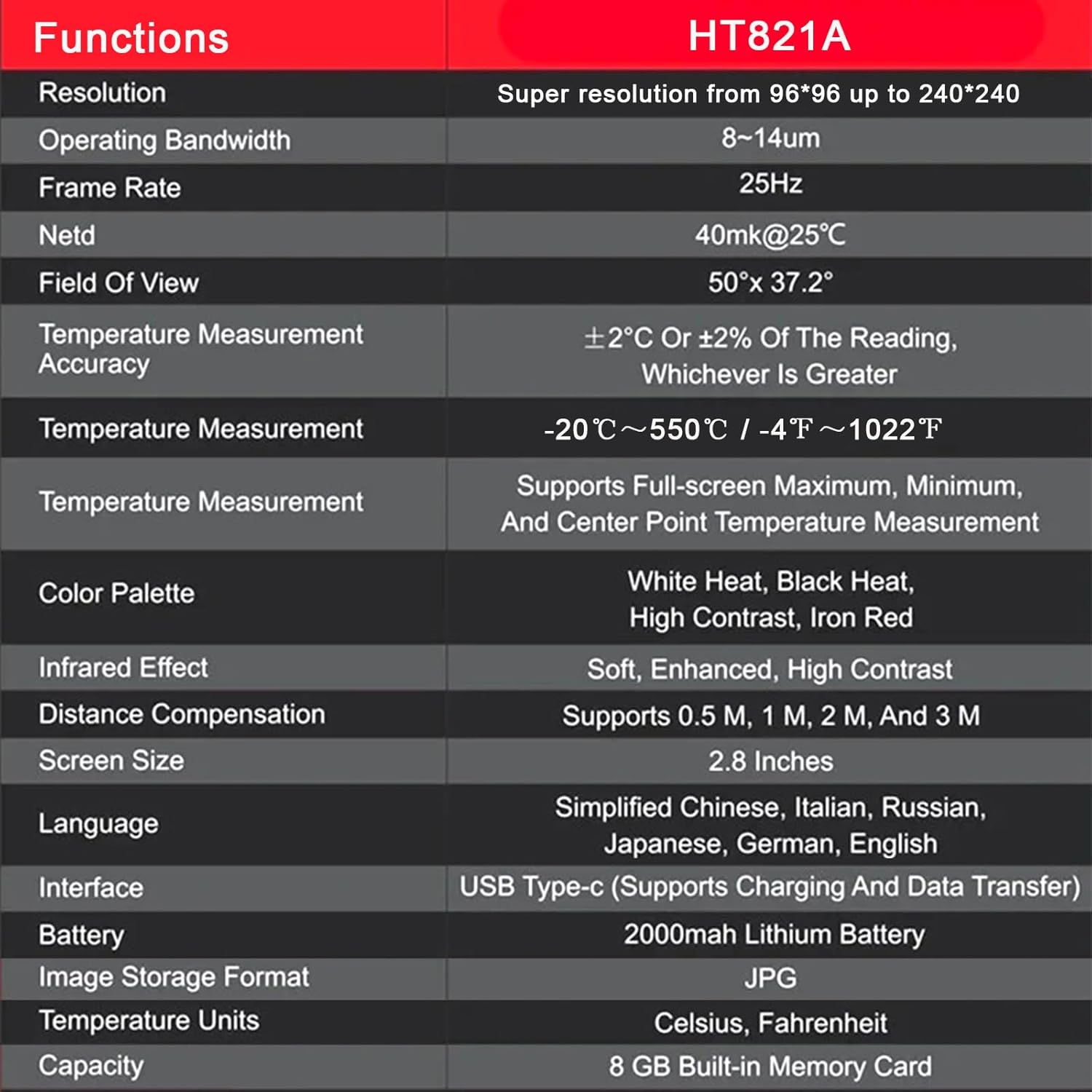
The following table outlines the key technical specifications of the HABOTEST HT821A Thermal Imager:
| Ciri | Perincian |
|---|---|
| Model | HT821A |
| Resolusi | 96x96 (Super resolution up to 240x240) |
| Lebar Jalur Pengendalian | 8-14µm |
| Kadar Bingkai | 25Hz |
| BERSIH | 40mk@25°C |
| Bidang Dari View | 50 ° × 37.2 ° |
| Ketepatan Pengukuran Suhu | ±2°C or ±2% of the reading, whichever is greater |
| Julat Pengukuran Suhu | -20°C hingga 550°C (-4°F hingga 1022°F) |
| Temperature Measurement Features | Supports Full-screen Maximum, Minimum, and Center Point Measurement |
| Palet Warna | White Heat, Black Heat, High Contrast, Iron Red (and others) |
| Infrared Effect | Soft, Enhanced, High Contrast |
| Pampasan Jarak | Supports 0.5 M, 1 M, 2 M, and 3 M |
| Saiz Skrin | 2.8 Inci |
| Sokongan Bahasa | Simplified Chinese, Italian, Russian, Japanese, German, English, Spanish, French, Dutch, Korean, Arabic, Traditional Chinese |
| Antara muka | USB Type-C (Supports Charging and Data Transfer) |
| Bateri | Bateri Litium 2000mAh |
| Format Storan Imej | JPG |
| Unit Suhu | Celsius, Fahrenheit |
| Storan Dalaman | 8 GB Built-in Memory Card |
| Bahan Luar | plastik |
10. Waranti dan Sokongan
10.1 Maklumat Waranti
HABOTEST products are manufactured to high-quality standards. For specific warranty terms and conditions, please refer to the warranty card included with your product or visit the official HABOTEST webtapak. Waranti biasanya meliputi kecacatan pada bahan dan mutu kerja di bawah penggunaan biasa.
10.2 Sokongan Pelanggan
If you have any questions, require technical assistance, or need to report a problem with your HABOTEST HT821A Thermal Imager, please contact HABOTEST customer support.
- Sokongan dalam talian: Visit the official HABOTEST webtapak untuk Soalan Lazim, pendaftaran produk dan borang hubungan.
- Sokongan E-mel: Rujuk kepada pembungkusan produk anda atau pegawai rasmi webtapak untuk alamat e-mel sokongan pelanggan.
Please have your product model number (HT821A) and purchase information ready when contacting support.