
1. Produk Lebihview
The ORDRO Z36 is a versatile 4K camcorder designed for capturing high-quality video and still images. It features 4K Ultra HD video recording and 64 MP photo capabilities, complemented by an 18x digital zoom for capturing distant subjects. The camcorder includes an integrated LED fill light for improved visibility in low-light conditions and an IR night vision mode for recording in complete darkness. Its 3.0-inch IPS flip screen rotates 270° for flexible viewing and self-recording. For convenience, a wireless remote control is included, along with a mini tripod for stable shots. The Z36 supports various creative modes such as time-lapse, slow motion, and continuous shooting, making it suitable for a range of recording needs.
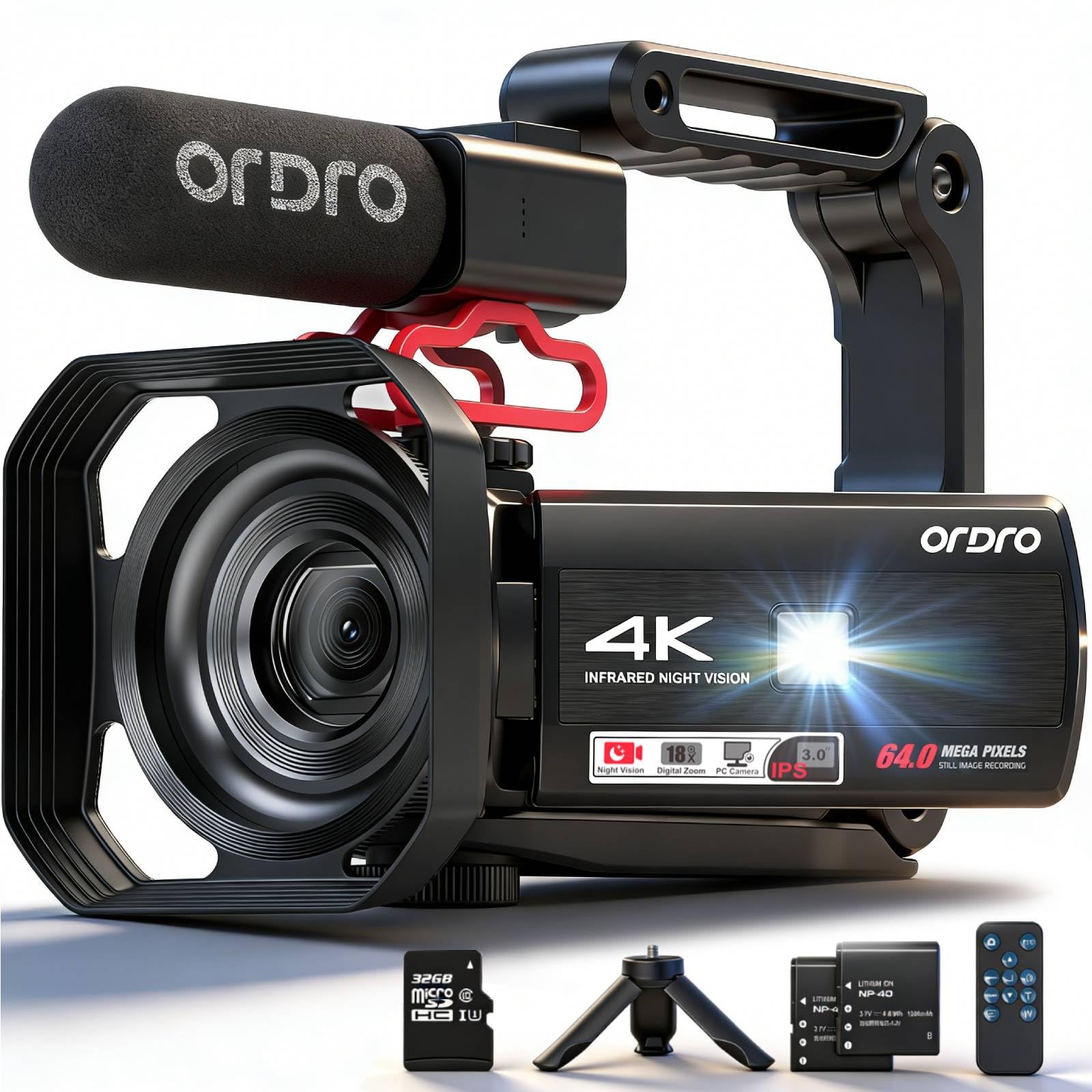
Image 1.1: The ORDRO Z36 4K Camcorder, showcasing its compact design and the 3.0-inch IPS flip screen in an extended position.
2. Persediaan
2.1 Membuka Kotak dan Kandungan Pakej
Buang semua komponen dengan berhati-hati. Pastikan item berikut ada:
- ORDRO Z36 4K Camcorder
- Bateri boleh dicas semula
- Kabel USB
- Kawalan Jauh Tanpa Wayar
- Tripod Mini
- Manual Pengguna (dokumen ini)
- Power Adapter (may be included separately)
2.2 Pemasangan dan Pengecasan Bateri
- Locate the battery compartment on the bottom or side of the camcorder.
- Buka penutup petak.
- Insert the rechargeable battery, ensuring the contacts align correctly.
- Tutup penutup petak bateri dengan selamat.
- Connect the camcorder to a power source using the provided USB cable and power adapter. The charging indicator light will illuminate.
- Allow the battery to charge fully before first use. The indicator light will change or turn off when charging is complete.
2.3 Pemasangan Kad Memori
A memory card (SD card, not included) is required to store videos and photos. The camcorder supports up to 128GB SD cards (Class 10 or higher recommended).
- Locate the SD card slot, usually on the side of the camcorder.
- Buka penutup slot.
- Insert the SD card with the metal contacts facing the correct direction (refer to the diagram near the slot). Push until it clicks into place.
- Tutup penutup slot.
- Penting: Format the memory card in the camcorder's menu before first use to ensure compatibility and optimal performance.
2.4 Kuasa Awal Hidup dan Tetapan
- Tekan dan tahan butang kuasa butang sehingga skrin menyala.
- Upon first power-on, you may be prompted to set the language, date, and time. Use the navigation buttons to select options and confirm.
- Adjust other basic settings as desired through the camcorder's menu system.
3. Arahan Operasi
3.1 Kawalan Asas
Familiarize yourself with the main buttons:
- Butang Kuasa: Turns the camcorder on/off.
- Butang Rakam/Pengatup: Starts/stops video recording or takes a photo.
- Zoom Lever (W/T): Adjusts digital zoom (Wide/Telephoto).
- Butang Menu: Accesses the camcorder's settings menu.
- Butang Navigasi: Digunakan untuk menavigasi menu dan memilih pilihan.
- Butang Mod: Switches between video, photo, and playback modes.
3.2 Merakam Video
- Ensure the camcorder is in video recording mode (check the icon on the screen).
- Frame your shot using the 3.0-inch flip screen.
- Tekan ke Rakam / Pengatup button once to start recording. A red indicator or recording timer will appear on the screen.
- Tekan ke Rakam / Pengatup butang sekali lagi untuk menghentikan rakaman.
- To adjust video resolution (e.g., 4K), access the video settings in the menu.
3.3 Mengambil Foto
- Switch the camcorder to photo mode using the Mod butang.
- Frame your subject.
- Tekan ke Rakam / Pengatup button to capture a 64 MP still image.
3.4 Zum Digital
Gunakan Tuas Zum (W for wide, T for telephoto) to adjust the 18x digital zoom. Move the lever towards 'T' to zoom in and towards 'W' to zoom out.
3.5 IR Night Vision and LED Fill Light
- Penglihatan Malam IR: Activate this mode via the menu for recording in extremely low light or complete darkness. The image will appear monochrome.
- Lampu Isi LED: For additional illumination in dim environments, activate the built-in LED light. This can usually be toggled on/off via a dedicated button or menu option.
3.6 3.0-inch IPS Flip Screen
The screen can be rotated up to 270° to allow for various shooting angles, including self-recording (vlogging). Gently pull the screen out from the side and rotate it to your desired position.
3.7 Alat Kawalan Jauh Tanpa Wayar
The included remote control allows for convenient operation from a distance. Ensure the remote's battery is installed and point it towards the camcorder's IR receiver. Functions typically include record start/stop, zoom, and mode selection.
3.8 Special Recording Features
- Masa berlalu: Capture a series of images over time and combine them into a sped-up video. Set the interval and duration in the menu.
- Pergerakan Perlahan: Record video at a higher frame rate to play back in slow motion. Select this option in video settings.
- Penggambaran berterusan: Take multiple photos in quick succession. Useful for capturing fast-moving subjects.
3.9 Main semula dan File Pemindahan
- Main balik: Switch to playback mode using the Mod button. Use navigation buttons to browse and play back recorded videos or view foto.
- Menyambung ke Komputer: Connect the camcorder to your computer using the USB cable. The camcorder will appear as a removable disk, allowing you to transfer files secara langsung.
4. Penyelenggaraan
4.1 Membersihkan Camcorder
- Kanta: Use a soft, lint-free cloth specifically designed for optical lenses. For stubborn smudges, use a small amount of lens cleaning solution. Avoid touching the lens with your fingers.
- Skrin: Wipe the screen gently with a soft, dry microfiber cloth. Do not use abrasive cleaners.
- Badan: Gunakan yang lembut, sedikit damp cloth to clean the camcorder body. Avoid excessive moisture.
4.2 Penjagaan Bateri
- Charge the battery fully before first use and whenever the battery indicator is low.
- Elakkan daripada menghabiskan bateri sepenuhnya dengan kerap, kerana ini boleh mengurangkan jangka hayatnya.
- If storing the camcorder for an extended period, remove the battery and store it in a cool, dry place with approximately 50% charge.
4.3 Penyimpanan
Store the camcorder in a dry, dust-free environment away from direct sunlight and extreme temperatures. Use a protective case when transporting the device.
4.4 Kemas Kini Perisian Tegar
Periodically check the ORDRO official website for any available firmware updates. Firmware updates can improve performance, add new features, or fix bugs. Follow the instructions provided on the website carefully when performing an update.
5. Penyelesaian masalah
| Masalah | Kemungkinan Punca | Penyelesaian |
|---|---|---|
| Camcorder tidak dihidupkan. | Bateri habis atau tidak dimasukkan dengan betul. | Charge the battery fully. Reinsert the battery, ensuring correct orientation. |
| Tidak boleh merakam video/mengambil gambar. | Memory card is full, not inserted, or corrupted. Incorrect mode selected. | Insert a memory card. Format the card (backup data first). Switch to video or photo mode. |
| Kualiti imej/video yang lemah. | Lens is dirty. Insufficient lighting. Incorrect settings. | Clean the lens. Use LED fill light or IR night vision as appropriate. Adjust resolution settings. |
| Camcorder freezes or becomes unresponsive. | Gangguan perisian. | Remove and reinsert the battery to perform a hard reset. If issue persists, check for firmware updates. |
| Alat kawalan jauh tidak berfungsi. | Remote battery drained. Obstruction between remote and camcorder. | Replace the remote control battery. Ensure a clear line of sight to the camcorder's IR receiver. |
Jika masalah berterusan selepas mencuba penyelesaian ini, sila hubungi sokongan pelanggan.
6. Spesifikasi
- Jenama: ORDRO
- model: Z36
- Resolusi Video: 4K Ultra HD
- Resolusi Foto: 64 MP
- Zum Digital: 18x
- Skrin: 3.0-inch IPS Flip Screen (270° rotation)
- Teknologi Sensor: CMOS
- Ciri Khas: IR Night Vision, LED Fill Light, Time-lapse, Slow Motion, Continuous Shooting
- Ketersambungan: USB
- Format Tangkapan Video: MP4
- Bateri: 1 D type rechargeable battery (included)
- Panjang Fokus Minimum: 1 milimeter
- Panjang Fokus Maksimum: 999 Milimeter
7. Waranti dan Sokongan
The ORDRO Z36 Camcorder comes with a standard manufacturer's warranty. Please refer to the warranty card included in your package for specific terms and conditions, including the warranty period and coverage details.
For technical support, service, or inquiries regarding your product, please visit the official ORDRO webtapak atau hubungi bahagian perkhidmatan pelanggan mereka. Maklumat hubungan biasanya boleh didapati pada pengilang webtapak atau dalam pembungkusan produk.
Nota: Simpan resit pembelian anda sebagai bukti pembelian untuk tuntutan waranti.