
1. Persediaan
Before first use, please ensure the ice maker is placed on a stable, level surface away from direct sunlight or heat sources. Allow the unit to stand upright for at least 2 hours before plugging it in to allow the refrigerant fluid to settle.
1.1 Membuka Kotak dan Pemeriksaan Awal
Carefully remove the ice maker from its packaging. Inspect the unit for any signs of damage. Ensure all accessories, including the removable drip tray and ice scoop, are present.
1.2 Penempatan
Position the ice maker on a flat, stable countertop. Ensure there is adequate ventilation around the unit, especially at the sides and rear, to prevent overheating. The compact dimensions of 16.93"D x 10.63"W x 16.34"H allow it to fit seamlessly into various spaces.

Imej 1.1: The Electactic Countertop Nugget Ice Maker with its compact dimensions highlighted, showing its suitability for various kitchen, office, or bar setups.
1.3 Pembersihan Awal
Before making ice for consumption, it is recommended to run a self-cleaning cycle. This helps to remove any manufacturing residues and ensures fresh-tasting ice. Refer to the 'Self-Cleaning Function' in the Maintenance section for detailed steps.
1.4 Pengisian Air
The ice maker features a 2.4L water reservoir. You can add water in two ways:
- Direct Pour: Lift the top lid and pour water directly into the reservoir.
- Tangki Boleh Tanggal: The water tank can be easily removed from the back of the unit for filling at a sink. Ensure the tank is securely reinserted before operation.

Imej 1.2: Illustration of the two methods for filling the water reservoir: directly pouring water into the top opening or removing the rear tank for filling.
2. Operasi
The Electactic Nugget Ice Maker is designed for user-friendly operation with intuitive controls and indicators.
2.1 Panel Kawalan Selesaiview
The front panel features an ON/OFF button and indicator lights for 'Add Water', 'Ice Full', and 'Clean'. These indicators provide real-time status updates for the machine.
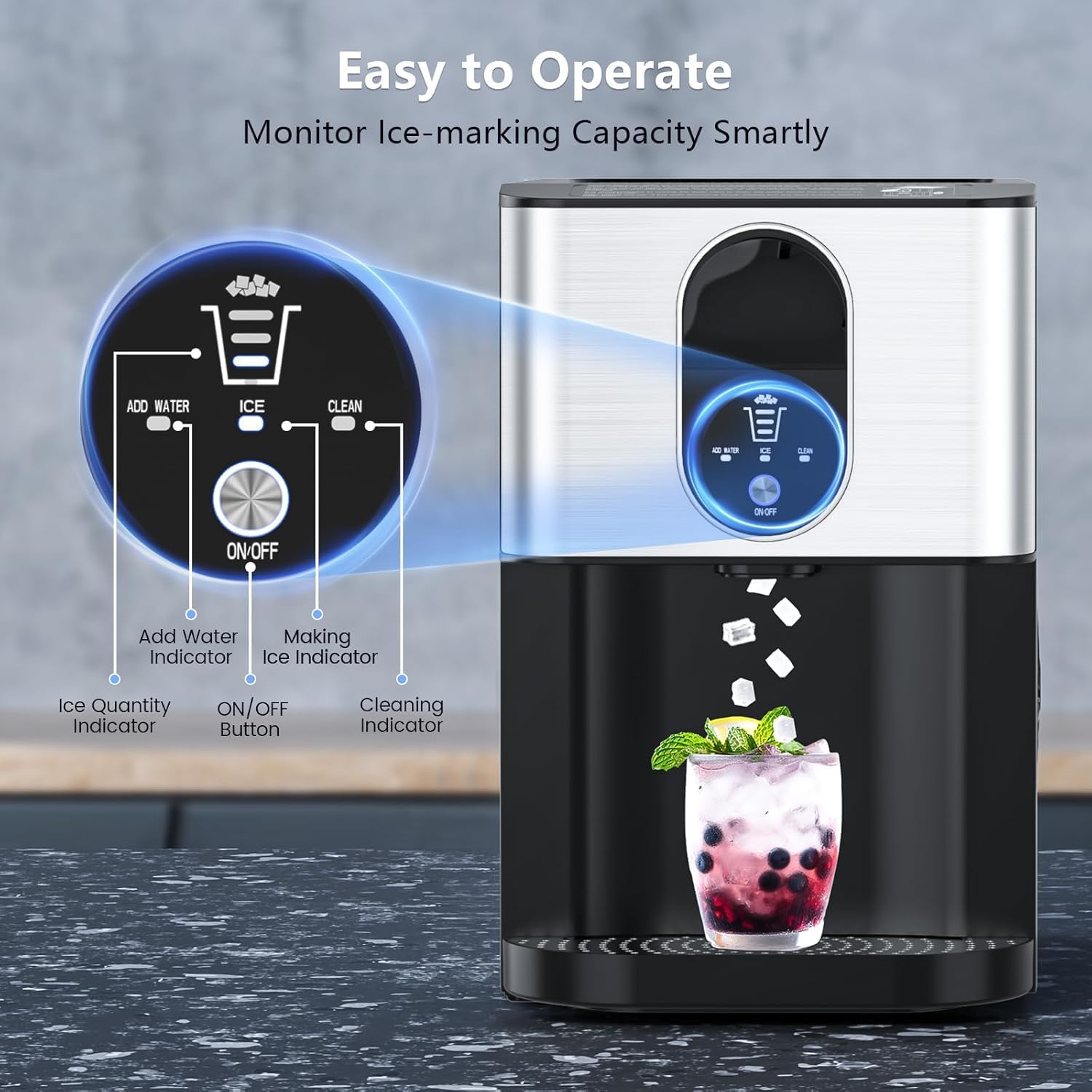
Imej 2.1: Satu jarak dekat view of the ice maker's control panel, showing the ON/OFF button and indicator lights for 'Add Water', 'Ice Full', and 'Clean'.
2.2 Ice Making Process
- Pastikan takungan air diisi.
- Tekan ke HIDUP/MATI button briefly to start the ice-making mode. The indicator light will illuminate.
- The machine will begin producing nugget ice. The first batch typically takes 15-20 minutes.
- The ice maker can produce up to 44 lbs of ice in 24 hours.
2.3 Ice Dispensing
The ice maker features a contactless dispensing system:
- Place your glass directly under the ice spout.
- Pull the lever located above the spout. Nugget ice will dispense directly into your glass.
- Release the lever to stop dispensing.

Imej 2.2: The Electactic Nugget Ice Maker in action, dispensing chewable ice into a glass, demonstrating its efficient and hands-free operation.
2.4 Video: Ice Dispensing Demonstration
Video 2.1: A short video demonstrating the quick and easy dispensing of nugget ice from the Electactic ice maker, highlighting its user-friendly design.
3. Penyelenggaraan
Regular maintenance ensures the longevity and optimal performance of your Electactic Nugget Ice Maker.
3.1 Fungsi Pembersihan Kendiri
The ice maker features an effortless one-touch self-cleaning cycle:
- Pastikan takungan air diisi dengan air bersih.
- Tekan dan tahan butang HIDUP/MATI button for 5 seconds. The 'Clean' indicator light will illuminate, and the cleaning cycle will begin.
- The cleaning process takes approximately 10 minutes.
- Once the cycle is complete, drain the water from the unit as described in the 'Draining Water' section.
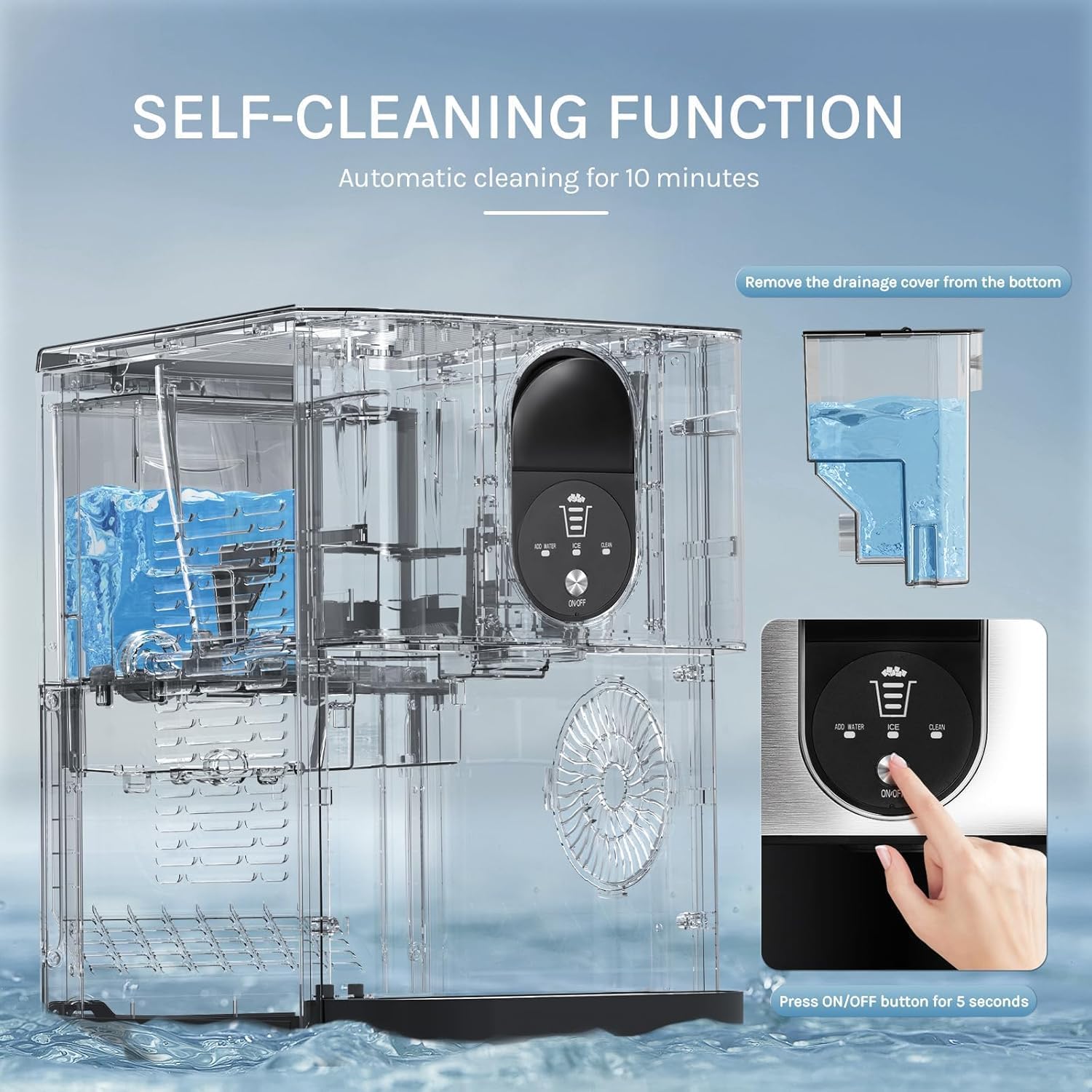
Imej 3.1: Visual guide to activating the self-cleaning function on the Electactic Ice Maker, showing the button and the internal water circulation during cleaning.
3.2 Menyalirkan Air
To drain residual water from the unit:
- Locate the drainage cover at the bottom of the unit.
- Remove the cover and allow all water to drain into a suitable container.
- Replace the drainage cover securely after draining.
3.3 Pembersihan Berkala
In addition to the self-cleaning function, periodically clean the removable parts:
- Remove the ice basket and drip tray.
- Wash these components with mild soap and warm water. Rinse thoroughly.
- Lap bahagian luar unit dengan lembut, damp kain.
- Ensure all parts are completely dry before reassembling and operating the machine.
4. Penyelesaian masalah
This section addresses common issues you might encounter with your ice maker.
| Masalah | Kemungkinan Punca | Penyelesaian |
|---|---|---|
| "Add Water" indicator is on | Takungan air kosong atau rendah. | Isi semula takungan air. |
| Penunjuk "Ais Penuh" menyala | Bakul ais penuh. | Keluarkan ais dari bakul. |
| Ais tidak mengeluarkan | No ice in the basket or dispenser mechanism is blocked. | Check ice level. Ensure no ice is jammed in the dispenser. |
| Bunyi luar biasa semasa operasi | Bunyi operasi biasa (pemampat, pam air) atau unit tidak mendatar. | Ensure the unit is on a level surface. If noise persists or is excessive, contact support. |
| Ice melts quickly | Ice storage is not a freezer; ambient temperature is high. | This is normal. Transfer ice to a freezer for long-term storage. |
5. Spesifikasi
| Ciri | Perincian |
|---|---|
| Jenama | Elektik |
| Nama Model | Z5820DN-SILVER-EL |
| Dimensi Produk | 16.93"D x 10.63"W x 16.34"H |
| Kapasiti | 2.4 Liters (Water Reservoir) |
| Pengeluaran Ais | Up to 44 lbs/24H |
| First Batch Time | 15-20 minit |
| Wattage | 200 watt |
| Voltage | 115 Volt |
| Bahan penyejuk | R600a |
| bahan | Keluli Tahan Karat |
| Berat Barang | 38.6 paun |
| Komponen yang Disertakan | Pembuat Ais |
6. Waranti & Sokongan
For warranty information, please refer to the documentation included with your product or visit the official Electactic website. For technical support, troubleshooting assistance, or to inquire about replacement parts, please contact Electactic customer support.
Electactic Customer Support: Refer to your product packaging or the official Electactic weblaman web untuk maklumat hubungan.