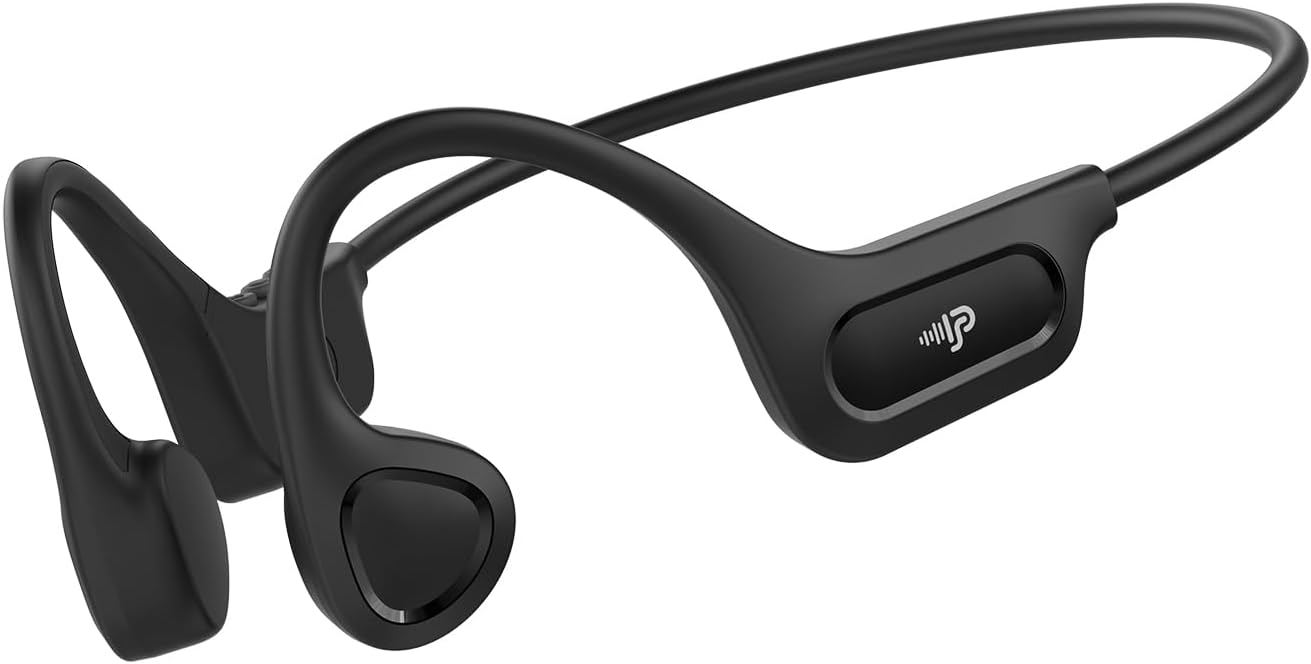
Manual Pengguna Fon Kepala Pengaliran Tulang PSIER X18
Model: X18 | Brand: PSIER
1. Pengenalan
The PSIER X18 Bone Conduction Headphones offer an innovative audio experience by transmitting sound through your cheekbones, leaving your ears open to ambient sounds. This design enhances situational awareness, making them ideal for outdoor activities, sports, and office environments. Featuring Bluetooth 6.0 connectivity, a lightweight design, and IPX5 waterproofing, these headphones are built for comfort and durability.
Ciri-ciri Utama:
Teknologi Pengaliran Tulang: Delivers audio through bone vibrations, keeping ear canals open.
Reka Bentuk Telinga Terbuka: Maintains awareness of surroundings for enhanced safety during activities.
Bluetooth 6.0: Provides stable and low-latency wireless connectivity.
Keselesaan Ringan: Weighs only 23g with a flexible memory-titanium frame for a secure fit.
Kalis Air IPX5: Resistant to sweat and rain, suitable for various weather conditions (not for swimming).
Masa Main Dilanjutkan: Sehingga 10 jam main balik muzik dengan sekali cas.
Video: Selesaiview of PSIER Bone Conduction Headphones, highlighting their suitability for active lifestyles and outdoor use, demonstrating the open-ear design and secure fit.
2. Apa yang ada di dalam Kotak
The package for your PSIER X18 Bone Conduction Headphones includes all necessary items to get started and ensure a comfortable experience.
PSIER X18 Bone Conduction Earbuds (1 pair)
Adjustable Strap (1)
Earplugs (1 pair)
Kabel Pengecas Jenis-C (1)
Manual Pengguna (1)
3. Panduan Persediaan
3.1 Caj Permulaan
Before first use, fully charge your headphones. Connect the provided Type-C charging cable to the charging port on the headphones and plug the other end into a USB power source. The LED indicator will show charging status and turn off when fully charged.
Image: PSIER X18 headphones connected to a Type-C charging cable.
3.2 Hidupkan/Mati Kuasa
Hidupkan kuasa: Press and hold the multi-function button (usually the middle button on the control panel) for 2 seconds until the LED indicator flashes blue and a voice prompt says "Power On".
Matikan: Press and hold the multi-function button for 3 seconds until the LED indicator flashes red and a voice prompt says "Power Off".
3.3 Berpasangan Bluetooth
Pastikan fon kepala dimatikan.
Press and hold the multi-function button for 5 seconds until the LED indicator flashes red and blue alternately, and a voice prompt says "Pairing". This indicates the headphones are in pairing mode.
Pada peranti anda (telefon pintar, tablet, komputer), dayakan Bluetooth dan cari peranti yang tersedia.
Select "X18" from the list of available devices.
Once connected, the LED indicator will flash blue slowly, and a voice prompt will confirm "Connected".
Video: Demonstrates powering on and pairing the PSIER Bone Conduction Headphones with a mobile device. The user presses the power button, then navigates to Bluetooth settings on their phone to connect to "X12" (note: model name in video is "X12", product is "X18").
3.4 Memakai Fon Kepala
Place the headphones with the transducers resting on your cheekbones, just in front of your ears. The neckband should rest comfortably behind your head. Adjust the fit using the included adjustable strap if needed to ensure a snug and secure fit, especially during active use.
Image: A person demonstrating the secure and comfortable fit of the PSIER X18 Bone Conduction Headphones during a run.
4. Arahan Operasi
4.1 Main balik Muzik
Main/Jeda: Tekan butang pelbagai fungsi sekali.
Lagu Seterusnya: Tekan dua kali butang berbilang fungsi.
Trek Sebelumnya: Tekan tiga kali butang berbilang fungsi.
Kelantangan: Tekan butang Volume +.
Perlahankan suara: Tekan butang Kelantangan -.
4.2 Pengurusan Panggilan
Jawab/Tamatkan Panggilan: Tekan butang pelbagai fungsi sekali.
Tolak Panggilan: Tekan dan tahan butang pelbagai fungsi selama 2 saat.
Aktifkan Pembantu Suara: Press the multi-function button twice quickly when not on a call.
4.3 Kesedaran Situasi
The open-ear design allows you to hear your audio while remaining aware of your surroundings. This is crucial for safety during outdoor activities like running or cycling, where hearing traffic or other warnings is important.
Image: A person cycling with PSIER X18 headphones, highlighting the open-ear design for environmental awareness.
5. Penyelenggaraan
5.1 Pembersihan
Lap fon kepala dengan lembut, damp cloth after each use, especially after workouts, to remove sweat and dirt. Do not use abrasive cleaners or submerge the headphones in water.
5.2 Penyimpanan
Store the headphones in a cool, dry place away from direct sunlight and extreme temperatures. Avoid placing heavy objects on them to prevent damage to the frame.
5.3 Rintangan Air (IPX5)
The PSIER X18 headphones are IPX5 rated, meaning they are protected against low-pressure water jets from any direction. This makes them suitable for use during light rain and sweaty workouts. They are not designed for submersion in water or for swimming.
Image: PSIER X18 headphones being splashed with water, demonstrating their IPX5 water resistance.
6. Penyelesaian masalah
6.1 Tiada Kuasa
Pastikan fon kepala dicas sepenuhnya.
Try using a different charging cable and power adapter.
6.2 Tidak Boleh Dipasangkan dengan Peranti
Make sure the headphones are in pairing mode (LED flashing red and blue alternately).
Ensure Bluetooth is enabled on your device and it is within range (up to 10 meters).
Forget "X18" from your device's Bluetooth list and try pairing again.
Mulakan semula kedua-dua fon kepala dan peranti anda.
6.3 Low Sound Quality or No Sound
Laraskan kelantangan pada kedua-dua fon kepala dan peranti anda yang disambungkan.
Pastikan transduser diletakkan dengan betul pada tulang pipi anda.
Check for any obstructions between the transducers and your skin.
Bergerak lebih dekat dengan peranti anda yang disambungkan untuk mengelakkan gangguan.
If using earplugs, ensure they are inserted correctly to enhance sound perception.
The PSIER X18 Bone Conduction Headphones come with a 1-year manufacturer's warranty covering defects in materials and workmanship. Please retain your proof of purchase for warranty claims.
8.2 Sokongan Pelanggan
For further assistance, troubleshooting, or warranty inquiries, please contact PSIER customer support through the retailer's platform or visit the official PSIER weblaman web untuk maklumat hubungan.
Ask a question about this manual
Ask about setup, troubleshooting, compatibility, parts, safety, or missing instructions. Manuals+ will review the question and use this page’s manual context to help answer it.