
pengenalan
Thank you for choosing the Severin S-Power Olymp HV 7175 Cordless Vacuum Cleaner. This powerful and versatile appliance is designed to provide efficient cleaning for various surfaces in your home. With its 19,000 Pa suction power, 2-in-1 functionality, and convenient features like LED lighting and vertical parking, it offers a comprehensive cleaning solution. Please read this manual carefully before first use to ensure proper operation, maintenance, and safety.

Image: The Severin S-Power Olymp HV 7175 cordless vacuum cleaner, fully assembled with the floor nozzle, shown in its upright position.
Arahan Keselamatan Penting
Sentiasa patuhi langkah berjaga-jaga keselamatan asas semasa menggunakan peralatan elektrik untuk mengurangkan risiko kebakaran, kejutan elektrik atau kecederaan. Simpan manual ini untuk rujukan pada masa hadapan.
- Perkakas ini bertujuan untuk kegunaan rumah sahaja. Jangan gunakan di luar rumah atau di atas permukaan basah.
- Jangan benarkan kanak-kanak mengendalikan pembersih vakum. Pengawasan rapi adalah perlu apabila digunakan berhampiran kanak-kanak.
- Jangan ambil cecair mudah terbakar atau mudah terbakar, seperti petrol, atau gunakan di kawasan yang mungkin terdapat.
- Jangan ambil apa-apa yang terbakar atau berasap, seperti rokok, mancis, atau abu panas.
- Jangan gunakan tanpa cawan habuk dan penapis di tempatnya.
- Turn off the appliance before connecting or disconnecting the battery pack, or before performing any maintenance.
- Gunakan hanya pengecas yang dibekalkan oleh pengilang untuk mengecas semula.
- Simpan perkakas di dalam rumah di tempat yang kering.
Kandungan Pakej
Please check the package contents upon unpacking. If any parts are missing or damaged, contact customer support immediately.
- Severin S-Power Olymp HV 7175 Main Unit (Motor and Dustbin)
- Tiub Sambungan
- Muncung Lantai Bermotor dengan Lampu LED
- Wall Mount Docking Station
- Penyesuai Pengecasan
- Alat Celah
- Berus Pelapis
- Manual Pengguna
Persediaan dan Pengecasan Awal
Perhimpunan
- Masukkan tiub sambungan ke dalam unit utama sehingga ia klik pada tempatnya dengan selamat.
- Pasangkan muncung lantai bermotor ke hujung tiub sambungan yang satu lagi, pastikan ia berbunyi klik dengan kuat.
- For handheld use, attach desired accessories (crevice tool, upholstery brush) directly to the main unit.
Mengecas Bateri
Before first use, fully charge the vacuum cleaner. The battery indicator on the main unit will show the charging status.
- Mount the wall dock in a convenient location near a power outlet.
- Connect the charging adapter to the wall dock and plug it into a power outlet.
- Place the vacuum cleaner onto the wall dock. Ensure the charging contacts align.
- The LED display will indicate charging progress. A full charge takes approximately 4-5 hours.

Image: The Severin S-Power Olymp HV 7175 vacuum cleaner mounted on its wall charging dock, connected to a power outlet.
Arahan Operasi
Mod Hidup/Mati dan Sedutan
- To turn on the vacuum cleaner, press the KUASA butang pada panel kawalan.
- The vacuum will start in Eco mode (Min suction).
- To switch to Max suction mode, press the MAX butang. Tekan MIN to return to Eco mode.
- To turn off the vacuum cleaner, press the KUASA butang lagi.
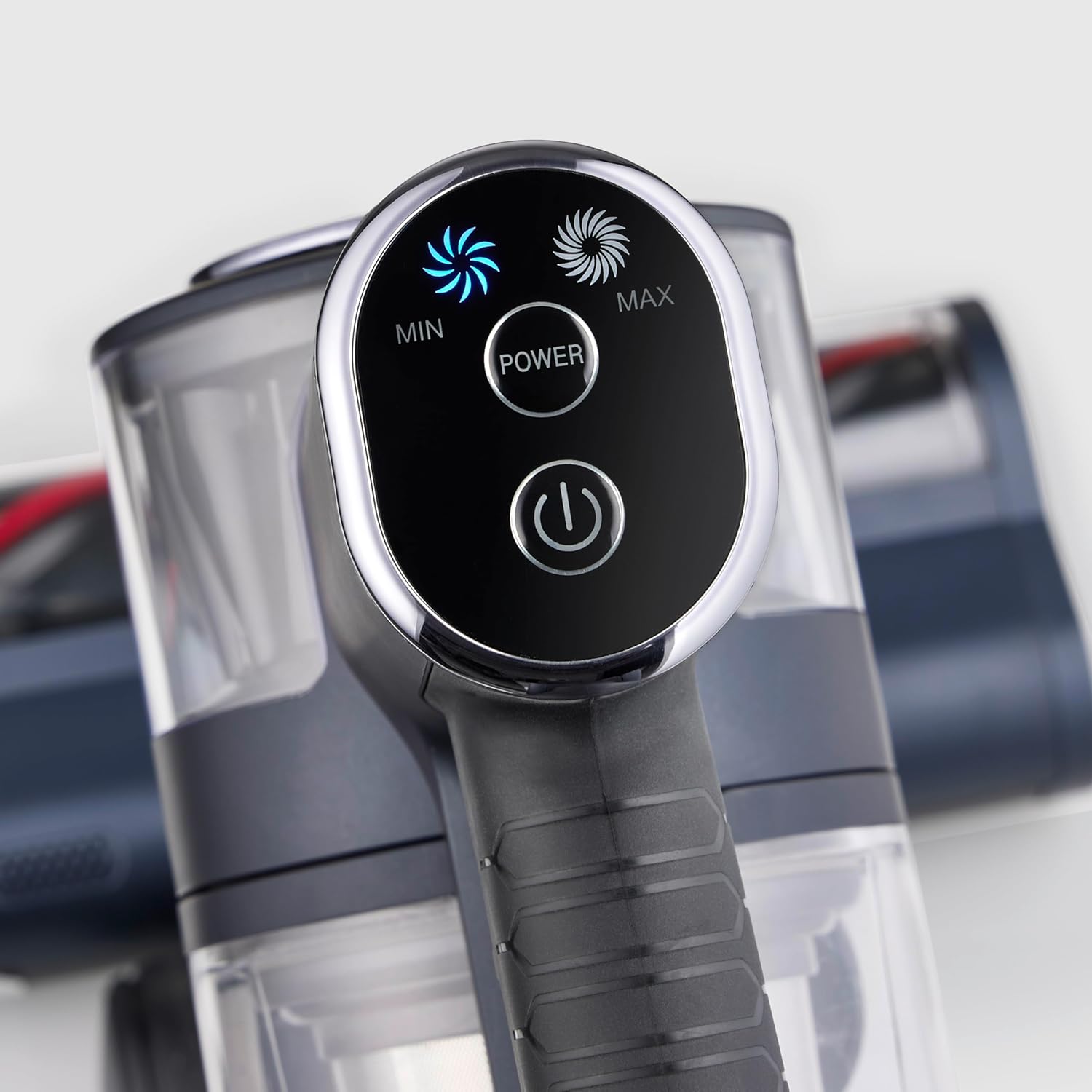
Imej: Dari dekat view of the vacuum cleaner's control panel, featuring illuminated buttons for Min, Max, and Power settings.
2-in-1 Functionality (Handheld Mode)
The S-Power Olymp can be easily converted into a handheld vacuum for versatile cleaning.
- Press the release button on the extension tube to detach it from the main unit.
- Attach the desired accessory (crevice tool or upholstery brush) directly to the main unit's suction opening.
- Use the handheld unit for cleaning car interiors, upholstery, stairs, or hard-to-reach areas.

Image: The Severin S-Power Olymp HV 7175 in handheld configuration, equipped with a crevice tool, being used to clean the interior of a car seat.
Ciri-ciri Ergonomik
- Adjustable Suction Tube: The height of the suction tube can be adjusted for comfortable use by users of different heights.
- Pencahayaan LED: The motorized floor nozzle features integrated LED lights to illuminate dark areas, ensuring no dust or debris is missed.
- Vertical Parking Function: The vacuum cleaner can stand upright independently when the handheld unit is removed, allowing for convenient temporary storage during cleaning breaks.
Penyelenggaraan dan Pembersihan
Penyelenggaraan tetap memastikan prestasi optimum dan memanjangkan jangka hayat pembersih vakum anda.
Mengosongkan Tong Sampah
Empty the dustbin regularly, ideally after each use, to maintain strong suction.
- Pastikan pembersih vakum dimatikan.
- Tekan butang pelepas tong sampah untuk menanggalkan tong sampah daripada unit utama.
- Hold the dustbin over a waste bin and press the bottom release latch to open the dustbin flap and empty its contents.
- Tutup penutup dan pasang semula tong sampah pada unit utama sehingga ia berbunyi klik.

Imej: A terperinci view of the Severin S-Power Olymp HV 7175's transparent dustbin and internal filter components, ready for emptying or cleaning.
Membersihkan Penapis
The HEPA filter and pre-filter should be cleaned periodically to prevent clogging and maintain suction power.
- Keluarkan tong sampah seperti yang diterangkan di atas.
- Putar dan tarik keluar pemasangan penapis dari tong sampah.
- Separate the HEPA filter and the metal mesh pre-filter.
- Tap the filters gently over a waste bin to remove loose dust. For a more thorough clean, rinse them under cold running water.
- Allow all filter components to air dry completely for at least 24 hours before reassembling and placing them back into the vacuum cleaner. Do not use the vacuum with wet filters.
Membersihkan Gulungan Berus
Hair and debris can get tangled in the brush roll. Clean it regularly for effective cleaning.
- Matikan pembersih vakum dan tanggalkan muncung lantai.
- Locate the brush roll access cover on the bottom of the nozzle. Open it using a coin or screwdriver if necessary.
- Keluarkan gulungan berus.
- Use scissors to cut away any tangled hair or threads.
- Bersihkan sebarang serpihan dari perumah gulungan berus.
- Reinsert the brush roll and close the access cover securely.
Menyelesaikan masalah
| Masalah | Kemungkinan Punca | Penyelesaian |
|---|---|---|
| Vakum tidak dihidupkan | Bateri habis Butang kuasa tidak ditekan dengan betul | Cas bateri sepenuhnya Press the POWER button firmly |
| Daya sedutan berkurang | Tong sampah penuh Penapis tersumbat Nozzle or tube is blocked Brush roll is tangled | Kosongkan tong sampah Bersihkan atau ganti penapis Semak dan bersihkan sebarang sekatan Bersihkan gulungan berus |
| Bateri tidak dicas | Pengecas tidak disambungkan dengan betul Pengecas atau bateri rosak | Ensure charger is securely plugged in Hubungi sokongan pelanggan |
| Gulung berus tidak berputar | Brush roll is tangled Halangan dalam muncung | Bersihkan gulungan berus Keluarkan sebarang halangan |
Spesifikasi
- model: HV 7175
- Jenama: Severin
- Kuasa sedutan: 19,000 Pa
- Kuasa: 200 Watt
- Voltage: 220 Volt
- Jenis Bateri: Litium-ion
- Runtime (Eco Mode): Sehingga 35 minit
- Masa Pengecasan: 4-5 jam
- Jenis Penapis: Penapis HEPA
- Tahap Bunyi: 80 Desibel
- Berat: 2 Kilogram
- Dimensi (L x W x H): 105L x 12l x 15H cm
- Permukaan Disyorkan: Semua jenis lantai
- Ciri Khas: Cordless, High Power, Lightweight, Front Light, Spot Cleaning, 2-in-1 Handheld Function, Vertical Parking
Waranti dan Sokongan
Severin products are manufactured to high-quality standards and come with a manufacturer's warranty. Please refer to the warranty card included in your package for specific terms and conditions, including the warranty period and coverage details.
For technical support, spare parts, or warranty claims, please contact Severin customer service. You can find contact information on the official Severin webtapak atau pada dokumentasi jaminan anda.
When contacting support, please have your model number (HV 7175) and proof of purchase readily available.