
1. Pengenalan
This manual provides detailed instructions for the assembly, operation, and maintenance of your SEDETA 47x24 Inch Electric Standing Desk. Please read all instructions carefully before use to ensure proper function and safety. This desk is designed for versatile use in various environments, including home offices, studios, and gaming setups.
Maklumat Keselamatan
- Pastikan semua komponen diikat dengan selamat sebelum digunakan.
- Jauhkan kanak-kanak dan haiwan peliharaan daripada meja semasa melaraskan ketinggian.
- Do not overload the desk; refer to the specifications for maximum weight capacity.
- Avoid placing liquids directly on the control panel or power outlets.
- Unplug the desk from the power source before cleaning or maintenance.
2. Kandungan Pakej
Verify that all parts are present before beginning assembly. If any parts are missing or damaged, please contact customer service.
- Desktop (1)
- Leg Frames (2)
- Crossbar/Support Bar (1)
- Panel Kawalan (1)
- Penyesuai Kuasa dan Kabel (1)
- Casters (4, 2 with locks)
- Adjustable Feet (4, optional alternative to casters)
- Built-in Power Strip (1)
- Assembly Hardware (screws, washers, Allen wrench, screwdriver)
- Manual Arahan (1)
3. Persediaan dan Pemasangan
Assembly typically requires two people for ease, but can be completed by one. Tools are included.
- Buka Pembungkusan Komponen: Keluarkan semua bahagian dari bungkusan dengan berhati-hati dan letakkannya di atas permukaan yang bersih dan lembut untuk mengelakkan calar.
- Pasang Bingkai Kaki: Secure the leg frames to the desktop using the provided screws. Ensure they are aligned correctly.
- Pasang Palang Palang: Attach the crossbar between the leg frames. Ensure the lifting axle is fully inserted into both slots for proper lifting mechanism function.
- Choose Mobility Option: Decide between casters for mobility or adjustable feet for stationary use. Attach your chosen option to the bottom of the leg frames. If using casters, ensure the two lockable casters are placed on the same side for easier locking.
- Panel Kawalan Gunung: Secure the control panel to the underside of the desktop in the designated area.
- Sambungan Pendawaian: Connect the motor cables from the leg frames to the control box, and then connect the control panel cable to the control box. Plug the power adapter into the control box.
- Pasang Jalur Kuasa: If not pre-installed, secure the built-in power strip into its designated slot on the desktop.
- Kuasa Permulaan: Plug the desk into a wall outlet. The LED display on the control panel should light up.

4. Arahan Operasi
Pelarasan Ketinggian
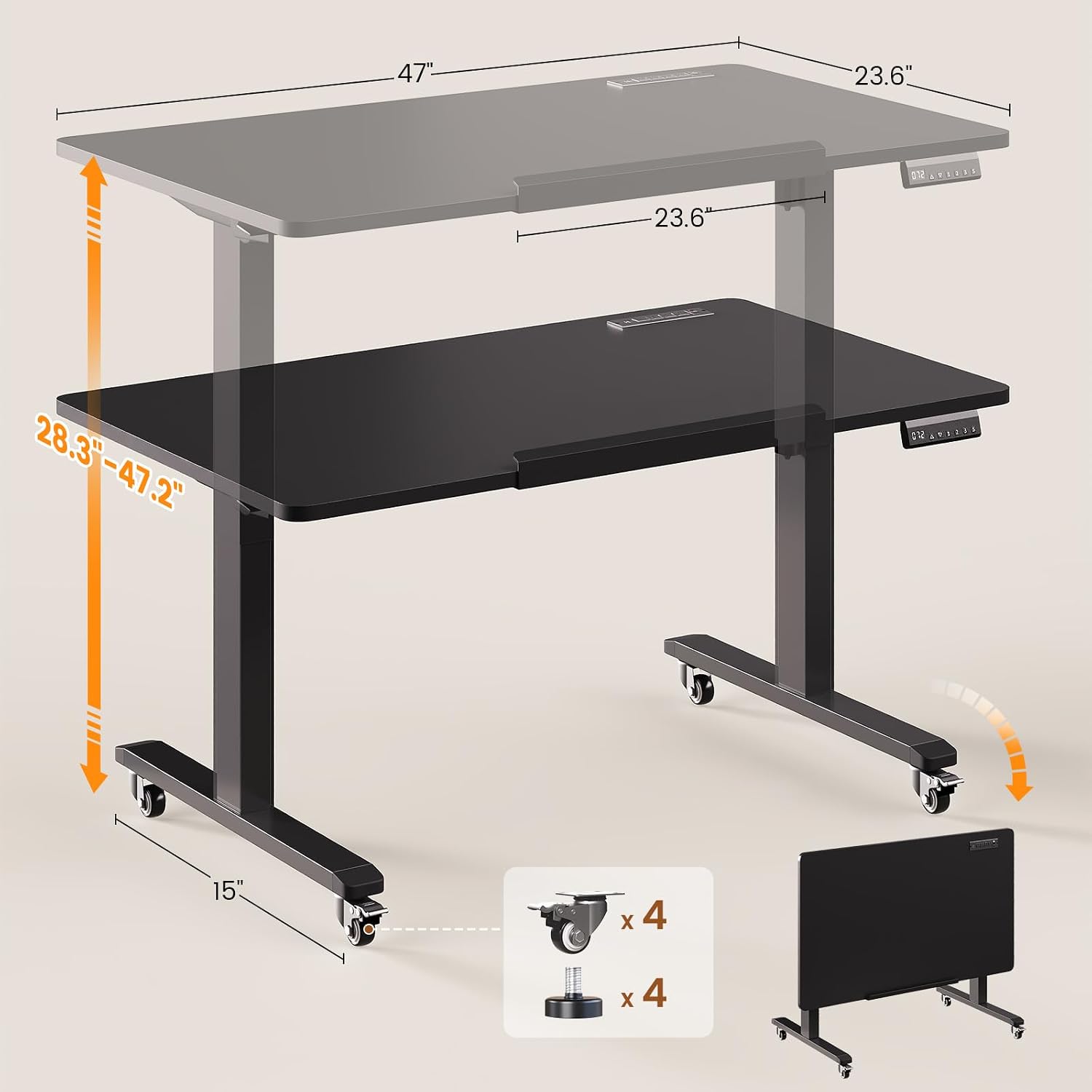
The desk features an electric lift system for smooth height adjustments between 28.3 inches and 47.2 inches.

- Menyelaraskan Tinggi: Gunakan Up dan Bawah butang anak panah pada panel kawalan untuk menaikkan atau menurunkan meja ke ketinggian yang anda inginkan. Ketinggian semasa akan dipaparkan pada skrin LED.
- Pratetap Memori: The control panel has three memory preset buttons (1, 2, 3). To save a height, adjust the desk to the desired position, then press the S button followed by the desired preset number (1, 2, or 3). To recall a saved height, simply press the corresponding preset number button.
- Reset Function (RST): If the desk encounters an error or does not respond, press and hold the RST button until the desk moves to its lowest position and resets.
Desktop Tilt Function
The desktop can be tilted from 0° to 180° for various activities like drawing or using it as a writing board.

- To tilt the desktop, locate the tilt mechanism on the side of the desk.
- Release the locking mechanism (usually a lever or knob) and adjust the desktop to your desired angle.
- Securely lock the mechanism once the desired tilt is achieved.
Mobility and Folding
The desk is equipped with casters for easy movement and can be folded for compact storage.
- Menggerakkan Meja: Unlock the two lockable casters. Gently push the desk to its new location. Once in position, lock the casters to prevent unintended movement.
- Lipatan untuk Storan: Adjust the desk to its lowest height. Tilt the desktop to the 180° vertical position. This allows the desk to be stored flat against a wall or in a closet.
5. Ciri-ciri
- Pelarasan Ketinggian Elektrik: Smooth and quiet motor (<40dB) allows for height changes from 28.3" to 47.2".
- 180° Tiltable Desktop: Converts from a flat desk to a drafting table or vertical writing board.
- Multifunctional Control Panel: Features an LED display, up/down buttons, and 3 memory presets for quick height recall.
- Jalur Kuasa Terbina dalam: Includes 4 AC outlets (120V/12A), 2 USB ports (5V/2A), and 1 Type-C port (5V/2A) with a 6.6 ft power cord for convenient device charging.
- Reka Bentuk Mudah Alih: Equipped with four smooth-rolling casters (two lockable) for easy relocation. Adjustable feet are also included as an alternative.
- Boleh dilipat untuk Storan: The desk can be folded flat for space-saving storage when not in use.
- Desktop yang Luas: Measures 47"L x 23.6"W, providing ample space for work or creative projects.
- Pembinaan yang kukuh: Features a robust alloy steel frame with a 200-lb capacity.


6. Penyelenggaraan
- Pembersihan: Lap desktop dan bingkai dengan lembut, damp kain. Elakkan pembersih yang melelas atau bahan kimia keras yang boleh merosakkan kemasan.
- Pengurusan Kabel: Regularly check and organize cables to prevent tangles and damage.
- Pelinciran: The electric lift mechanism is generally maintenance-free. Do not attempt to lubricate internal components unless specifically instructed by customer support.
- Pemeriksaan Pengikat: Periksa semua skru dan pengikat secara berkala untuk memastikan ia ketat. Ketatkan semula jika perlu.
7. Penyelesaian masalah
| Masalah | Kemungkinan Punca | Penyelesaian |
|---|---|---|
| Desk does not move or respond to control panel. | Power cable disconnected; motor cable loose; control panel error. | Check power connections. Ensure all motor and control panel cables are securely plugged in. Press and hold the RST butang selama 5 saat untuk menetapkan semula sistem. |
| Meja bergerak tidak sekata. | Lifting axle not fully inserted; uneven weight distribution. | Ensure the crossbar's lifting axle is fully inserted into both leg frame slots. Redistribute items on the desktop evenly. Perform a system reset. |
| Bunyi bising semasa operasi. | Normal motor sound; loose fasteners. | A quiet motor sound is normal (<40dB). Check and tighten all assembly screws if excessive noise occurs. |
| Desktop tilt mechanism is stiff or loose. | Locking mechanism needs adjustment. | Ensure the tilt locking mechanism is fully engaged or disengaged. Do not force the tilt. |
| Alur keluar kuasa tidak berfungsi. | Power strip switch off; desk not powered. | Check the power switch on the built-in power strip. Ensure the desk is plugged into a live wall outlet. |
8. Spesifikasi
- Jenama: SEDETA
- model: B0GHQ32MJ2
- Dimensi Produk: 47.2"P x 23.6"L x 28.3"T (tinggi minimum)
- Julat Pelarasan Tinggi: 28.3" hingga 47.2"
- Desktop Tilt Range: 0° hingga 180°
- warna: Hitam
- Bahan: Engineered Wood (Desktop), Alloy Steel (Frame)
- Mekanisme Mengangkat: Elektrik
- Tahap Bunyi: <40dB
- Kapasiti Berat: 200 lbs (approximate, for flat desktop)
- Jalur Kuasa: 4 AC Outlets (120V/12A), 2 USB Ports (5V/2A), 1 Type-C Port (5V/2A)
- Panjang Kord Kuasa: 6.6 kaki
- Ciri Khas: Foldable, 180° Tiltable desktop, Mobile (with casters), Built-in Power Outlet, Memory Presets
9. Waranti dan Sokongan
SEDETA provides a 3-year service warranty for this product. For any issues during purchase, assembly, or use, please contact SEDETA customer service. We are committed to providing satisfactory solutions.
Maklumat Hubungan: Please refer to the contact details provided with your purchase or visit the official SEDETA webtapak untuk sokongan.