
1. Maklumat Keselamatan Penting
Please read all safety instructions before using the printer to ensure safe and proper operation. Keep this manual for future reference.
- Jangan dedahkan pencetak kepada air atau kelembapan berlebihan.
- Avoid extreme temperatures. Operate and store the printer in a cool, dry environment.
- Use only the provided charging cable and approved power adapters.
- Jangan cuba membuka atau membaiki pencetak sendiri. Hubungi khidmat pelanggan untuk mendapatkan bantuan.
- Jauhkan pencetak daripada kanak-kanak.
2. Produk Lebihview
The Bewinner Portable Pocket Printer is a compact and lightweight thermal label printer designed for on-the-go printing needs. It connects wirelessly to smartphones and tablets via an app, offering a variety of templates for labels, lists, and messages.

The Bewinner Portable Pocket Printer, a compact thermal label printer.
Ciri-ciri Utama:
- Reka Bentuk Mudah Alih: Padat dan ringan untuk dibawa dengan mudah.
- Kesambungan Tanpa Wayar: Seamless connection to iOS and Android smartphones via app.
- Rich Functions: One-click printing with various templates for labels, lists, and messages.
- Penggunaan Serbaguna: Ideal for clothing and jewelry labels, price tags, address labels, QR codes, and study aids.
- Safe Printing: Inkless thermal printing technology for clear prints without odors.
3. Kandungan Pakej
Pastikan semua item ada dalam pakej:
- 1 x Portable Thermal Printer
- 1 x Kabel Pengecasan
- 1 x Manual Pengguna
4. Persediaan
4.1 Mengecas Pencetak
Before initial use, fully charge the printer. Connect the provided Type-C charging cable to the printer's charging port and plug the other end into a compatible USB power adapter (not included).
- Lampu penunjuk pengecasan akan menunjukkan status pengecasan.
- Pengecasan penuh biasanya mengambil masa kira-kira 2-3 jam.
4.2 Memasang Kertas Termal
The printer uses thermal paper rolls with a size of approximately 57x50mm (2.2x2.0 inches).
- Open the printer's cover by gently pressing the release button or lifting the designated area.
- Insert the thermal paper roll into the compartment, ensuring the printing side of the paper faces the print head.
- Pull a small portion of the paper out of the printer's exit slot.
- Tutup penutup pencetak dengan kuat sehingga ia berbunyi klik pada tempatnya.

View of the printer with its cover open, demonstrating the correct way to install the thermal paper roll.
4.3 Pemasangan Aplikasi
The Bewinner Portable Pocket Printer operates via the 'Eleph-label' mobile application.
- Cari untuk the 'Eleph-label' app on your device's app store (e.g., Apple App Store for iOS, Google Play Store for Android).
- Muat turun dan pasang aplikasi.
- Follow the on-screen instructions within the app to complete the setup.
For more information or support regarding the app, you may visit: http://gzhztz.com/en/?case/105.html
5. Arahan Operasi
5.1 Menghidupkan/Mematikan
- Untuk Menghidupkan: Tekan dan tahan butang kuasa sehingga lampu penunjuk menyala.
- Untuk Mematikan: Tekan dan tahan butang kuasa sekali lagi sehingga lampu penunjuk padam.
5.2 Menyambung ke Peranti Anda
The printer connects to your smartphone or tablet via Bluetooth through the 'Eleph-label' app.
- Pastikan pencetak dihidupkan dan berada dalam julat peranti mudah alih anda.
- Open the 'Eleph-label' app on your smartphone or tablet.
- Within the app, navigate to the device connection settings.
- Select the Bewinner printer from the list of available Bluetooth devices to establish a connection.

The printer's wireless connectivity with both smartphones and tablets for convenient operation.

The printer connected wirelessly to a smartphone, demonstrating the mobile printing function.
5.3 Label Percetakan
Once connected, you can begin creating and printing labels using the 'Eleph-label' app.
- Open the 'Eleph-label' app and select a template or create a new label design.
- Customize the text, images, and layout as desired. The app offers various material themes and options for different label types.
- Confirm the label content and settings.
- Initiate printing with the one-click print function within the app.
- The printer will automatically print the label. Tear off the printed label along the serrated edge.
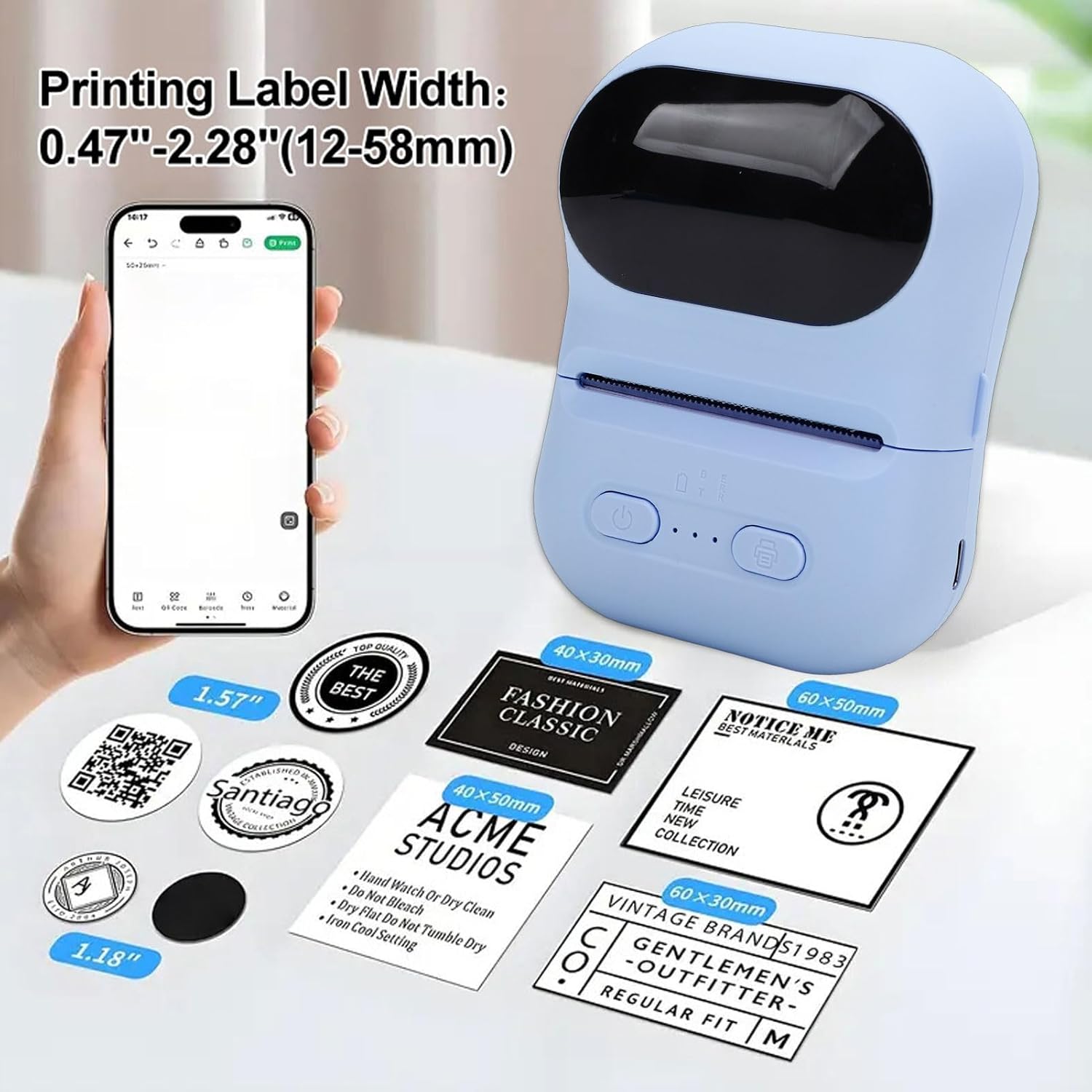
Examples of labels printed by the device, illustrating different widths and designs.

Illustrations of the printer's versatility for small business applications, including price tags, clothing labels, address labels, and QR codes.
6. Penyelenggaraan
6.1 Membersihkan Kepala Cetak
To maintain print quality, periodically clean the print head.
- Pastikan pencetak dimatikan.
- Buka penutup pencetak.
- Lap kepala cetak dengan lembut menggunakan kapasampditambah dengan isopropil alkohol.
- Biarkan kepala cetak kering sepenuhnya sebelum menutup penutup dan menghidupkan pencetak.
6.2 Storing the Printer and Thermal Paper
- Simpan pencetak di tempat yang sejuk dan kering jauh dari cahaya matahari langsung dan suhu yang melampau.
- Keep thermal paper rolls in their original packaging or in a dark, dry place to prevent premature fading or damage.
7. Penyelesaian masalah
Jika anda menghadapi masalah dengan pencetak anda, rujuk masalah dan penyelesaian biasa berikut:
| Masalah | Kemungkinan Punca | Penyelesaian |
|---|---|---|
| Pencetak tidak dihidupkan. | Bateri lemah; Butang kuasa tidak ditekan dengan betul. | Cas pencetak; Tekan dan tahan butang kuasa selama beberapa saat. |
| Tidak dapat bersambung ke aplikasi. | Bluetooth is off; Printer is out of range; App issue. | Ensure Bluetooth is enabled on your device; Move printer closer; Restart the app and printer. |
| Kualiti cetakan yang buruk atau cetakan kosong. | Thermal paper installed incorrectly; Print head dirty; Low battery. | Reinstall paper with printing side facing up; Clean the print head; Charge the printer. |
| Kertas jem. | Paper not aligned; Foreign object in paper path. | Open cover, remove jammed paper carefully, and reinstall correctly; Check for obstructions. |
8. Spesifikasi
| Ciri | Spesifikasi |
|---|---|
| Jenama | Bewinner |
| Nama Model | Bewinnerwxo0u51g32-13 |
| Kaedah Mencetak | Percetakan Terma |
| Parameter Percetakan | 200DPI |
| Jenis Bateri | Bateri Litium Ion |
| Kapasiti Bateri | 1100mAh |
| Antara Muka Pengecasan | Jenis C |
| Kaedah Sambungan | Bluetooth (via Eleph-label APP) |
| Saiz Kertas | Approx. 57x50mm (2.2x2.0 inches) |
| Dimensi Produk | 5.51"D x 3.94"W x 2.76"H |
9. Maklumat Waranti
This product is covered by a manufacturer warranty for 90 days from the date of purchase. Please retain your proof of purchase for warranty claims. The warranty covers defects in materials and workmanship under normal use.
Waranti tidak meliputi:
- Kerosakan yang disebabkan oleh kemalangan, penderaan, penyalahgunaan, banjir, kebakaran, gempa bumi atau sebab luaran yang lain.
- Damage caused by operating the product outside the permitted or intended uses described by Bewinner.
- Damage caused by service performed by anyone who is not a representative of Bewinner.
10. Sokongan Pelanggan
For further assistance, technical support, or warranty inquiries, please contact Bewinner customer service through the retailer where the product was purchased or refer to the official Bewinner webtapak untuk maklumat hubungan.
Please have your model number (Bewinnerwxo0u51g32-13) and proof of purchase ready when contacting support.