
1. Produk Lebihview
1.1 Pengenalan
The LongPlus CLK2-W1X8 is a versatile wireless security camera designed for both indoor and outdoor use. It features 2K QHD video resolution, dual-mode night vision, AI motion detection, two-way audio, and flexible storage options. This manual provides detailed instructions for setting up, operating, and maintaining your camera to ensure optimal performance.

Image: LongPlus Smart Wireless Security Camera overview.
1.2 Ciri-ciri Utama
- Resolusi Video 2K QHD: Provides clear and detailed surveillance footage.
- Dual-Mode Night Vision: Offers both full-color and infrared night vision up to 33ft.
- Pengesanan Gerakan AI: Accurately distinguishes between people, vehicles, pets, and packages.
- Perbincangan Dua Hala: Mikrofon dan pembesar suara terbina dalam untuk komunikasi masa nyata.
- Siren Alarm & Flashing Light: Deter intruders with audible and visual alerts.
- Reka Bentuk Tanpa Wayar: Rechargeable battery for flexible placement without power cords.
- IP65 Kalis Cuaca: Ensures reliable operation in various weather conditions.
- Tempatan & Storan Awan: Supports Micro SD card (up to 128GB) and cloud storage options.
- VicoHome App & Alexa Integration: Remote monitoring and voice control.

Image: LongPlus camera highlighting key features such as 4K HD, 5200mAh battery, multi-user share, 2-way talk, human/car detection, SD/cloud storage, sound/light alarm, and color/infrared night vision.
1.3 Apa yang ada di dalam Kotak
Setelah membuka bungkusan, pastikan semua barang ada:
- LongPlus Security Camera
- Pendakap Pemasangan
- Kabel Pengecas USB
- Skru Pemasangan dan Penambat Dinding
- Manual Pengguna (dokumen ini)
2. Persediaan dan Pemasangan
2.1 Mengecas Kamera
Before initial use, fully charge the camera's built-in rechargeable battery. Connect the provided USB charging cable to the camera's charging port and a standard 5V USB power adapter (not included). The charging indicator light will show the charging status.

Image: Illustration of the camera's wire-free, battery-powered design, emphasizing the 5200mAh battery capacity.
2.2 Muat Turun Apl dan Pembuatan Akaun
Muat turun VicoHome app from the Apple App Store or Google Play Store. Follow the on-screen instructions to create an account and log in.
2.3 Menyambung ke Wi-Fi
Open the VicoHome app and follow the prompts to add your new camera. The camera supports both 2.4GHz and 5GHz Wi-Fi networks. Ensure your smartphone is connected to the same Wi-Fi network you intend to use for the camera during the setup process.

Image: The camera supports both 2.4GHz and 5GHz Wi-Fi for flexible connectivity.
2.4 Memasang Kamera
Select a suitable location for your camera, ensuring good Wi-Fi signal strength and an unobstructed view. Use the included mounting bracket, screws, and wall anchors to securely attach the camera to a wall or ceiling. The IP65 rating ensures it can withstand outdoor elements.

Image: A hand attaching the camera to its wall-mounted bracket, demonstrating easy installation.
2.5 Memasukkan Kad SD
To enable local storage, insert a Micro SD card (up to 128GB, not included) into the designated slot on the camera. Ensure the camera is powered off before inserting or removing the SD card. Format the SD card via the VicoHome app after insertion for proper functionality.

Image: Close-up of the camera showing the Micro SD card slot, indicating support for up to 512GB (note: product specifications state 128GB).
3. Mengendalikan Kamera Anda
3.1 Langsung View dan Rakaman
Access the VicoHome app to view live 2K QHD video footage from your camera anytime, anywhere. The camera supports 24/7 recording when in Always-On Power mode, with retention time depending on your SD card size or cloud plan. You can also review past recordings through the app.

Image: Demonstrates the camera's 4K Ultra HD clarity with 8X zoom, 8 million pixels, and F1.6 lens aperture.

Image: Illustrates the 24/7 recording and live view capabilities, showing day and night monitoring.
3.2 Pengesanan Gerakan dan Makluman
The camera utilizes advanced AI to detect and differentiate between people, vehicles, pets, and packages. Its sensitive PIR sensor triggers real-time alerts, sending instant notifications to your phone via the VicoHome app. You can adjust detection sensitivity within the app to minimize false alarms. In case of an unwanted presence, activate the loud siren and flashing white light directly from the app to deter intruders.
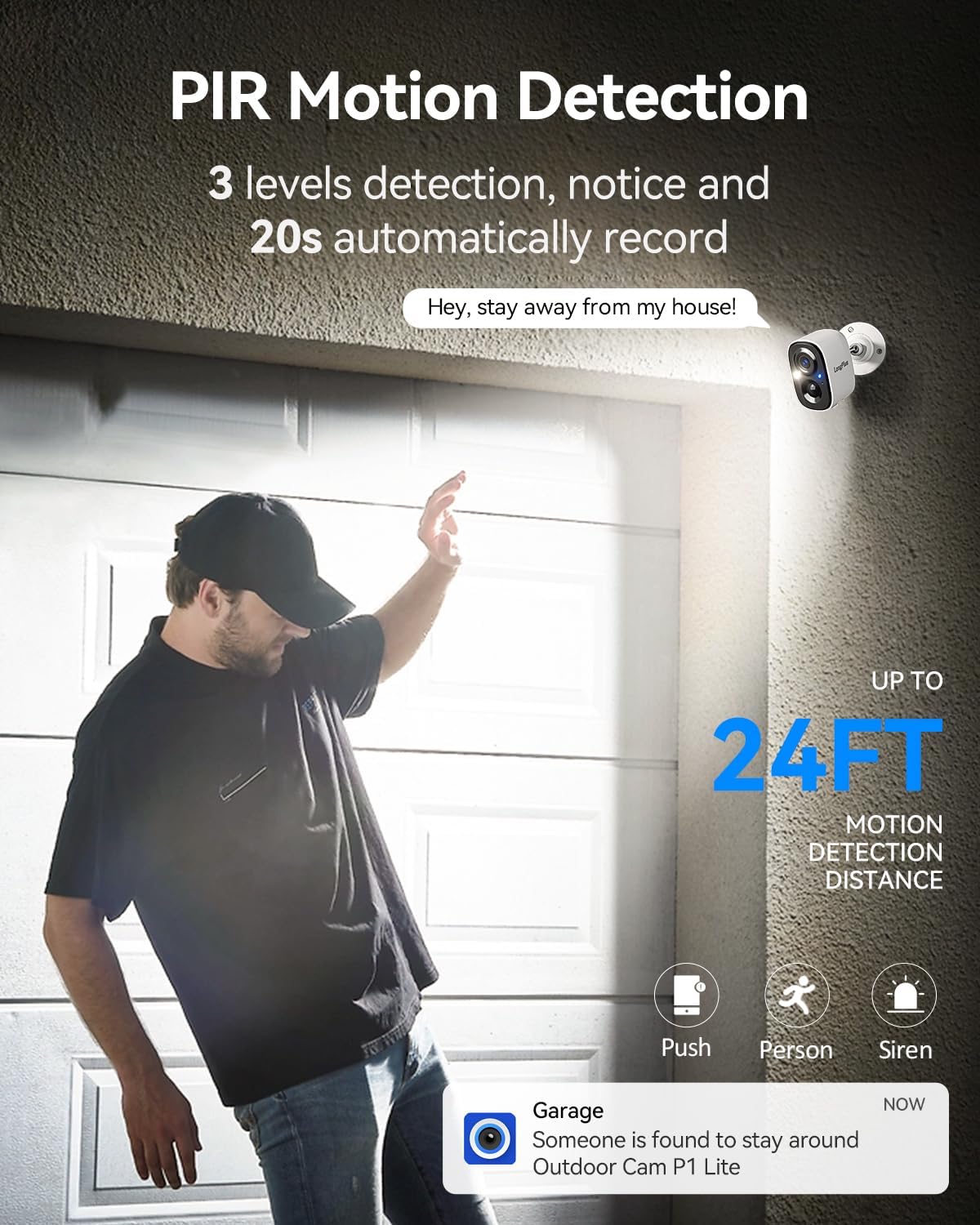
Image: Depicts PIR motion detection with a person triggering an alert, showing a notification on a smartphone and the camera's motion detection range.
3.3 Komunikasi Audio Dua Hala
Engage in real-time conversations using the camera's built-in microphone and speaker. Through the VicoHome app, you can speak to visitors, delivery personnel, or warn off potential intruders directly from your smartphone.

Image: Illustrates the two-way talk feature, showing a person at the door and a user communicating via the VicoHome app.
3.4 Mod Penglihatan Malam
The camera offers dual-mode night vision. Choose between full-color night vision, which utilizes supplemental lighting for a clearer, more detailed view, or infrared night vision for discreet monitoring in complete darkness. Both modes provide coverage up to 33ft.
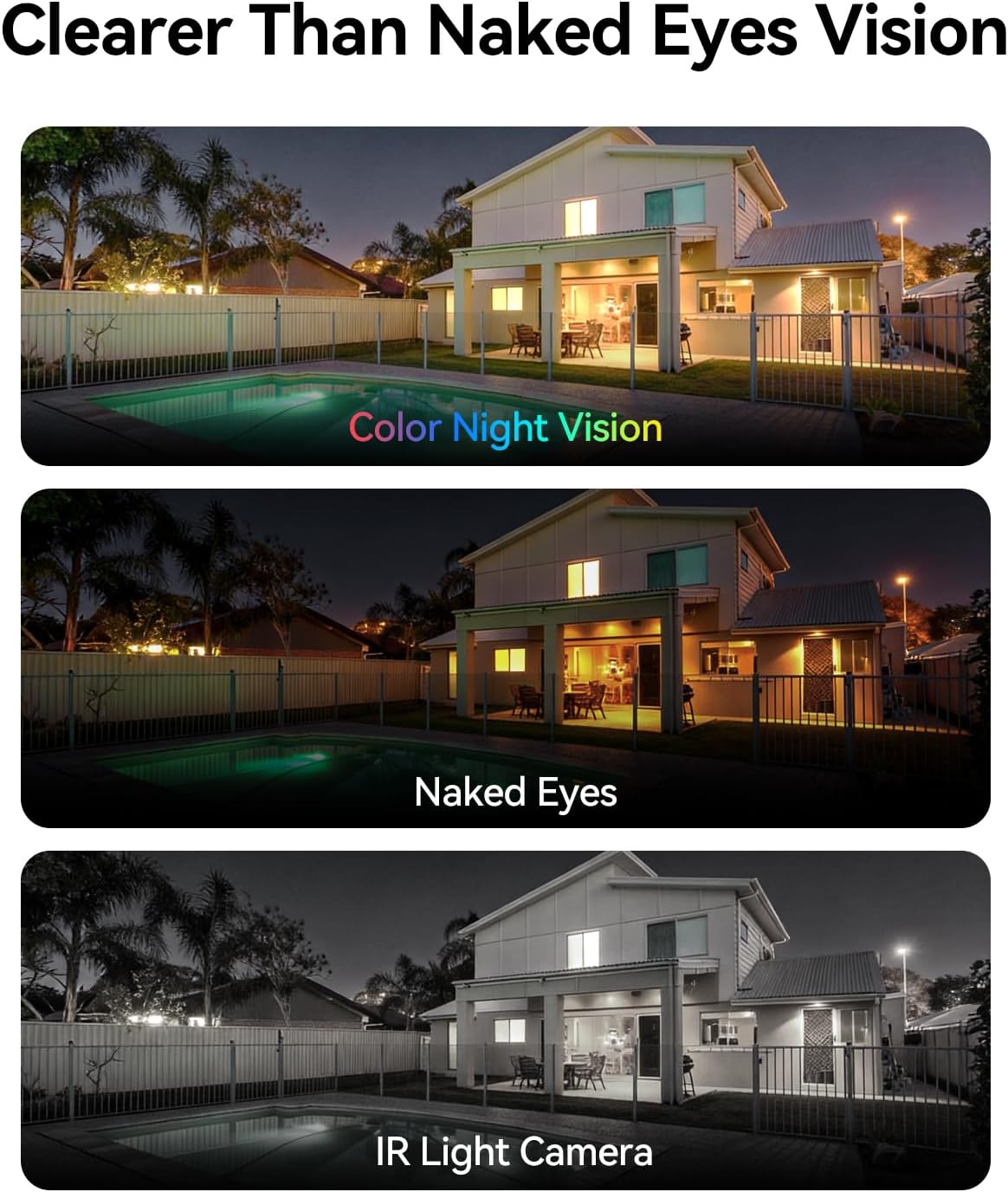
Image: Comparison of color night vision, standard vision, and infrared (IR) light camera vision at night.
3.5 Storage Options (SD Card & Cloud)
Rakam footage locally onto a Micro SD card (up to 128GB) or securely to the cloud. All users receive complimentary 3-day rolling cloud storage without a subscription. A free 30-day trial is available to unlock advanced capabilities, including AI recognition, extended cloud history, and custom detection zones. Premium cloud plans are available after the trial.

Image: Visual representation of both SD card and cloud storage options for the camera.
3.6 Sharing Camera Access
You can share access to your camera's live feed and recordings with multiple users through the VicoHome app, allowing for seamless multi-person monitoring of your property.

Image: Depicts multiple family members simultaneously viewing the camera feed on their devices.
3.7 Personalized Working Time
Configure the camera's operating schedule to optimize battery life and recording preferences. Choose between 'Always-On Power Mode' for continuous 24/7 recording or 'Power-Saving Mode' where you can select specific AI detection times to reduce battery drain.
4. Penyelenggaraan
4.1 Pengurusan Bateri
To ensure continuous operation, regularly check the battery level via the VicoHome app and recharge the camera as needed. Battery life can vary based on usage, motion detection frequency, and environmental conditions.
4.2 Membersihkan Kamera
Bersihkan kanta dan perumah kamera secara berkala dengan lembut, damp cloth to remove dust and dirt. Avoid using harsh chemicals or abrasive materials that could damage the camera's finish or lens.
4.3 Kemas Kini Perisian Tegar
Keep your camera's firmware updated to the latest version through the VicoHome app. Firmware updates often include performance improvements, new features, and security enhancements.
5. Penyelesaian masalah
5.1 Isu dan Penyelesaian Biasa
- Kamera tidak bersambung ke Wi-Fi:
Ensure your Wi-Fi network is 2.4GHz or 5GHz and has a strong signal. Verify the Wi-Fi password is correct. Try restarting your router and the camera. - Hayat bateri pendek:
Frequent motion detection events, continuous live viewing, or extreme temperatures can reduce battery life. Adjust motion detection sensitivity, reduce live view time, or switch to Power-Saving Mode. Ensure the camera is fully charged. - Motion alerts are too frequent or not triggering:
Adjust the motion detection sensitivity settings in the VicoHome app. Ensure the detection zone is correctly configured. Check for obstructions in the camera's field of view. - Kad SD tidak merakam:
Ensure the SD card is correctly inserted and formatted within the VicoHome app. Check if the SD card is full or corrupted. Replace the SD card if necessary. - Kualiti video yang lemah:
Periksa kekuatan isyarat Wi-Fi anda. Pastikan kanta kamera bersih dan bebas daripada halangan. - Audio dua hala tidak berfungsi:
Ensure microphone and speaker permissions are enabled for the VicoHome app on your smartphone. Check the volume settings on both your phone and within the app.
6. Spesifikasi Produk
| Ciri | Spesifikasi |
|---|---|
| Nama Model | Battery Security Camera (CLK2-W1X8) |
| Penggunaan yang Disyorkan | Indoor/Outdoor Surveillance |
| Teknologi Ketersambungan | Wireless (Wi-Fi 2.4GHz/5GHz) |
| Resolusi Tangkapan Video | 4K (Resolusi Pegun Berkesan 3 MP) |
| Ciri Khas | 2-Way Audio, Motion Sensor, Color Night Vision |
| Penilaian Kalis Air | IP65 |
| Sumber Kuasa | Dikuasakan Bateri (5200mAh) |
| Penyimpanan | Micro SD (up to 128 GB), Cloud Storage |
| Viewsudut | 110 Darjah |
| Peranti Serasi | Smartphone (VicoHome App), Amazon Alexa |
| Dimensi Item | 4 x 2 x 5 inci |
| Berat Barang | 0.36 Kilogram |
7. Waranti dan Sokongan Pelanggan
7.1 Maklumat Waranti
LongPlus products are covered by a limited warranty from the date of purchase. Please refer to the warranty card included with your product or visit the official LongPlus webtapak untuk terma dan syarat jaminan terperinci.
7.2 Sokongan Pelanggan
If you encounter any issues or have questions regarding your LongPlus CLK2-W1X8 camera, please contact our customer support team. You can find contact information on the LongPlus official website or within the VicoHome app's 'Help' section.
Sokongan dalam talian: melawat www.longplus.com/support (cthamppautan, sila sahkan sokongan sebenar URL).
Sokongan E-mel: support@longplus.com (cthample email, please verify actual support email).