
1. Pengenalan
This manual provides essential information for the safe and efficient operation of your THKFMSRC GD3024EMH High Frequency Off-Grid MPPT Solar Inverter. Please read this manual thoroughly before installation and use, and retain it for future reference.
The GD3024EMH is a high-frequency off-grid solar inverter designed to convert DC power from solar panels into AC power for household appliances. It features Maximum Power Point Tracking (MPPT) technology for optimized solar energy harvesting and operates as a hybrid system.
2. Maklumat Keselamatan
AMARAN: Kegagalan mematuhi arahan keselamatan ini boleh mengakibatkan renjatan elektrik, kebakaran, kecederaan serius atau kematian.
- Pemasangan mesti dilakukan oleh kakitangan yang berkelayakan.
- Ensure all wiring is correctly polarized and securely connected.
- Jangan kendalikan inverter jika ia rosak atau kelihatan tidak berfungsi.
- Keep the inverter away from flammable materials, moisture, and direct sunlight.
- Ensure adequate ventilation around the inverter to prevent overheating.
- Disconnect all power sources (solar, battery, utility) before performing any maintenance or wiring.
3. Kandungan Pakej
Verify that all items listed below are included in your package. If any items are missing or damaged, please contact your supplier.
- THKFMSRC GD3024EMH Solar Inverter Unit
- Manual Pengguna (dokumen ini)
- Perkakasan Pemasangan (skru, sauh)
- Communication Cable (if applicable)
4. Produk Lebihview
The THKFMSRC GD3024EMH inverter integrates a solar charge controller, inverter, and battery charger into one unit. It is designed to provide uninterrupted power support.
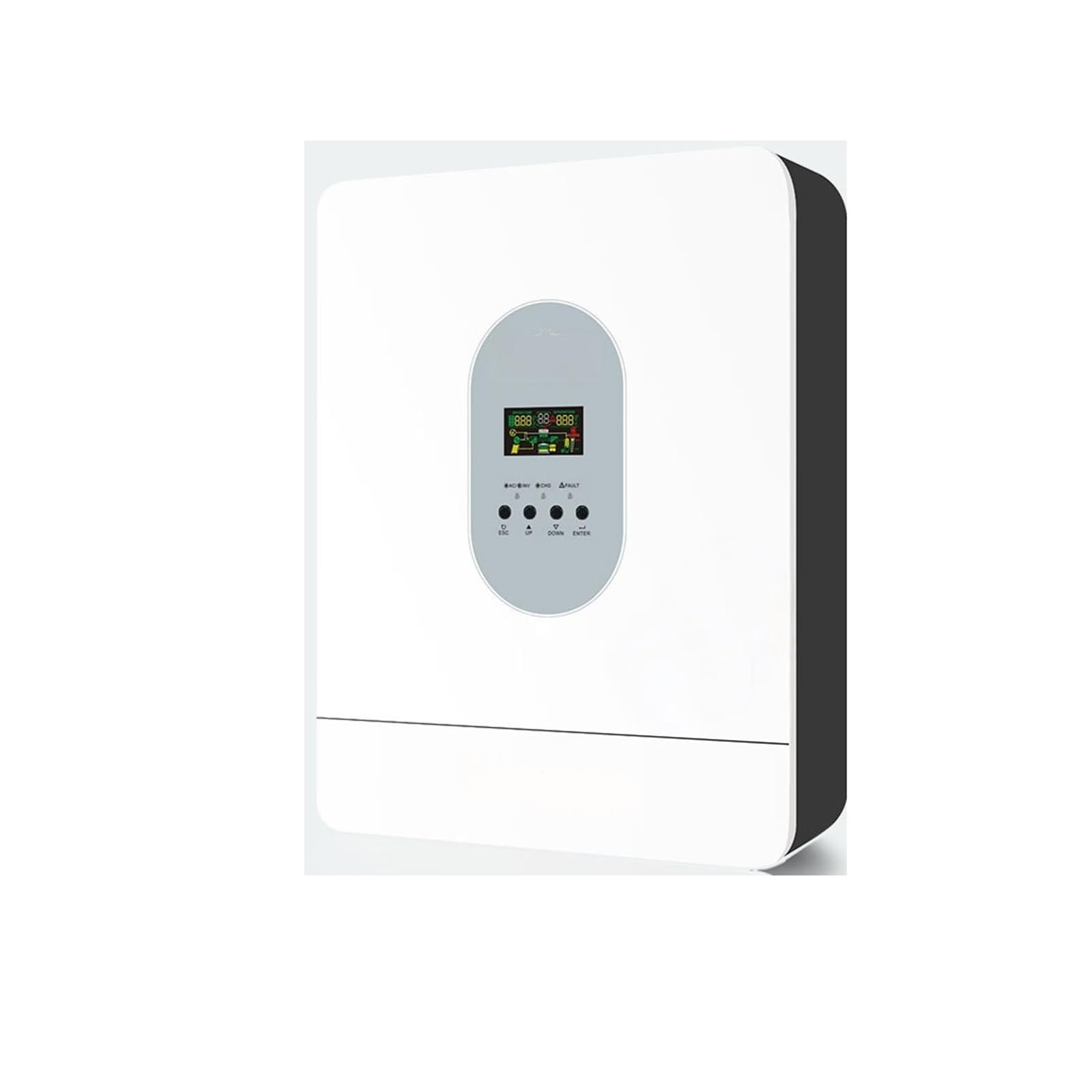
Rajah 4.1: Depan view of the THKFMSRC GD3024EMH solar inverter. This image displays the main unit with its control panel and various connection points for solar input, battery, and AC output.
4.1. Ciri-ciri
- Inverter gelombang sinus tulen
- Pengawal cas solar MPPT terbina dalam
- Input boleh dikonfigurasikan voltagrangkaian untuk peralatan rumah dan komputer peribadi melalui tetapan LCD
- Arus pengecasan bateri yang boleh dikonfigurasi berdasarkan aplikasi melalui tetapan LCD
- Keutamaan Pengecas AC / Suria yang boleh dikonfigurasi melalui tetapan LCD
- Serasi dengan sesalur kuasa voltage atau kuasa penjana
- Mulakan semula automatik semasa AC pulih
- Lebihan beban/lebih suhu/perlindungan litar pintas
- Reka bentuk pengecas bateri pintar untuk prestasi bateri yang dioptimumkan
- Fungsi permulaan sejuk
5. Persediaan
5.1. Memasang Inverter
- Pilih lokasi pemasangan yang sesuai:
- Indoors, protected from direct sunlight, rain, and dust.
- Vertical wall mounting is recommended.
- Ensure sufficient clearance (at least 20 cm) around the unit for proper heat dissipation.
- The ambient temperature should be between 0°C and 55°C.
- Mark the positions for the mounting screws on the wall using the inverter as a template.
- Drill holes and insert wall anchors (if necessary).
- Securely mount the inverter to the wall using the provided screws.
5.2. Sambungan Pendawaian
CAUTION: Before making any connections, ensure all power sources (solar panels, batteries, AC input) are disconnected and turned off.
- Sambungan Bateri: Connect the battery cables to the inverter's battery terminals. Ensure correct polarity (+ to + and - to -). The GD3024EMH requires a 24V battery bank.
- Sambungan Panel Suria: Connect the solar panel cables to the inverter's PV input terminals. Observe correct polarity. Ensure the open-circuit voltage of your solar array does not exceed the inverter's maximum PV input voltage.
- Sambungan Input AC: If connecting to a utility grid or generator, connect the AC input cable to the designated AC input terminal.
- Sambungan Output AC: Connect your loads (appliances) to the AC output terminals.
- Pembumian: Connect the inverter to an earth ground using a suitable grounding wire.
Refer to the wiring diagram provided in the full product manual for detailed connection points.
6. Arahan Operasi
6.1. Permulaan Kuasa
- Pastikan semua sambungan pendawaian adalah kukuh dan betul.
- Turn on the battery breaker/switch.
- Turn on the solar panel breaker/switch.
- If using AC input, turn on the AC input breaker.
- Press and hold the ON/OFF button on the inverter for a few seconds to power it on. The LCD display will illuminate.
6.2. LCD Display and Buttons
The inverter features an LCD display and several buttons for monitoring and configuration.
- Paparan LCD: Menunjukkan status sistem masa nyata, volum input/outputtages, battery charge, and error codes.
- Butang Fungsi: Typically include UP, DOWN, ENTER, and ESCAPE for navigating menus and adjusting settings.
6.3. Tetapan Asas
Access the settings menu via the function buttons to configure parameters such as:
- Keluaran Voltage/Kekerapan: (e.g., 110V/60Hz for this model)
- Mengecas Arus: Adjust based on battery capacity.
- Input AC Voltage Julat: For appliance or UPS mode.
- Charger Priority: Solar first, AC first, or Solar and AC.
- Output Source Priority: Solar first, Utility first, or SBU (Solar-Battery-Utility).
Consult the detailed settings section in the complete manual for specific parameter adjustments.
7. Penyelenggaraan
Penyelenggaraan berkala memastikan prestasi optimum dan jangka hayat inverter anda.
- Pembersihan: Periodically clean the inverter's exterior with a dry cloth. Ensure ventilation openings are free from dust and debris.
- Sambungan: Annually check all electrical connections for tightness and corrosion. Re-tighten if necessary.
- Pemeriksaan Bateri: Regularly inspect battery terminals for corrosion and ensure battery fluid levels (if applicable) are correct.
- Persekitaran: Pastikan persekitaran operasi kekal dalam julat suhu dan kelembapan yang ditetapkan.
WARNING: Disconnect all power sources before performing any cleaning or inspection.
8. Penyelesaian masalah
Bahagian ini menyediakan penyelesaian kepada isu biasa. Untuk masalah yang tidak disenaraikan di sini, hubungi sokongan teknikal.
| Masalah | Kemungkinan Punca | Penyelesaian |
|---|---|---|
| Inverter tidak menyala | Tiada sambungan bateri; Bateri voltage too low; ON/OFF button not pressed correctly. | Check battery connections; Charge battery; Press and hold ON/OFF button. |
| Tiada output AC | Overload; Short circuit; Inverter in fault mode. | Reduce load; Check for short circuits in wiring; Restart inverter. |
| Solar panels not charging battery | Incorrect PV connection; Insufficient sunlight; PV voltage terlalu rendah/tinggi. | Check PV wiring polarity; Ensure panels are in direct sunlight; Verify PV array voltage adalah dalam spesifikasi. |
| Kod ralat dipaparkan | Kesalahan sistem tertentu. | Refer to the full manual's error code section for detailed explanations and solutions. |
9. Spesifikasi
Key technical specifications for the THKFMSRC GD3024EMH (24V-110V) model:
- model: GD3024EMH
- Sistem Voltage: 24V DC
- Keluaran AC Voltage: 110V AC
- Inverter Efficiency: 98% (as per product description)
- Sumber Kuasa: Battery Powered (Hybrid with Solar/AC)
- Wattage: 1 kWh (as per product specifications, likely refers to energy capacity or rated power)
- Jenis: High Frequency Off-Grid MPPT Solar Inverter
- ASIN: B0GHF554WP
Note: Detailed specifications, including maximum PV input, charge current, and surge power, are available in the complete product datasheet.
10. Waranti dan Sokongan
For warranty information, please refer to the warranty card included with your product or contact your point of purchase. THKFMSRC products are designed for reliability and performance.
For technical support, troubleshooting assistance, or spare parts, please contact THKFMSRC customer service through the retailer where the product was purchased or visit the official THKFMSRC weblaman web untuk maklumat hubungan.
When contacting support, please have your model number (GD3024EMH) and ASIN (B0GHF554WP) ready.