
CANDY BC4S69M6D8J-S
Candy ProWash 400 Built-in Washing Machine User Manual
Model: BC4S69M6D8J-S
1. Pengenalan
Thank you for choosing the Candy ProWash 400 BC4S69M6D8J-S built-in washing machine. This appliance is designed for optimal performance, efficiency, and seamless integration into your kitchen or laundry space. With a 9 kg capacity and a powerful 1600 RPM spin speed, it handles demanding loads efficiently. Its Class A energy rating ensures reduced consumption, while the Inverter BPM motor provides quiet and durable operation. The Mix Power System and Steam function offer deep and gentle cleaning. Featuring Wi-Fi connectivity and the hOn App, you can control your washing machine remotely and access additional programs for smart laundry management.
This manual provides essential information for the safe installation, operation, and maintenance of your new washing machine. Please read it thoroughly before use and keep it for future reference.
2. Maklumat Keselamatan
Sentiasa ikuti langkah berjaga-jaga keselamatan asas apabila menggunakan peralatan elektrik untuk mengurangkan risiko kebakaran, renjatan elektrik dan kecederaan kepada orang.
- Baca semua arahan sebelum menggunakan perkakas.
- Pastikan perkakas dibumikan dengan betul.
- Jangan benarkan kanak-kanak bermain di atas atau di dalam perkakas.
- Jauhkan bahan pembungkus daripada kanak-kanak.
- Jangan pasang atau simpan perkakas ini di tempat ia akan terdedah kepada cuaca.
- Jangan baiki atau ganti mana-mana bahagian perkakas atau cuba apa-apa servis melainkan disyorkan secara khusus dalam manual ini.
- Sentiasa putuskan sambungan perkakas daripada bekalan kuasa sebelum membersihkan atau melakukan penyelenggaraan.
- Do not use flammable liquids or vapors near the appliance.
3. Produk Lebihview
Familiarize yourself with the main components of your Candy ProWash 400 washing machine.
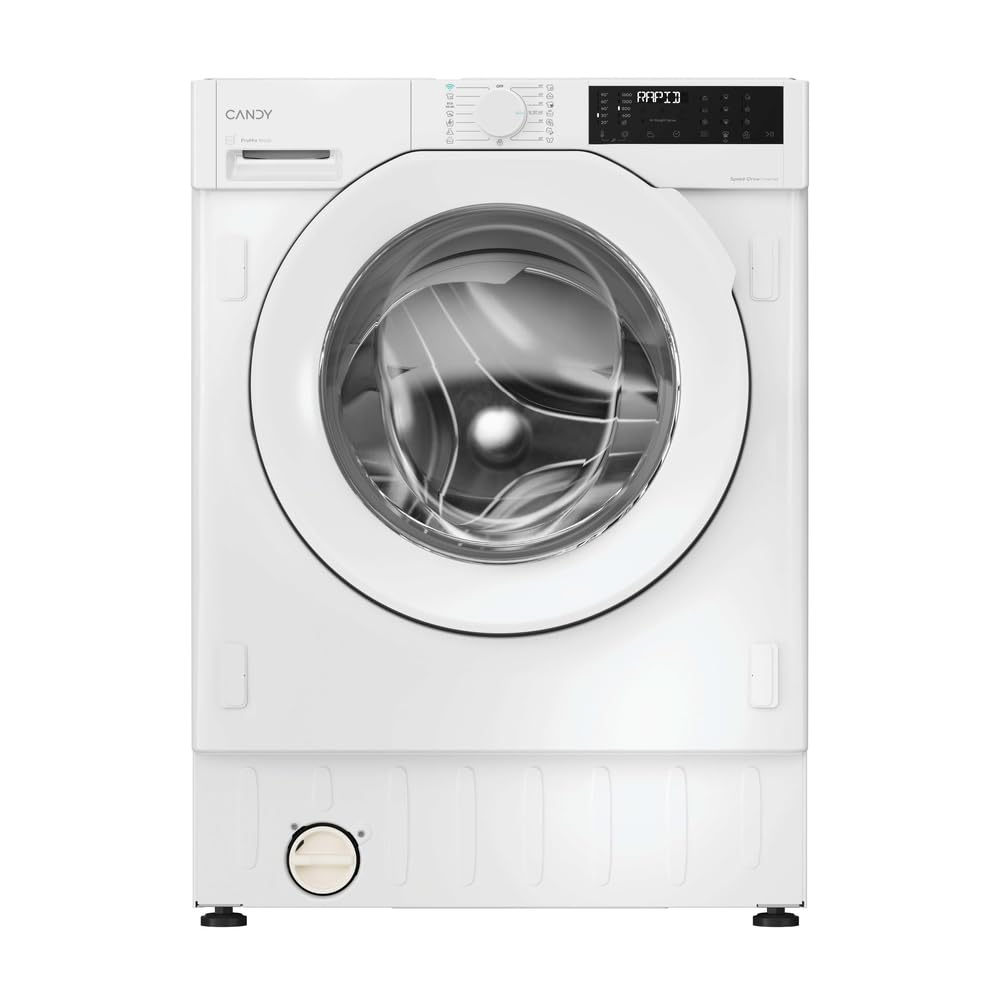
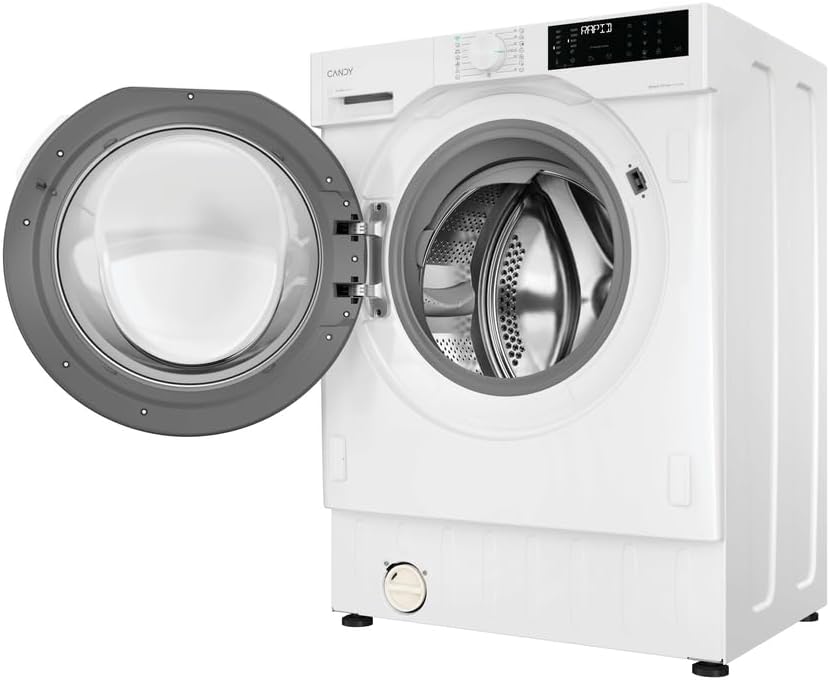


Panel Kawalan
Panel kawalan biasanya termasuk:
- Dail Pemilih Program: Untuk memilih program cucian yang diingini.
- Skrin Paparan: Shows program duration, remaining time, error codes, and selected options.
- Butang Pilihan: For selecting additional functions like temperature, spin speed, steam, or delayed start.
- Butang Mula/Jeda: Untuk memulakan atau menghentikan sementara kitaran basuh.
Dispenser Pencuci
Located on the top left, the dispenser drawer has compartments for pre-wash detergent, main wash detergent, and fabric softener.
4. Pemasangan dan Persediaan
Proper installation is crucial for the safe and efficient operation of your washing machine. It is recommended that installation be performed by a qualified technician.
4.1 Membongkar
- Keluarkan semua bahan pembungkusan, termasuk alas polistirena dan sebarang filem pelindung.
- Tanggalkan bolt transit yang terletak di bahagian belakang mesin. Bolt ini mengikat dram semasa pengangkutan dan mesti ditanggalkan sebelum digunakan. Simpan untuk pengangkutan pada masa hadapan.
- Insert the plastic caps provided into the holes left by the transit bolts.
4.2 Kedudukan dan Meratakan
The Candy ProWash 400 is a built-in appliance, designed to be integrated into a cabinet. Ensure the installation space meets the specified dimensions (82x60x52.5 cm HxWxD).
- Letakkan mesin basuh di atas lantai yang kukuh dan rata.
- Adjust the adjustable feet at the bottom of the machine to ensure it is perfectly level. Use a spirit level to verify. Proper leveling prevents excessive vibration and noise during operation.
- Pastikan terdapat pengudaraan yang mencukupi di sekeliling perkakas.
4.3 Sambungan Air
- Connect the cold water inlet hose to a cold water tap with a 3/4" thread.
- Ensure the connection is tight to prevent leaks. Do not overtighten.
- Open the water tap fully and check for any leaks.
4.4 Sambungan Longkang
- Position the drain hose at a height between 50 cm and 85 cm from the floor.
- Pastikan hos saliran tidak bengkok atau tersumbat.
- The drain hose can be hooked over the edge of a sink or connected to a dedicated standpipe.
4.5 Sambungan Elektrik
- Connect the power plug to a properly grounded electrical outlet.
- Pastikan voltage dan frekuensi sepadan dengan spesifikasi pada plat penarafan perkakas.
- Jangan gunakan kord sambungan atau berbilang penyesuai.
5. Arahan Operasi
5.1 Sebelum Basuh Pertama
Run a short cycle without laundry and detergent to clean the drum and remove any manufacturing residues.
5.2 Memuatkan Dobi
- Isih pakaian mengikut jenis fabrik, warna dan tahap kekotoran.
- Semak label penjagaan pakaian untuk arahan membasuh.
- Open the door and load the laundry into the drum, ensuring not to overload. Leave enough space for clothes to tumble freely.
5.3 Menambah Detergen dan Pelembut
Pull out the detergent dispenser drawer and add appropriate amounts of detergent and fabric softener to the designated compartments.
- Petak I: Pre-wash detergent (if selected).
- Petak II: Main wash detergent.
- Petak III (Simbol bunga): Fabric softener. Do not exceed the 'MAX' level.
The Mix Power System ensures detergent is activated in depth for more effective cleaning.
5.4 Pemilihan Program
Turn the Program Selector Dial to choose one of the 16 available wash programs. The display will show the default temperature and spin speed for the selected program.
Key programs include:
- Kapas: Untuk barangan kapas tahan lama.
- Eko: Program cekap tenaga untuk kapas yang biasanya kotor.
- Sintetik: Untuk fabrik sintetik dan campuran.
- Makanan istimewa: Untuk barang rapuh yang memerlukan penjagaan lembut.
- Wool/Hand Wash: For woolens and hand-washable items.
- Program Pantas: Quick wash options for lightly soiled items.
- Fungsi Stim: Helps to refresh clothes and reduce wrinkles.
5.5 Melaraskan Pilihan
After selecting a program, you can customize settings using the option buttons:
- Suhu: Laraskan suhu cucian.
- Kelajuan putaran: Modify the spin speed (up to 1600 RPM).
- Kelewatan Mula: Tangguhkan permulaan kitaran.
- Stim: Activate the steam function for selected programs.
5.6 Memulakan Kitaran
Tekan ke Mula/Jeda button to begin the wash cycle. The indicator light will illuminate, and the display will show the remaining time.
5.7 Wi-Fi and hOn App Connectivity
Your washing machine features Wi-Fi and Bluetooth connectivity, allowing remote control via the hOn App.
- Muat turun Aplikasi hOn daripada gedung aplikasi telefon pintar anda.
- Follow the in-app instructions to pair your washing machine.
- Once connected, you can start/stop cycles, select additional programs, monitor progress, and receive notifications from anywhere.
6. Penyelenggaraan dan Penjagaan
Penyelenggaraan tetap memastikan jangka hayat dan prestasi optimum perkakas anda.
6.1 Membersihkan Dispenser Detergen
Periodically remove and clean the detergent dispenser drawer to prevent detergent buildup and mold. Rinse it under running water and brush away any residue.
6.2 Membersihkan Penapis
The filter, usually located at the bottom front of the machine, should be cleaned regularly (e.g., every 2-3 months) to prevent blockages.
- Place a shallow container under the filter cover to catch any residual water.
- Carefully open the filter cover.
- Unscrew the filter slowly to allow water to drain.
- Remove any lint, coins, or foreign objects from the filter.
- Rinse the filter under running water and screw it back in securely.
- Tutup penutup penapis.
6.3 Membersihkan Dram
Run a maintenance wash (e.g., a hot cycle with no laundry and a descaling agent or washing machine cleaner) monthly to prevent odors and limescale buildup.
6.4 Membersihkan Bahagian Luar
Lap permukaan luar dengan lembut, damp kain. Jangan gunakan pembersih atau pelarut yang melelas.
6.5 Musim sejuk (jika berkenaan)
If the machine is in an unheated area and there's a risk of freezing, drain all water from the hoses and pump. Consult a technician if unsure.
7. Penyelesaian masalah
Sebelum menghubungi khidmat pelanggan, rujuk jadual berikut untuk isu dan penyelesaian biasa.
| Masalah | Kemungkinan Punca | Penyelesaian |
|---|---|---|
| Mesin tidak bermula | No power; Door not closed; Start/Pause button not pressed. | Periksa bekalan kuasa; Pastikan pintu ditutup rapat; Tekan Mula/Jeda. |
| Machine does not fill with water | Paip air ditutup; Hos salur masuk air tertekuk; Penapis air disekat. | paip air terbuka; Luruskan hos; Penapis salur masuk air bersih. |
| Machine does not drain or spin | Drain hose kinked/blocked; Pump filter blocked; Imbalance in load. | Check/clear drain hose; Clean pump filter; Redistribute laundry. |
| Getaran / bunyi yang berlebihan | Transit bolts not removed; Machine not level; Overloaded drum. | Remove transit bolts; Adjust leveling feet; Reduce load size. |
| Kod ralat pada paparan | Kerosakan khusus. | Refer to the full user manual for specific error code meanings or contact support. |
8. Spesifikasi
Technical details for the Candy ProWash 400 BC4S69M6D8J-S washing machine.
| Ciri | Perincian |
|---|---|
| Nama Model | BC4S69M6D8J-S |
| Jenama | CANDY |
| taip | Built-in Front Load Washing Machine |
| Kapasiti | 9 kg |
| Kelajuan Putaran Maksimum | 1600 RPM |
| Kelas Tenaga | A (up to 20% more efficient) |
| Jenis Motor | Penyongsang BPM |
| Ketersambungan | Wi-Fi + Bluetooth (hOn App) |
| Program | 16 Standard Cycles (e.g., Spin, Cotton, Eco) |
| Ciri Khas | Mix Power System, Steam Function, High Efficiency |
| Tahap Bunyi (Putaran) | 72 desibel |
| Dimensi (HxWxD) | 82 x 60 x 52.5 cm |
| Berat Barang | 64 kg |
| Bahan Drum | Keluli Tahan Karat |
| Jenis Kawalan | Tombol |
| Pilihan Dispenser Detergen | Dispenser pintu |
| EU Spare Parts Availability | 10 Tahun |

9. Maklumat Waranti
The product warranty information provided is 'Null' in the available data. Please refer to your purchase documentation, retailer, or the official Candy website for specific warranty terms and conditions applicable to your region and purchase date.
10. Sokongan Pelanggan
For technical assistance, spare parts, or further information, please contact Candy customer service or visit their official webtapak.
- Sokongan dalam talian: Lawati pegawai Kedai Gula-gula di Amazon or the main Candy webtapak.
- Pusat Perkhidmatan: Locate authorized service centers in your area through the Candy webtapak.
Ask a question about this manual
Ask about setup, troubleshooting, compatibility, parts, safety, or missing instructions. Manuals+ will review the question and use this page’s manual context to help answer it.