
1. Pengenalan
This manual provides detailed instructions for the setup, operation, maintenance, and troubleshooting of your GMKtec G3 Pro Mini PC. Please read this guide thoroughly before using your device to ensure optimal performance and longevity.
The GMKtec G3 Pro is a compact desktop computer designed for various applications, including office work, business, multimedia, and online learning. It features an Intel Core i3-10110U processor, 16GB DDR4 RAM, and a 512GB PCIe M.2 SSD, offering efficient performance in a small form factor.
2. Apa yang ada di dalam Kotak
Sahkan bahawa semua item terdapat dalam pakej:
- GMKtec Nucbox G3 Pro Mini PC (16GB RAM, 512GB SSD)
- Kabel HDMI
- Penyesuai Kuasa
- Manual Pengguna
- Lekapkan VESA dengan Skru

3. Produk Lebihview
The GMKtec G3 Pro Mini PC is designed for compact and efficient computing. It features a robust set of ports and internal components to support various tasks.
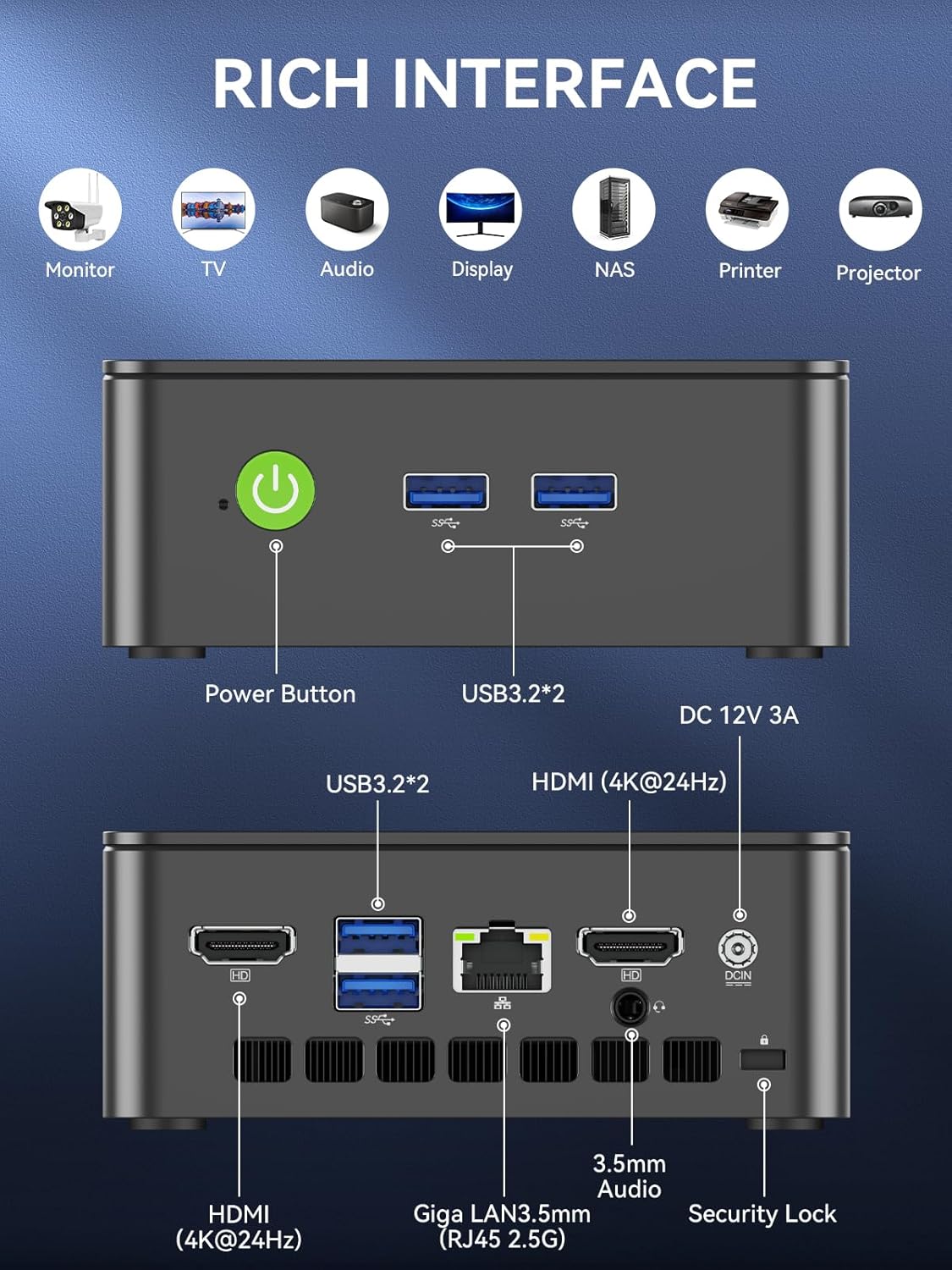
Panel Depan
- Butang Kuasa: Untuk menghidupkan/mematikan peranti.
- USB 3.2 x 2: Untuk menyambung peranti seperti papan kekunci, tetikus atau peranti storan luaran.
Panel Belakang
- HDMI (4K@60Hz) x 2: For connecting to displays, supporting dual 4K output.
- USB 3.2 x 2: Port tambahan untuk persisian.
- Bicu Audio 3.5mm: Untuk menyambungkan fon kepala atau pembesar suara luaran.
- Giga LAN (RJ45 2.5GbE): Untuk sambungan rangkaian berwayar.
- DC DALAM: Port input kuasa.
- Slot Kunci Keselamatan: For securing the device to a desk.
Komponen Dalaman
- Dual DDR4 RAM Slots: Supports up to 64GB RAM.
- M.2 2280 PCIe Gen3*4 Slot: For NVMe SSDs, supporting up to 8TB.
- M.2 2242 SATA3.0 Slot: For SATA SSDs, supporting up to 1TB.
- Cooling Fan & Vents: Integrated cooling system to maintain optimal operating temperatures.

4. Panduan Persediaan
Ikuti langkah ini untuk persediaan awal:
- Sambung Peranti: Connect your keyboard, mouse, and any other necessary USB devices to the available USB 3.2 ports.
- Paparan Sambungkan: Use an HDMI cable to connect your monitor(s) to the HDMI ports on the rear panel. The device supports dual 4K@60Hz displays.
- Sambungkan Kuasa: Plug the power adapter into the DC IN port on the mini PC, then plug the adapter into a power outlet.
- Hidupkan kuasa: Tekan butang kuasa pada panel hadapan untuk menghidupkan PC mini.
- Initial Operating System Setup: Ikut arahan pada skrin untuk melengkapkan persediaan Windows 11 Pro.
- Sambungan Rangkaian: For faster setup, avoid connecting to a wired LAN initially. Connecting LAN might trigger long updates, delaying desktop access. Connect to Wi-Fi 6 or connect to the 2.5GbE LAN port after initial setup is complete.

5. Arahan Operasi
Hidupkan/Mati Kuasa
- Untuk Menghidupkan: Tekan butang kuasa sekali.
- Untuk Mematikan: From the operating system, select 'Shut down'. Alternatively, press and hold the power button for 5 seconds to force a shutdown (use only when necessary).
BIOS Settings and Performance Modes
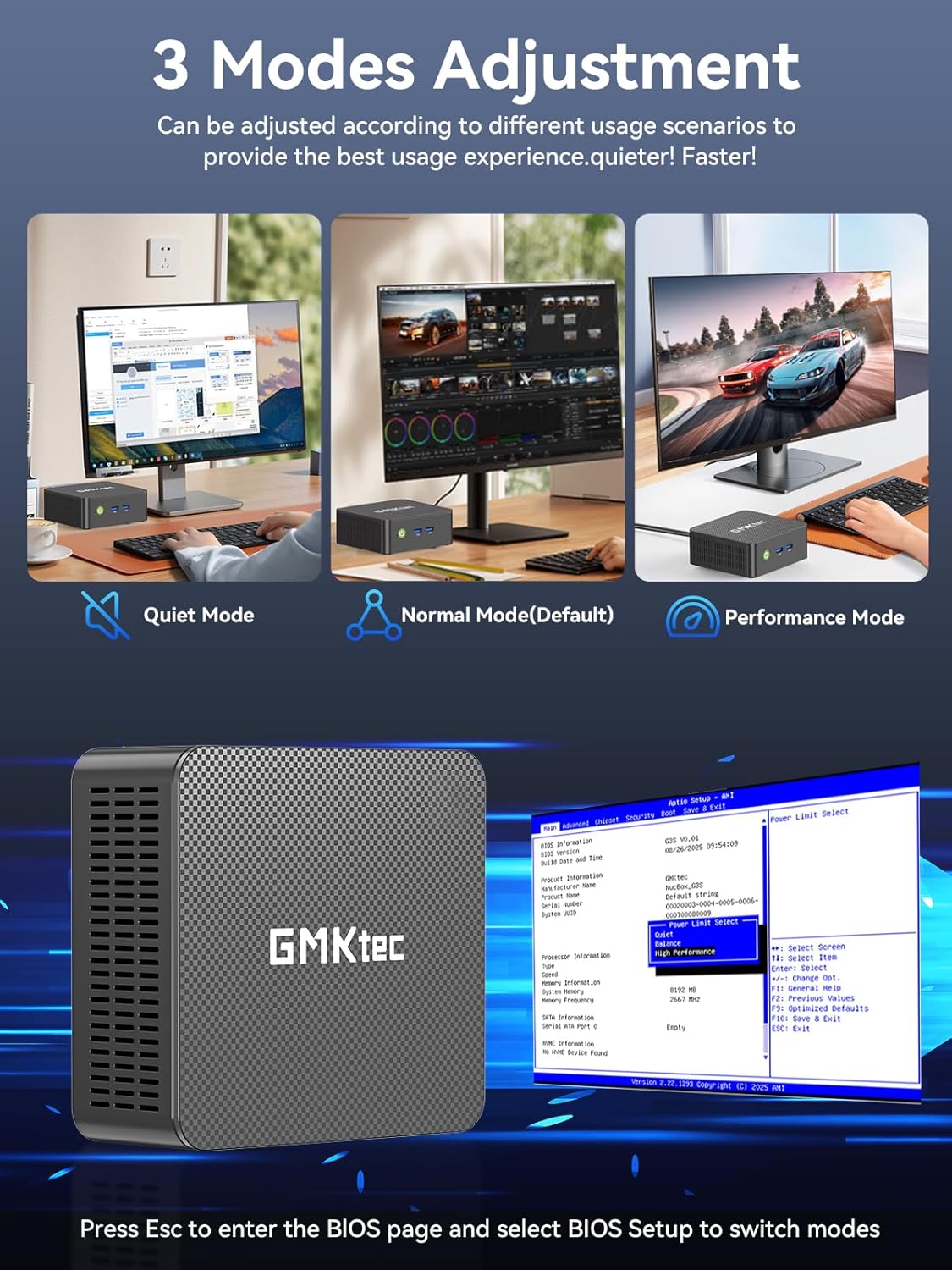
The GMKtec G3 Pro supports different performance modes that can be adjusted via the BIOS settings to optimize for quiet operation, normal use, or maximum performance.
- Mengakses BIOS: Press the 'Esc' key repeatedly during startup to enter the BIOS page.
- Melaraskan Mod: Navigate to the BIOS Setup and select your desired mode (Quiet Mode, Normal Mode, Performance Mode) based on your usage scenario.
6. Peluasan Storan
The GMKtec G3 Pro offers flexible storage expansion options:
- M.2 2280 NVMe PCIe Slot: Supports high-speed NVMe SSDs up to 8TB for primary storage or additional high-performance storage.
- M.2 2242 SATA Slot: Supports SATA SSDs up to 1TB for additional storage capacity.
To install or upgrade storage, refer to the detailed instructions in the full user manual or consult a qualified technician.
7. Ketersambungan
The Mini PC provides comprehensive connectivity options:
- Wi-Fi 6 (802.11ax): Offers high-speed wireless internet access up to 600Mbps.
- Bluetooth 5.2: For connecting wireless devices such as keyboards, mice, and headphones.
- 2.5GbE Ethernet (RJ45): Provides ultra-fast wired network speeds, up to 2.5 times faster than standard Gigabit Ethernet.

8. Persediaan Paparan Dwi
The GMKtec G3 Pro supports connecting two 4K@60Hz displays simultaneously via its two HDMI 2.0 ports. This allows for an extended desktop experience, enhancing productivity for multitasking, content creation, or entertainment.
Simply connect two monitors using HDMI cables to the respective ports on the rear of the mini PC. The operating system will automatically detect the displays, and you can configure their arrangement and resolution through the display settings.

9. Sistem Penyejukan
The GMKtec G3 Pro is equipped with a smart quiet cooling fan and strategically placed cooling vents to ensure efficient heat dissipation. This design allows for ultra-quiet operation, typically below 38dB, even under load, providing a comfortable working environment.

10. Spesifikasi
| Ciri | Spesifikasi |
|---|---|
| Jenama | GMKtec |
| Nama Model | G3Pro |
| Sistem Operasi | Windows 11 Pro |
| Model CPU | Intel Core i3-10110U |
| Kelajuan CPU | Sehingga 4.1 GHz |
| Pemproses bersama Grafik | Grafik Intel UHD 1200MHz |
| Memori RAM Dipasang | 16 GB DDR4 (Dual Channel) |
| Saiz Maksimum Memori RAM | 64 GB |
| Penerangan Cakera Keras | 512 GB M.2 2280 PCIe Gen3*2 + 1*M.2 2242 SATA |
| Teknologi Ketersambungan | Bluetooth 5.2, WiFi 6, Ethernet (2.5GbE), HDMI (4K@60Hz) |
| Output Video | HDMIx2 |
| Resolusi Paparan Maksimum | 4096 × 2160 Piksel |
| Jumlah Port USB | 4 (USB 3.2) |
| Penggunaan Kuasa | 6 Watt (biasa) |
| Ciri Khas | Wake On LAN, But PXE, RTC Wake, Auto Power On |
11. Penyelenggaraan
To ensure the longevity and optimal performance of your GMKtec G3 Pro Mini PC, consider the following maintenance tips:
- Jaga kebersihan: Regularly clean the exterior of the mini PC with a soft, dry cloth. Ensure cooling vents are free from dust and obstructions.
- Kemas Kini Perisian: Pastikan sistem pengendalian dan pemacu anda dikemas kini kepada versi terkini untuk keselamatan dan peningkatan prestasi.
- Penutupan Betul: Sentiasa matikan PC mini dengan betul melalui sistem pengendalian untuk mengelakkan rasuah data.
- Keadaan Persekitaran: Kendalikan PC mini di kawasan yang mempunyai pengudaraan yang baik, jauh dari cahaya matahari langsung, haba yang berlebihan dan kelembapan.
12. Penyelesaian masalah
If you encounter issues with your GMKtec G3 Pro Mini PC, try the following basic troubleshooting steps:
- Tiada Kuasa: Pastikan penyesuai kuasa disambungkan dengan selamat ke kedua-dua PC mini dan soket kuasa yang berfungsi. Cuba soket lain jika perlu.
- Tiada Paparan: Verify that the HDMI cables are securely connected to both the mini PC and the monitor(s). Ensure monitors are powered on and set to the correct input source.
- Tiada sambungan internet: For Wi-Fi, check your router and network settings. For wired Ethernet, ensure the cable is properly connected and the network adapter is enabled in the operating system.
- Prestasi Perlahan: Close unnecessary applications, check for background processes, and ensure sufficient free storage space. Consider adjusting performance modes in BIOS.
- Isu persisian: Try connecting USB devices to different ports. Ensure drivers are installed correctly for specialized peripherals.
For more complex issues, refer to the comprehensive troubleshooting section in the full user manual or contact customer support.
13. Waranti dan Sokongan
Your GMKtec G3 Pro Mini PC comes with a Waranti terhad 1 tahun from the date of purchase, covering defects due to design and workmanship.
For any questions, technical assistance, or warranty claims, please utilize the following support channels:
- Sokongan E-mel: Contact the professional after-sales team at support@gmktec.com.
- Sokongan dalam talian: Visit the GMKtec store on Amazon or the official GMKtec webtapak untuk Soalan Lazim dan sumber tambahan.
- 24/7 Client Support: Dedicated support is available to assist you with your needs.