
pengenalan
This manual provides detailed instructions for the setup, operation, and maintenance of your AT&T DECT 6.0 Cordless Phone, model BL108-3. Please read this guide thoroughly to ensure proper use and to take full advantage of all features, including Smart Call Blocker, Bluetooth Connect to Cell, and the digital answering machine.
Kandungan Pakej
Sahkan bahawa pakej anda mengandungi item berikut:
- Unit Pangkalan
- 3 Telefon bimbit tanpa wayar
- 3 Adaptor Kuasa
- 2 Pengecas (untuk telefon bimbit tambahan)
- Tali Talian Telefon
- 6 Sel Bateri
- Panduan Mula Pantas
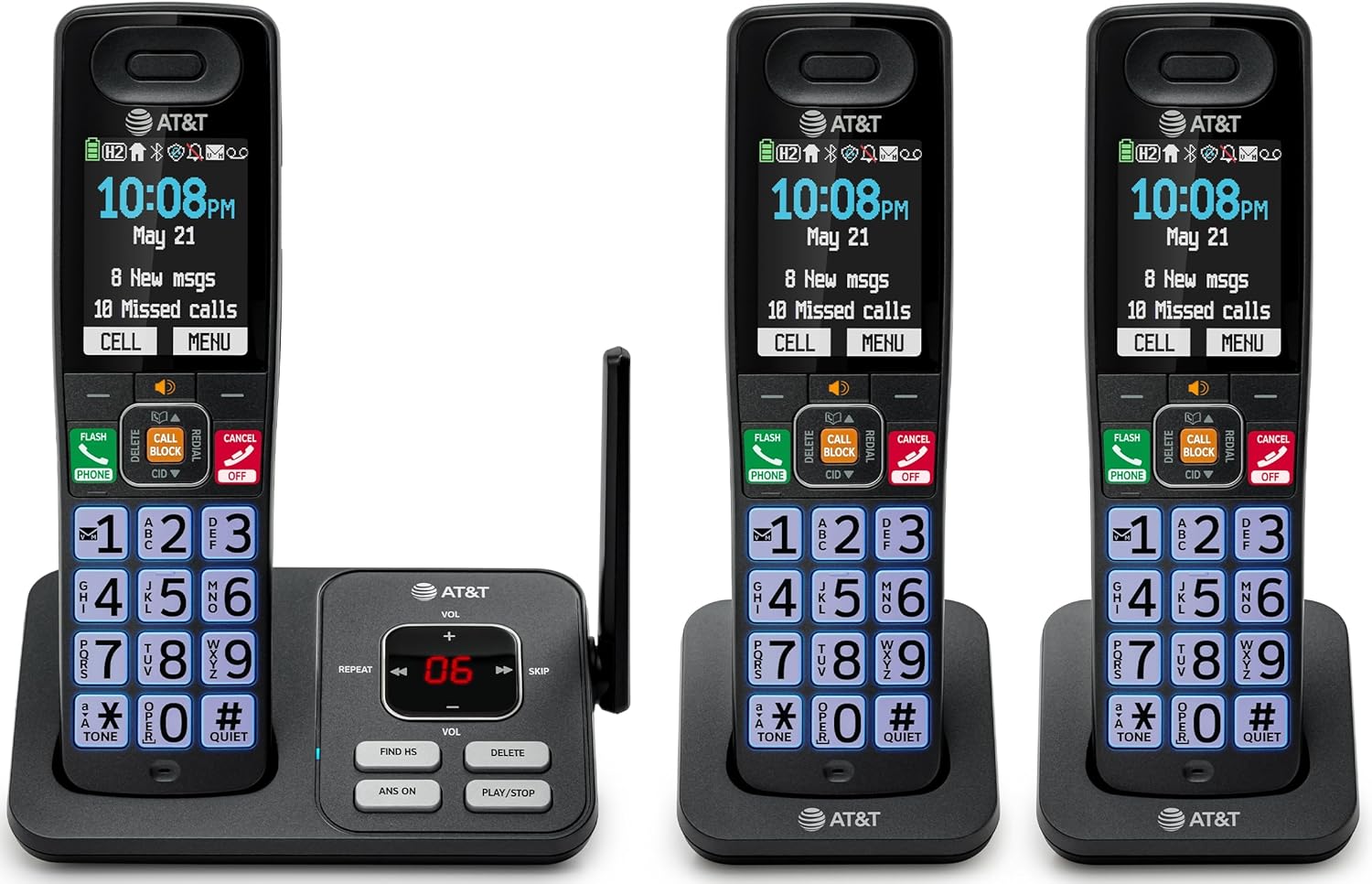
Image: The complete AT&T BL108-3 cordless phone system, showing the base unit and three handsets.
Persediaan
1. Base Unit and Power Connection
- Letakkan unit asas pada permukaan yang rata dan stabil.
- Connect one end of the telephone line cord to the TEL LINE jack on the base unit.
- Sambungkan hujung satu lagi kord talian telefon ke bicu dinding telefon.
- Plug one power adapter into the POWER jack on the base unit.
- Plug the other end of the power adapter into an electrical outlet not controlled by a wall switch.
2. Handset Battery Installation and Charging
- Buka penutup petak bateri di belakang setiap telefon bimbit.
- Insert the provided battery cells, ensuring correct polarity (+ and -).
- Tutup penutup petak bateri.
- Place each handset in its respective charger or the base unit cradle. The CHARGE light on the handset will illuminate.
- Allow the handsets to charge for at least 10 hours before initial use.
3. Additional Charger Setup
- Plug the power adapters for the additional chargers into electrical outlets not controlled by a wall switch.
- Place the additional handsets into these chargers to charge.
Arahan Operasi
Membuat dan Menerima Panggilan
- To make a call: Press TELEFON, kemudian dail nombor itu.
- To answer a call: Press TELEFON atau sebarang kunci dail.
- Untuk menamatkan panggilan: Tekan MATI/BATAL or place the handset in the cradle.
Penyekat Panggilan Pintar
The Smart Call Blocker feature automatically filters out robocalls. You can also manually block unwanted numbers.
- To block a number during a call: Press the dedicated PANGGILAN PANGGILAN kunci.
- The block directory can store up to 1,000 entries.

Image: A close-up of the handset displaying the "Smart Call Block" screen, with the "CALL BLOCK" button highlighted on the base unit.
Bluetooth Connect to Cell
Pair your smartphone with the BL108-3 system to make and receive mobile calls through any of the cordless handsets.
- Pada unit asas, tekan MENU, then navigate to "Bluetooth" and select "Pair Cell".
- Dayakan Bluetooth pada telefon pintar anda dan cari peranti yang tersedia.
- Select the AT&T phone from the list on your smartphone to pair.
- Once paired, mobile calls can be made and received using the cordless handsets.

Image: A visual representation of the "Connect to Cell" feature, showing a handset on a nightstand wirelessly connected to a smartphone.
Video: Demonstrates the seamless Bluetooth connection to a cell phone, allowing calls to be made and received through the AT&T cordless handset.
Mesin Penjawab Digital
The integrated digital answering system records up to 22 minutes of messages.
- To play messages: Press MAIN/BERHENTI on the base unit or handset.
- To skip messages: Press SKIP.
- To delete messages: Press PADAM.

Image: The phone's base unit and handset displaying an incoming message on the answering system, with a visual of a message being left.
Pengumuman ID Pemanggil
The handset speaks the caller's name aloud, allowing you to screen calls without picking up the phone.
- Pastikan perkhidmatan ID Pemanggil dilanggan melalui pembekal perkhidmatan telefon anda.
- The feature is active by default.

Image: The handset and base unit showing a call coming in, with a speech bubble indicating "Call from Johnson" to illustrate the Caller ID Announce feature.
Intercom Between Handsets
You can use the handsets to communicate with each other, or transfer calls.
- To initiate an intercom call: Press INTERKOM on a handset, then select the desired handset number.
- To transfer a call: During an external call, press INTERKOM, select the handset, and then hang up after the other handset answers.

Image: Two handsets, one on the base and one on a charger, with arrows indicating communication between them, illustrating the intercom feature.
Direktori Buku Telefon
Store up to 1500 names and numbers in the phonebook for quick dialing.
- To add an entry: Press MENU, navigate to "Phonebook", then "Add New Entry".
- To dial from phonebook: Press TELEFON, kemudian DIR, select the entry, and press TELEFON sekali lagi.

Image: The handset screen showing a phonebook list with alphabetical navigation, demonstrating the phonebook directory feature.
Full-Duplex Handset Speakerphone
Allows both parties to speak and be heard simultaneously during a speakerphone call.
- To activate speakerphone during a call: Press PENCERAMAH.
- To switch back to handset mode: Press TELEFON.

Image: A person using the handset in speakerphone mode while working on a laptop, with speech bubbles indicating a two-way conversation.
Mod Senyap
Temporarily silences all handset and base unit ringers for a set period.
- To activate: Press and hold #SENYAP pada telefon bimbit.
- Untuk menyahaktifkan: Tekan dan tahan #SENYAP sekali lagi.

Image: The handset screen showing "Quiet mode on" with a sleeping person in the background, illustrating the Quiet Mode feature.
Mod ECO
Reduces power consumption for optimal battery performance.
- ECO mode is typically enabled by default to conserve energy.
- Refer to the full user manual for options to adjust or disable this feature if needed.

Image: The handset and base unit in a setting with wind turbines in the background, and the screen showing "ECO mode", symbolizing energy efficiency.
Lampu suluh terbina dalam
For safety at night or in emergencies, the handset includes a built-in flashlight.
- To activate the flashlight: Locate the flashlight button on the side of the handset and press it.

Image: A close-up of the handset's side, showing the flashlight beam and the "FLASHLIGHT" label, indicating its location and function.
Penyelenggaraan
- Pembersihan: Bersihkan telefon dan unit asas dengan lembut, damp kain. Jangan gunakan semburan pembersih atau bahan kimia yang keras.
- Penjagaan Bateri: For optimal battery life, fully charge the handsets for 10 hours before first use. If the phone will be unused for an extended period, remove the batteries.
- Keadaan Persekitaran: Elakkan mendedahkan telefon kepada suhu yang melampau, cahaya matahari langsung atau kelembapan.
Menyelesaikan masalah
| Masalah | Penyelesaian |
|---|---|
| Tiada nada dail |
|
| Telefon bimbit tidak dicas |
|
| Kualiti panggilan buruk atau statik |
|
| Cannot make/receive Bluetooth calls |
|
Spesifikasi
| Ciri | Perincian |
|---|---|
| Jenama | AT&T |
| Nombor Model | BL108-3 |
| Jenis Telefon | Tanpa wayar (DECT 6.0) |
| warna | Hitam |
| Handsets Included | 3 |
| Paparan | 2.4" Color Backlit Display |
| Jenis Sistem Menjawab | Digital (masa rakaman sehingga 22 minit) |
| Penyekat Panggilan | Smart Call Blocker (up to 1,000 entries) |
| Bluetooth | Connect to Cell (smartphone pairing) |
| Masa Tunggu Sedia Telefon | 6 hari |
| ID pemanggil | Yes, with Announce feature |
| Kapasiti Buku Telefon | Up to 1500 names and numbers |
| Telefon pembesar suara | Full-Duplex Handset Speakerphone |
| Dimensi (Unit Asas) | 5.63 x 2.99 x 7.4 inci (L x P x H) |
| Sumber Kuasa | Elektrik Bertali |
| bahan | plastik |
| UPC | 650530034121 |

Image: Diagram showing the dimensions of the AT&T BL108-3 base unit and a handset.
Maklumat Waranti
Your AT&T BL108-3 Cordless Phone comes with a Waranti terhad 1 tahun. Please retain your purchase receipt as proof of purchase. For detailed warranty terms and conditions, refer to the full user manual or contact AT&T customer support.
Sokongan
For further assistance, technical support, or to order replacement parts, please visit the official AT&T support website or contact their customer service. You can often find FAQs and additional resources online.
- Sokongan dalam talian: melawat AT&T Wireless Support (or search for AT&T Landline Phone Support).
- Perkhidmatan Pelanggan: Refer to your Quick Start Guide for specific contact numbers.