
1. Pengenalan
This manual provides essential information for setting up, operating, maintaining, and troubleshooting your GMKtec K15 AI Mini PC. The K15 is a compact, high-performance barebone mini computer featuring an Intel Ultra 5 125U processor, designed for a wide range of applications from home entertainment to professional workloads.
Sila baca manual ini dengan teliti sebelum menggunakan peranti ini untuk memastikan operasi yang betul dan memaksimumkan jangka hayatnya.
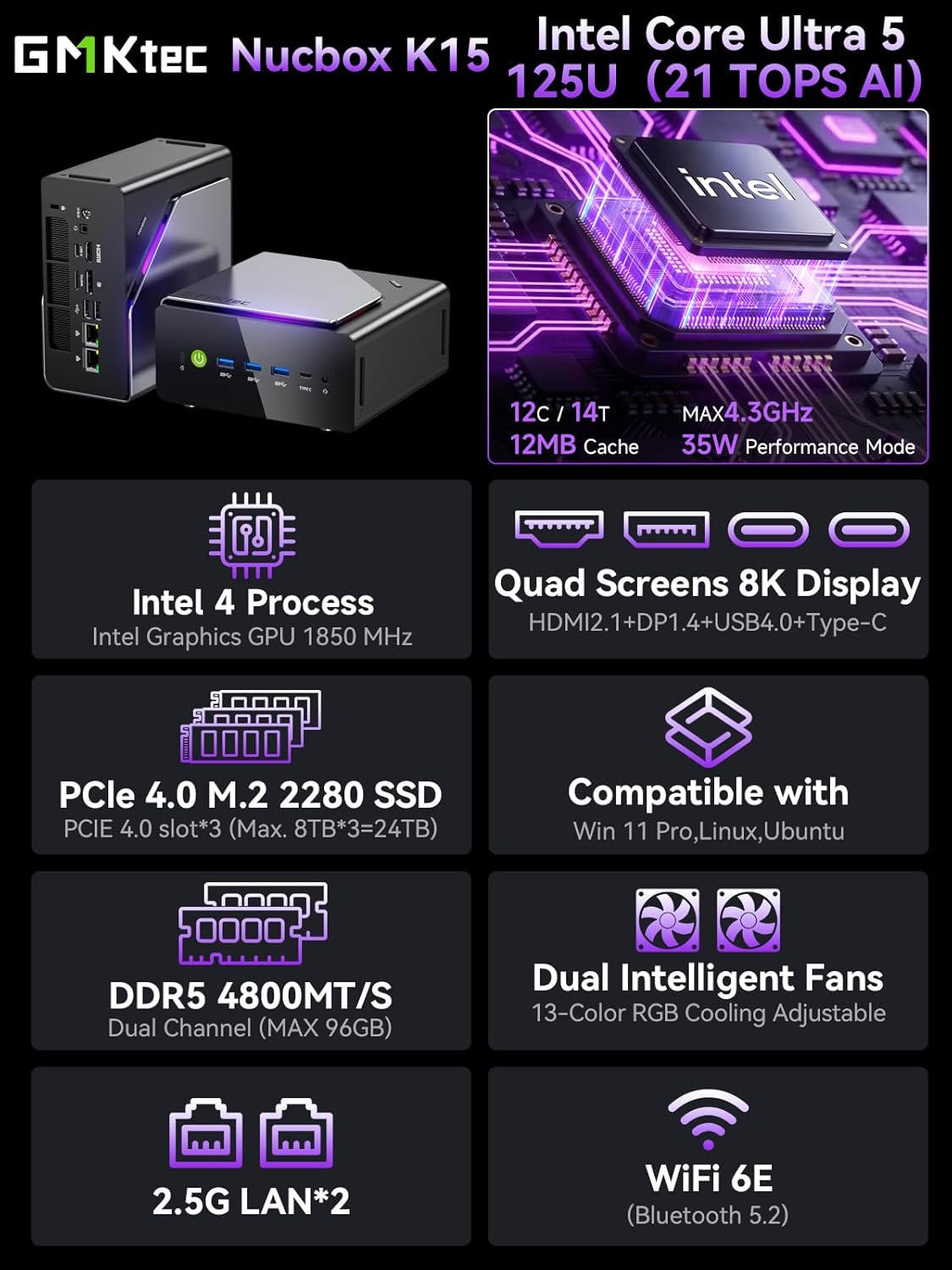
Imej 1.1: Selesaiview of GMKtec K15 Mini PC features, including Intel Ultra 5 125U CPU, 8K display support, PCIe 4.0 SSD, DDR5 RAM, dual intelligent fans, 2.5G LAN, and WiFi 6E.
2. Kandungan Pakej
Sahkan bahawa semua item terdapat dalam pakej:
- 1 x GMKtec Nucbox K15 Mini PC
- 1 x Penyesuai Kuasa
- 1 x VESA Mount dengan Skru
- 1 x Kabel HDMI
- 1 x Manual Pengguna (dokumen ini)
3. Fizikal Overview
Familiarize yourself with the ports and components of your GMKtec K15 Mini PC.

Image 3.1: Detailed diagram showing the front and rear I/O ports of the GMKtec K15 Mini PC.
Panel Depan
- Butang Kuasa: Untuk menghidupkan atau mematikan peranti.
- USB 3.2 Gen2 Ports (x3): Untuk menyambungkan peranti USB berkelajuan tinggi.
- Full-Function Type-C Port (USB4): Supports data transfer, video output (DP1.4), and power delivery (PD3.0).
- Bicu Audio 3.5mm: Untuk fon kepala atau pembesar suara.
- Butang Tetapkan Semula: For system reset (use a pin).
Panel Belakang
- Input Kuasa DC: Sambungkan penyesuai kuasa yang disertakan.
- Slot Kunci Kensington: Untuk penguncian keselamatan.
- Bicu Audio 3.5mm: Untuk output audio.
- Port USB4: Supports data transfer and video output.
- HDMI Port (2.1): Untuk menyambung ke paparan.
- Pelabuhan OCuLink: High-speed direct connection for external graphics or 10G NICs.
- DisplayPort (1.4): Untuk menyambung ke paparan.
- Port USB 2.0 (x2): Untuk menyambungkan peranti USB standard.
- 2.5G Ethernet Ports (x2): Untuk sambungan rangkaian berwayar berkelajuan tinggi.
- Butang Mod Peminat: To adjust fan speed/mode.

Image 3.2: The OCuLink port on the GMKtec K15 Mini PC, designed for high-speed external graphics card connections.
4. Panduan Persediaan
The GMKtec K15 is a barebone system, meaning RAM, SSD, and operating system are not pre-installed. Follow these steps to prepare your Mini PC for first use.
4.1 Memasang RAM dan SSD
The K15 supports dual-channel DDR5-4800MHz RAM (up to 128GB) and three PCIe 4.0 x4 M.2 2280 SSDs (up to 24TB total storage).
- Matikan: Ensure the Mini PC is powered off and disconnected from the power adapter.
- Casis terbuka: Carefully open the Mini PC chassis. Refer to the specific instructions provided with your device for opening the case.
- Pasang RAM: Locate the DDR5 SO-DIMM slots. Align the RAM module notch with the slot key and insert it firmly at a 45-degree angle. Push down until the clips on both sides lock the module in place.
- Pasang SSD: Locate the M.2 2280 PCIe 4.0 x4 slots. Insert the M.2 SSD into the slot at a slight angle, then gently push it down and secure it with the provided screw.
- Tutup Casis: Carefully close the Mini PC chassis, ensuring all connections are secure.

Image 4.1: Internal layout of the GMKtec K15 Mini PC, illustrating the locations for DDR5 RAM and three M.2 2280 PCIe 4.0 x4 SSDs.
4.2 Menyambung Peranti
- paparan: Connect your monitor(s) to the HDMI, DisplayPort, or USB4 Type-C ports using appropriate cables. The K15 supports up to four displays simultaneously.
- Papan Kekunci & Tetikus: Sambungkan papan kekunci dan tetikus USB anda ke mana-mana port USB yang tersedia.
- Rangkaian: For wired internet, connect an Ethernet cable to one of the 2.5G LAN ports. For wireless, ensure your WiFi 6E router is configured.
- Kuasa: Connect the power adapter to the DC Power Input port on the rear panel, then plug the adapter into a power outlet.
4.3 Pemasangan Sistem Operasi
Since the K15 is a barebone system, an operating system (OS) is not included. You will need to install your preferred OS (e.g., Windows 11 Pro, Linux, Ubuntu) from a bootable USB drive. Refer to the OS manufacturer's instructions for installation.
5. Operasi
5.1 Hidupkan/Mati Kuasa
- Hidupkan kuasa: Tekan butang kuasa pada panel hadapan.
- Matikan: From within your operating system, select the shutdown option. Alternatively, press and hold the power button for 5 seconds to force a shutdown (use only when necessary).
5.2 Tatarajah Paparan
The K15 supports up to four simultaneous displays via HDMI 2.1 (8K@60Hz), DisplayPort 1.4 (8K@30Hz), and dual USB4 Type-C ports (DP1.4/PD3.0). Configure your display settings within your operating system to extend, duplicate, or use only one screen.

Image 5.1: A GMKtec K15 Mini PC setup demonstrating connection to multiple 4K/8K displays for enhanced multitasking.
5.3 Kesambungan Rangkaian
- Berwayar: The dual 2.5GbE LAN ports provide high-speed wired network access.
- wayarles: Integrated Wi-Fi 6E offers fast and stable wireless connectivity. Configure Wi-Fi settings through your operating system.
- Bluetooth: Bluetooth 5.2 allows connection to wireless peripherals such as keyboards, mice, and audio devices.
5.4 AI Processing with NPU
The Intel Ultra 5 125U processor includes a dedicated Neural Processing Unit (NPU) for accelerating AI tasks. This NPU enhances performance for machine learning applications, real-time analytics, and AI-driven creative workloads, reducing CPU load and improving efficiency.

Image 5.2: Visual representation of the K15's Intel AI Boost with Dedicated NPU, highlighting its benefits for AI-enhanced creativity and efficient computing.
6. Penyelenggaraan
- Pembersihan: Regularly clean the exterior of the Mini PC with a soft, dry cloth. Use compressed air to clear dust from vents and ports. Ensure the device is powered off before cleaning.
- Kemas Kini Perisian: Keep your operating system, drivers, and applications updated to ensure optimal performance and security.
- Pengudaraan: Ensure the Mini PC is placed in a well-ventilated area to prevent overheating. Do not block the air vents.
7. Penyelesaian masalah
If you encounter issues with your GMKtec K15 Mini PC, refer to the following common solutions:
| Masalah | Penyelesaian yang Mungkin |
|---|---|
| No power / Device does not turn on | Check power adapter connection. Ensure the power outlet is functional. Press the power button firmly. |
| Tiada output paparan | Verify monitor connection and input source. Try a different HDMI/DP cable or port. Ensure RAM and SSD are correctly installed. |
| Prestasi perlahan | Check for background processes. Ensure sufficient RAM and SSD space. Update drivers. Monitor system temperature. |
| Isu sambungan rangkaian | For wired: Check Ethernet cable and router. For wireless: Verify Wi-Fi password, router status, and signal strength. Update network drivers. |
| Periferal tidak dikenali | Try a different USB port. Reinstall device drivers. Restart the Mini PC. |
Jika masalah berterusan, sila hubungi sokongan pelanggan.
8. Spesifikasi
Detailed technical specifications for the GMKtec K15 AI Mini PC:
| Ciri | Perincian |
|---|---|
| Jenama | GMKtec |
| Nama Model | K15 |
| Model CPU | Intel Core Ultra 5 125U (12 Cores/14 Threads) |
| Kelajuan CPU | Sehingga 4.3 GHz |
| Grafik | Integrated Intel Graphics GPU (Max 1.85GHz) |
| Jenis RAM | DDR5 RAM (Dual-channel, 4800 MHz) |
| Kapasiti RAM Maks | 128 GB |
| Penyimpanan | 3x M.2 2280 PCIe 4.0 x4 SSD slots (Max 24TB total) |
| Output Video | HDMI 2.1 (8K@60Hz), DisplayPort 1.4 (8K@30Hz), 2x USB4 Type-C (DP1.4/PD3.0) |
| Rangkaian | 2x 2.5GbE LAN, Wi-Fi 6E, Bluetooth 5.2 |
| Port USB | 3x USB 3.2 Gen2, 2x USB 2.0, 2x USB4 Type-C |
| Pelabuhan Lain | OCuLink, 2x 3.5mm Audio Jack, Kensington Lock |
| Sistem Operasi | None (Barebone) |
| warna | Kelabu Besi |
9. Maklumat Waranti
The GMKtec K15 AI Mini PC comes with a Waranti 1 tahun from the date of purchase. This warranty covers manufacturing defects and hardware malfunctions under normal use. It does not cover damage caused by misuse, accidents, unauthorized modifications, or improper installation of components.
Sila simpan bukti pembelian anda untuk tuntutan waranti.
10. Sokongan Pelanggan
For technical assistance, warranty claims, or any questions regarding your GMKtec K15 AI Mini PC, please contact our support team:
- Sokongan E-mel: support@gmktec.com (Available 24/7)
- Sokongan Amazon: For purchases made on Amazon, you can also contact support through your Amazon account. Navigate to "Your Orders" and select "Ask Product Question" for the GMKtec K15.
11. Video Produk
Tonton video rasmi ini untuk visual seterusnyaview of the GMKtec K15 AI Mini PC, highlighting its features and capabilities.
Video 11.1: Tayangan video produk rasmicasing the GMKtec K15 AI Mini PC Intel Ultra 5 125U with Oculink port and other features.