
pengenalan
The KU XIU X55 Turbo is a foldable 3-in-1 magnetic wireless charging station designed to simultaneously charge your compatible iPhone, Apple Watch, and AirPods. It features Qi2.2 technology for fast wireless charging, a compact design for portability, and magnetic alignment for secure device placement. This manual provides instructions for setting up, operating, and maintaining your charging station.
Kandungan Pakej
Sila sahkan bahawa semua item yang disenaraikan di bawah disertakan dalam pakej anda:
- 1 x KU XIU X55 Turbo 3-in-1 Charging Station
- 1 x 45W USB-C PD Adapter
- 1 x 3.28ft (1m) USB-C Cable
- 1 x Beg Penyimpanan
- 1 x Manual Pengguna (dokumen ini)
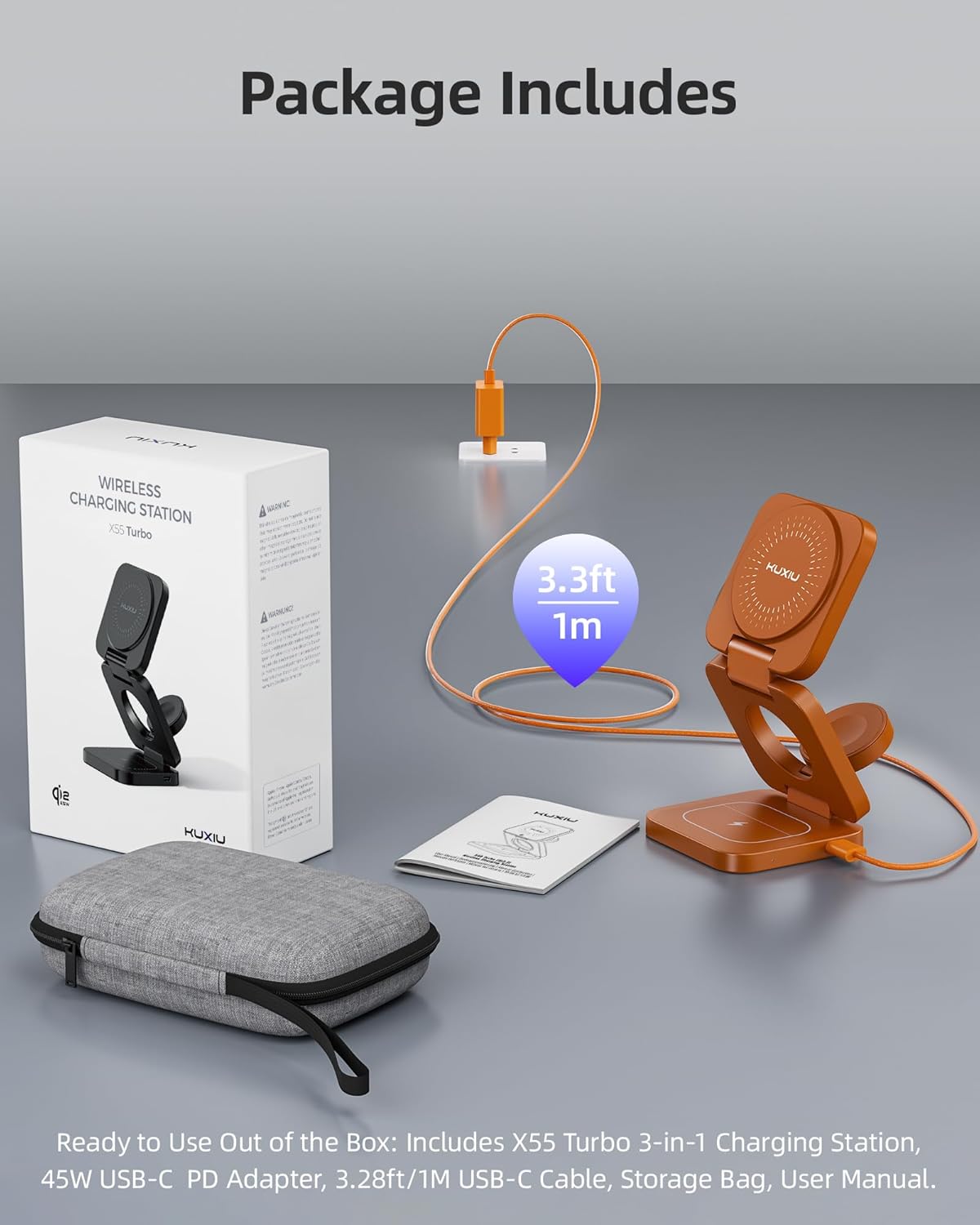
Image: Contents of the KU XIU X55 Turbo package, including the charging station, power adapter, USB-C cable, storage bag, and user manual.
Arahan Persediaan
- Buka Pembungkusan Pengecas: Carefully remove the KU XIU X55 Turbo charging station and all accessories from its packaging.
- Buka lipatan Stesen Pengecasan: The charging station is designed to be foldable. Gently unfold it to its upright position, ensuring all charging surfaces are accessible. The phone charging pad can be adjusted to various angles for optimal viewing.
- Sambungkan Penyesuai Kuasa: Insert the provided USB-C cable into the USB-C port on the charging station. Connect the other end of the USB-C cable to the included 45W USB-C PD adapter.
- Palamkan ke dalam Kuasa: Plug the 45W USB-C PD adapter into a wall outlet. The charging station is now ready for use.
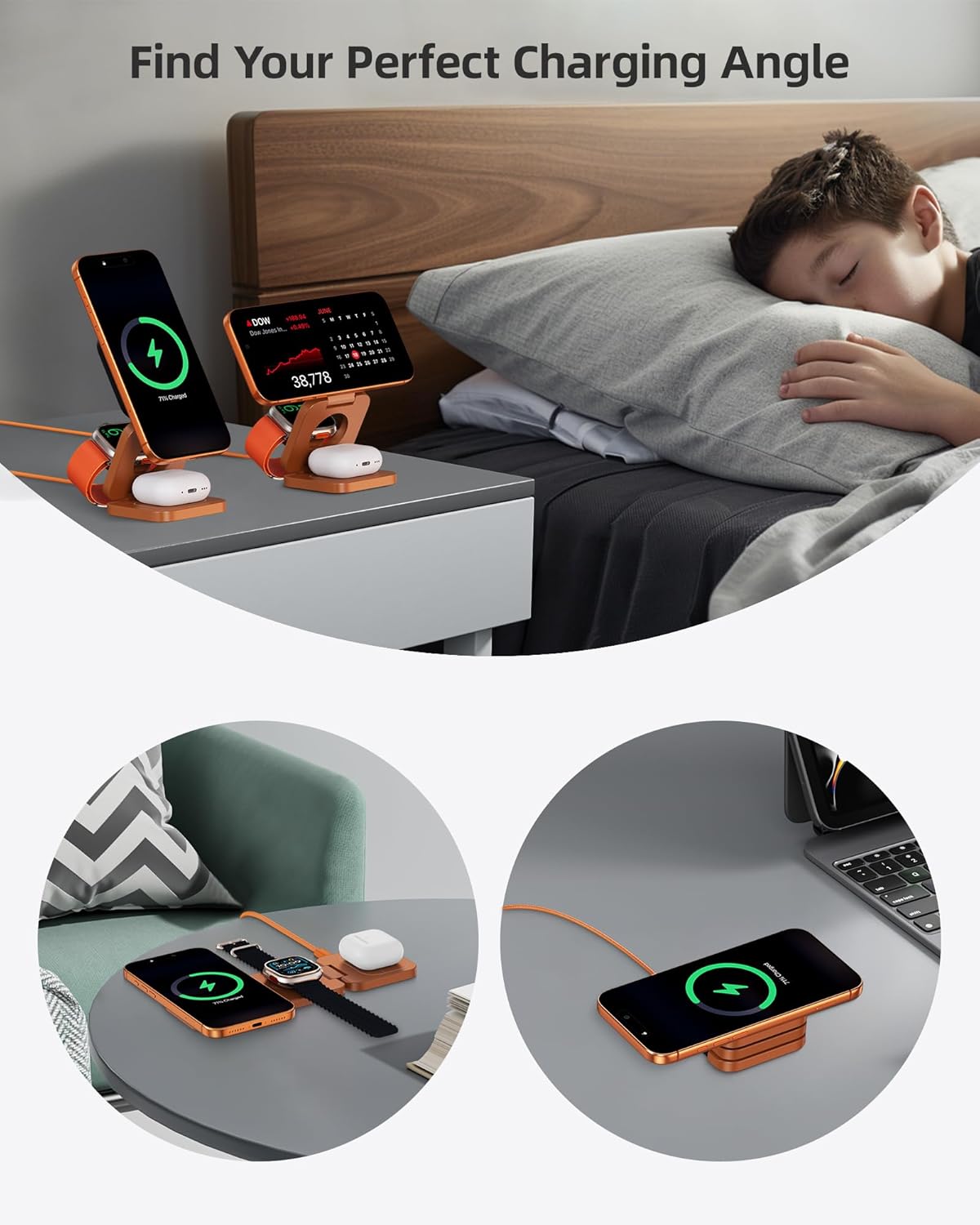
Image: The charging station in an upright position, ready to charge multiple devices, demonstrating adjustable phone charging angles.
Arahan Operasi
Charging Your iPhone (or compatible smartphone)
- Place your iPhone (or other compatible magnetic wireless charging smartphone) onto the upright magnetic charging pad.
- Ensure the phone aligns magnetically with the charging coil. A charging indicator will typically appear on your device's screen.
- For optimal charging, it is recommended to use the phone without a case, or with a magnetic/MagSafe compatible case.
Mengecas Apple Watch Anda
- Place your Apple Watch onto the dedicated Apple Watch charging puck.
- Ensure the back of the watch makes full contact with the charging surface. The watch display will indicate charging status.
Charging Your AirPods (or compatible wireless earbuds)
- Place your AirPods charging case (or other compatible wireless charging earbud case) onto the flat charging pad at the base of the station.
- Ensure the case is centered on the charging pad. The indicator light on your AirPods case will show charging status.

Image: Visual representation of the magnetic alignment feature, showing a phone securely attached to the charging pad.
Foldable Design for Travel
The X55 Turbo can be folded into a compact form factor, making it convenient for travel. To fold, gently collapse the charging pads until the unit is flat and compact. Store it in the provided storage bag for protection.

Image: Step-by-step illustration of how to fold the charging station into its ultra-compact travel size.
Keserasian
The KU XIU X55 Turbo charging station supports various devices with different charging speeds:
- Qi2.2 25W: iPhone 17/16 Series, Pixel 10 Pro XL
- 20W: iPhone 17 Air
- Qi2 15W: iPhone 12-15 Series, Pixel 10 Series
- Max 5W for Apple Watch: Ultra 3/2/Ultra, Series 11-1, SE 3/2/SE
- Max 5W for AirPods: AirPods Pro 3/Pro 2/Pro/4 with ANC/ 3rd/2nd Generation with wireless charging case

Image: A visual guide detailing the maximum charging wattage for different compatible Apple devices.
Penyelenggaraan
- Pembersihan: Disconnect the charger from the power source before cleaning. Use a soft, dry, lint-free cloth to wipe the surfaces of the charging station. Do not use abrasive cleaners, solvents, or aerosol sprays.
- Storan: When not in use, especially during travel, fold the charging station into its compact form and store it in the provided storage bag to protect it from dust and scratches.
- Pengendalian: Avoid dropping the device or exposing it to extreme temperatures or humidity. Do not attempt to disassemble or repair the unit yourself.
Menyelesaikan masalah
- Peranti Tidak Mengecas:
- Ensure the charging station is properly connected to the 45W power adapter and plugged into a working wall outlet.
- Verify that your device is correctly aligned on the charging pad. Magnetic alignment is crucial for iPhones.
- Remove any thick or non-MagSafe compatible cases from your phone.
- Semak sama ada peranti anda serasi dengan pengecasan wayarles.
- Cuba mulakan semula peranti anda.
- Pengecasan perlahan:
- Ensure you are using the included 45W power adapter and USB-C cable. Using a lower wattage penyesuai boleh menyebabkan kelajuan pengecasan lebih perlahan.
- Confirm your device supports the higher charging speeds (e.g., Qi2.2 25W for iPhone 17/16 series). Older devices or non-compatible cases may limit charging speed.
- Avoid placing metal objects or foreign materials between your device and the charging pad.
- Magnetic Alignment Issues:
- Ensure your iPhone has MagSafe technology or is using a MagSafe compatible case.
- Clean the magnetic surface of both the charger and your device/case to ensure no obstructions.
Spesifikasi
| Jenama | KU XIU |
| Nombor Model | X55 Turbo |
| Jenis Penyambung | USB Jenis C |
| Input Voltage | 9 Volt |
| Wattage (Penyesuai) | 45 Watt |
| Arus Keluaran | 3 Amps |
| Keluaran Voltage | 3 Volt |
| Phone Charging Output | Sehingga 25W (Qi2.2) |
| Apple Watch Charging Output | Maksimum 5W |
| AirPods Charging Output | Maksimum 5W |
| Dimensi Dilipat | 2.68 inci x 2.68 inci x 1.28 inci |
| Berat badan | 150g / 5.29oz |
| warna | Jingga |
Waranti dan Sokongan
KU XIU products are designed and manufactured to the highest quality standards. For specific warranty details regarding your X55 Turbo charging station, please refer to the warranty card included in your product packaging or visit the official KU XIU website. For technical support, troubleshooting assistance, or any product-related inquiries, please contact KU XIU customer service through their official channels.
Manufacturer: Shenzhen Kuxiu Communication Co., Ltd.