
pengenalan
This user manual provides essential information and instructions for the safe and efficient operation of your FIREBAT AS1 Laptop. Please read this manual thoroughly before using the device and retain it for future reference. This document covers setup, operation, maintenance, and troubleshooting for the FIREBAT AS1 model with AMD Ryzen 7430U processor.
Produk Selesaiview
The FIREBAT AS1 is a 15.6-inch Full HD IPS laptop designed for productivity and entertainment. It features an AMD Ryzen 7430U processor, integrated AMD Radeon Graphics, and a versatile port selection.
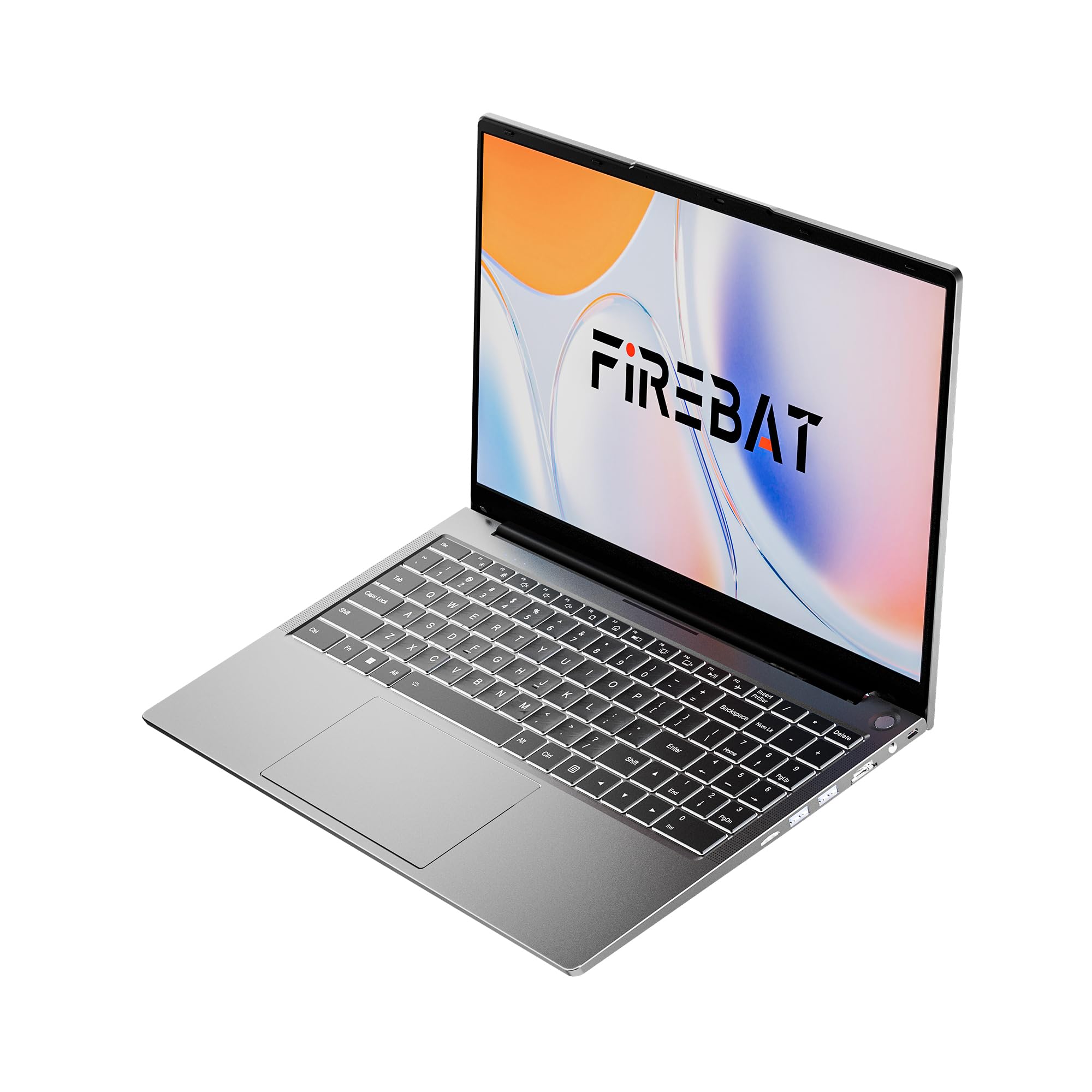
Figure 1: FIREBAT AS1 Laptop (Closed View)
Ciri-ciri Utama
- Pemproses: AMD Ryzen 5 7430U (6 Teras/12 Benang, sehingga 4.3GHz)
- paparan: 15.6-inch Full HD (1920x1080) IPS
- Ingatan: 16GB DDR4 RAM (Expandable up to 64GB)
- Storan: 512GB M.2 SSD (Expandable up to 2TB)
- Grafik: Grafik AMD Radeon Bersepadu
- papan kekunci: Full-sized backlit keyboard with numeric keypad
- Ketersambungan: Wi-Fi 6, Bluetooth 5.2, RJ45 Ethernet
- Pelabuhan: USB 3.2 Gen1 Type-A, USB 3.2 Gen1 Type-C (PD 100W, DP1.4), HDMI 1.4, SD Card Reader, 3.5mm Audio Jack
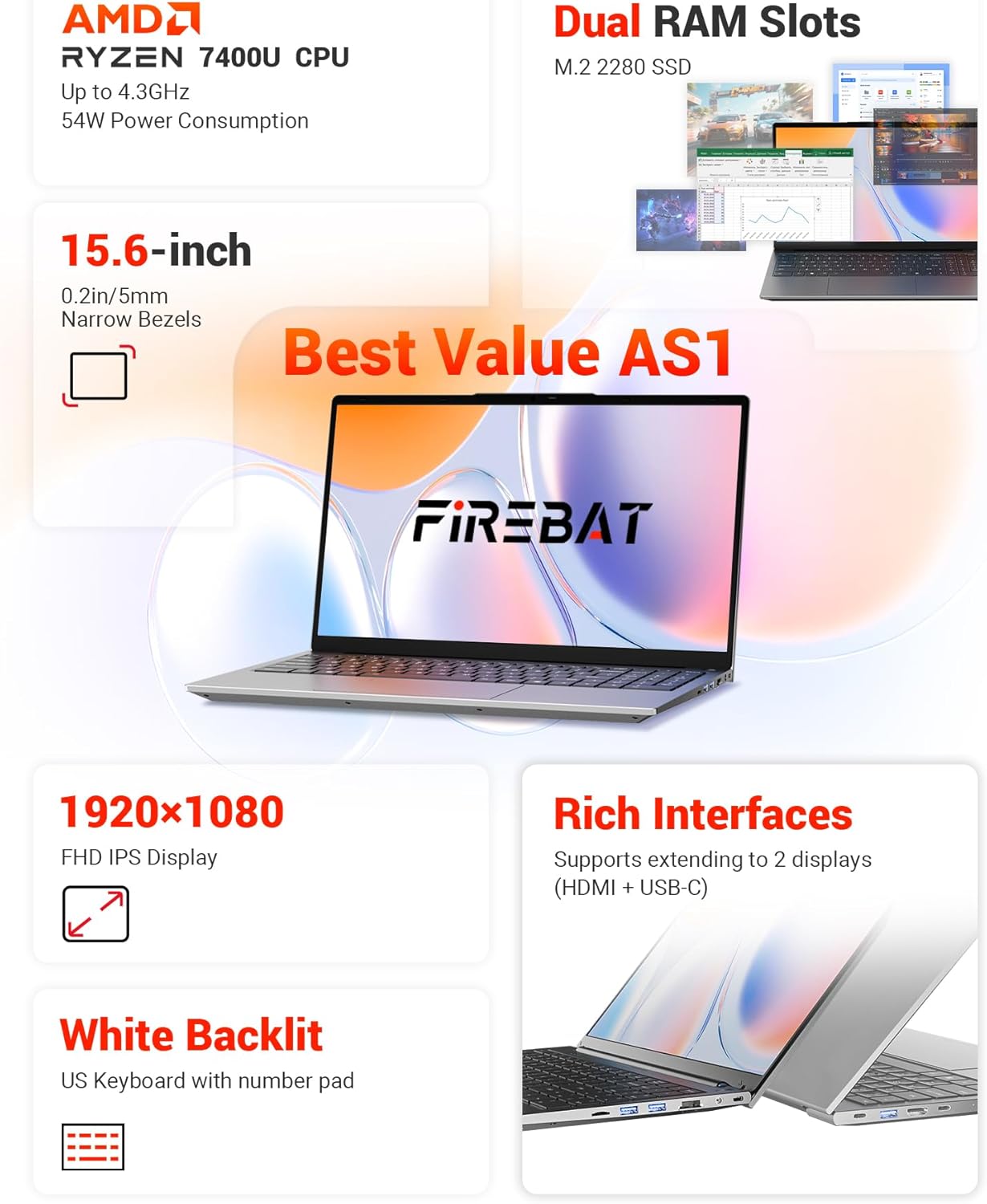
Gambar 2: Lebihview of FIREBAT AS1 Laptop Features
Imej ini memberikan gambaran menyeluruhview of the FIREBAT AS1 laptop's core components and features, including the AMD Ryzen 7430U CPU, expandable dual RAM slots, M.2 2280 SSD support, 15.6-inch Full HD IPS display, white backlit keyboard with numeric pad, and various connectivity ports.

Figure 3: Ultra-Portable Design of FIREBAT AS1 Laptop
The image illustrates the laptop's ultra-portable design, emphasizing its compact 15.6-inch form factor, lightweight build at 3.7 lbs (1.69 kg), slim profile of 0.6 inches (15.9 mm), and a versatile 180-degree lay-flat hinge for flexible viewsudut-sudut.
Pelabuhan dan Penyambung
The FIREBAT AS1 laptop offers a variety of ports for connecting peripherals and external displays:
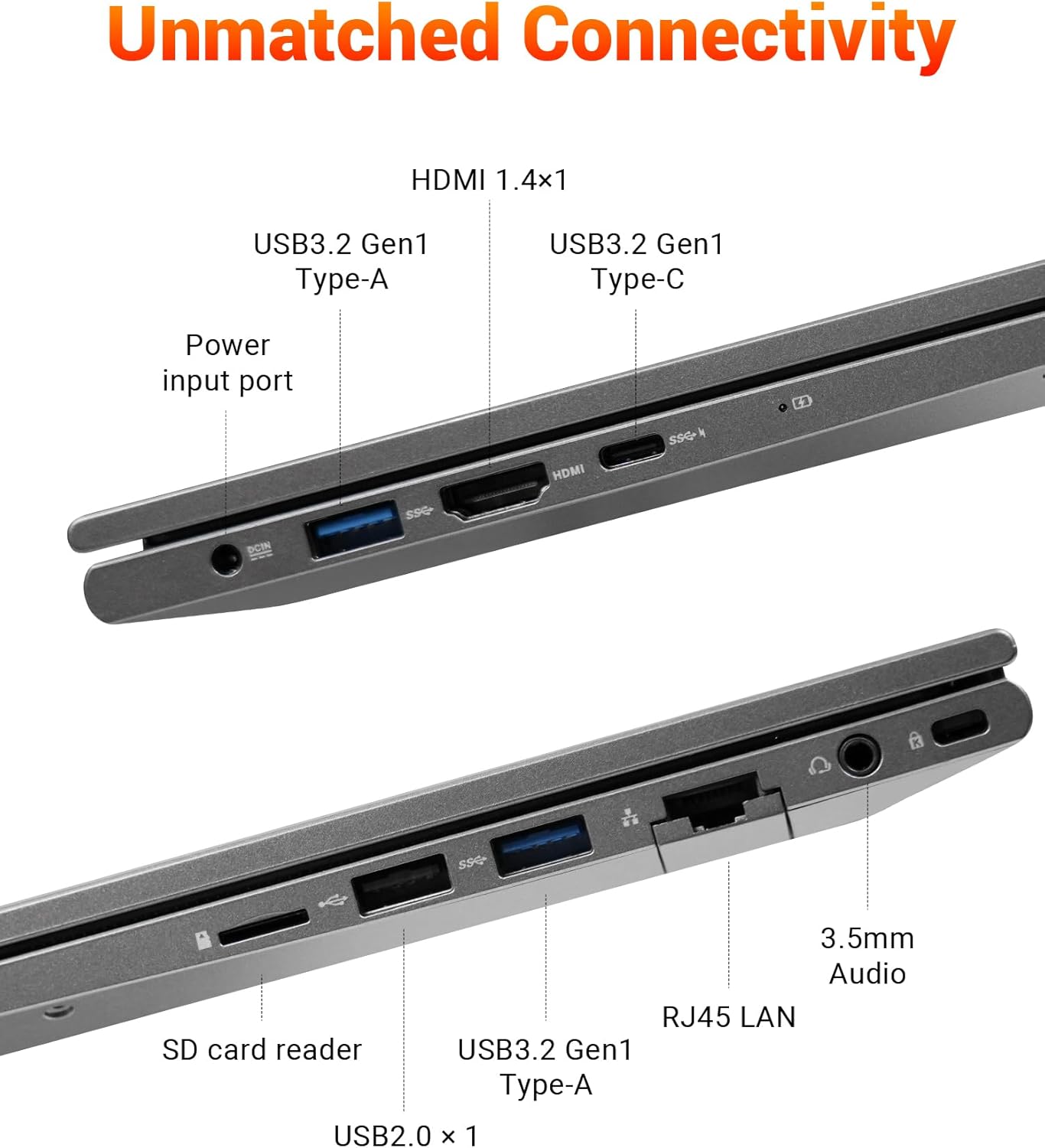
Figure 4: FIREBAT AS1 Laptop Connectivity Ports
This image details the comprehensive connectivity options available on the FIREBAT AS1 laptop. It highlights the various ports on both sides, including USB 3.2 Gen1 Type-A, HDMI 1.4, USB 3.2 Gen1 Type-C (supporting PD 100W and DP1.4), the power input port, an SD card reader, RJ45 LAN port, and a 3.5mm audio jack.
- Bahagian Kiri: Power Input, USB 3.2 Gen1 Type-A, HDMI 1.4, USB 3.2 Gen1 Type-C (Power Delivery & DisplayPort)
- Sebelah Kanan: USB 2.0 Type-A, SD Card Reader, RJ45 LAN, 3.5mm Audio Jack, USB 3.2 Gen1 Type-A
Persediaan
Menyahkotak dan Menghidupkan Permulaan
- Keluarkan komputer riba dan semua aksesori dengan berhati-hati dari pembungkusan.
- Connect the power adapter to the laptop's power input port and then to a power outlet.
- Open the laptop lid. The laptop may power on automatically or you may need to press the power button located on the top right of the keyboard.
- Ikut arahan pada skrin untuk melengkapkan persediaan Windows awal.
Menyambung ke Rangkaian
- Wi-Fi: Klik ikon Wi-Fi dalam bar tugas, pilih rangkaian yang anda inginkan, masukkan kata laluan dan klik Sambung.
- Ethernet: Connect an Ethernet cable from your router or modem to the RJ45 LAN port on the right side of the laptop.
Arahan Operasi
Kuasa Hidup/Mati dan Mod Tidur
- Hidupkan kuasa: Tekan butang kuasa.
- Tutup: Klik butang Mula, kemudian Kuasa > Tutup.
- Mod tidur: Tutup penutup komputer riba atau klik butang Mula, kemudian Kuasa > Tidur.
Papan Kekunci dan Pad Sentuh
- The laptop features a full-sized keyboard with a dedicated numeric keypad for efficient data entry.
- The keyboard is backlit. Use the function keys (Fn + Fx) to adjust backlight brightness or toggle it on/off.
- Pad sentuh ketepatan menyokong gerak isyarat berbilang sentuhan untuk navigasi. Rujuk tetapan Windows untuk penyesuaian.
Menyambung Paparan Luaran
The FIREBAT AS1 supports connecting up to two external displays simultaneously via HDMI and USB-C (DisplayPort Alt Mode).
- HDMI: Connect an HDMI cable from your monitor to the HDMI port on the left side of the laptop.
- USB-C: Connect a compatible USB-C to DisplayPort or USB-C to HDMI cable/adapter from your monitor to the USB-C port on the left side.
- Setelah disambungkan, tekan Kekunci Windows + P to select your display mode (Duplicate, Extend, Second screen only).
Video 1: FIREBAT AMD 7430U Laptop Computer Overview
Video ini memberikan gambaran umumview of the FIREBAT AS1 laptop, showcasing its design, display quality, and various features in action.
Penyelenggaraan
Membersihkan Laptop
- Gunakan kain yang lembut dan tidak berbulu dampdiisi dengan air atau pembersih skrin untuk membersihkan paparan.
- Use a soft brush or compressed air to clean dust from the keyboard and ventilation grilles.
- Elakkan menggunakan bahan kimia yang keras atau bahan yang melelas.
Penjagaan Bateri
- Untuk jangka hayat bateri yang optimum, elakkan daripada kerap mencas sepenuhnya bateri.
- Simpan komputer riba di tempat yang sejuk dan kering apabila tidak digunakan untuk tempoh yang lama.
- Jika menyimpan untuk jangka masa yang lama, pastikan bateri dicas sekitar 50-70%.
RAM and SSD Upgrades
The FIREBAT AS1 laptop supports user-upgradable RAM and SSD. It features dual-channel RAM slots (up to 64GB) and an M.2 2280 SSD slot (up to 2TB).

Gambar 5: Dalaman View with RAM and SSD Slots
Satu dalaman view of the FIREBAT AS1 laptop, illustrating the dual-channel DDR4 RAM slots, which can be upgraded to 64GB, and the M.2 2280 SSD slot, supporting NVMe/SATA drives up to 2TB for expanded storage.
Video 2: How to Add RAM to FIREBAT AS1 Laptop
Watch this video for a step-by-step guide on how to safely add or upgrade RAM modules in your FIREBAT AS1 laptop.
Nota: Opening the laptop for upgrades may require specific tools and care. Refer to the video and consult professional assistance if unsure.
Menyelesaikan masalah
Isu dan Penyelesaian Biasa
- Komputer riba tidak dihidupkan:
- Pastikan penyesuai kuasa disambungkan dengan selamat pada kedua-dua komputer riba dan salur keluar kuasa yang berfungsi.
- Periksa sama ada alur keluar kuasa berfungsi dengan memasang peranti lain.
- Jika bateri telah habis sepenuhnya, biarkan ia mengecas selama beberapa minit sebelum cuba menghidupkannya.
- Tiada paparan pada skrin:
- Pastikan komputer riba dihidupkan.
- Jika monitor luaran disambungkan, cuba putuskan sambungannya.
- Laraskan kecerahan paparan menggunakan kekunci fungsi.
- Isu sambungan Wi-Fi:
- Pastikan Wi-Fi didayakan dalam tetapan Windows.
- Mulakan semula penghala dan modem anda.
- Periksa sama ada peranti lain boleh bersambung ke rangkaian Wi-Fi yang sama.
- Keyboard or touchpad not responding:
- Mulakan semula komputer riba.
- Ensure no external devices are interfering.
For further assistance, please refer to the support information provided in the Warranty and Support section.
Spesifikasi
| Ciri | Spesifikasi |
|---|---|
| Jenama | BAJU API |
| Nombor Model | AS1 7430U |
| Sistem Operasi | Default (Windows) |
| Model CPU | AMD Ryzen 5 7430U |
| Kelajuan CPU | Sehingga 4.3 GHz |
| Kiraan Pemproses | 6 |
| Memori RAM Dipasang | 16 GB DDR4 |
| Saiz Maksimum Memori RAM | 64 GB |
| Penerangan Cakera Keras | 512 GB SSD (Expandable to 2TB) |
| Saiz Skrin | 15.6 Inci |
| Resolusi Paparan Maksimum | 1920x1080 Piksel |
| Jenis Paparan | IPS |
| Pemproses bersama Grafik | AMD Radeon |
| Teknologi Ketersambungan | Bluetooth, Ethernet, HDMI, USB, Wi-Fi |
| Keserasian Tanpa Wayar | 802.11ax (Wi-Fi 6) |
| Jumlah Port USB | 4 |
| Total Number of HDMI Ports | 1 |
| Dimensi Item | 14 x 9 x 0.78 inci |
| Berat Barang | 3.69 paun |
| warna | Kelabu |
Waranti dan Sokongan
Maklumat Waranti
The FIREBAT AS1 Laptop comes with a Waranti Pengeluar 1 Tahun. Waranti ini melindungi kecacatan pada bahan dan mutu kerja di bawah penggunaan biasa. Sila simpan bukti pembelian anda untuk tuntutan waranti.
Sokongan Pelanggan
For technical support, warranty inquiries, or any questions regarding your FIREBAT AS1 Laptop, please contact FIREBAT customer service:
- e-mel: support@firebatpc.com
- Webtapak: www.firebatpc.com