
1. Pengenalan
This manual provides essential information for using your REDMI Note 15 Pro+ 5G smartphone. Please read it carefully to ensure proper operation and to maximize the device's features. Keep this manual for future reference.

Image: The REDMI Note 15 Pro+ 5G smartphone in Mirage Blue, showcasing reka bentuknya yang anggun.
2. Apa yang ada di dalam Kotak
Sahkan bahawa semua item terdapat dalam pembungkusan produk anda:
- REDMI Note 15 Pro+ 5G Smartphone
- Pengecas
- Kabel Jenis-C USB
- Alat Keluarkan SIM
- Kad Waranti
- Panduan Pengguna (dokumen ini)
- Kes Pelindung
3. Persediaan
3.1. Memasukkan Kad SIM
- Cari dulang kad SIM di sisi peranti anda.
- Masukkan alat lenting SIM ke dalam lubang kecil di sebelah dulang dan tekan perlahan-lahan sehingga dulang terkeluar.
- Letakkan kad Nano-SIM anda ke dalam dulang dengan sesentuh emas menghadap ke bawah.
- Tolak dulang kembali ke dalam peranti dengan berhati-hati sehingga ia berbunyi pada tempatnya.

Imej: Belakang view of the REDMI Note 15 Pro+ 5G, indicating the location of the SIM card tray.
3.2. Hidupkan Awal dan Persediaan Asas
- Press and hold the Power button until the REDMI logo appears.
- Ikut arahan pada skrin untuk memilih bahasa, rantau, sambung ke Wi-Fi dan sediakan akaun Google anda.

Imej: Depan view of the REDMI Note 15 Pro+ 5G, displaying the screen during initial setup.
3.3. Mengecas Peranti
Connect the provided USB Type-C cable to the phone's charging port and the other end to the 100W HyperCharge adapter. Plug the adapter into a power outlet. The device supports 100W fast charging and 22.5W reverse charging.

Image: Visual representation of the 6500mAh Silicon-Carbon battery and 100W HyperCharge technology.
4. Mengendalikan Peranti Anda
4.1. Ciri Paparan
The REDMI Note 15 Pro+ 5G features a 6.83-inch Quad curved 1.5K CrystalRes AMOLED display with 3200 nits peak brightness. It supports a 120Hz adaptive refresh rate for smooth visuals and Eye Protect 2.0 with Triple TÜV Certifications to reduce eye strain.

Image: The vibrant 1.5K Quad-curved AMOLED display of the REDMI Note 15 Pro+ 5G, highlighting its brightness.

Image: Information on the advanced eye protection features, including TÜV triple certification, for comfortable viewing.
4.2. Sistem Kamera
Capture stunning photos and videos with the advanced 200MP OIS camera system. It features a 1/1.4" sensor for exceptional detail and clarity, even in low light. The camera supports 4K video recording, ultra-sharp details, steady videos with OIS, and portraits with natural depth.

Imej: Selesaiview of the 200MasterPixel OIS Camera system, emphasizing its clarity and capabilities.
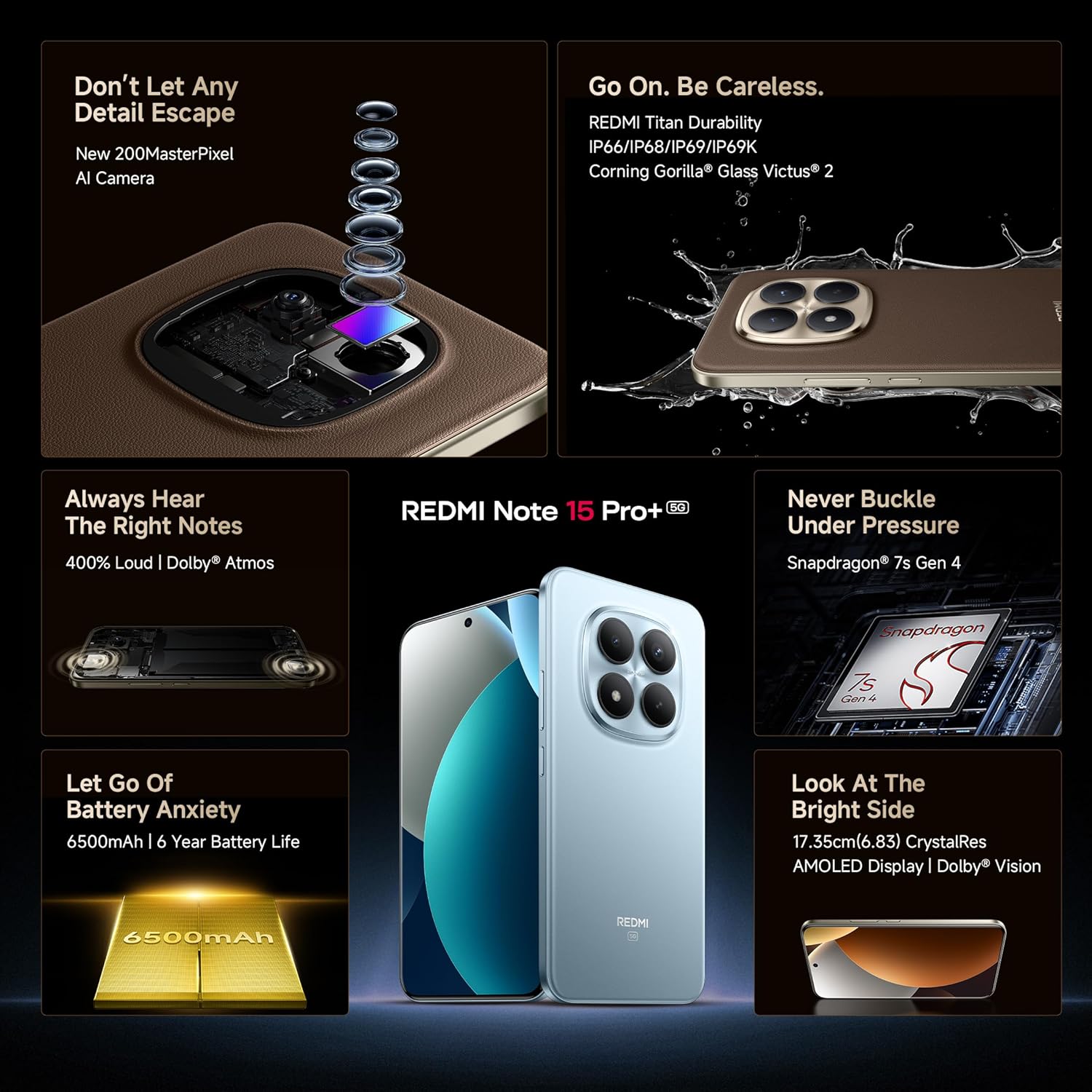
Imej: Dari dekat view of the 200MP camera module, showing its intricate lens arrangement.
4.3. Prestasi
Powered by the Snapdragon 7s Gen 4 processor, the device delivers smooth and efficient performance for gaming and multitasking. The IceLoop cooling technology helps maintain optimal temperatures during intensive use.

Image: Graphic illustrating the Snapdragon 7s Gen 4 processor, highlighting its advanced performance.
4.4.Audio
Experience immersive sound with symmetric stereo speakers and Dolby Atmos support, providing up to 400% louder and clearer audio for media consumption and calls.

Image: Diagram showing the symmetric stereo speakers and Dolby Atmos sound enhancement.
4.5. Ciri Perisian dan AI
The REDMI Note 15 Pro+ 5G runs on Android 15 with Xiaomi HyperOS 2, offering a seamless and intelligent cross-device experience. It includes AI features like Circle to Search, Gemini Assistance, and Xiaomi HyperAI Tools for enhanced user interaction. The device also supports Xiaomi Offline Communication for device-to-device calling without cellular or Wi-Fi in certain zones.

Image: The Xiaomi HyperOS 2 logo, representing the device's operating system.

Image: Visuals demonstrating AI features such as Circle to Search and Gemini Assistance on the smartphone.

Image: Illustration of the Xiaomi Offline Communication feature, showing device-to-device calling without network.
5. Penyelenggaraan
5.1. Membersihkan Peranti Anda
Gunakan kain lembut dan tidak berbulu untuk membersihkan skrin dan badan telefon anda. Elakkan menggunakan bahan kimia yang keras atau bahan kasar yang boleh merosakkan kemasannya. Untuk kotoran degil, sapukan sedikitampen kain dengan air atau pembersih skrin yang direka untuk elektronik.
5.2. Kemas Kini Perisian
Semak dan pasang kemas kini perisian secara kerap untuk memastikan peranti anda mempunyai ciri terkini, tampung keselamatan dan peningkatan prestasi. Navigasi ke Tetapan > Perihal telefon > Versi MIUI untuk menyemak kemas kini.
5.3. Penjagaan Bateri
The device is equipped with a 6500mAh Silicon-Carbon battery designed for long life, supporting 1600 charge cycles. To prolong battery health:
- Elakkan suhu yang melampau.
- Jangan biarkan bateri habis sepenuhnya sebelum mengecas semula.
- Use the original 100W HyperCharge adapter and cable for optimal charging.
5.4. Ketahanan dan Perlindungan
The REDMI Note 15 Pro+ 5G features a high-strength fiberglass back panel and Corning Gorilla Glass Victus 2 for enhanced durability. It boasts IP66/IP68/IP69/IP69K protection against dust and water, making it resistant to drops, splashes, and high-pressure water jets.
Image: Visual highlighting the durability features, including Corning Gorilla Glass Victus 2 and IP69K water resistance.
6. Penyelesaian masalah
6.1. Peranti Tidak Dihidupkan
- Pastikan bateri dicas. Sambungkan pengecas dan tunggu beberapa minit sebelum cuba menghidupkan.
- Tekan dan tahan butang Kuasa selama sekurang-kurangnya 10-15 saat untuk memaksa mulakan semula.
6.2. Apl Ranap atau Membeku
- Tutup apl yang bermasalah dan buka semula.
- Kosongkan cache dan data aplikasi (Tetapan > Aplikasi > [Nama Aplikasi] > Storan > Kosongkan cache/Kosongkan data).
- Mulakan semula peranti anda.
6.3. Isu Ketersambungan Rangkaian
- Hidupkan dan matikan Mod Pesawat.
- Periksa sama ada kad SIM anda dimasukkan dengan betul.
- Reset network settings (Settings > Connection & sharing > Reset Wi-Fi, mobile networks, and Bluetooth).
6.4. Tetapan Semula Kilang
Jika masalah berterusan, anda mungkin perlu melakukan tetapan semula kilang. Amaran: Ini akan memadamkan semua data pada peranti anda. Sandarkan data penting sebelum meneruskan.
- Pergi ke Tetapan > Perihal telefon > Tetapan semula kilang.
- Ikut arahan pada skrin untuk mengesahkan tetapan semula.
7. Spesifikasi
| Ciri | Perincian |
|---|---|
| Jenama | Redmi |
| Nama Model | REDMI Note 15 Pro+ 5G |
| Sistem Operasi | Android 15, Xiaomi HyperOS |
| Memori RAM | 12 GB |
| Kapasiti Storan | 256 GB |
| warna | Mirage Blue |
| Jenis Paparan | AMOLED, 1.5K Quad curved, 3200 nits peak brightness |
| Pemproses | Snapdragon 7s Gen 4 |
| Kuasa Bateri | 6500 mAh |
| Mengecas | 100W HyperCharge, 22.5W Reverse Charging |
| Kamera | 200MP OIS Camera |
| Tahan Air/Habuk | IP66/IP68/IP69/IP69K |
| Dimensi | 16.3 x 7.8 x 0.8 Sentimeter |
| Berat badan | 207 Gram |
| Jenis Penyambung | USB Jenis C |
| Teknologi Selular | 5G |
8. Waranti dan Sokongan
8.1. Maklumat Waranti
Your REDMI Note 15 Pro+ 5G comes with a Waranti pengilang 1 tahun for the device and Waranti pengilang 6 bulan for in-box accessories, including batteries, from the date of purchase.
8.2. Manufacturer and Importer
Pengeluar: DBG Technology (India) Pvt Ltd, PLOT NO-2, BAWAL, SECTOR-8, Rewari, Haryana, 123501.
Pengimport: Xiaomi Technology India Private Limited, Building Orchid. Block E, Embassy Tech Village, Marathahalli Outer Ring Road, Devarabisanahalli, Bengaluru 560103.
8.3. Sokongan Dalam Talian
For additional support, FAQs, and service center locations, please visit the official Redmi webtapak atau Kedai Redmi di Amazon.
9. Maklumat Keselamatan
Please observe the following safety guidelines to prevent damage to your device or injury to yourself:
- Do not expose the device to extreme temperatures, direct sunlight, or fire.
- Elakkan daripada menjatuhkan atau menyebabkan peranti ini mengalami hentaman yang teruk.
- Gunakan hanya pengecas dan aksesori yang diluluskan.
- Jangan cuba membuka atau membaiki peranti sendiri. Rujuk kepada kakitangan perkhidmatan yang diberi kuasa.
- Keep the device away from water and liquids, despite its water resistance, to prevent potential damage.
- Buang peranti dan baterinya secara bertanggungjawab mengikut peraturan tempatan.