
pengenalan
This manual provides essential information for setting up, operating, maintaining, and troubleshooting your REDMI Note 15 Pro+ 5G smartphone. Please read this guide thoroughly to ensure optimal performance and longevity of your device.
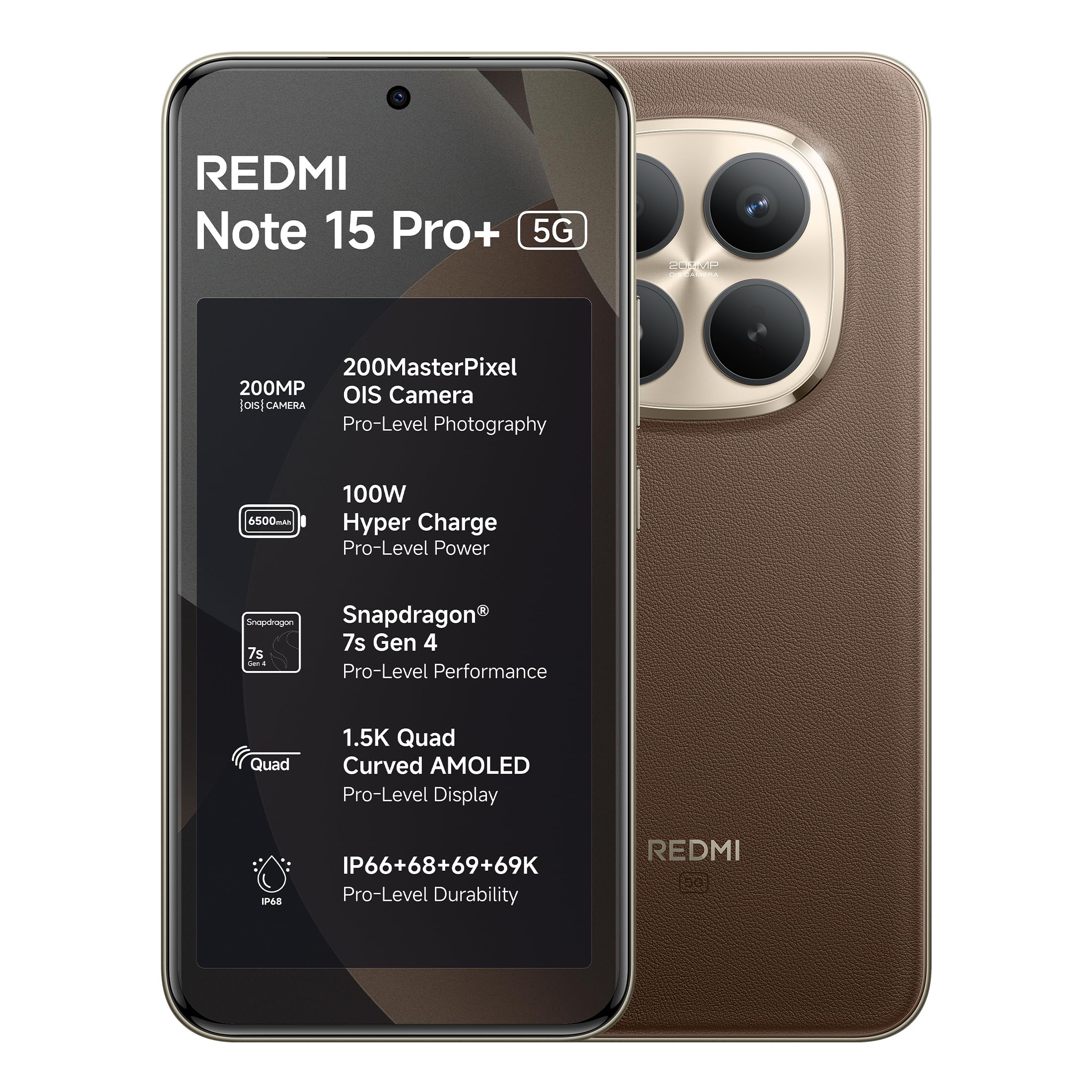
Figure 1: REDMI Note 15 Pro+ 5G (Coffee Mocha)
1. Persediaan
1.1 Kotak Isi
Sahkan bahawa semua item terdapat dalam pembungkusan produk:
- REDMI Note 15 Pro+ 5G Smartphone
- Pengecas
- Kabel Jenis-C USB
- Alat Keluarkan SIM
- Panduan Pengguna (dokumen ini)
- Kad Waranti
- Kes Pelindung
1.2 Memasukkan Kad SIM
- Cari dulang kad SIM di sisi peranti.
- Masukkan alat lenting SIM ke dalam lubang kecil di sebelah dulang dan tekan perlahan-lahan sehingga dulang terkeluar.
- Letakkan kad Nano-SIM anda ke dalam dulang dengan kenalan emas menghadap ke bawah. Pastikan orientasi yang betul.
- Tolak dulang kembali ke dalam slot dengan berhati-hati sehingga siram dengan peranti.
1.3 Hidupkan dan Konfigurasi Awal
- Press and hold the Power button until the REDMI logo appears.
- Ikut arahan pada skrin untuk memilih bahasa, rantau dan sambungkan ke rangkaian Wi-Fi anda.
- Log masuk dengan akaun Google anda atau buat yang baharu.
- Complete the setup process, including setting up security features like fingerprint or face unlock.
2. Mengendalikan Peranti Anda
2.1 Paparan dan Navigasi
The device features a 6.83-inch Quad curved 1.5K Ultra QHD AMOLED display with up to 3200 nits peak brightness. It supports a 120Hz adaptive refresh rate for smooth scrolling and interaction. Eye Protect 2.0 with Triple TÜV Certifications helps reduce eye strain.

Figure 2: Immersive AMOLED Display
2.2 Sistem Kamera
Your REDMI Note 15 Pro+ 5G is equipped with an advanced 200MP ultimate clarity camera system featuring OIS (Optical Image Stabilization) and an HPE 1/1.4" sensor. This camera is designed for capturing detailed photos and 4K videos with natural depth and steady motion.
- Capture Ultra-Sharp Details: Utilize the 200MP mode for maximum resolution.
- Steady Videos: OIS ensures stable video recording, even when moving.
- Portraits: Use portrait mode for natural depth-of-field effects.

Figure 3: 200MasterPixel Camera System
2.3 Prestasi dan Permainan
Powered by the Snapdragon 7s Gen 4 processor, the device offers smooth performance for daily tasks and gaming. IceLoop cooling technology helps maintain optimal temperatures during intensive use.

Figure 4: Snapdragon 7s Gen 4 Processor
2.4 Bateri dan Pengecasan
The 6500mAh Silicon-Carbon battery supports 100W HyperCharge, allowing for rapid charging. It also features 22.5W reverse charging. The battery is designed for advanced 1600 lifecycles, ensuring long-term reliability.

Figure 5: 6500mAh Silicon-Carbon Battery
2.5 Ciri Audio
Experience enhanced audio with symmetric stereo speakers and Dolby Atmos® support. The speakers deliver clear sound, suitable for music and calls.

Figure 6: Ultra-Loud, Ultra-Clear Sound
2.6 Xiaomi HyperOS and AI Features
The device runs on Android 15 with Xiaomi HyperOS, offering intelligent AI features and seamless cross-device connectivity. Key features include:
- Offline Communication: Enables device-to-device calling even without cellular or Wi-Fi network coverage, ideal for travel or areas with poor signal.
- AI Tools: Integrated AI features like Circle to Search and Gemini Assistance enhance user interaction and productivity.

Figure 7: Powered by Xiaomi HyperOS

Figure 8: Smarter Help with AI Tools

Figure 9: Xiaomi Offline Communication
3. Penyelenggaraan
3.1 Membersihkan Peranti Anda
To clean your device, use a soft, lint-free cloth. Avoid using abrasive cleaners, solvents, or aerosol sprays directly on the phone. For stubborn marks, slightly dampen kain dengan air atau pembersih skrin yang direka untuk elektronik.
3.2 Penjagaan Bateri
The 6500mAh Silicon-Carbon battery is designed for extended longevity with 1600 lifecycles. To maximize battery life:
- Elakkan suhu yang melampau.
- Use the provided 100W HyperCharge charger and cable for optimal charging.
- Elakkan menyahcas sepenuhnya bateri dengan kerap.
3.3 Kemas Kini Perisian
Your device will receive regular software updates, including OS updates for up to 4 years and security patches for up to 6 years. Ensure your device is connected to Wi-Fi and has sufficient battery before initiating updates.
4. Ketahanan dan Perlindungan
The REDMI Note 15 Pro+ 5G features a fiberglass back panel and Corning Gorilla Glass Victus 2 for enhanced durability. It boasts an IP69K rating, providing high-level protection against dust and water ingress, including high-pressure water jets and steam cleaning. AI Wet Touch 2.0 ensures screen responsiveness even when wet.

Rajah 10: Ciri Perlindungan Terbina Dalam
5. Penyelesaian masalah
Jika anda menghadapi masalah dengan peranti anda, cuba langkah penyelesaian masalah asas berikut:
- Peranti Tidak Responsif: Tekan dan tahan butang Kuasa selama kira-kira 10 saat untuk memaksa mulakan semula.
- Isu Rangkaian: Periksa sama ada kad SIM anda telah dimasukkan dengan betul. Cuba hidupkan dan matikan Mod Pesawat.
- Kerosakan Aplikasi: Tutup dan buka semula aplikasi. Jika masalah berterusan, kosongkan cache aplikasi atau pasang semula.
- Masalah Pengecasan: Pastikan pengecas dan kabel disambungkan dengan selamat dan tidak rosak. Cuba salur keluar kuasa yang berbeza.
- Gangguan Perisian: Pastikan perisian peranti anda dikemas kini.
For more complex issues, refer to the support section or contact customer service.
6. Spesifikasi
| Ciri | Perincian |
|---|---|
| Jenama | Redmi |
| Model | Nota 15 Pro+ 5G |
| Sistem Operasi | Android 15, Xiaomi HyperOS |
| Saiz Terpasang Memori RAM | 12 GB |
| Kapasiti Penyimpanan Memori | 256 GB |
| Saiz Skrin | 6.83 Inci (17.35 cm) |
| Jenis Paparan | AMOLED |
| warna | Kopi Mocha |
| Jenis Penyambung | USB Jenis C |
| Tahap Ketahanan Air | Kalis air (IP69K) |
| Rear Facing Camera Photo Sensor Resolution | 200 MP |
| Kapasiti Bateri | 6500 Miliamp jam |
| Berat Barang | 208 Gram |
| Dimensi Item (L x W x H) | 16.3 x 7.8 x 0.8 Sentimeter |
| Pembekal Tanpa Wayar | Tidak dikunci untuk Semua Pengangkut |
| Teknologi Selular | 5G |
| Isi Kotak | Charger, cable, SIM eject tool, Warranty card, User guide, Protective case |
7. Maklumat Waranti
Your REDMI Note 15 Pro+ 5G comes with a Waranti pengilang 1 tahun untuk peranti dari tarikh pembelian. Aksesori dalam kotak, termasuk bateri, dilindungi oleh Waranti pengilang 6 bulan dari tarikh pembelian.
Sila simpan bukti pembelian anda untuk tuntutan waranti.
8. Sokongan dan Perkhidmatan
For technical assistance, service, or warranty claims, please contact Redmi customer support. You can find contact information on the official Redmi website or through the provided warranty card.
Maklumat Pengilang:
DBG Technology (India) Pvt Ltd
PLOT NO-2, BAWAL, SECTOR-8, Rewari, Haryana, 123501.
Maklumat pengimport:
Xiaomi Technology India Private Limited
Building Orchid. Block E, Embassy Tech Village, Marathahalli Outer Ring Road, Devarabisanahalli, Bengaluru 560103
Redmi aims for efficient service, with many issues resolved quickly. For more details on repair services, refer to the official Redmi support channels.

Figure 11: Support and Repair Services
For information on potential benefits and subscriptions, please scan the QR code provided in your product packaging or visit the official Redmi weblaman web untuk maklumat lanjut. Scan for benefits


