
1. Pengenalan
Terima kasih kerana membeliasing the Sharp PS-916 Bluetooth Party Speaker System. This system includes two identical portable Bluetooth speakers designed to deliver powerful audio with versatile connectivity options. Please read this manual carefully before using the product to ensure proper operation and to maximize your listening experience.
Kandungan Pakej:
- 2 x Sharp PS-916 Party Speakers
- 1 x Kabel Pengecasan
- 1 x Alat Kawalan Jauh
- 1 x Manual Pengguna

Image: The Sharp PS-916 system includes two speakers for a complete stereo experience.
2. Persediaan
2.1 Charging the Speakers
The PS-916 speakers are equipped with rechargeable batteries, providing up to 12 hours of playback. Before initial use, fully charge both speakers.
- Connect the charging cable to the DC IN port on the rear of each speaker.
- Plug the other end of the charging cable into a suitable power adapter (not included) or USB power source.
- The charging indicator light will illuminate. It will change color or turn off once charging is complete.
2.2 Menghidupkan/Mematikan
To power on or off each speaker, press and hold the ON/STAND BY INPUT butang yang terletak pada panel kawalan.
2.3 Penggandingan Bluetooth (Pembesar Suara Tunggal)
- Ensure the speaker is powered on and in Bluetooth mode. The Bluetooth indicator will flash, indicating it is ready for pairing.
- Pada peranti mudah alih anda, dayakan Bluetooth dan cari peranti yang tersedia.
- Select "Sharp PS-916" from the list of devices.
- Once connected, the Bluetooth indicator will stop flashing and remain solid.
2.4 True Wireless Stereo (TWS) Pairing (Two Speakers)
TWS allows you to connect two PS-916 speakers wirelessly for a stereo sound experience.
- Power on both PS-916 speakers.
- Ensure neither speaker is currently connected to a Bluetooth device.
- On one of the speakers (this will be the primary speaker), press the TWS button. The speaker will enter TWS pairing mode.
- The primary speaker will automatically search for the secondary speaker. Once connected, you will hear an audible confirmation, and the TWS indicator lights on both speakers will illuminate.
- Sekarang, sambungkan peranti mudah alih anda ke pembesar suara utama melalui Bluetooth seperti yang diterangkan dalam bahagian 2.3. Audio akan dimainkan melalui kedua-dua pembesar suara dalam stereo.
3. Beroperasi
3.1 Panel Kawalan Selesaiview

Image: Main control panel for the Sharp PS-916 speaker.
- ON/STAND BY INPUT: Power on/off, switch input modes (Bluetooth, USB, TF, AUX, FM).
- PLAY/PAUSE (►/∕∕): Mainkan atau jeda main balik audio.
- PREVIOUS (◀◀): Langkau ke trek sebelumnya.
- NEXT (▶▶): Langkau ke trek seterusnya.
- KNOB VOLUME: Putar untuk melaraskan kelantangan induk.
- TWS: Initiate or disconnect True Wireless Stereo pairing.
- PENYAMA: Cycle through preset equalizer modes.
- ASAS: Activate or deactivate bass boost.
- CAHAYA: Change or turn off the LED light effects.
- MIC CONTROL: Adjust microphone volume or echo (if applicable).
3.2 Port Input
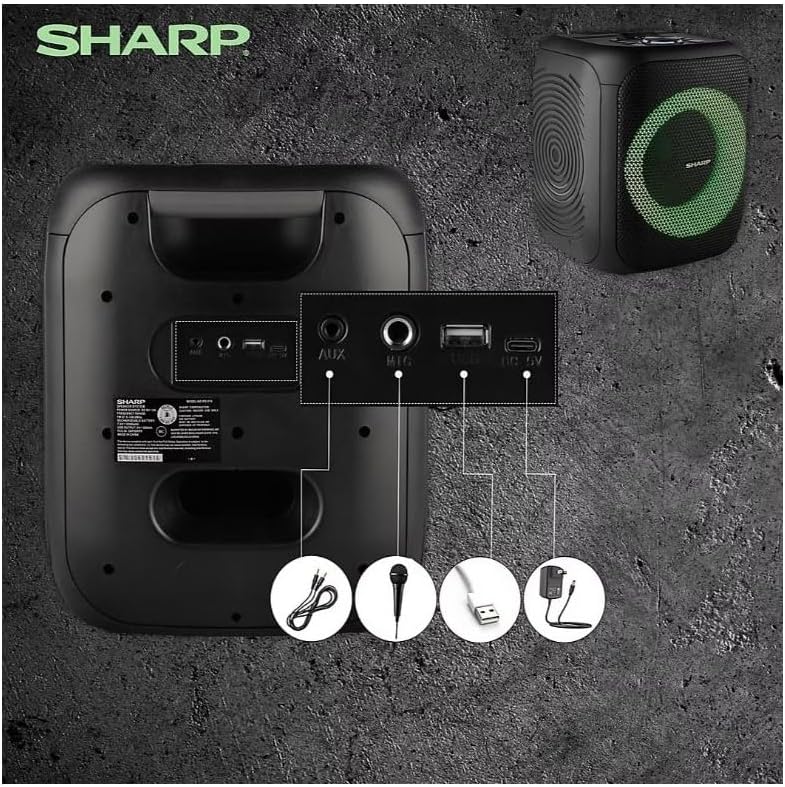
Image: Rear panel with various input and charging ports.
- AUX DI: Sambungkan peranti audio luaran menggunakan kabel audio 3.5mm.
- MIC DALAM: Connect a microphone (sold separately) for karaoke or announcements.
- USB: Masukkan pemacu kilat USB untuk main balik audio.
- KAD TF: Masukkan kad TF (microSD) untuk main balik audio.
- DC DALAM: Connect the charging cable to power and charge the speaker.
3.3 Playing Audio from USB/TF Card
- Insert a USB flash drive or TF card into the corresponding port.
- Tekan ke ON/STAND BY INPUT button repeatedly until the display shows the USB or TF mode.
- Main semula akan bermula secara automatik. Gunakan MAIN/JEDA, SEBELUMNYA, dan SETERUSNYA butang untuk mengawal main balik.
3.4 Menggunakan Input AUX
- Connect one end of a 3.5mm audio cable to the AUX IN port on the speaker.
- Sambungkan hujung satu lagi ke bicu fon kepala atau output audio peranti luaran anda.
- Tekan ke ON/STAND BY INPUT button repeatedly until the display shows AUX mode.
- Kawal main balik dan kelantangan daripada peranti luaran anda.
3.5 Operasi Radio FM

Image: The PS-916 features an integrated FM Tuner.
- Tekan ke ON/STAND BY INPUT button repeatedly until the display shows FM mode.
- Tekan dan tahan butang MAIN/JEDA butang untuk mengimbas dan menyimpan stesen FM yang tersedia secara automatik.
- Gunakan SEBELUMNYA dan SETERUSNYA butang untuk menavigasi stesen yang disimpan.
3.6 LED Light Effects
Tekan ke CAHAYA button to cycle through different LED light modes or to turn the lights off.
4. Penyelenggaraan
4.1 Pembersihan
- Always power off the speaker and disconnect it from the power source before cleaning.
- Gunakan kain lembut dan kering untuk mengelap permukaan luar.
- Jangan gunakan pembersih cecair, aerosol atau pelarut, kerana ini boleh merosakkan kemasan atau komponen dalaman.
4.2 Penyimpanan
- Simpan pembesar suara di tempat yang sejuk dan kering, jauh daripada cahaya matahari langsung dan suhu yang melampau.
- Jika menyimpan untuk tempoh yang lama, cas bateri kepada kira-kira 50% setiap beberapa bulan untuk mengekalkan kesihatan bateri.
5. Penyelesaian masalah
If you encounter issues with your Sharp PS-916 speakers, please refer to the following common problems and solutions:
| Masalah | Penyelesaian yang Mungkin |
|---|---|
| Speaker tidak dihidupkan. | Pastikan bateri telah dicas. Sambungkan kabel pengecas dan cuba lagi. |
| Tiada suara dari pembesar suara. | Periksa tahap kelantangan pada pembesar suara dan peranti anda yang disambungkan. Pastikan mod input yang betul dipilih. |
| Peranti Bluetooth tidak boleh berpasangan. | Ensure the speaker is in Bluetooth pairing mode (indicator flashing). Move your device closer to the speaker. Disconnect from other Bluetooth devices. |
| Gandingan TWS gagal. | Ensure both speakers are powered on and not connected to any other Bluetooth devices. Try initiating TWS pairing again. |
| Bunyi herot. | Reduce the volume on both the speaker and your connected device. Ensure the audio source is not distorted. |
6. Spesifikasi
| Ciri | Perincian |
|---|---|
| Jenama | tajam |
| Nama Model | PS-916 |
| Konfigurasi Pembesar Suara | 8" Woofer, 1" Tweeter (per speaker) |
| Kuasa Keluaran Puncak | 400 Watt (setiap pembesar suara) |
| Kuasa Output RMS | 40 Watt (setiap pembesar suara) |
| Teknologi Ketersambungan | Bluetooth |
| Input Tambahan | USB, TF Card, 3.5mm AUX, Microphone Input |
| Hayat Bateri | Sehingga 12 Jam |
| Ciri Khas | True Wireless Stereo (TWS) Pairing, Bass Boost, LED Light Effects, FM Tuner |
| warna | Hitam |
| Berat Barang | 6.5 Pound (setiap pembesar suara) |
| UPC | 728434122111 |
| GTIN | 728434122111 |
7. Waranti & Sokongan
7.1 Maklumat Waranti
This Sharp PS-916 product comes with a 90-day limited warranty. This warranty covers manufacturing defects under normal use. It does not cover damage caused by misuse, accidents, unauthorized modifications, or normal wear and tear.
7.2 Sokongan Pelanggan
For technical assistance, warranty claims, or further inquiries, please refer to the contact information provided with your purchase documentation or visit the official Sharp support webtapak.