
JONR H2 PRO MAX
JONR H2 PRO MAX Wet Dry Vacuum Cleaner User Manual
Model: H2 PRO MAX
pengenalan
Thank you for choosing the JONR H2 PRO MAX Wet Dry Vacuum Cleaner. This manual provides essential information for the safe and efficient operation, maintenance, and troubleshooting of your appliance. Please read this manual thoroughly before using the product and retain it for future reference.
Arahan Keselamatan Penting
AMARAN: Untuk mengurangkan risiko kebakaran, kejutan elektrik atau kecederaan, baca semua arahan sebelum digunakan.
- Sentiasa kendalikan perkakas pada permukaan yang kering dan rata.
- Jangan rendamkan perkakas dalam air atau cecair lain.
- Jauhkan rambut, pakaian longgar, jari dan semua bahagian badan daripada bukaan dan bahagian yang bergerak.
- Gunakan hanya seperti yang diterangkan dalam manual ini. Gunakan hanya lampiran yang disyorkan pengilang.
- Jangan gunakan dengan kord atau palam yang rosak. Jika perkakas tidak berfungsi sebagaimana mestinya, telah terjatuh, rosak, ditinggalkan di luar rumah, atau terjatuh ke dalam air, kembalikannya ke pusat servis.
- Jangan pegang palam atau perkakas dengan tangan yang basah.
- Jangan letakkan sebarang objek ke dalam bukaan. Jangan gunakan dengan mana-mana bukaan yang disekat; jauhkan daripada habuk, serabut, rambut dan apa sahaja yang boleh mengurangkan aliran udara.
- Berhati-hati semasa membersihkan tangga.
- Jangan gunakan untuk mengambil cecair mudah terbakar atau mudah terbakar, seperti petrol, atau gunakan di kawasan yang mungkin terdapat.
- Jangan ambil apa-apa yang terbakar atau berasap, seperti rokok, mancis, atau abu panas.
- Elakkan permulaan yang tidak disengajakan. Pastikan suis berada dalam kedudukan mati sebelum menyambung ke pek bateri, mengambil atau membawa perkakas.
- Isi semula hanya dengan pengecas yang ditentukan oleh pengilang.
- Dalam keadaan kesat, cecair mungkin dikeluarkan daripada bateri; elakkan bersentuhan. Jika terkena secara tidak sengaja, siram dengan air. Jika cecair terkena mata, dapatkan bantuan perubatan tambahan.
Kandungan Pakej
Sahkan bahawa semua komponen ada dan dalam keadaan baik semasa membongkar.
- JONR H2 PRO MAX Main Unit
- Mengendalikan Pemasangan
- Dok Pengecasan
- Penyesuai Kuasa
- Cleaning Solution (Starter Bottle)
- Berus Pembersih
- Pemegang Aksesori
- Manual Pengguna
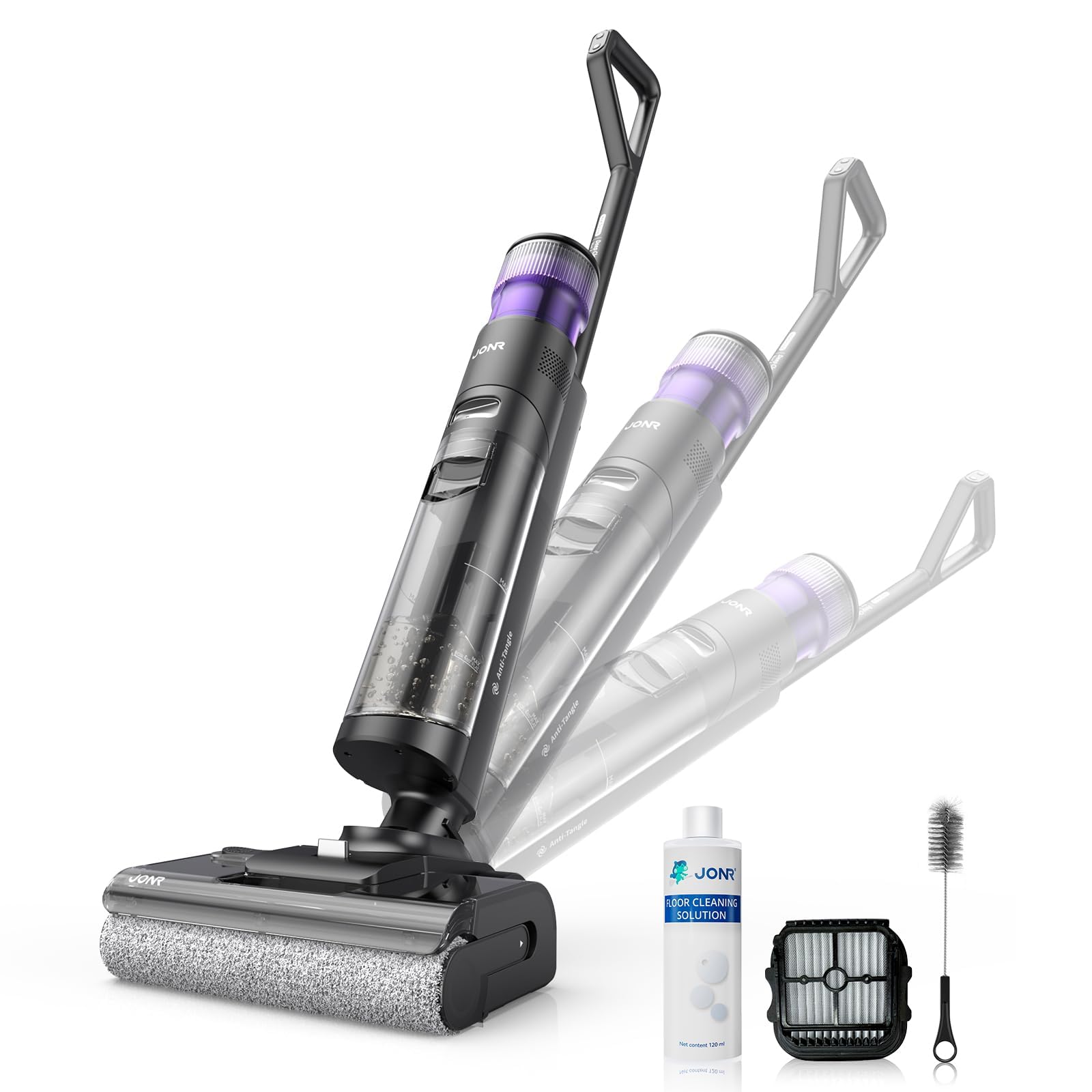
Image: JONR H2 PRO MAX Wet Dry Vacuum Cleaner and its included accessories. This image shows the main unit, handle, charging dock, and various cleaning tools.
Gambarajah Produk
Familiarize yourself with the parts of your JONR H2 PRO MAX.
- Tangki Air Bersih (CWT)
- Tangki Air Kotor (DWT)
- Butang Lepaskan Pegangan
- Skrin Paparan
- Butang Kuasa
- Butang Pemilihan Mod
- Butang Pembersihan Diri
- Penutup Gulung Berus
- Gulung Berus
- Mengecas Kenalan
- Dok Pengecasan

Image: Labeled diagram illustrating the main parts of the JONR H2 PRO MAX Wet Dry Vacuum Cleaner, including tanks, buttons, and brush roll area.
Persediaan
1. Mengendalikan Perhimpunan
- Insert the handle assembly into the main unit until you hear a click, ensuring it is securely locked.
- To disassemble, press the handle release button and pull the handle upwards.
2. Mengecas Bateri
- Place the main unit onto the charging dock, ensuring the charging contacts align.
- Sambungkan penyesuai kuasa ke dok pengecasan dan pasangkannya ke salur keluar dinding.
- The display screen will indicate charging status. A full charge takes approximately 4 hours.
- For optimal battery life, fully charge the unit before first use.

Image: The JONR H2 PRO MAX Wet Dry Vacuum Cleaner positioned on its charging dock, with the power adapter connected.
3. Filling the Clean Water Tank (CWT)
- Press the CWT release button and remove the tank.
- Open the tank cap and fill with clean tap water. For enhanced cleaning, add a small amount of JONR cleaning solution (do not exceed the MAX line).
- Close the cap securely and reinsert the CWT into the main unit until it clicks into place.
Arahan Operasi
1. Hidupkan/Mati Kuasa
- Press the Power Button to turn the unit on. The display screen will illuminate.
- Press the Power Button again to turn the unit off.
2. Selecting Cleaning Mode
The JONR H2 PRO MAX offers multiple cleaning modes:
- Mod Auto: Default mode for general cleaning. The unit automatically adjusts suction and water flow based on floor dirt detection.
- Mod Maks: Provides maximum suction and water flow for heavily soiled areas.
- Mod Sedutan: For vacuuming liquids without dispensing water.
Press the Mode Selection Button to cycle through the available cleaning modes. The selected mode will be displayed on the screen.
3. Cleaning Your Floors
- Tilt the main unit back to engage the brush roll and start cleaning.
- Move the unit slowly forward and backward over the desired area.
- The unit will dispense water and cleaning solution, scrub the floor, and vacuum up dirty water simultaneously.
- The display screen provides real-time information such as battery level, current mode, and dirty water tank status.

Image: The JONR H2 PRO MAX Wet Dry Vacuum Cleaner actively cleaning a hard floor surface, demonstrating its wet and dry cleaning capabilities.
Penyelenggaraan
Regular maintenance ensures optimal performance and extends the lifespan of your JONR H2 PRO MAX.
1. Emptying and Cleaning the Dirty Water Tank (DWT)
- After each use, or when the DWT full indicator appears, remove the DWT.
- Open the DWT lid and carefully pour out the dirty water.
- Rinse the DWT thoroughly with clean water. Clean the filter inside the DWT if necessary.
- Allow the DWT and filter to air dry completely before reassembling.
2. Fungsi Pembersihan Diri
- Place the unit on the charging dock. Ensure the CWT has sufficient clean water.
- Press the Self-Cleaning Button. The unit will perform an automatic cleaning cycle for the brush roll and internal pipes.
- After the self-cleaning cycle, empty and clean the DWT.
- The hot air drying function will then activate to dry the brush roll, preventing odors.

Image: The JONR H2 PRO MAX Wet Dry Vacuum Cleaner on its charging dock, with indicators suggesting the self-cleaning cycle is active.
3. Membersihkan Gulungan Berus
- Turn off the unit and remove it from the charging dock.
- Open the brush roll cover.
- Remove the brush roll. Use the provided cleaning brush to remove any hair, debris, or tangled material.
- Bilas gulungan berus di bawah air yang mengalir.
- Allow the brush roll to air dry completely before reinstalling. Ensure it is properly aligned.
4. Membersihkan Penapis
- The filter is located within the DWT. Remove it and rinse under clean water.
- Benarkan penuras kering sepenuhnya sebelum dimasukkan semula.
- Replace the filter every 3-6 months, or as needed, for optimal performance.
Menyelesaikan masalah
Rujuk bahagian ini untuk isu biasa dan penyelesaiannya.
| Masalah | Kemungkinan Punca | Penyelesaian |
|---|---|---|
| Unit tidak dihidupkan. | Bateri habis. | Cas unit sepenuhnya. |
| Unit tidak dihidupkan. | Butang kuasa tidak ditekan dengan betul. | Pastikan butang kuasa ditekan dengan kuat. |
| Penyedutan yang teruk. | Dirty Water Tank (DWT) is full. | Empty and clean the DWT. |
| Penyedutan yang teruk. | Brush roll or air path is clogged. | Clean the brush roll and check for blockages in the air path. |
| Penyedutan yang teruk. | Penapis kotor atau tersumbat. | Bersihkan atau ganti penapis. |
| Air tidak mendispens. | Clean Water Tank (CWT) is empty. | Refill the CWT. |
| Air tidak mendispens. | CWT not installed correctly. | Ensure the CWT is securely in place. |
| Unit leaks water. | Tanks not properly sealed or installed. | Check that both CWT and DWT are correctly installed and their caps are sealed. |
| Bau yang tidak menyenangkan. | Dirty Water Tank (DWT) needs cleaning. | Empty and thoroughly clean the DWT after each use. Run self-cleaning cycle. |
Spesifikasi
| Nama Model | H2 PRO MAX |
| Jenama | JONR |
| Sumber Kuasa | Dikuasakan Bateri (Tanpa Kord) |
| Jenis Bateri | Litium-Ion |
| Masa Mengecas | Lebih kurang 4 Jam |
| Wattage | 200 watt |
| Kapasiti Tangki Air Bersih | 850 mililiter |
| Tahap Kebisingan | 80 Desibel |
| Dimensi Produk | 10.6"L x 9"W x 44"H |
| Berat Barang | 16.97 paun |
| Jenis Penapis | Span |
| Ciri Khas | Hot Air Drying, Tangle-Free Brush Roll, Smart Hard Floor Cleaner |
Waranti dan Sokongan
JONR products are manufactured to high-quality standards. For warranty information, technical support, or service inquiries, please contact JONR customer service.
Please visit the official JONR website or refer to your purchase documentation for specific warranty terms and contact details.
Nota: Simpan resit pembelian anda sebagai bukti pembelian untuk tuntutan waranti.
Ask a question about this manual
Ask about setup, troubleshooting, compatibility, parts, safety, or missing instructions. Manuals+ will review the question and use this page’s manual context to help answer it.