
1. Pengenalan
The ZIBOO ET1015 Digital Manometer is a precision instrument designed for measuring differential, positive, and negative pressure. It is an essential tool for HVAC technicians, maintenance engineers, and professionals requiring accurate pressure readings in various applications, including ventilation, air conditioning systems, and gas pressure testing. This manual provides detailed instructions for the safe and effective use of your ET1015 manometer.
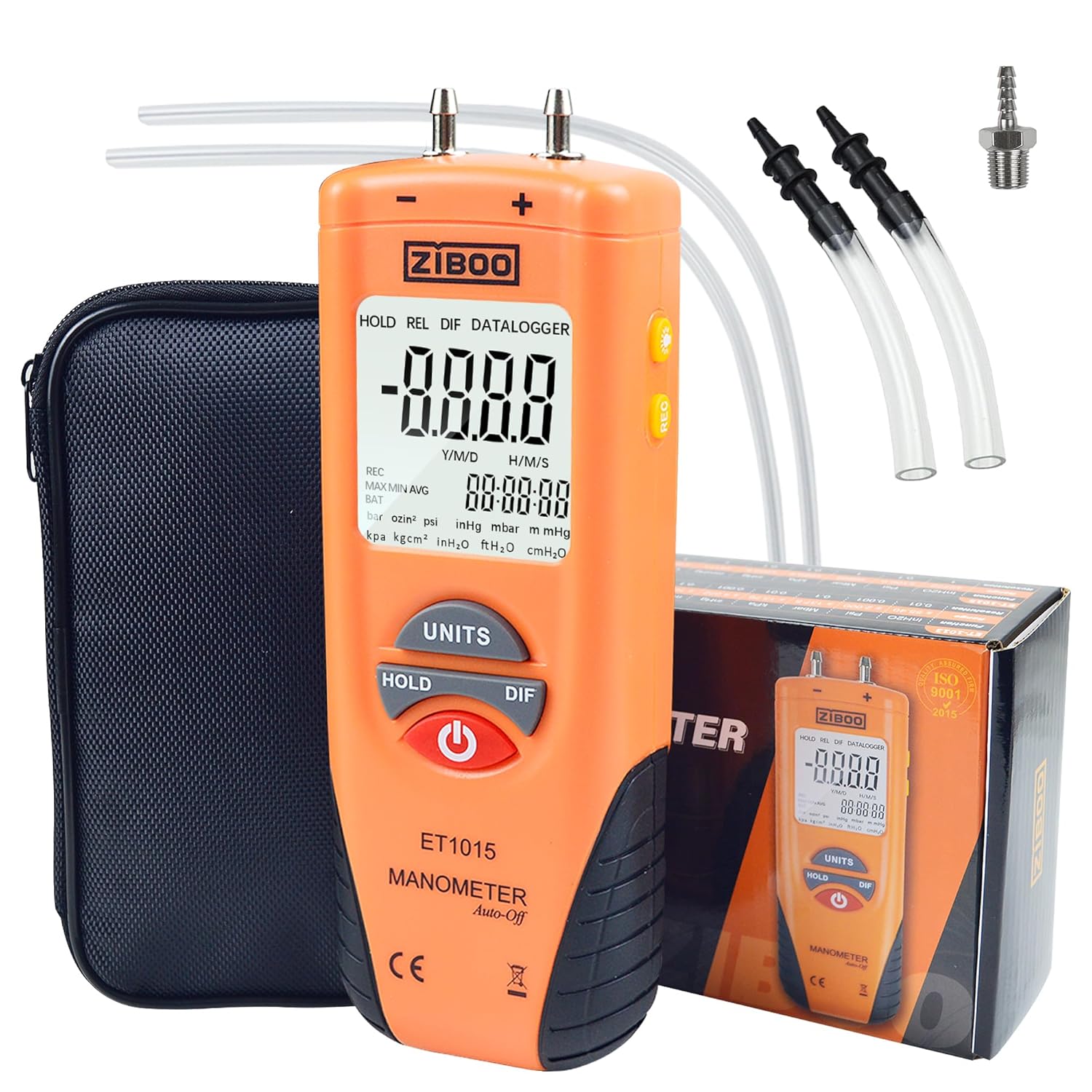
Image 1.1: ZIBOO ET1015 Digital Manometer showing its main display and buttons.
2. Maklumat Keselamatan
Please read and understand all safety instructions before operating the ZIBOO ET1015 Digital Manometer. Failure to follow these instructions may result in injury or damage to the device.
- Do not exceed the maximum pressure rating of 150 PSI.
- Ensure all connections are secure before applying pressure.
- Do not use the device in environments with explosive gases or vapors.
- Keep the device dry and clean. Avoid exposure to extreme temperatures.
- Replace the battery promptly when the low battery indicator appears to ensure accurate readings.
- Peranti ini tidak bertujuan untuk kegunaan perubatan.
3. Kandungan Pakej
Sahkan bahawa semua item yang disenaraikan di bawah terdapat dalam pakej anda:
- 1x ZIBOO ET1015 Digital Manometer
- 1x Protective Carry Pouch
- 2x Soft Connection Tubing
- 1x 9V Battery
- 1x Manual Pengguna

Image 3.1: Complete kit contents of the ZIBOO ET1015 Digital Manometer.
4. Produk Lebihview
Familiarize yourself with the components and controls of your ET1015 manometer.
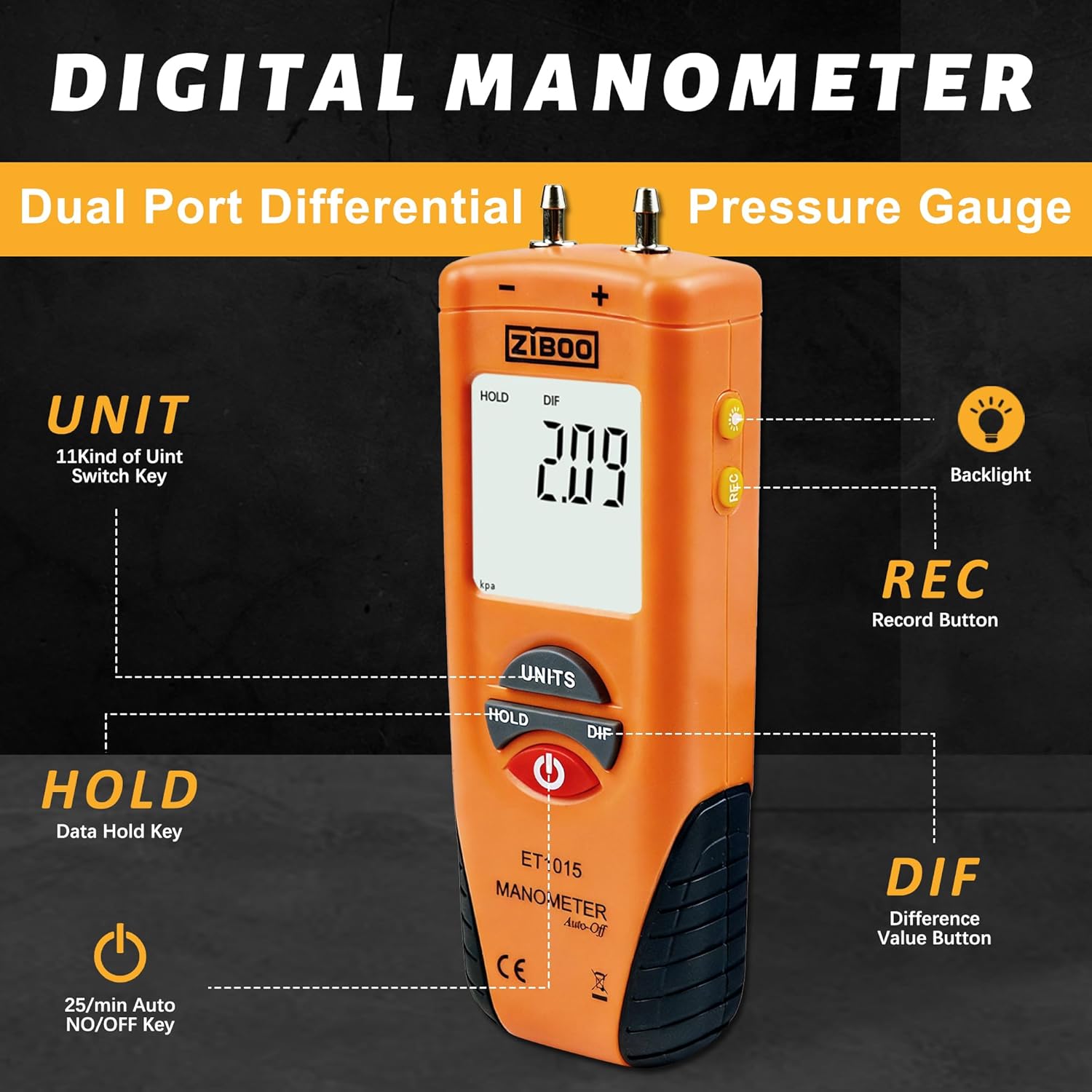
Image 4.1: Front panel and display description of the ZIBOO ET1015.
Komponen Utama:
- Dual Pressure Ports: For connecting tubing to measure differential pressure. Labeled '+' and '-'.
- Paparan LCD Besar: Shows primary data, MAX/MIN/AVG readings, unit indicators, and battery status.
- Butang UNIT: Cycles through 11 selectable pressure units.
- Butang TAHAN: Membekukan bacaan semasa pada paparan.
- DIF Button: Calculates and displays the differential pressure between the two ports.
- Butang REC: Activates recording mode to view Maximum (MAX), Minimum (MIN), and Average (AVG) readings.
- Butang Kuasa: Menghidupkan/Mematikan peranti.
- Butang Lampu Belakang: Toggles the display backlight for improved visibility in dim conditions.
5. Persediaan
5.1 Pemasangan Bateri
The ZIBOO ET1015 requires one 9V battery (included). To install:
- Cari penutup petak bateri di bahagian belakang peranti.
- Luncurkan atau tanggalkan penutup untuk membuka.
- Insert the 9V battery, ensuring correct polarity (+/-).
- Gantikan penutup petak bateri dengan selamat.
5.2 Tiub Penghubung
Use the provided soft connection tubing to connect the manometer to the pressure source.
- Attach one end of the tubing to the desired pressure port (+ or -) on the top of the manometer.
- Connect the other end of the tubing to the pressure source you wish to measure.
- For differential pressure, connect two tubes to both ports and to the respective pressure points.

Image 5.1: Manometer connected to a system via tubing for pressure measurement.
6. Arahan Operasi
6.1 Hidupkan/Mati Kuasa
- Tekan ke kuasa button to turn the device ON.
- The device features an Auto Power-Off function that activates after 25 minutes of inactivity to conserve battery life.
- To manually turn OFF, press and hold the kuasa butang.
6.2 Zero Adjustment (Clearance)
Before taking measurements, especially for differential pressure, it is recommended to perform a zero adjustment.
- Ensure both pressure ports are open to the atmosphere (not connected to any pressure source).
- Turn on the manometer.
- Tekan dan tahan butang DIF button for approximately 2 seconds until the display shows '0.00' or 'ZERO'. This calibrates the sensor to zero pressure.
6.3 Pemilihan Unit
Tekan ke UNIT button to cycle through the 11 available measurement units:
- inH2O, psi, bar, mbar, kPa, inHg, mmHg, ozin², ftH2O, cmH2O, kgcm²
6.4 Fungsi HOLD
Tekan ke TAHAN button to freeze the current reading on the display. Press it again to release and resume live readings.
6.5 DIF (Differential Pressure) Function
Tekan ke DIF button to instantly calculate and display the differential pressure between the two connected ports. This is useful for measuring pressure drops across filters, coils, or ducts.
6.6 REC (Record) Mode
The REC mode allows you to track pressure fluctuations over time.
- Tekan ke REC button to enter recording mode. The display will show 'REC'.
- While in REC mode, you can press the REC button again to cycle through Maximum (MAX), Minimum (MIN), and Average (AVG) readings. A relative time clock will also be displayed.
- To exit REC mode, press and hold the REC butang.
6.7 Lampu Latar
Tekan ke Lampu latar button (light bulb icon) to turn the display backlight ON or OFF. This improves visibility in dimly lit environments.
6.8 Aplikasi
The ZIBOO ET1015 is suitable for a variety of applications:
- HVAC system diagnostics and balancing.
- Gas furnace calibration and testing.
- Pneumatic control systems.
- Clean room monitoring.
- Spot checks for pressure variations.

Image 6.1: Manometer used to measure pressure in an HVAC system.

Image 6.2: Manometer measuring pressure in a gas line connection.
7. Penyelenggaraan
7.1 Pembersihan
Lap peranti dengan lembut, damp cloth. Do not use abrasive cleaners or solvents. Ensure no liquid enters the pressure ports or other openings.
7.2 Penggantian Bateri
When the low battery indicator (BAT) appears on the display, replace the 9V battery as described in Section 5.1. Prompt battery replacement ensures continued accuracy and functionality.
7.3 Penyimpanan
Store the manometer in its protective carry pouch in a cool, dry place, away from direct sunlight and extreme temperatures. If storing for extended periods, remove the battery to prevent leakage.
8. Penyelesaian masalah
If you encounter issues with your ZIBOO ET1015, refer to the following common problems and solutions:
- Peranti tidak dihidupkan: Check if the 9V battery is installed correctly and has sufficient charge. Replace if necessary.
- Display shows 'Err.1': This indicates an over-range condition. The measured pressure exceeds the device's maximum capacity (100 PSI). Disconnect from the pressure source immediately to prevent damage.
- Display shows 'Err.2': This indicates an under-range condition. The measured pressure is below the device's minimum detectable range.
- Bacaan tidak tepat: Ensure the zero adjustment has been performed correctly before measurement. Check for any leaks in the tubing connections.
- Low Battery Indicator (BAT): Ganti bateri 9V.
Jika masalah berterusan selepas mencuba penyelesaian ini, sila hubungi sokongan pelanggan.
9. Spesifikasi
Detailed technical specifications for the ZIBOO ET1015 Digital Manometer:
| Parameter | Spesifikasi |
|---|---|
| Paparan | Dwi LCD |
| Ketepatan | ±0.3% FSO (25°C) |
| Kebolehulangan | ±0.2% (Max +/-0.5% FSO) |
| Kelinearan/Histeresis | ±0.29% FSO |
| Tekanan Maksimum | 100 PSI |
| Masa Tindak Balas | 0.5 saat biasa |
| Penunjuk Bateri Rendah | ya |
| Penunjuk Julat Lebih | Err.1 |
| Di Bawah Penunjuk Julat | Err.2 |
| Keadaan Operasi | 32°F hingga 122°F (0 hingga 50°C) |
| Keadaan Penyimpanan | 14°F hingga 140°F (-1 hingga 60°C) |
| Bekalan Kuasa | 1x 9V Battery (included) or External 9VDC |
| Dimensi (lebih kurang) | 14.5 sm (H) x 5 sm (W) x 3 sm (D) |
| Berat (lebih kurang) | 0.65 Kilograms (with battery) |
| Nombor Model Item | ZIBOO ET1015 |
| UPC | 707862787321 |

Image 9.1: Parametric indicators for ZIBOO ET1015.
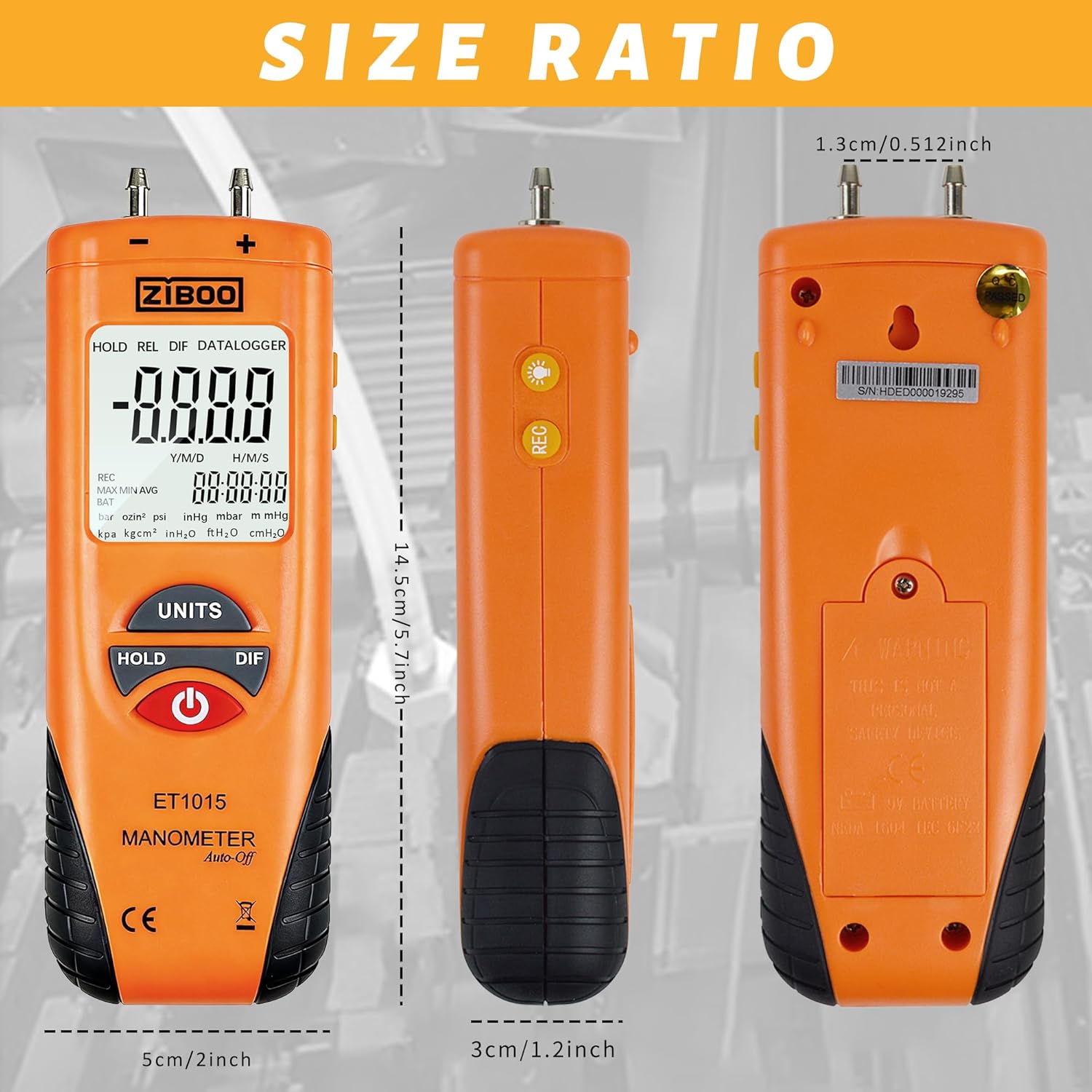
Image 9.2: Size ratio and dimensions of the ZIBOO ET1015.
10. Waranti dan Sokongan
ZIBOO products are designed for reliability and performance. This product typically comes with a standard manufacturer's warranty. For specific warranty details, technical support, or service inquiries, please refer to the warranty card included in your package or contact ZIBOO customer service through their official webtapak atau peruncit tempat produk itu dibeli.