
pengenalan
Thank you for choosing the CORBOBO Aula F3099 Wireless Keyboard and SM802 Wireless Mouse Combo. This manual provides detailed instructions for setting up, operating, and maintaining your new peripheral devices. Please read this manual thoroughly before use to ensure optimal performance and longevity of your product.
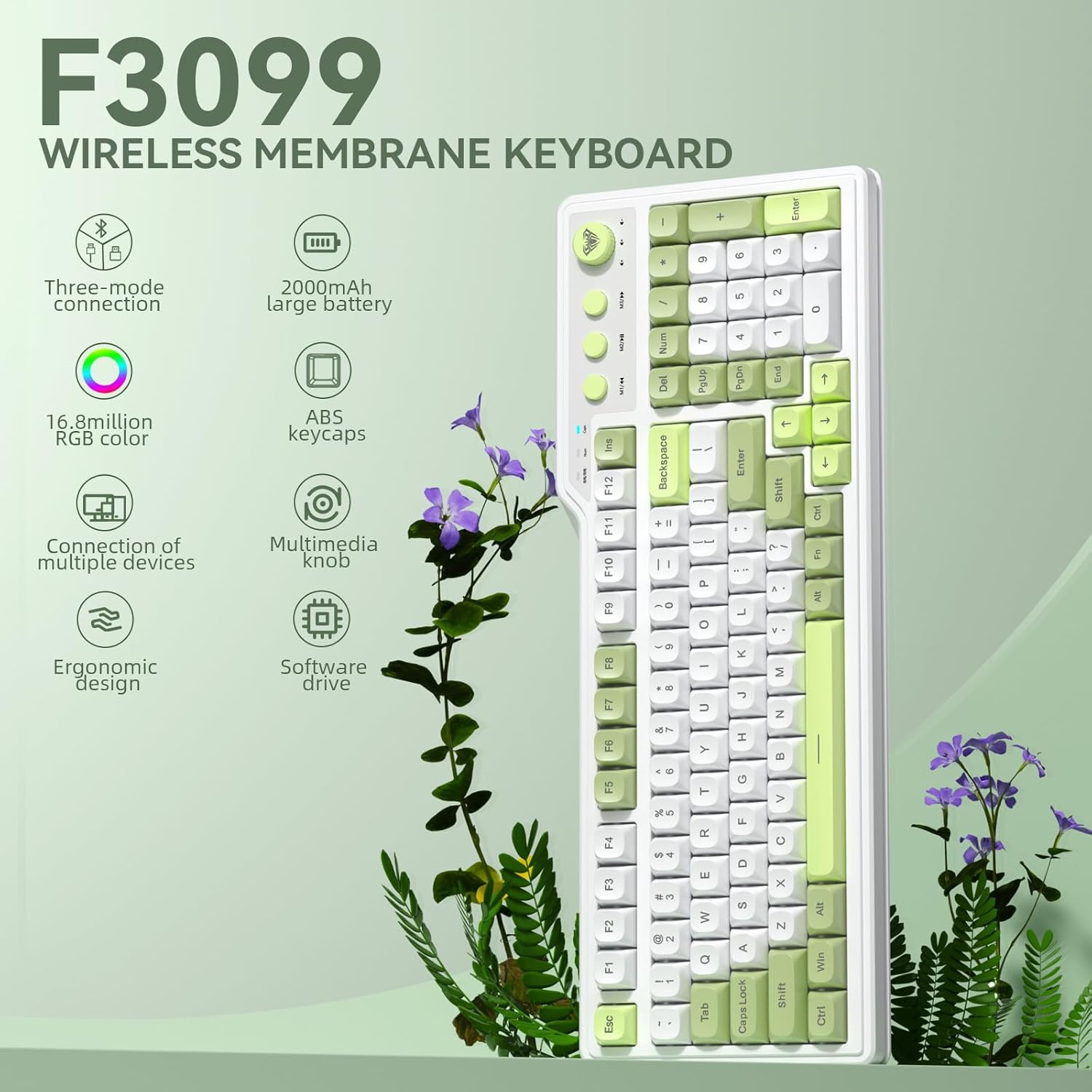
Imej: Selesaiview of the Aula F3099 Wireless Keyboard and SM802 Wireless Mouse Combo.
Arahan Persediaan
1. Keyboard Connection (Aula F3099)
The Aula F3099 keyboard supports three connection modes: 2.4G wireless, Bluetooth, and wired USB-C.
- Mod Wayarles 2.4G: Tekan fn + ~ to activate 2.4G wireless mode. Insert the USB receiver into an available USB port on your computer. The keyboard will automatically connect.
- Mod Bluetooth: Tekan fn+1, fn+2, atau fn+3 to switch between three Bluetooth channels. The keyboard can store up to three Bluetooth devices. On your device (PC, laptop, mobile), search for "F3099" in the Bluetooth settings and pair.
- Mod Berwayar: Tekan fn+4 to switch to wired mode. Connect the keyboard to your computer using the provided USB-C cable.

Image: Illustration of the Aula F3099 keyboard's tri-mode connection capabilities.
2. Mouse Connection (SM802)
The SM802 mouse also supports tri-mode connectivity: 2.4GHz wireless, Bluetooth, and wired USB.
- Mod Wayarles 2.4GHz: Locate the mode switch on the bottom of the mouse and set it to 2.4G. Insert the USB receiver (often stored in the mouse's bottom compartment) into your computer's USB port.
- Mod Bluetooth: Set the mode switch on the bottom of the mouse to BT. On your device, search for "SM802" in the Bluetooth settings and pair.
- Mod Berwayar: Connect the mouse to your computer using a USB cable. The mouse will function in wired mode and charge simultaneously.
3. Mengecas
Both the Aula F3099 keyboard and SM802 mouse are rechargeable. Connect them via USB-C cable to a power source (e.g., computer USB port, USB wall adapter) to charge. An indicator light will typically show charging status.
Arahan Operasi
1. Aula F3099 Keyboard Operation
- Tombol Multimedia: The knob has dual modes. Long-press the knob for 3 seconds to switch between Gaming Mode and Office Mode.
- Mod Permainan: Rotate the knob to adjust RGB backlight brightness. Press the knob to cycle through different backlight effects.
- Mod Pejabat: Rotate the knob to adjust computer volume. Press the knob to mute/unmute audio.
- Multimedia Hot Keys (M1/M2/M3): These keys function differently based on the knob's mode.
- Mod Permainan: In wired mode, M1/M2/M3 can be customized for macros. To record a macro: Press Fn + INS, then press M1/M2/M3, enter your desired key output, and press Fn + INS sekali lagi untuk berjimat.
- Mod Pejabat: M1 (Previous Song), M2 (Play/Pause), M3 (Next Song).
- RGB Backlight Adjustment:
- Fn + Tamat: Adjust constant light mode.
- Fn + PgUp: Adjust to the next light effect.
- Fn + PgDn: Adjust to the last light effect.
- Fn + !: Tingkatkan kecerahan lampu latar.
- Fn + -: Kurangkan kecerahan lampu latar.
- Fn + =: Increase light speed.
- Fn + _: Decrease light speed.
- Programmable Driver: The keyboard supports macro customization via a driver. The driver only operates in wired mode on Windows systems. Note that this membrane silicone keyboard does not support hot-swap functionality.

Imej: Terperinci view of the Aula F3099 keyboard's dual-mode multimedia knob functions.
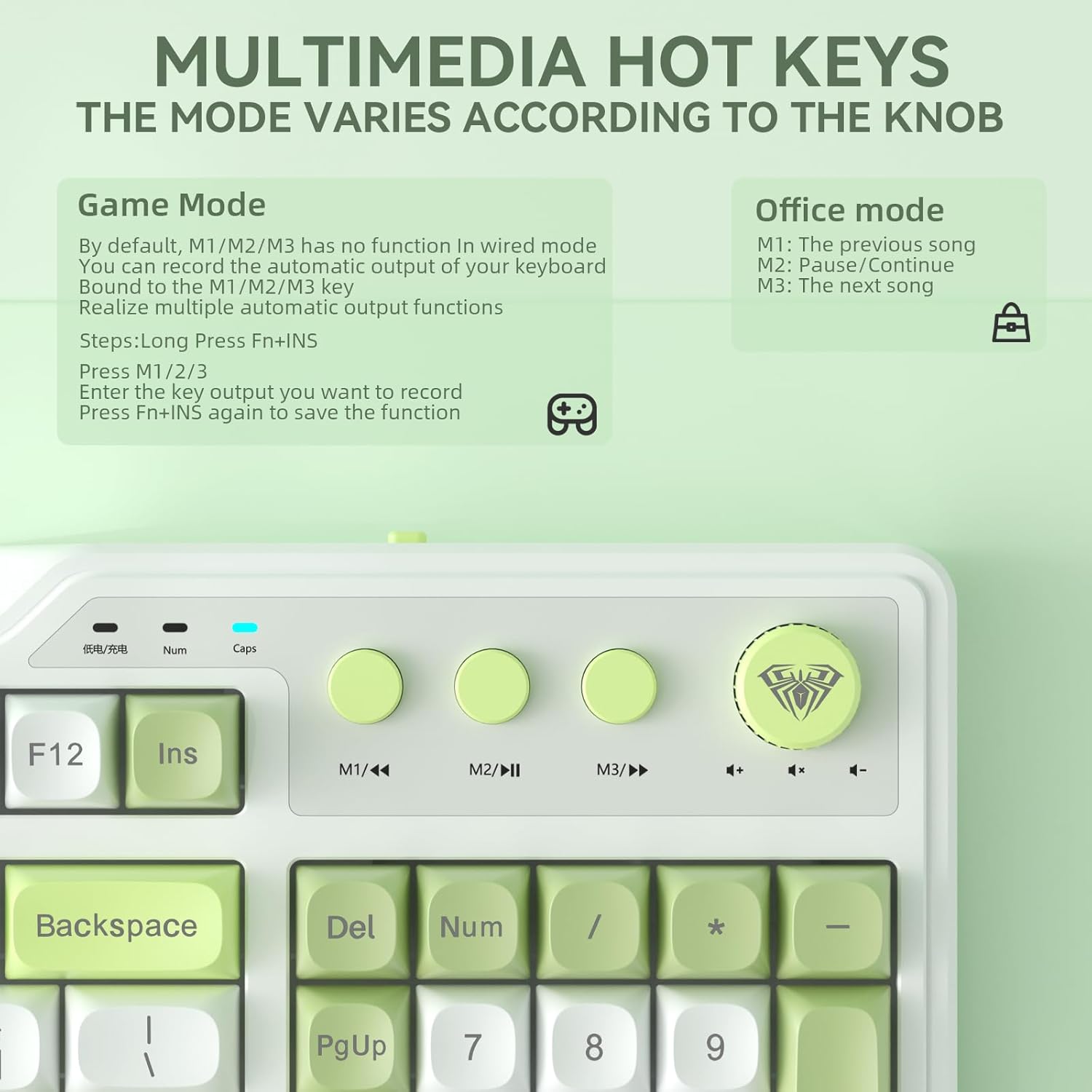
Image: Explanation of multimedia hot key functions in both game and office modes.
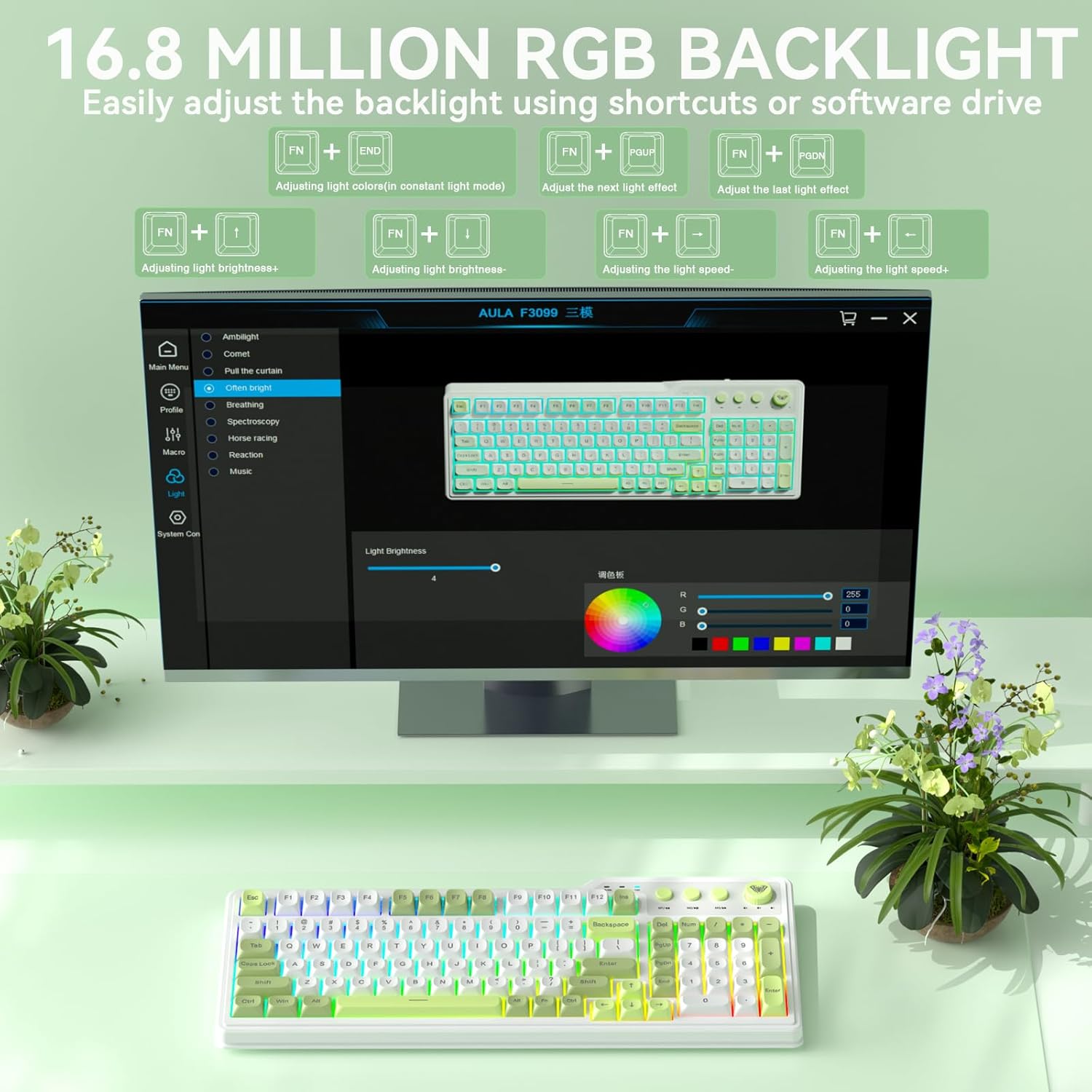
Image: Visual guide for adjusting the 16.8 million RGB backlight effects and brightness.
2. SM802 Mouse Operation

Imej: Selesaiview of the SOLAKAKA SM802 Wireless Gaming Mouse, highlighting its features.
- Pelarasan DPI: The mouse comes with 6 preset DPI levels (1200/1600/2400/3200/6400/12800). Use the DPI switching button (located near the scroll wheel) to cycle through these levels. DPI can be adjusted up to 24,000 via the driver software.
- Butang Boleh Aturcara: The SM802 features 6 programmable buttons. These include Left, Right, Middle Click, Roller Forward, Roller Backward, Forward, and Backward buttons. Macro functions and remapping can be configured using the dedicated driver software.
- Kesan RGB: The mouse features multiple RGB lighting effects. These can be switched via a dedicated RGB switching button (non-programmable) or through the driver software. Available effects include turning off lighting, Wave (colorful RGB waves), and Circular Breathing (single-color breathing light).
- Interchangeable Shells: The mouse includes two interchangeable shell kits: a breathable version and a classic version. These can be swapped to change the mouse's appearance and feel. The breathable shell reduces weight to 68 grams and enhances airflow for comfort.

Image: Diagram illustrating the 6 programmable buttons on the SM802 mouse.

Imej: Cthamples of RGB lighting effects available on the SM802 mouse.
Penyelenggaraan
- Pembersihan: Gunakan kain lembut dan kering untuk membersihkan permukaan papan kekunci dan tetikus. Untuk kotoran degil, sedikit damp Kain dengan sabun lembut boleh digunakan, memastikan tiada cecair memasuki peranti. Elakkan bahan kimia yang keras atau bahan yang melelas.
- Penjagaan Bateri: To prolong battery life, avoid fully discharging the devices frequently. Charge them when the battery indicator is low. If storing for an extended period, charge them to about 50% and store in a cool, dry place.
- Storan: Store the keyboard and mouse in a clean, dry environment away from extreme temperatures, direct sunlight, and excessive dust.
Menyelesaikan masalah
- Peranti Tidak Bersambung:
- Pastikan peranti dihidupkan dan dicas sepenuhnya.
- Verify the correct connection mode (2.4G, BT, Wired) is selected on the device.
- Untuk 2.4G, pastikan penerima USB dipasang dengan selamat.
- For Bluetooth, ensure Bluetooth is enabled on your computer/device and re-attempt pairing.
- Try connecting via wired mode to rule out wireless issues.
- Backlight Not Working/Adjusting (Keyboard):
- Check if the keyboard is in Gaming Mode if you are trying to adjust effects via the knob.
- Ensure you are using the correct Fn key combinations for backlight adjustments.
- The backlight may be turned off or set to minimum brightness.
- Isu Penjejakan Tetikus:
- Ensure the mouse sensor is clean and free of debris.
- Use the mouse on a suitable surface (e.g., mouse pad).
- Adjust DPI settings to a comfortable level.
- Cas semula tetikus jika bateri lemah.
- Driver Software Issues:
- Ensure the keyboard/mouse is connected in wired mode when installing or using the driver.
- The driver is compatible with Windows systems only.
- Download the latest driver from the official CORBOBO webtapak jika ada.
Spesifikasi
Aula F3099 Wireless Keyboard
- Ketersambungan: Tri-Mode (2.4G Wireless, Bluetooth 5.0, USB-C Wired)
- Kapasiti Bateri: 2000mAh
- Keycaps: bahan ABS
- Lampu latar: 16.8 Juta RGB
- ciri-ciri: Multimedia knob (dual-mode), Number pad, Programmable driver (Windows, wired mode), Ergonomic design
- Keserasian: PCs, Laptops, Mobile devices (Bluetooth)
SOLAKAKA SM802 Wireless Gaming Mouse
- Ketersambungan: Tri-Mode (2.4GHz Wireless, Bluetooth, Wired USB)
- Penderia: Premium PAW3311 Optical Tracking System
- DPI: 1200/1600/2400/3200/6400/12800 (preset), up to 24,000 DPI (via driver)
- Kelajuan Penjejakan: 300IPS
- Pecutan: 35g
- Kadar Pengundian: Sehingga 1000Hz
- Berat: 68g (with breathable shell)
- Butang: 6 Butang Boleh Aturcara
- ciri-ciri: RGB Backlight, Rechargeable, Interchangeable Shells (breathable/classic)
- Keserasian: Laptop/PC/Mac