
1. Pengenalan
The Bigme B7 Pro Color e-Reader is an advanced Android E-Ink tablet designed for an enhanced reading, note-taking, and multimedia experience. It features a 7-inch Kaleido 3 color e-ink display, an upgraded MediaTek Dimensity 1080 octa-core processor, 8GB RAM, and 256GB internal storage. This device supports 4G connectivity, borderless handwriting with a magnetic stylus, and operates on Android 14. This manual provides essential information for setting up, operating, maintaining, and troubleshooting your device.
2. Apa yang ada di dalam Kotak
Upon unboxing your Bigme B7 Pro, please verify that all the following items are included:
- 1 x Bigme B7 Pro Color e-Reader Tablet
- 1 x Magnetic Handwriting Pen (Stylus)
- 1 x Kabel Pengecas USB Jenis-C
- 1 x Manual Pengguna (dokumen ini)
- 1 x Giftbox

Figure 2.1: Contents of the Bigme B7 Pro package, including the e-reader, stylus, charging cable, and user manual.
3. Peranti Lebihview
Familiarize yourself with the physical components of your Bigme B7 Pro e-Reader.
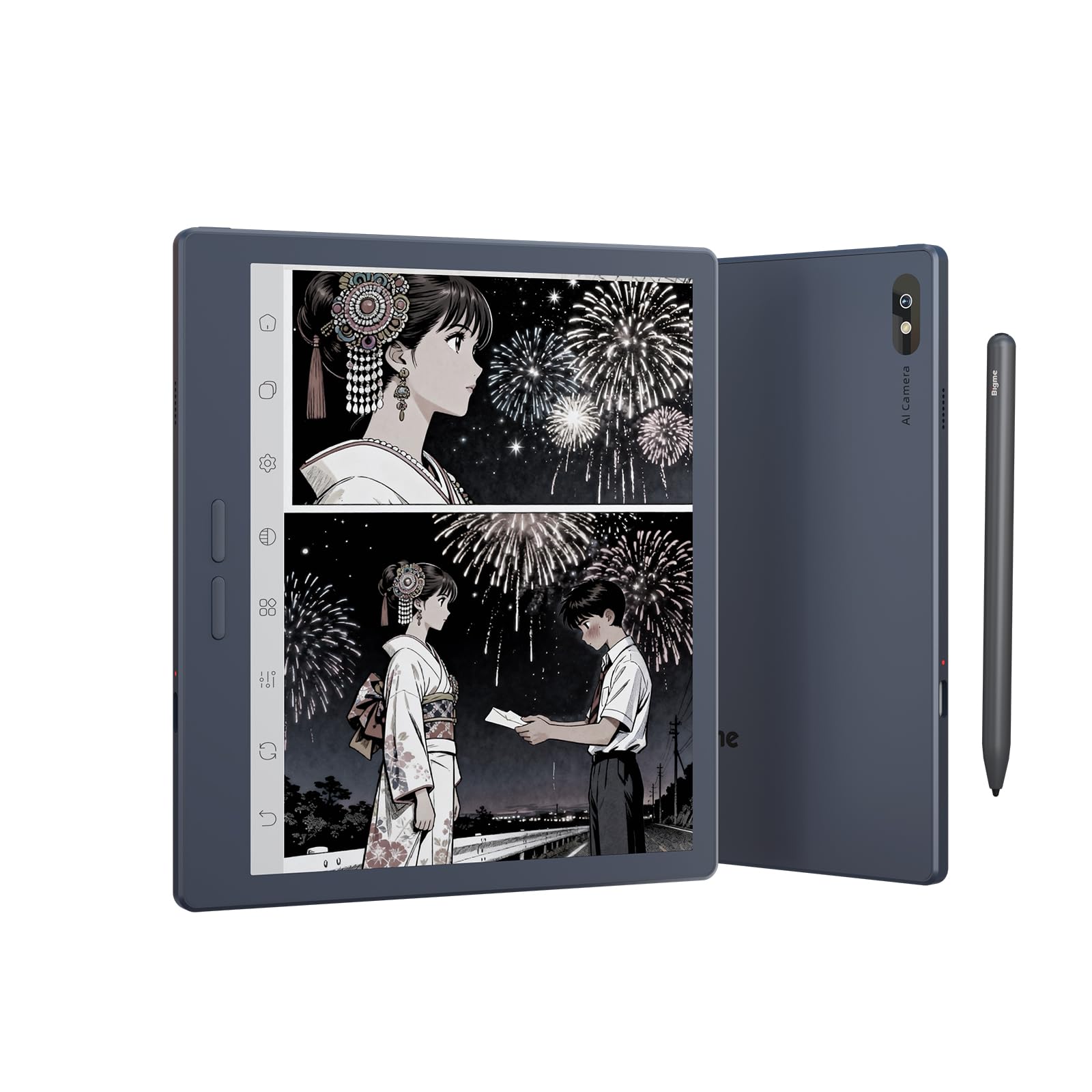
Rajah 3.1: Depan view of the Bigme B7 Pro Color e-Reader, showcasing paparan 7 incinya.

Rajah 3.2: Belakang view of the Bigme B7 Pro Color e-Reader, highlighting the 5MP AI camera.
3.1. Butang dan Port Fizikal
- Butang Kuasa: Terletak di sisi, tekan dan tahan untuk hidup/mati atau mulakan semula.
- Port USB-C: Untuk pengecasan dan pemindahan data.
- Slot Kad SIM: For 4G connectivity (Nano SIM).
- Slot Kad Mikro SD: For storage expansion up to 2TB.
4. Persediaan Awal
4.1. Mengecas Peranti
Before first use, fully charge your Bigme B7 Pro using the provided USB-C cable and a compatible power adapter. The charging indicator will show the charging status.
4.2. Menghidupkan/Mematikan
- To power on: Press and hold the Power button until the Bigme logo appears.
- Untuk mematikan: Tekan dan tahan butang Kuasa, kemudian pilih "Matikan" daripada pilihan.
- Untuk memulakan semula: Tekan dan tahan butang Kuasa, kemudian pilih "Mulakan Semula" daripada pilihan.
4.3. Konfigurasi Awal
Follow the on-screen prompts to complete the initial setup, which typically includes:
- Pemilihan Bahasa: Pilih bahasa pilihan anda.
- Sambungan Wi-Fi: Connect to a Wi-Fi network to access online features and updates.
- Akaun Google: Sign in with your Google account to access the Google Play Store and other services.
- Penyisipan Kad SIM (Pilihan): If using 4G connectivity, insert a Nano SIM card into the designated slot.
5. Arahan Operasi
5.1. Display and Refresh Rate
The Bigme B7 Pro features a 7-inch 300PPI E-ink Kaleido 3 color display, offering a paper-like reading experience with zero blue light and flicker-free technology. It supports an ultra-fast refresh rate (up to 43FPS) for smoother video and animation playback.

Figure 5.1: The device displaying video content, illustrating its ultra-fast refresh rate for smooth playback.
The device also includes a 36-level adjustable dual front light mode, allowing comfortable reading in various lighting conditions, day or night.
5.2. Navigasi dan Antara Muka Pengguna
Navigate the device using its responsive touchscreen. The Android 14 operating system provides a familiar interface.
5.3. Reading eBooks
Open your preferred e-book application to access your library. The device supports multiple reading formats. Adjust font size, contrast, and other display settings for optimal reading comfort.
5.4. Note-Taking and Stylus Functionality
The included magnetic stylus enables precise note-taking, document annotation, and creative tasks. The device supports borderless handwriting, allowing you to write freely across the screen without restrictions.

Figure 5.2: The e-reader screen showing freehand drawing and notes created with the stylus, illustrating borderless handwriting.
5.5. App Usage and Connectivity
Running on Android 14, the Bigme B7 Pro allows access to the Google Play Store for downloading various third-party applications.
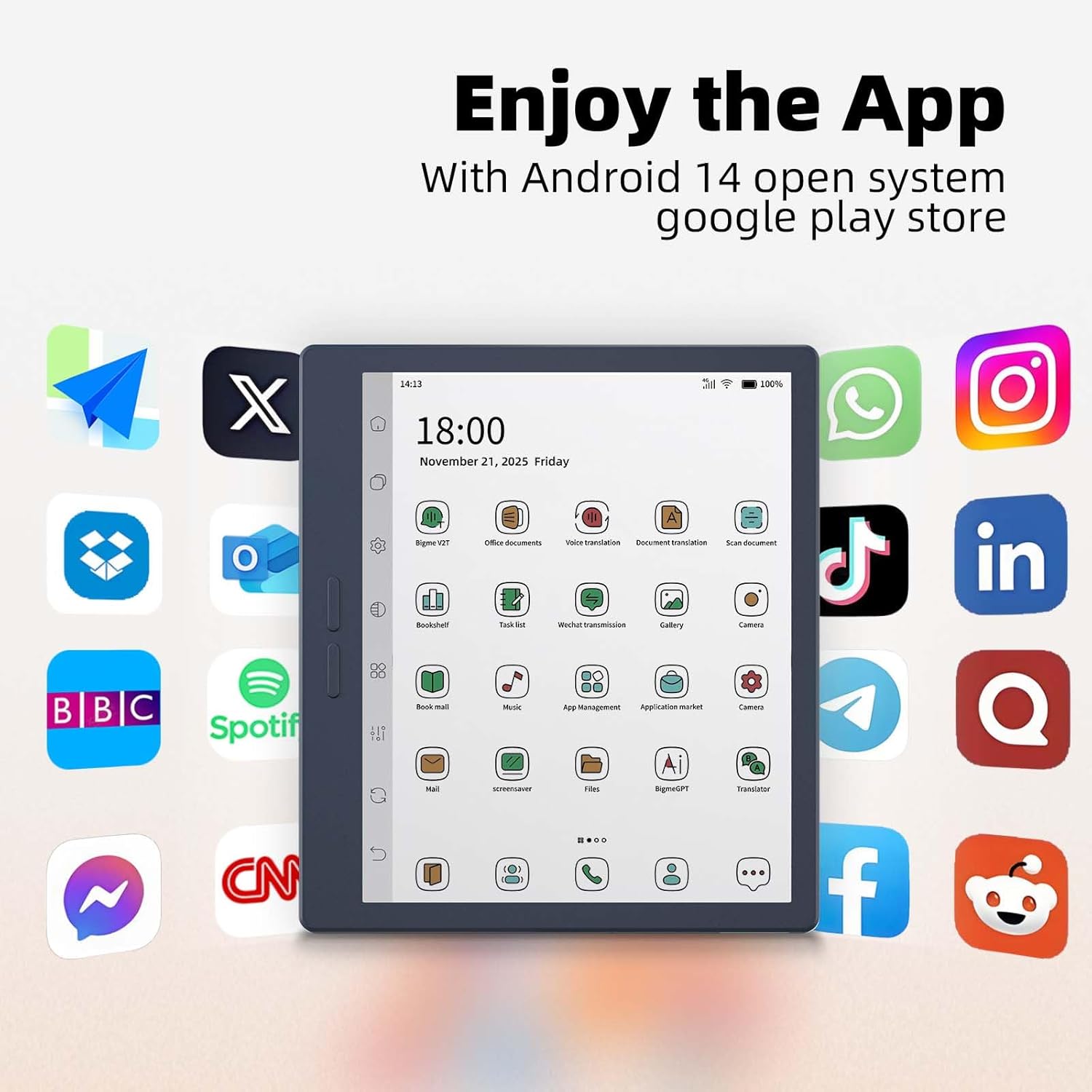
Figure 5.3: The e-reader's home screen showing a grid of popular Android application icons, indicating broad app compatibility.
The device supports Wi-Fi and Bluetooth for wireless connections. Additionally, its 4G global all-network support (Nano SIM) ensures you remain connected even without Wi-Fi.

Figure 5.4: A person using the Bigme B7 Pro for a call, demonstrating its 4G global connectivity feature.
5.6. Ciri Lanjutan
- Kamera Belakang 5MP: Supports video conferencing, OCR text recognition, and document scanning.
- Ciri AI: Includes call recording to text, intelligent audiobook organization, multi-AI GPT summarization, voice translation, and Q&A.
- Kualiti Bunyi Hi-Fi: Enhances audio experiences.
Figure 5.5: The e-reader showcasing its multifunction usage, including video conferencing, OCR text recognition, and document scanning capabilities.
5.7. Prestasi dan Storan
Equipped with a MediaTek Dimensity 1080 Octa-core processor (2.6GHz), 8GB RAM, and 256GB internal storage, the device ensures smooth performance. Storage can be expanded up to 2TB via a Micro SD card (not included).

Figure 5.6: Diagram illustrating the Bigme B7 Pro's upgraded MediaTek Dimensity 1080 octa-core CPU, 8GB RAM, and 256GB ROM for enhanced performance.
6. Penyelenggaraan
6.1. Membersihkan Peranti
- Gunakan kain lembut yang tidak berbulu untuk mengelap skrin dan badan dengan lembut.
- Elakkan menggunakan bahan kimia yang keras, pembersih yang melelas, atau kelembapan berlebihan.
6.2. Penjagaan Bateri
- Cas peranti dengan kerap, tetapi elakkan membiarkannya dinyahcas sepenuhnya untuk tempoh yang lama.
- Jangan dedahkan peranti kepada suhu yang melampau.
6.3. Kemas Kini Perisian
Periodically check for and install software updates to ensure optimal performance and access to new features. Updates can usually be found in the device's settings menu.
6.4. Pengurusan Storan
Regularly manage your device's storage by deleting unnecessary files or applications. Utilize the Micro SD card slot for additional storage if needed.
7. Penyelesaian masalah
7.1. Peranti Tidak Dihidupkan
- Ensure the device is sufficiently charged. Connect it to a power source for at least 30 minutes.
- Perform a forced restart by holding the Power button for 10-15 seconds.
7.2. Skrin Tidak Responsif
- Mulakan semula peranti.
- Pastikan skrin bersih dan bebas daripada serpihan.
7.3. Isu Ketersambungan Wi-Fi
- Toggle Wi-Fi off and on in the settings.
- Mulakan semula penghala Wi-Fi anda.
- Lupakan rangkaian dan sambung semula.
7.4. Aplikasi Ranap atau Terhenti
- Tutup dan buka semula aplikasi.
- Clear the app's cache and data in device settings.
- Uninstall and reinstall the application.
- Pastikan perisian peranti terkini.
7.5. Tetapan Semula Kilang
Jika masalah berterusan, tetapan semula kilang mungkin dapat menyelesaikannya. Amaran: This will erase all data on your device. Back up important files before proceeding. Navigate to Settings > System > Reset options > Erase all data (factory reset).
8. Spesifikasi
| Jenama | Bigme |
| Nama Model | B7 Pro |
| Teknologi Paparan | Color E-Ink Kaleido 3 display |
| Saiz Skrin | 7 Inci |
| Resolusi | 300 PPI |
| Pemproses | MediaTek Dimensity 1080 Okta-teras (2.6GHz) |
| Memori (RAM) | 8 GB |
| Storan (ROM) | 256 GB |
| Storan Boleh Dikembangkan | Up to 2TB via Micro SD card (not included) |
| Sistem Operasi | Android 14 |
| Teknologi Ketersambungan | Bluetooth, Wi-Fi, 4G (Nano SIM) |
| Kamera | 5-megapixel Rear Camera |
| Input Antara Muka Manusia | Touchscreen, Stylus |
| warna | Biru1 |
| Dimensi Produk (P x L x T) | 6.13" L x 5.32" W x 0.21" Th |
| Berat Barang | 175 Gram |
| Komponen yang Disertakan | Color e-reader Tablet, Smart stylus, Charging cable, User manual, Giftbox |
9. Waranti dan Sokongan
9.1. Jaminan Produk
The Bigme B7 Pro Color e-Reader comes with a Waranti pengilang selama 1 tahun dari tarikh pembelian. Waranti ini melindungi kecacatan pada bahan dan mutu kerja di bawah penggunaan biasa. Sila simpan bukti pembelian anda untuk tuntutan waranti.
9.2. Sokongan Pelanggan
Should you encounter any questions, issues, or require assistance with your Bigme B7 Pro, please contact our customer service team. We are committed to providing friendly and helpful support to resolve any problems you may experience. Refer to the contact information provided with your purchase or on the official Bigme weblaman web untuk saluran sokongan.