
1. Pengenalan
Thank you for choosing the Frizzlife WB99 Countertop Reverse Osmosis System. This system provides purified, alkaline water directly from your countertop without the need for complex installation. It is designed to remove a wide range of contaminants, ensuring clean and healthy drinking water for you and your family. This manual will guide you through the setup, operation, and maintenance of your new water purification system.
2. Produk Lebihview
2.1 Ciri-ciri Utama
- Penapisan Lanjutan: Reduces over 1000 harmful contaminants, including large particles, chlorine, fluoride, heavy metals, and TDS.
- Air Beralkali: Features a composite alkaline carbon fiber filter (SC90) to increase water's pH level.
- Tiada Pemasangan Diperlukan: Plug-and-use design eliminates the need for drilling or plumbing.
- Portable Water Pitcher: Includes a convenient pitcher for easy serving and storage.
- Pemantauan Masa Nyata: Digital display shows real-time TDS levels and filter life indicators.
- Customizable Dispensing: Select from preset volumes (4oz, 8oz, 17oz) or continuous dispensing.
- Kecekapan Tinggi: Achieves a 3.5:1 pure to drain ratio, saving water compared to traditional RO systems.
2.2 Contaminant Reduction and Filtration Stages
The Frizzlife WB99 system utilizes a multi-stage filtration process, including an FCR100+ RO membrane and an SC90 alkaline carbon filter, certified by NSF/ANSI 58 for structural integrity and material safety.

Image: The Frizzlife WB99 system highlights its ability to reduce large particles, chlorine, fluoride, heavy metals, TDS, odor, and chloramine. It also shows the SC90 Composite Alkaline Carbon Fiber filter for pH balance and the FCR100+ filter with 0.0001 micron filtration, certified by NSF/ANSI 58.
3. Arahan Persediaan
The Frizzlife WB99 system is designed for easy, no-installation setup. Follow these steps to get started:
- Buka pembungkusan Sistem: Keluarkan semua komponen dari pembungkusan dengan berhati-hati. Pastikan semua bahagian ada dan tidak rosak.
- Letakkan Sistem: Position the system on a flat, stable countertop near a power outlet.
- Pasangkan: Connect the power cord to the system and then into a standard electrical outlet. The display will illuminate.
- Isi Tangki: Remove the raw water tank from the back of the unit. Fill it with tap water up to the MAX line. Place the tank back into the unit securely.
- Siram Awal: For the first use, it is recommended to flush the system. Dispense and discard at least two full tanks of water to rinse the filters and system components.

Image: Visual guide for the simple setup process: 1. Plug in the power cord. 2. Fill the raw water tank. 3. Tap the display to select dispensing options. 4. Dispense purified water. This image also illustrates the easy 'Twist and Pull' filter replacement method.
4. Arahan Operasi
4.1 Pengeluaran Air
- Ensure Tank is Full: Make sure the raw water tank has sufficient water.
- Bekas Tempat: Position your cup or the portable pitcher under the dispenser spout.
- Pilih Kelantangan: On the touch display, tap the desired volume button (4oz, 8oz, or 17oz). The system will automatically dispense the selected amount.
- Continuous Dispensing: To dispense continuously, ensure no volume buttons are selected, then press the dispense button. Press again to stop.
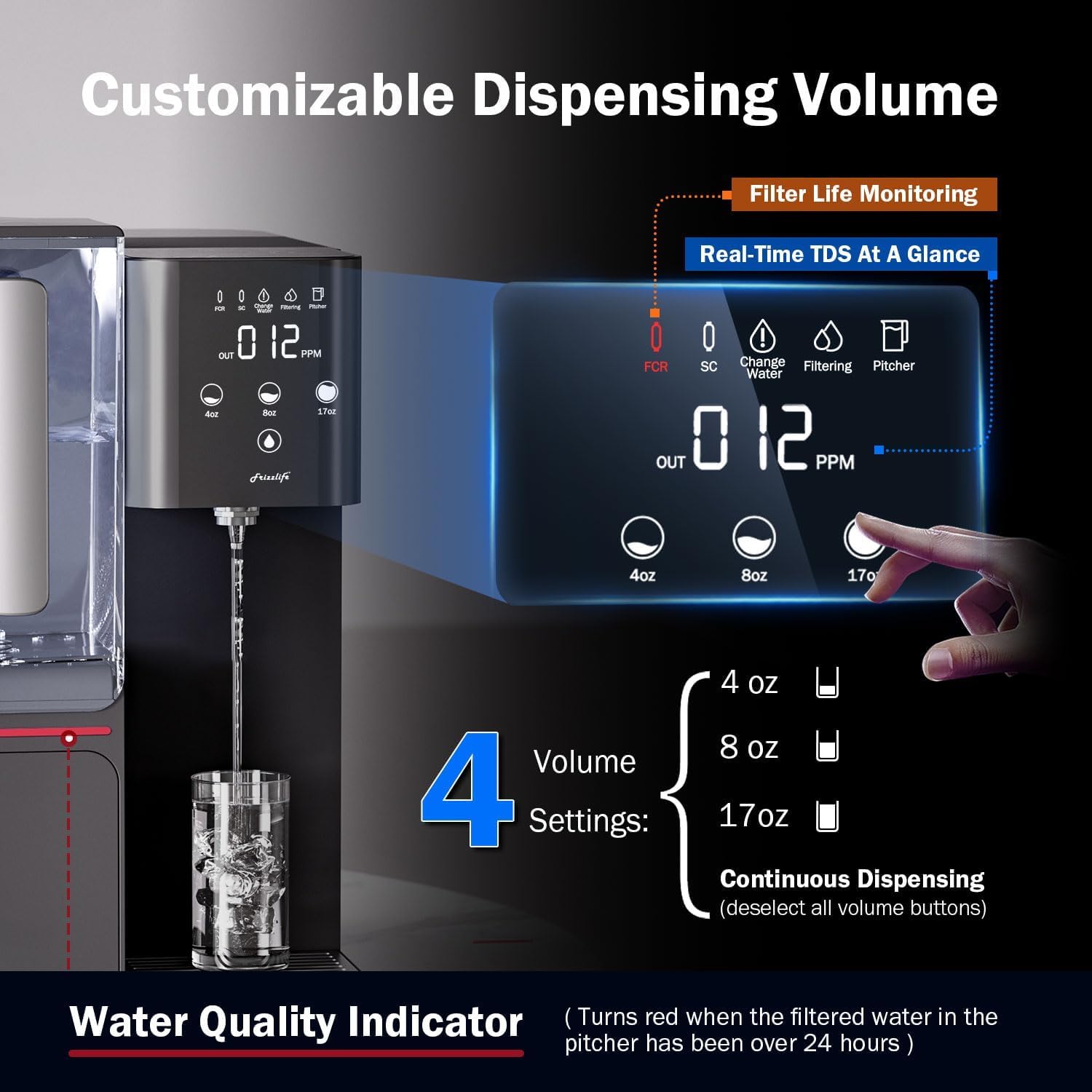
Image: The Frizzlife WB99 control panel displaying real-time TDS levels, filter life indicators (FCR, SC), and customizable dispensing volume options (4oz, 8oz, 17oz, and continuous dispensing).
4.2 Portable Pitcher Usage
The included portable pitcher allows you to easily store and serve purified water. Simply place the pitcher under the dispenser and select your desired volume. Once filled, the pitcher can be stored in your refrigerator.

Image: A woman pouring water from the Frizzlife WB99's portable pitcher, demonstrating its convenience for serving and storage, with an inset showing the pitcher stored inside a refrigerator.
4.3 Water Quality Indicator
The system features a water quality indicator. If the filtered water in the pitcher has been stored for over 24 hours, this indicator may turn red, suggesting the water should be refreshed for optimal quality.
5. Penyelenggaraan
5.1 Penggantian Penapis
The Frizzlife WB99 system features a simple 'Twist and Pull' filter replacement mechanism. The display will indicate when filters need to be replaced (FCR for the RO filter, SC for the alkaline carbon filter).
- Matikan: Cabut palam sistem daripada soket kuasa.
- Alih Keluar Penapis: Locate the filter housing. Twist the old filter counter-clockwise and pull it out.
- Pasang Penapis Baharu: Insert the new filter into the housing and twist clockwise until it locks into place. Ensure the correct filter type is installed in the designated slot.
- Tetapkan Semula Kehidupan Penapis: After replacing, plug the system back in. Refer to the manual's specific instructions for resetting the filter life indicator on the display.
5.2 Membersihkan Sistem
Pembersihan tetap memastikan prestasi dan kebersihan yang optimum.
- Raw Water Tank: Remove the raw water tank and wash it with mild soap and water. Rinse thoroughly before refilling.
- Dulang Drip: The drip tray should be emptied and cleaned regularly to prevent water buildup.
- Luaran: Lap bahagian luar unit dengan lembut, damp kain. Jangan gunakan pembersih yang kasar.

Image: The Frizzlife WB99's large capacity 4.5L (152 oz) raw water tank, shown being refilled, emphasizing its convenience for refilling and ease of cleaning.
6. Penyelesaian masalah
If you encounter any issues with your Frizzlife WB99 system, please refer to the following common problems and solutions:
| Masalah | Kemungkinan Punca | Penyelesaian |
|---|---|---|
| Tiada air yang dikeluarkan | Raw water tank empty; System not plugged in; Filter clogged. | Isi semula tangki air mentah; Periksa sambungan kuasa; Gantikan penapis. |
| Rasa/bau yang luar biasa | New filters not flushed; Filters need replacement. | Perform initial flush; Replace filters as indicated by the display. |
| TDS reading is high | RO filter needs replacement; System malfunction. | Check FCR filter life indicator and replace if necessary. Contact support if issue persists. |
| Water Quality Indicator red | Filtered water in pitcher is over 24 hours old. | Discard old water and refill with fresh purified water. |
If the problem persists after attempting these solutions, please contact Frizzlife customer support.
7. Spesifikasi
- Nombor Model: WB99
- Faedah produk: Removes over 60 contaminants and increases water's pH level.
- Penapisan Stages: Berbilang-stage Reverse Osmosis with Alkaline Remineralization.
- Pure to Drain Ratio: 3.5:1
- Kapasiti tangki: 4.5 Liters (Raw Water)
- Tahap Bunyi: Very Low (approx. 50 dB)
- Pensijilan: NSF/ANSI 58 Certified Elements.
- UPC: 850040788846, 850073755990

Image: A comparison table highlighting the features of the Frizzlife WB99-C, such as its portable pitcher, alkaline water, plug-and-use installation, filter life monitoring, TDS display, very low noise level (50 dB), and suitability for various scenarios like kitchen, living room, bedroom, and RV.
8. Waranti dan Sokongan
Frizzlife provides USA-based technical support for your WB99 Countertop Reverse Osmosis System. For warranty information, technical assistance, or to purchase replacement filters, please visit the official Frizzlife webtapak atau hubungi perkhidmatan pelanggan mereka secara langsung.
Webtapak: www.frizzlife.com
Hubungi: Refer to the contact section on the Frizzlife weblaman web untuk nombor telefon atau sokongan e-mel.